Loading...
Contents
How to Check If Your Resume Is ATS Friendly
(Step-by-Step Guide for 2026)
Jul 10, 202620 min readUpdated Oct 5, 2026
Run your resume through an ATS Resume Checker to get a compatibility score, then compare it against the job description for missing keywords. Use a single-column layout, standard section headings, and a clean DOCX file. Fix flagged formatting issues and retest before applying. Aim for a score of 80% or higher.
If you've been applying to jobs for weeks without hearing back, even for roles you're clearly qualified for, the problem might not be your experience. It could be your resume format.
Most mid-size and large companies now use an Applicant Tracking System (ATS) to filter resumes before a recruiter ever opens them. If your resume isn't ATS friendly, it can get parsed incorrectly, misread, or ranked low, even if you're the perfect fit for the job. This is one of the most common reasons qualified candidates never get a callback, and one of the least talked about.
In this guide, you'll learn exactly how to check if your resume is ATS friendly, what an ATS actually does with your resume, the formatting mistakes that quietly tank your applications, and a free way to test and improve your ATS resume score before you hit "apply."
FREE TO USE
25K+ INTERVIEWS4.8★ RATING68% IMPROVEMENT
Crack Your Dream Job
Real Interviews. Real Pressure. Practice until it feels easy.
- Seamless Interview Experience
- Resume & JD Questions
- Instant Personalized Feedback
How to Check If Your Resume Is ATS Friendly
Here's the short version, if you just need the checklist:
- Run your resume through an ATS Resume Checker to get a compatibility score and parsing report.
- Compare it side-by-side with the job description to spot missing skills and requirements.
- Check for ATS keywords, such as job-specific tools, certifications, and role titles the system is scanning for.
- Review your formatting. Avoid tables, columns, graphics, or text boxes that confuse parsers.
- Use standard section headings like "Work Experience" and "Education" instead of creative labels.
- Test both PDF and Word (.docx) versions to confirm the file type the ATS can read cleanly.
- Read your ATS score and suggestions, then fix issues before you submit the application.
Each step is explained in detail below, along with the mistakes that trip up most job seekers.
What Is an ATS-Friendly Resume?
An ATS-friendly resume is a resume that an Applicant Tracking System can scan, parse, and categorize accurately, without losing information, misreading sections, or dropping key details.
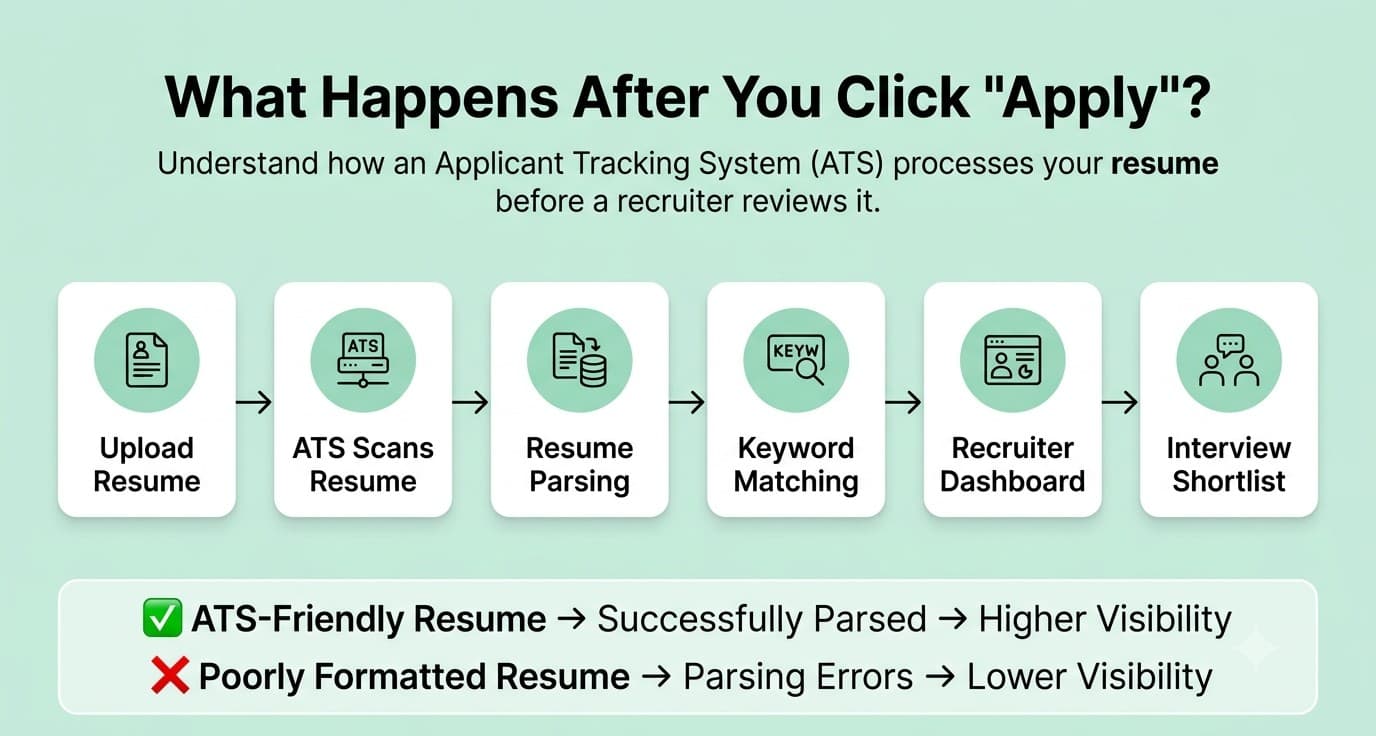
An Applicant Tracking System is recruitment software that companies use to collect applications, extract data from resumes, and organize candidates into a searchable database. Instead of a recruiter manually opening every resume, the ATS reads the file, pulls out your contact details, work history, education, and skills, and stores them in structured fields. Recruiters then search or filter that database using keywords tied to the job description.
Here's the basic workflow:
Resume → ATS Parsing → Recruiter Dashboard
Companies use ATS platforms because they receive far more applications than any human team could realistically review one by one. The software speeds up screening, standardizes candidate data, and lets recruiters quickly search for specific skills or qualifications across hundreds of applicants.
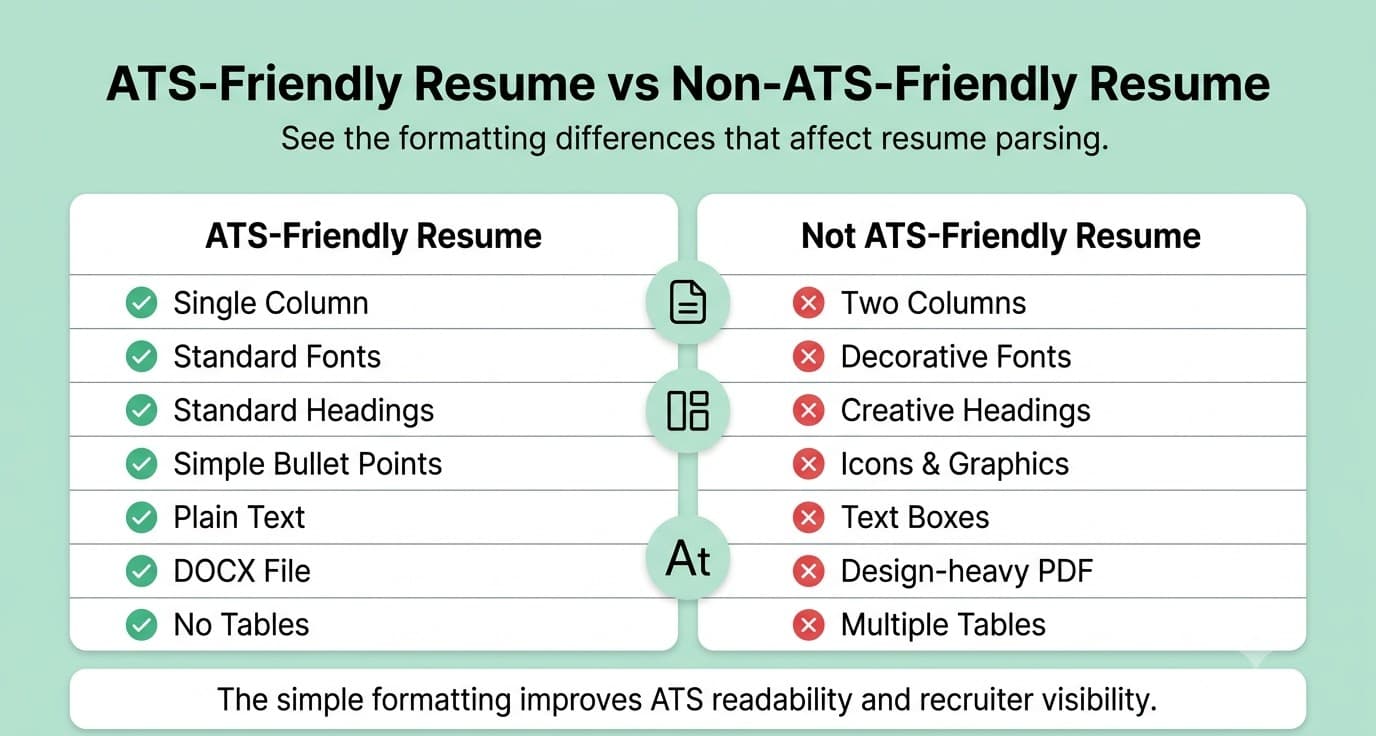
The key difference between an ATS-friendly resume and a visually designed resume comes down to structure. A creative, graphic-heavy resume might look impressive to a human eye, but multi-column layouts, icons, text boxes, and embedded graphics often break the parsing process.
The ATS either misreads the content, places it in the wrong field, or skips it entirely. A truly ATS-friendly resume uses clean, linear formatting that both the software and a human recruiter can read correctly.
Why Should You Check Whether Your Resume Is ATS Friendly?
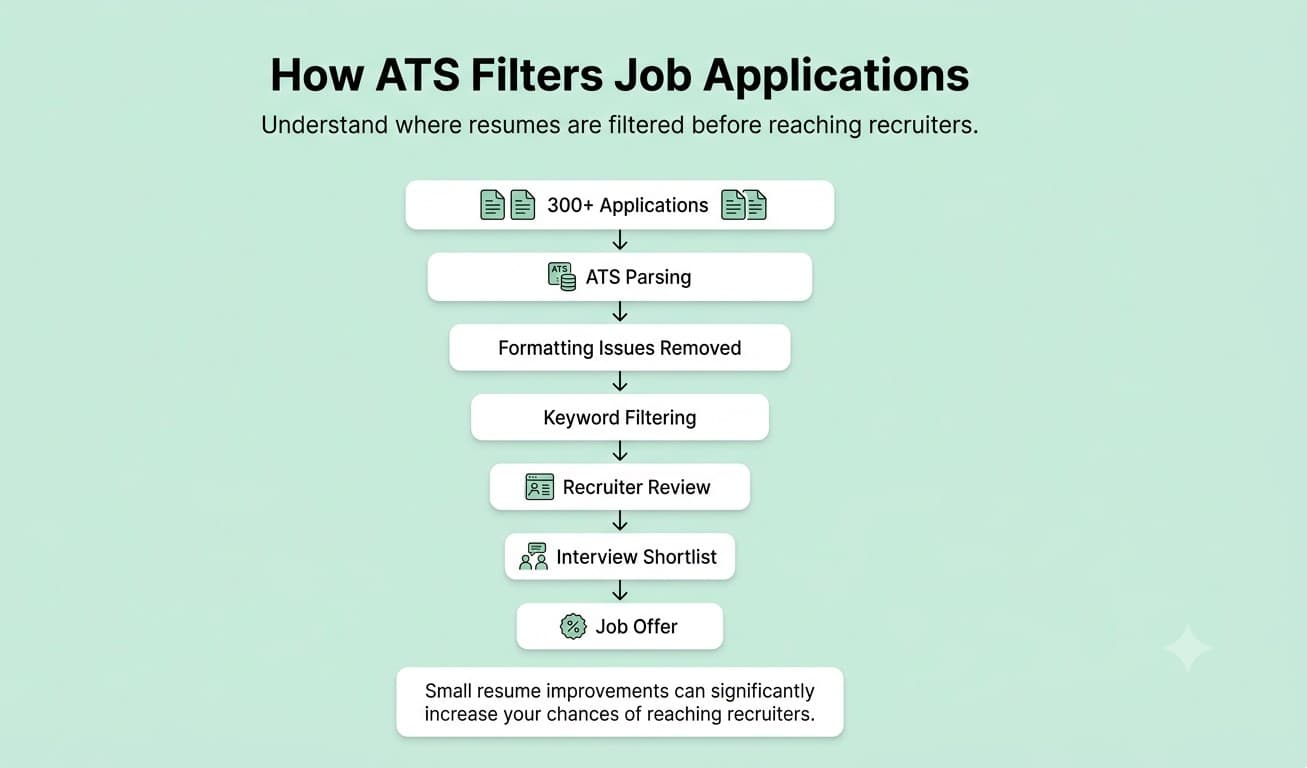
You should check your resume's ATS compatibility because recruiters at mid-size and large companies rarely read every resume manually, the ATS decides which resumes even reach a human. A single job posting can attract hundreds of applicants. Recruiters simply don't have the bandwidth to open and read every one, so the ATS does the first pass: organizing, ranking, and surfacing the resumes that best match the role. If your resume has formatting the system can't parse, or lacks the keywords the recruiter is searching for, it can get buried or filtered out regardless of how strong your actual experience is. This is why checking your resume before you apply matters more than most job seekers realize. A resume that reads perfectly in Word or Google Docs can still fail badly once it's uploaded into an ATS. Common issues include: Running your resume through the Mocklingo ATS Resume Checker lets you catch these problems before you submit an application, rather than finding out after weeks of silence. It scans your resume the way an actual ATS would, flags parsing errors, and shows you what to fix, so every application you send has a fair shot at reaching a real person. Pairing this with regular mock interview practice means you're not just getting past the screening software. You're also ready for the conversation that follows it.
What Are the Latest Resume & ATS Statistics Job Seekers Should Know in 2026?
| Statistic | Data Point |
|---|---|
| Fortune 500 companies using an ATS | ~98-99% |
| Large organizations (1,000+ employees) using an ATS | ~80-89% |
| Small businesses now using an ATS | 20-60% (rising steadily) |
| Average applications received per job posting | 250+ |
| Resumes rejected by ATS before a human sees them | ~75% |
| Applicants who receive an interview invitation | 2-3% |
| Employers who believe they lose qualified candidates due to non-ATS-friendly resumes | 88% |
| Recruiters who rely on keyword filters inside their ATS | 99.7% |
| Resumes rejected due to formatting issues alone | ~70% |
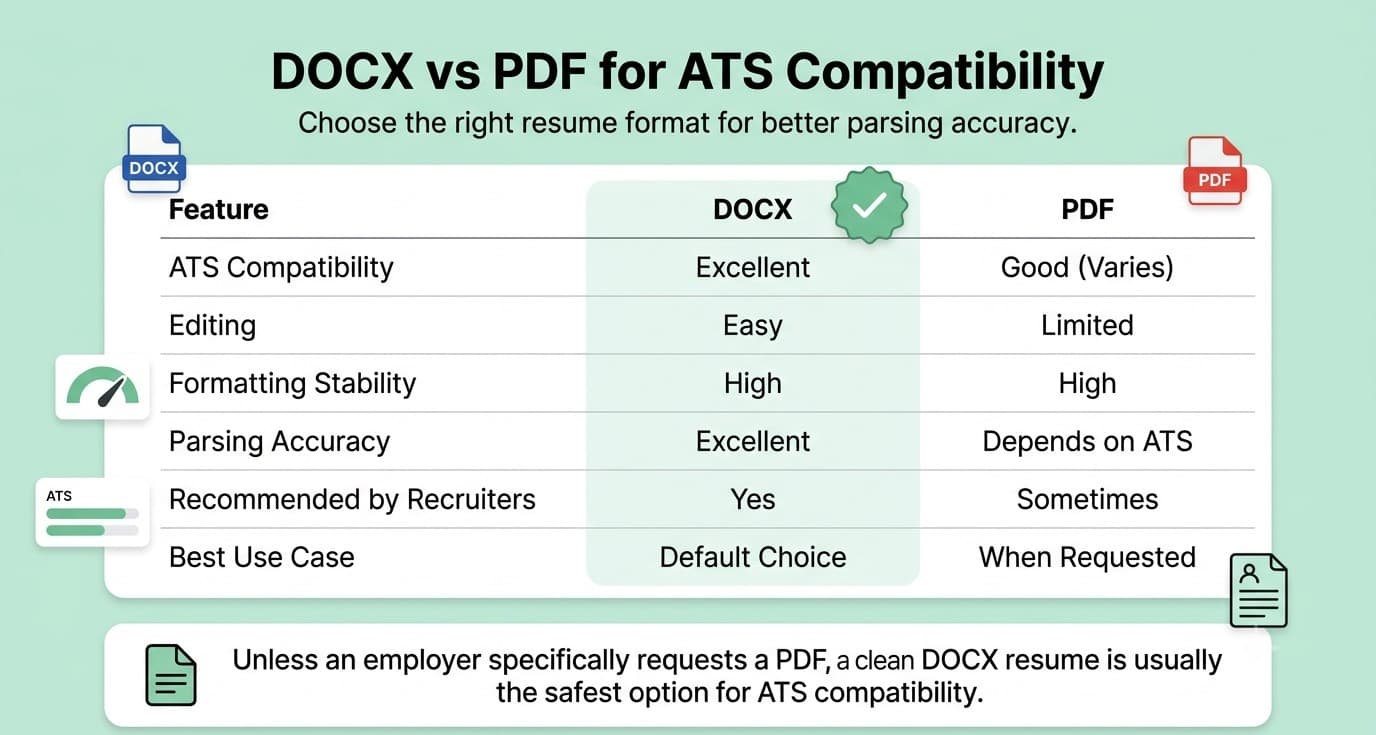
| Plain, single-column DOCX parsing failure rate | ~4% |
| PDF parsing failure rate (varies by ATS) | Up to 18% |
| ATS that skip header/footer contact details | ~25% |
Sources: SelectSoftwareReviews, Jobscan, CareerBuilder, Harvard Business School "Hidden Workers" study, ManpowerGroup, TopResume, Lever Talent Benchmarks, EDLIGO ATS parsing analysis (2025).
What These Numbers Mean for You
Almost every mid-size to large company is filtering your resume through software first. With adoption rates near-universal among big employers, assuming "a human will read this eventually" is risky. Format for the machine first, then the human.
Competition per job posting is brutal. With 250+ applications per role and only 2 to 3% converting to interviews, small formatting mistakes have an outsized cost. You're not just competing on qualifications. You're also competing on whether your resume is even readable.
Keyword matching genuinely decides outcomes. With nearly all recruiters relying on keyword search inside their ATS, using the same terminology as the job description (not just synonyms) directly affects whether you surface in a search.
File format is not a minor detail. The gap between a clean, single-column DOCX and a complex PDF layout can mean the difference between a 4% and an 18% chance of parsing errors. This alone justifies testing both formats before you apply.
Formatting mistakes are common, and avoidable. With roughly 7 in 10 rejected resumes failing due to formatting rather than a lack of qualifications, this is one of the easiest things you can fix in under an hour.
FREE TO USE
8k+ SESSIONS92% FLUENCY4.9★ RATING
Speak With Confidence
Real Conversations. Real Scenarios. Speak until it feels natural.
- Real-Time Speaking Practice
- Guided Conversation Flows
- Instant AI Feedback
How to Check If Your Resume Is ATS Friendly
Use an ATS Resume Checker
Why it matters: An ATS Resume Checker simulates how an actual ATS parses your resume. It gives you a compatibility score and a breakdown of what's working and what isn't, so you don't have to wait weeks for a rejection email to find out.
Common mistakes: Relying only on how the resume looks in Word or on-screen. Assuming a "nice design" template from Canva or a design tool is automatically ATS-safe.
Best practices: Upload your resume to a checker before every round of applications, not just once. Re-check it after every major edit, since even small formatting changes can affect parsing.
Actionable tip: Run the same resume through more than one checker if possible. Different ATS platforms (Workday, Taleo, Greenhouse, iCIMS, Lever) parse slightly differently, so cross-checking gives you a more realistic picture.
Compare Your Resume with the Job Description
Why it matters: ATS platforms rank candidates based on how closely a resume matches the specific job posting, not on how strong your resume looks on its own.
Common mistakes: Sending the same generic resume to every job. Ignoring required skills or certifications listed explicitly in the posting.
Best practices: Read the job description line by line and highlight recurring skills, tools, and qualifications. Mirror that exact language in your resume wherever it's true to your experience.
Actionable tip: Paste both your resume and the job description into a keyword comparison tool to instantly see the gaps. This is often faster and more accurate than eyeballing it.
Check Resume Keywords
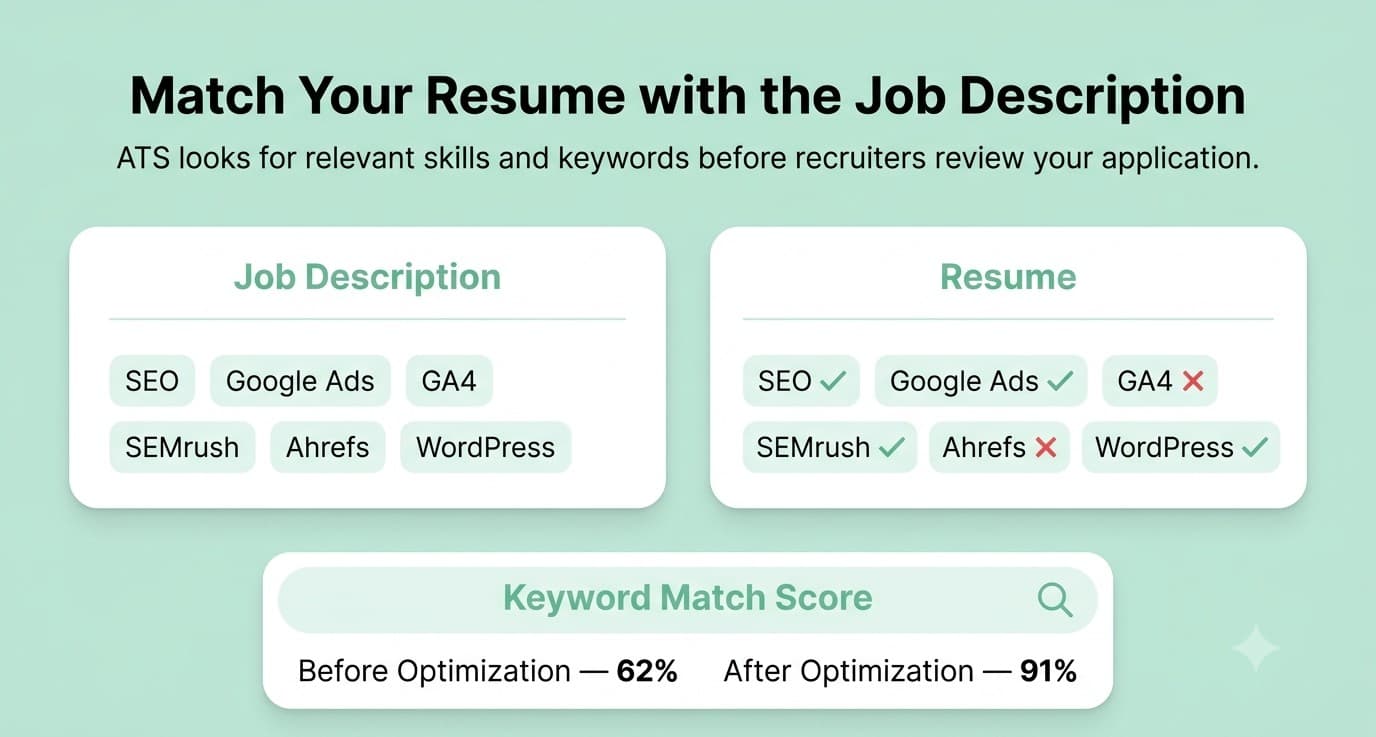
Why it matters: With most recruiters relying on keyword search inside their ATS, missing the right terms means your resume may never surface in a search, even if you're qualified.
Common mistakes: Using only synonyms (e.g., "team lead" instead of "Project Manager") instead of the exact job title or skill name used in the posting. Keyword stuffing, meaning cramming in terms unnaturally just to game the system.
Best practices: Include both the full term and its abbreviation where relevant (e.g., "Search Engine Optimization (SEO)"). Weave keywords naturally into your experience bullets and a dedicated skills section.
Actionable tip: Build a "master skills list" from 3-5 job postings in your target role, then tailor a subset into each resume version you send.
Review Formatting
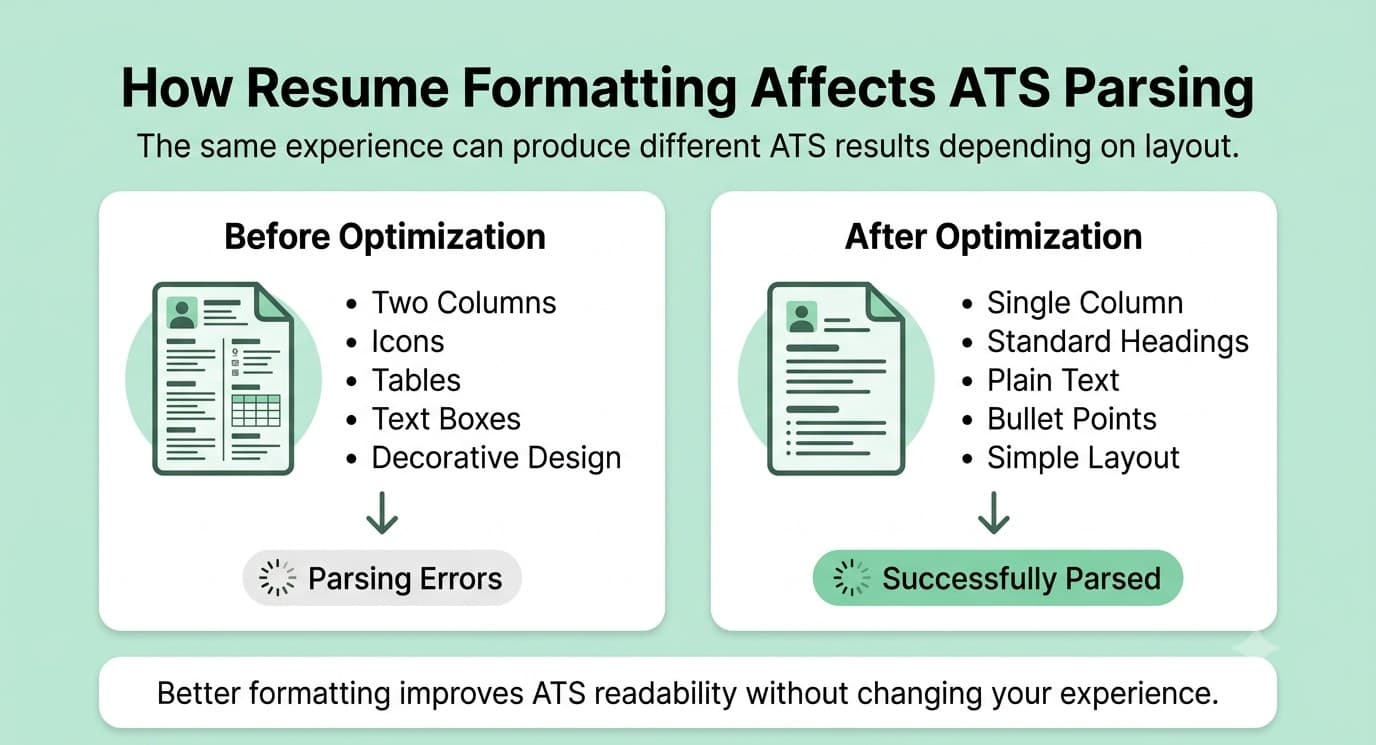
Why it matters: ATS parsers read resumes top to bottom, left to right, in a single linear stream. Anything that breaks that stream, such as columns, tables, or text boxes, can scramble or drop your information.
Common mistakes: Multi-column layouts, resume templates with sidebars, tables used to organize skills, icons replacing text labels.
Best practices: Stick to a single-column, reverse-chronological layout. Use simple bullet points instead of tables or graphics.
Actionable tip: Copy and paste your resume into a plain text editor (like Notepad). If the content looks jumbled or out of order, an ATS will likely have the same problem.
Use Standard Resume Headings
Why it matters: ATS software is trained to recognize common section headings. Creative labels can confuse the parser into miscategorizing your information, or missing it entirely.
Common mistakes: Using headings like "My Journey" instead of "Work Experience," or "What I Bring" instead of "Skills."
Best practices: Stick to conventional headings: Work Experience, Education, Skills, Certifications, Summary.
Actionable tip: If you want personality in your resume, save it for your cover letter or LinkedIn summary, not your section titles.
Test PDF vs Word Compatibility
Why it matters: Not every ATS parses PDF and DOCX files with the same accuracy. Some platforms still struggle with PDFs, especially ones exported from design tools.
Common mistakes: Assuming PDF is always safe because it "preserves formatting." Submitting a resume built in a heavily designed template exported as PDF.
Best practices: Unless the job posting specifically requests a PDF, a clean, text-based DOCX file is generally the safer default. If you do submit a PDF, make sure it was exported from a simple, text-based document rather than a graphic design file.
Actionable tip: Keep both a DOCX and PDF version ready, and check the job posting or company careers page for any stated file format preference before applying.
Review Your ATS Score and Suggestions
Why it matters: A single scan tells you what's broken; understanding and acting on the suggestions is what actually improves your callback rate.
Common mistakes: Running a check once and never revisiting it. Ignoring lower-priority suggestions that add up to a meaningfully better score.
Best practices: Aim for a compatibility score of 80% or higher before applying. Treat suggestions as a checklist, not just a number.
Actionable tip: Re-run your resume through the checker after each fix to confirm the score actually improved. Some changes have a bigger impact than others.
What Are the Signs Your Resume Is Not ATS Friendly?
Watch for these red flags:
- Graphics and icons used instead of text (e.g., a phone icon instead of the word "Phone")
- Tables used to organize experience, skills, or dates
- Multi-column layouts, especially two- or three-column templates
- Fancy or decorative fonts that aren't standard system fonts
- Missing job-specific keywords that match the posting's language
- Contact info placed in a header or footer, which some ATS platforms skip entirely
- Images or embedded logos, including headshots
- Uncommon section names like "My Story" instead of "Summary"
- Text boxes used for any part of the resume content
- Special characters or symbols used as bullet points instead of standard dashes or dots
If your resume has two or more of these issues, there's a strong chance it's losing information, or getting rejected, before a recruiter ever opens it.
What Should Be on Your ATS Resume Checklist Before Applying?
Run through this checklist before you submit any application, or run it automatically with the Mocklingo ATS Resume Checker.
- ✓ Standard, readable fonts (Arial, Calibri, Georgia, Times New Roman)
- ✓ Reverse chronological work experience format
- ✓ Job-specific keywords pulled directly from the posting
- ✓ Standard section headings (Work Experience, Education, Skills)
- ✓ No graphics, icons, or embedded images
- ✓ No tables used for layout or content
- ✓ No text boxes anywhere in the document
- ✓ Contact information in the main body, not the header/footer
- ✓ Single-column layout throughout
- ✓ File saved in the correct format (DOCX unless PDF is specifically requested)
- ✓ Resume tested through an ATS checker before submission
Can ChatGPT Make Your Resume ATS Friendly?
AI tools like ChatGPT can genuinely help you draft stronger bullet points, tighten your summary, and suggest keywords based on a job description. Used well, they save time and can improve the quality of your writing significantly.
But AI-generated content doesn't automatically solve formatting problems. ChatGPT can't see how your resume will actually render once it's uploaded into a real ATS, and it has no way to verify parsing accuracy, section recognition, or file compatibility. It's also common for AI tools to suggest generic or overused phrasing that doesn't match the specific language a particular employer's ATS is scanning for.
The safest approach is to use AI for the writing and drafting stage, then run the finished resume through an actual ATS Resume Checker to confirm it parses cleanly. Treat AI as a first draft assistant, not a final formatting guarantee.
Related: How to Use AI to Write a Resume
What Is the Best Free Way to Test Your Resume?
If you want a fast, practical way to check your resume before applying, the Mocklingo ATS Resume Checker is built for exactly this.
Here's how it works:
- Upload your resume in DOCX or PDF format.
- Get an ATS compatibility score based on how a real ATS would parse your document.
- Review keyword analysis comparing your resume against a target job description.
- See formatting suggestions that flag tables, columns, graphics, or other parsing risks.
- Apply actionable improvements before you submit your next application.
It's designed to give you a clear, honest picture of where your resume stands. No guesswork, no vague advice, just specific fixes you can make in minutes.
Conclusion
An ATS isn't something to be afraid of. It's simply the first checkpoint your resume has to pass before a human ever sees it. Small, fixable issues like a two-column layout, a missing keyword, or contact details tucked into a header can quietly cost you interviews you were otherwise qualified for.
The good news is that most of these problems are easy to catch and fix once you know what to look for. Standard formatting, the right keywords, and a clean file format go a long way toward making sure your resume actually gets read.
Before your next application, take two minutes to scan your resume with the Mocklingo ATS Resume Checker. It's a small step that can make a real difference in how many of your applications actually reach a recruiter's desk.