Loading...
Contents
GitHub Copilot vs Cursor: Which Is Better for Frontend Developers in 2026?
May 13, 202627 min readUpdated Oct 5, 2026
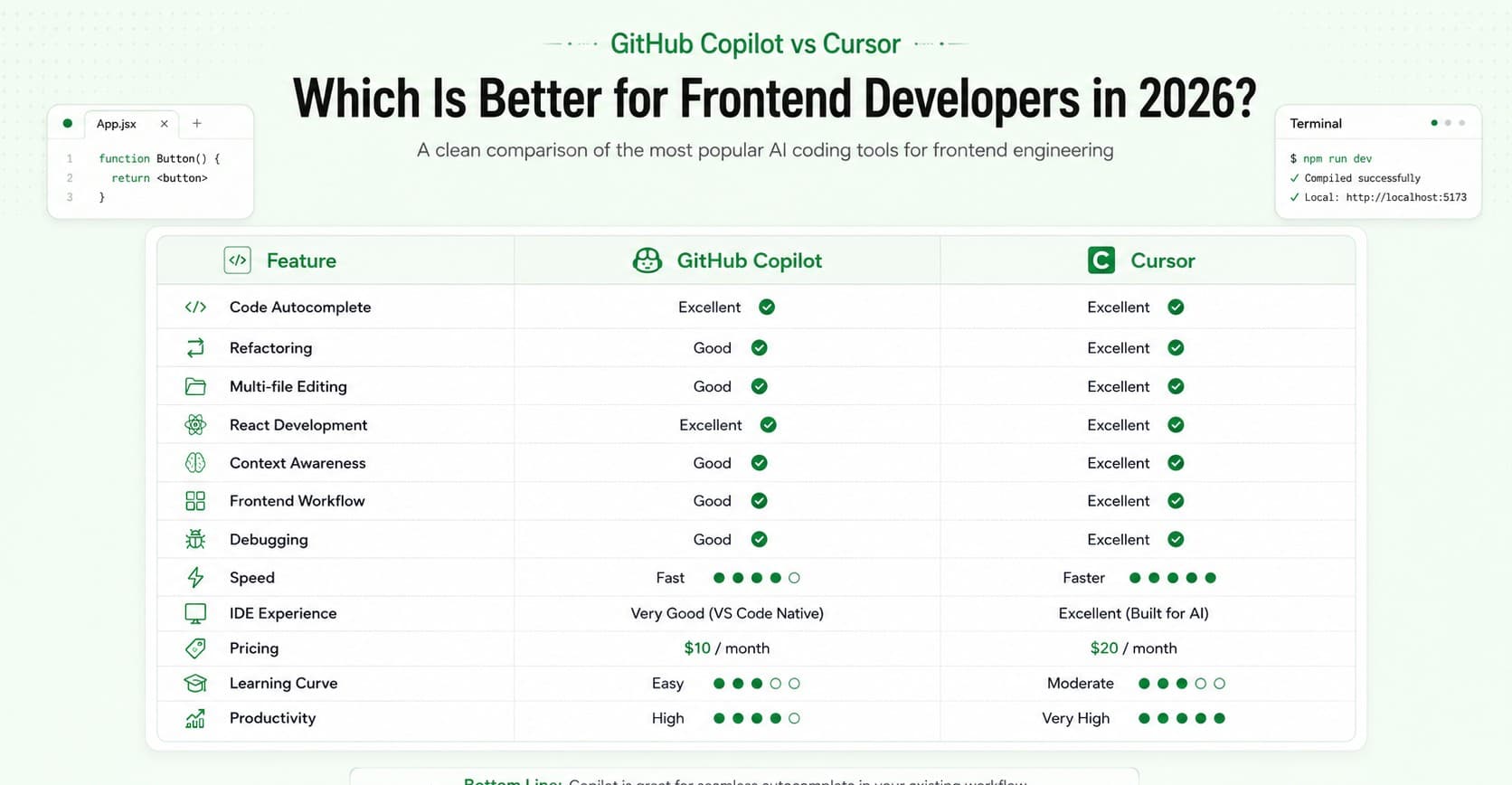
So you want to code faster. You have heard of GitHub Copilot. You have probably also seen Cursor showing up everywhere lately. Both of them promise to make your life as a developer easier. But which one actually delivers, especially if you are a frontend developer working with React, CSS, JavaScript, or TypeScript every day? That is exactly what this blog is about. We are going to compare GitHub Copilot vs Cursor in plain, simple language. No jargon. No paid sponsorships. Just an honest look at both tools so you can decide which one actually fits your workflow.
FREE TO USE
25K+ INTERVIEWS4.8★ RATING68% IMPROVEMENT
Crack Your Dream Job
Real Interviews. Real Pressure. Practice until it feels easy.
- Seamless Interview Experience
- Resume & JD Questions
- Instant Personalized Feedback
What Is GitHub Copilot?
GitHub Copilot launched in June 2022. It was built as a partnership between GitHub and OpenAI. Think of it as an AI assistant that lives inside your code editor. You write a comment or start typing a function, and Copilot suggests the rest. Over time, it has grown into a lot more than just autocomplete. It now has a chat feature, an agent mode, and even the ability to open pull requests on its own. By January 2026, Copilot had reached 4.7 million paid subscribers, which was a 75 percent increase from the previous year. The biggest advantage of Copilot is that it works as a plugin. It fits right into the editor you already use. VS Code, JetBrains, Neovim, Visual Studio. You do not have to change anything about how you work. You just install it and it starts helping.
What is Cursor?
Cursor is newer and it takes a very different approach. Cursor is not a plugin. It is a standalone AI code editor built as a fork of VS Code by a company called Anysphere. That means instead of adding AI on top of your editor, they rebuilt the entire editor with AI at the center of everything. Cursor's tab completion scans the entire project, not just the current file. When it suggests a symbol from another module, it auto-imports it. If you already use VS Code, switching to Cursor feels surprisingly smooth. Your extensions, settings, and keyboard shortcuts all carry over automatically. Cursor disclosed in June 2025 that it had crossed 500 million dollars in annual recurring revenue and was used by over half of the Fortune 500. That kind of growth does not happen unless people are genuinely finding it useful.
GitHub Copilot vs Cursor: The Core Difference
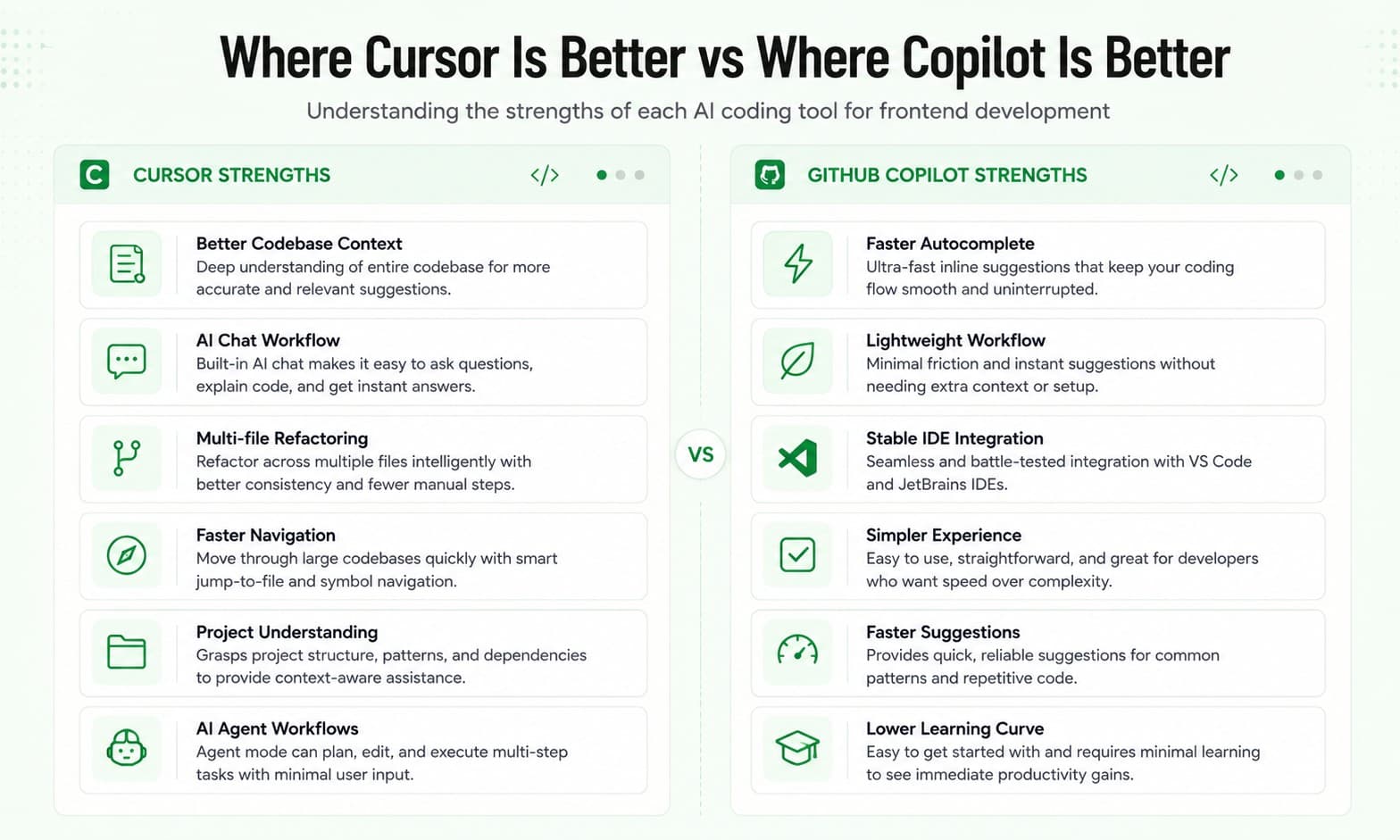
Before we go into features and pricing, here is the most important thing to understand. Copilot is a helper inside your editor. Cursor is an editor built around AI. That one difference shapes everything. Copilot helps you write code faster while you work normally. Cursor changes the way you work entirely. Neither approach is wrong. But one might fit you better depending on how you code.
Comparing Features Side by Side
Both tools do autocomplete. Both are good at it. In everyday use, especially for small functions, variable names, and simple logic, you will barely notice a difference. Autocomplete is table stakes in 2026, and most developers accept the quality quickly after the first week because the baseline is now high across both tools. For frontend developers writing React components, CSS utility classes, or TypeScript interfaces, both tools will save you time here. Neither wins clearly. Verdict: Draw This is where things get very different. Imagine you rename a component in your React app. That name probably shows up in 15 other files. Your imports, your tests, your route definitions, your documentation. Cursor's Composer feature, launched with Cursor 2.0 in October 2025, lets you describe a refactoring task in plain English and generates a coordinated change plan across every affected file. Developers report that rename and refactor operations that previously took hours of careful manual work now take single-digit minutes. Copilot can help with this too, but it works better on one file at a time. Coordinating changes across an entire project requires a kind of project-level awareness that a plugin architecture struggles to provide. For frontend developers building large applications with many components, this is a huge deal. Verdict: Cursor wins clearly When you ask Copilot a question about your project, it mostly works with the file you have open. It does not deeply understand how all your files connect to each other. Cursor indexes your entire repository so the AI understands your project structure, naming conventions, and architecture. When you ask it to add a feature, it knows where the relevant code lives and follows your existing patterns. This matters enormously for real frontend projects. If your app has 50 components with shared props, hooks, and utilities, Cursor will understand that context. Copilot often will not. Verdict: Cursor wins Both tools now have some form of agent mode where the AI can plan and execute tasks on its own, not just suggest code. Copilot's coding agent lets you assign GitHub issues to Copilot. It creates a branch, writes code, runs tests, and opens a pull request, all on its own. For straightforward tasks it is remarkably effective. Cursor's agent mode can autonomously navigate your codebase, read files, run terminal commands, install dependencies, fix errors, and iterate until the task is done. Copilot Agent Mode feels more like a junior developer who follows instructions carefully and integrates with your GitHub workflow. Cursor's agent feels more like a senior developer who understands the whole codebase and can make architectural decisions. Verdict: Cursor is more powerful, Copilot is more predictable This one is important if you are not a VS Code user. GitHub Copilot works in Visual Studio Code, Visual Studio, JetBrains IDEs, Neovim, the command line, and the GitHub website. Cursor is a standalone editor built on VS Code. It does not work inside JetBrains, Neovim, or other editors. You have to use Cursor as your actual editor. If you are already on VS Code, this is not a problem at all. But if your team uses JetBrains or another editor, Copilot is the only practical choice. Verdict: Copilot wins for flexibility GitHub Copilot's Pro plan now includes GPT-4o as the default model, with Claude Sonnet 4.6 and Gemini 2.5 Pro available as alternatives. The Pro Plus tier at 39 dollars per month unlocks Claude Opus 4.6 and higher usage limits. Cursor's Pro plan includes access to GPT-5.4, Claude Opus 4.6, Claude Sonnet 4.6, Gemini 3 Pro, and Grok Code, with the ability to configure which model handles different types of tasks. Cursor gives you more flexibility in how you use different models for different jobs. Verdict: Cursor has more model flexibilityCode Autocomplete
Multi-File Editing
Codebase Understanding
Agent Mode
IDE and Editor Support
AI Model Options
FREE TO USE
8k+ SESSIONS92% FLUENCY4.9★ RATING
Speak With Confidence
Real Conversations. Real Scenarios. Speak until it feels natural.
- Real-Time Speaking Practice
- Guided Conversation Flows
- Instant AI Feedback
Pricing: What Do They Actually Cost?
Here is the current pricing as of 2026: The math is straightforward. Copilot costs about half of Cursor at every tier. Whether Cursor's deeper capabilities justify the premium depends entirely on how you work. If your daily workflow is writing new components, fixing bugs in single files, and pushing to GitHub, Copilot gives you most of what you need at half the cost. If your workflow involves refactoring across many files, understanding large codebases, or building features that touch many parts of your app at once, Cursor earns its higher price quickly.
How Each Tool Feels for Frontend Developers
Let me get practical. Here is how each tool actually behaves on real frontend tasks. Both tools are excellent here. You write the component name and some props, and they fill in the structure, hooks, and basic logic. The copilot is fast and unobtrusive. Cursor is equally fast and adds slightly more context-aware suggestions. Use either. Both are great. Say you want to refactor a messy 300-line component into three smaller ones. This is where the tools diverge. Copilot can suggest smaller pieces as you go, but you have to do most of the planning yourself. Cursor's Composer lets you describe the refactor in plain English. It then shows you what changes it plans to make across all affected files. You review each change and approve or reject it. Cursor is significantly better for refactoring. Both tools handle this fine. You paste your CSS, describe the problem, and they suggest a fix. No real difference in practice. Draw. You joined a project. There are 80 components you have never seen before. You want to understand how the data flows. With Copilot, you ask questions file by file. With Cursor, you ask about the whole project and it can trace how data moves between files, components, and hooks. Cursor is much better for onboarding and reading unfamiliar code. Both tools generate unit tests reasonably well. Copilot integrates smoothly with your test runner. Cursor can generate tests for multiple related files at once using Composer. Cursor is slightly better for larger test coverage. Copilot is good enough for most cases.Writing a New React Component
Refactoring an Old Component
Fixing a CSS Bug
Understanding Someone Else's Code
Writing Tests
The Honest Downsides
Every blog that only talks about the positives is wasting your time. Here are the real downsides of each tool. The context it works with is mostly limited to the file you have open. For large frontend projects this becomes a limitation quickly. Its characteristic failure mode is the confident wrong answer, where it gives you code that looks correct but has subtle bugs. You always need to review what it gives you carefully. The premium request limit on the Pro plan is also a real concern for heavy users. Once you exceed 300 premium requests per month, you pay extra per request. The price is double. For a solo developer or a student, that adds up. It forces an editor switch. If your muscle memory lives in JetBrains, there is real friction in moving to Cursor. Indexing and responsiveness can be slow on very large repositories. And there is no real-time collaboration built in, which matters for teams. A pricing change in June 2025 frustrated many users who felt they were getting fewer requests for the same 20 dollars per month.GitHub Copilot Downsides
Cursor Downsides
Who Should Use a Copilot?
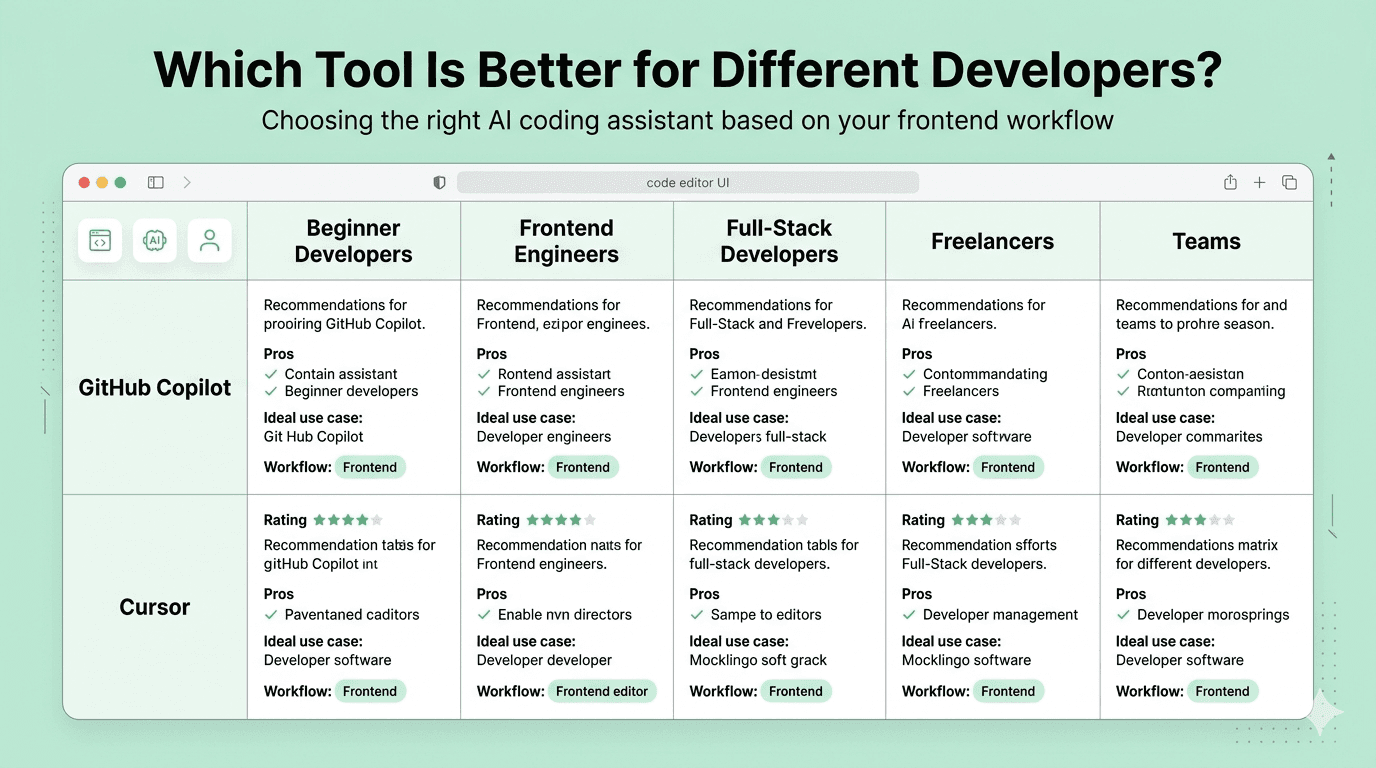
GitHub Copilot is the better choice if: You are already comfortable in VS Code or JetBrains and do not want to change your editor. Your work mostly involves writing new code or fixing bugs in individual files. You want a reliable, affordable tool that does not get in the way. Your team uses GitHub heavily and you want agent mode that integrates with your pull request workflow. You are a student or early career developer watching your budget.
Who Should Use a Cursor?
Cursor is the better choice if: You work on large frontend projects with many interconnected files and components. You spend a significant amount of time refactoring or onboarding into unfamiliar codebases. You are already in VS Code and the transition would be seamless for you. You want the most powerful multi-file editing and codebase-aware AI available right now. You are willing to pay a higher price for tools that genuinely save you hours every week.
Can You Use Both at the Same Time?
Yes. And many developers already do. A common setup is Copilot running in a different editor for fast inline completions, then jumping to Cursor for complex multi-file tasks. At 30 dollars per month combined, for a developer billing even a moderate hourly rate, five minutes saved per day covers the cost many times over. This is not as strange as it sounds. Different tools for different jobs is just good engineering.
GitHub Copilot vs Cursor: The Final Verdict
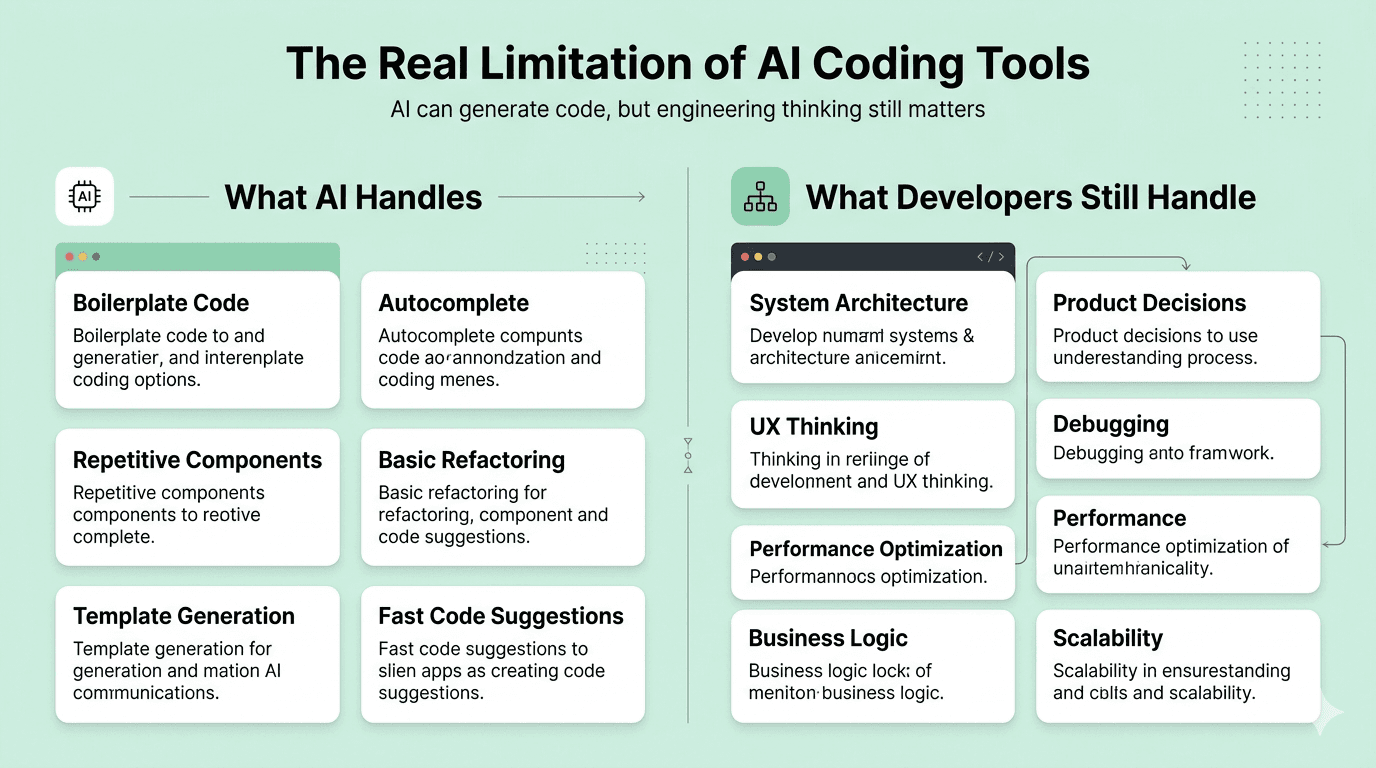
Here is the honest answer after looking at everything. If you are a solo frontend developer or just getting started with AI tools, GitHub Copilot at 10 dollars per month is a very good place to begin. It is reliable, it fits your existing workflow, and it will genuinely make you faster on everyday tasks. If you are working on serious frontend projects with complex component trees, shared state, and many files, Cursor is worth the extra cost. The Composer feature and codebase indexing alone can save you several hours a week on refactoring and debugging. The question to ask yourself is simple: do you mostly write new code, or do you also spend a lot of time changing and understanding existing code? If mostly new code, Copilot. If a lot of refactoring and understanding existing code, Cursor. Neither tool is magic. Both tools still write wrong code sometimes, and you still need to understand what they generate. But used well, both of them can genuinely change how fast you ship.
Comparison Table
Conclusion
Both tools are genuinely useful in 2026. The AI coding assistant space has come a long way and both GitHub Copilot and Cursor are real products that real developers rely on every day. The one that is better for you is the one that matches the actual work you do. Start with Copilot if you want to ease in. Move to Cursor when your projects grow large enough that context-aware editing starts to matter. Either way, using one of these tools and not the other is the only wrong answer.Read More: I Interviewed at Razorpay for Frontend