Loading...
Contents
Top 100 Full Stack Developer Interview Questions
Aug 11, 2026198 min readUpdated Sep 21, 2026
A Comprehensive Preparation Guide
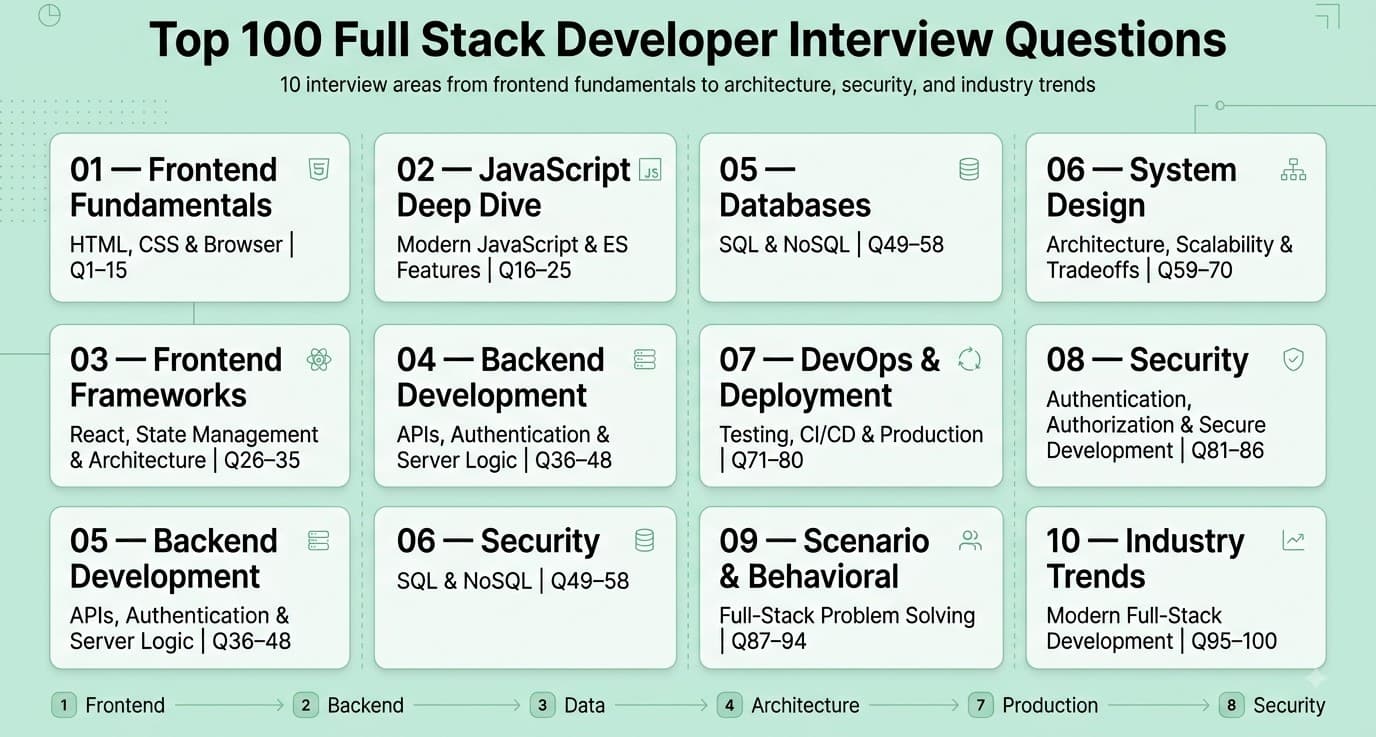
This guide covers the 100 most important full stack developer interview questions, organized by topic and roughly ordered by frequency/importance within each category, moving from frontend fundamentals through backend, databases, system design, and current industry trends.
Categories:
- Frontend Fundamentals: HTML, CSS & the Browser (Q1-15)
- JavaScript Deep Dive & Modern ES Features (Q16-25)
- Frontend Frameworks & State Management (Q26-35)
- Backend Development & API Design (Q36-48)
- Databases: SQL & NoSQL (Q49-58)
- System Design & Architecture (Q59-70)
- DevOps, Testing & Deployment (Q71-80)
- Security (Q81-86)
- Scenario-Based & Behavioral Questions (Q87-94)
- Industry Trends (Q95-100)
FREE TO USE
25K+ INTERVIEWS4.8★ RATING68% IMPROVEMENT
Crack Your Dream Job
Real Interviews. Real Pressure. Practice until it feels easy.
- Seamless Interview Experience
- Resume & JD Questions
- Instant Personalized Feedback
Part 1: Frontend Fundamentals: HTML, CSS & the Browser
Question 1
Question: What is the CSS box model, and how do content-box and border-box differ?
Answer: The box model describes how an element's total rendered size is calculated from its content, padding, border, and margin. With the default content-box, the width/height you set applies only to the content area, and padding/border are added on top, making the element visually larger than the specified dimensions. With border-box, width/height include padding and border, so the element's total rendered size matches exactly what you specified.
Explanation: A foundational CSS concept, frequently tested because misunderstanding it is a very common source of unexpected layout sizing bugs.
Real-World Example: Many CSS resets/frameworks (like Bootstrap) apply box-sizing: border-box globally specifically because it makes sizing far more predictable and intuitive when combining widths with padding and borders across a whole layout.
Common Mistakes: Not setting box-sizing: border-box globally and then being confused when adding padding to an element unexpectedly breaks a previously fitting layout.
Follow-up Questions: How would you apply border-box sizing globally across an entire project? How does margin collapsing work, and when does it occur? How does the box model interact with display: flex or display: grid children?
Question 2
Question: Explain the difference between flexbox and CSS grid, and when would you use each?
Answer: Flexbox is a one-dimensional layout system, ideal for laying out items in a single row or column with flexible sizing and alignment (like a navigation bar or a card's internal content). CSS Grid is a two-dimensional layout system, ideal for laying out content in both rows and columns simultaneously (like an overall page layout with a header, sidebar, and main content area).
Explanation: A very commonly tested modern CSS layout question, testing whether a candidate reaches for the right tool based on the layout's dimensionality rather than defaulting to one technique for everything.
Real-World Example: A product card's internal layout (image, title, price, and a button aligned in a row) is a natural fit for Flexbox, while the overall page structure (header, sidebar, main content, footer) is more naturally expressed with CSS Grid's explicit row/column template.
Common Mistakes: Trying to force complex two-dimensional layouts using nested Flexbox containers when CSS Grid would be far simpler and more maintainable, or vice versa, using Grid for simple one-dimensional alignment where Flexbox is more appropriate and less verbose.
Follow-up Questions: How would you create a responsive grid layout that adjusts the number of columns based on available space, without media queries (hint: auto-fit/auto-fill with minmax)? How does flex-grow, flex-shrink, and flex-basis work together? How would you center an element both horizontally and vertically using each approach?
Question 3
Question: What is the difference between position: relative, absolute, fixed, and sticky in CSS?
Answer: relative positions an element relative to its own normal position, without removing it from document flow. absolute positions an element relative to its nearest positioned (non-static) ancestor, removing it from normal document flow entirely. fixed positions an element relative to the browser viewport, staying in place during scrolling. sticky behaves like relative until a specified scroll threshold is crossed, then behaves like fixed within its containing block.
Explanation: A foundational CSS positioning question, frequently tested since the interactions between these values (especially absolute and its nearest positioned ancestor) are a common source of layout confusion.
Real-World Example: A sticky table header that stays visible while scrolling through a long table, but only within the bounds of that specific table (not the whole page), is a classic real-world position: sticky use case.
Common Mistakes: Forgetting that an absolutely positioned element needs a positioned ancestor (typically position: relative on a parent) to position relative to, otherwise it unexpectedly positions relative to the entire document/viewport.
Follow-up Questions: How does z-index interact with positioned elements, and what creates a new stacking context? How would you build a modal overlay using these positioning techniques? Why might position: sticky sometimes fail to work as expected (hint: overflow on an ancestor)?
Question 4
Question: What is the Critical Rendering Path, and how would you optimize it to improve page load performance?
Answer: The Critical Rendering Path is the sequence of steps the browser takes to convert HTML, CSS, and JavaScript into pixels on the screen: parsing HTML into the DOM, parsing CSS into the CSSOM, combining them into the render tree, calculating layout, and finally painting. Optimization techniques include minimizing render-blocking resources (deferring non-critical CSS/JS), inlining critical above-the-fold CSS, minimizing the number and size of resources, and using resource hints like preload and preconnect.
Explanation: A foundational web performance concept, testing understanding of browser internals beyond just writing functional code — important for any role where page load speed materially affects user experience or business metrics.
Real-World Example: An e-commerce site's product page might inline critical CSS for the above-the-fold hero content directly in the HTML <head> while deferring the loading of below-the-fold styles, letting the browser render visible content faster without waiting for a full external stylesheet download.
Common Mistakes: Placing <script> tags in the <head> without async or defer, blocking HTML parsing and delaying the page's first render unnecessarily.
Follow-up Questions: What's the difference between async and defer for script loading? How would you measure and diagnose a slow Critical Rendering Path in a real application? What is Time to First Byte (TTFB), and how does it fit into overall page load performance?
Question 5
Question: What is semantic HTML, and why does it matter?
Answer: Semantic HTML uses elements that convey meaning about their content's role (like <nav>, <article>, <header>, <button>) rather than generic, meaningless containers (<div>, <span>) for everything — improving accessibility for screen readers and assistive technology, SEO (search engines use semantic structure to understand page content), and code maintainability for other developers.
Explanation: A foundational best-practices question, testing whether a candidate writes HTML with accessibility and long-term maintainability in mind rather than purely visual, structure-agnostic markup.
Real-World Example: Using a <button> element for a clickable action (rather than a <div> with an onclick handler) automatically provides keyboard accessibility (tab focus, Enter/Space activation) and correct screen reader announcement, all "for free" without additional custom code.
Common Mistakes: Using <div> and <span> for everything ("divitis"), requiring significant extra ARIA attributes and JavaScript to replicate accessibility behavior that semantic elements provide natively.
Follow-up Questions: How would you make a custom, non-semantic interactive component (like a custom dropdown) accessible using ARIA attributes? What's the difference between <section> and <article>, and when would you use each? How does semantic HTML affect SEO specifically?
Question 6
Question: How does the browser's event loop work, and how does it relate to asynchronous JavaScript execution?
Answer: JavaScript is single-threaded, executing code via a call stack; the event loop continuously checks whether the call stack is empty and, if so, moves the next queued callback (from the callback queue for things like setTimeout, or the microtask queue for Promises, which has priority over the callback queue) onto the stack for execution — this is how JavaScript achieves non-blocking asynchronous behavior despite being fundamentally single-threaded.
Explanation: One of the most fundamental and frequently tested JavaScript runtime concepts, essential to understanding why asynchronous code behaves the way it does, especially around ordering and timing.
Real-World Example: A common interview exercise asks candidates to predict the console output order of a mix of synchronous code, setTimeout, and Promise.then() calls — correctly answering requires understanding that microtasks (Promises) are processed before the next macrotask (like setTimeout), even if the setTimeout delay is set to 0.
Common Mistakes: Assuming setTimeout(fn, 0) executes immediately/synchronously, not understanding it still gets queued and only runs after the current call stack is fully cleared and any pending microtasks have been processed.
Follow-up Questions: What's the difference between the microtask queue and the macrotask (callback) queue, and which has priority? Can you walk through the exact execution order of a specific code snippet mixing synchronous code, Promises, and setTimeout? How does async/await relate to the event loop under the hood?
Question 7
Question: What is the difference between null and undefined in JavaScript?
Answer: undefined means a variable has been declared but not yet assigned a value (or a function parameter wasn't provided, or a property doesn't exist on an object) — it's JavaScript's default "no value yet" state. null is an explicit assignment representing "intentionally no value," set deliberately by a developer to indicate the absence of a meaningful value.
Explanation: A foundational JavaScript question testing precise understanding of a commonly confused distinction, including their different behaviors with type coercion and equality checks.
Real-World Example: An API response might explicitly return null for a user's optional middle name field (indicating "we checked, there isn't one"), while a JavaScript variable that's simply been declared but not yet assigned (let x;) is undefined (indicating "not yet set").
Common Mistakes: Using == instead of === when specifically wanting to distinguish null from undefined (since null == undefined is true but null === undefined is false), or not knowing typeof null famously (and confusingly) returns "object", a long-standing JavaScript quirk.
Follow-up Questions: What does typeof undefined versus typeof null return, and why is the null result considered a well-known JavaScript bug/quirk? How would you check if a variable is either null or undefined in one concise check? What's the difference between == and ===, and which should you generally prefer?
Question 8
Question: What is responsive web design, and what techniques do you use to implement it?
Answer: Responsive design ensures a website adapts and displays appropriately across different screen sizes and devices, implemented through techniques like fluid/percentage-based layouts, CSS media queries (applying different styles based on viewport width/characteristics), flexible images (max-width: 100%), and a mobile-first design approach (writing base styles for small screens, then progressively enhancing for larger ones with min-width media queries).
Explanation: A foundational, extremely commonly tested frontend skill given the near-universal need for websites to work well across a wide range of device sizes.
Real-World Example: A navigation menu might display as a full horizontal bar on desktop but collapse into a hamburger menu icon on mobile screens, implemented via a media query that changes the layout below a certain breakpoint width.
Common Mistakes: Using fixed pixel widths throughout a layout instead of relative units (%, rem, vw/vh) or flexible layout techniques (Flexbox/Grid), causing the layout to break or require excessive horizontal scrolling on smaller screens.
Follow-up Questions: What's the difference between a mobile-first and desktop-first approach to writing media queries, and which do you prefer and why? How would you handle images that need to look sharp on high-DPI ("retina") displays? What are CSS container queries, and how do they differ from traditional viewport-based media queries?
Question 9
Question: What is the Document Object Model (DOM), and how does JavaScript interact with it?
Answer: The DOM is a tree-structured, in-memory representation of an HTML document that the browser constructs from parsed HTML, where each HTML element becomes a node in the tree — JavaScript interacts with the DOM through the DOM API (methods like document.querySelector, element.appendChild, or setting element.textContent) to read and dynamically modify the page's structure, content, and styling after the initial page load.
Explanation: A foundational concept underlying all client-side interactivity, essential vocabulary for discussing how JavaScript actually changes what a user sees on a webpage.
Real-World Example: A "like" button click handler that updates a like count displayed on the page without reloading it works by using JavaScript to directly modify the relevant DOM node's text content, illustrating the fundamental DOM manipulation pattern underlying all dynamic web interactivity.
Common Mistakes: Performing many individual DOM manipulations in a tight loop (each potentially triggering a reflow/repaint), causing significant performance issues, rather than batching changes (e.g., building up a document fragment first, then inserting it once).
Follow-up Questions: What's the difference between innerHTML and textContent, and what security risk does using innerHTML with untrusted content pose? What is a document fragment, and how does it help with performance when adding many elements at once? What's the difference between the DOM and the Virtual DOM used by frameworks like React?
Question 10
Question: What causes a browser reflow (layout) versus a repaint, and how does this affect performance?
Answer: A reflow (layout) recalculates the position and size of elements in the page, triggered by changes affecting layout (like changing an element's width, adding/removing DOM nodes, or changing font size) — this is computationally expensive, especially since it can cascade to affect other elements. A repaint updates only the visual appearance (like color or background) without affecting layout/geometry, which is less expensive than a reflow but still has some performance cost.
Explanation: A performance-oriented question testing understanding of browser rendering internals, relevant to writing genuinely performant, interactive JavaScript rather than just functionally correct code.
Real-World Example: Animating an element's width/height/top/left properties directly triggers repeated expensive reflows on every animation frame, while animating transform and opacity properties instead can often be handled entirely by the GPU compositor without triggering reflow or even repaint, resulting in dramatically smoother animation performance.
Common Mistakes: Reading a layout-triggering property (like offsetHeight) immediately after writing a style change in a loop, inadvertently forcing a synchronous reflow on every iteration ("layout thrashing"), severely degrading performance.
Follow-up Questions: Why are transform and opacity generally more performant to animate than width/height/top/left? What is layout thrashing, and how would you avoid it in your code? How would you use browser developer tools to identify and diagnose reflow/repaint performance issues in a real application?
Question 11
Question: What is CSS specificity, and how is it calculated?
Answer: CSS specificity determines which conflicting style rule takes precedence when multiple rules target the same element, calculated by counting the number of ID selectors, class/attribute/pseudo-class selectors, and element/pseudo-element selectors in a rule (roughly in that order of decreasing weight), with inline styles and !important overriding normal specificity-based precedence entirely.
Explanation: A foundational CSS concept, testing whether a candidate can debug and reason about "why isn't my CSS rule applying" issues systematically rather than guessing or reaching for !important as a first resort.
Real-World Example: A component library's default button style defined with a class selector (.btn) can be unintentionally difficult to override with another single class selector due to CSS load order or nesting, requiring understanding of specificity (or a more specific selector, or CSS custom properties/variables) to correctly and predictably override it.
Common Mistakes: Overusing !important as a blunt-force way to win specificity battles, which creates a maintenance nightmare since it breaks the normal cascade and makes future overrides increasingly difficult.
Follow-up Questions: How would you calculate the specificity of a selector like .container .item.active? Why is !important generally considered a CSS anti-pattern to avoid, and when (if ever) might it be justified? How does CSS specificity interact with the more modern CSS cascade layers (@layer) feature?
Question 12
Question: What is the difference between localStorage, sessionStorage, and cookies?
Answer: localStorage persists data in the browser indefinitely (until explicitly cleared), accessible only via JavaScript, with no automatic transmission to the server. sessionStorage behaves similarly but is cleared when the browser tab/window closes. Cookies are smaller (roughly 4KB limit), can be set with an expiration, are automatically sent with every HTTP request to the matching domain (relevant for both functionality and performance), and can be configured with security flags like HttpOnly and Secure.
Explanation: A foundational web storage question, frequently tested since choosing the wrong storage mechanism for a given use case (especially around security-sensitive data like auth tokens) is a common real-world mistake.
Real-World Example: A shopping cart that should persist across browser sessions is well suited to localStorage, while a temporary UI state (like which accordion section is expanded) that shouldn't persist after the tab closes fits sessionStorage, and a session authentication token benefiting from HttpOnly (inaccessible to JavaScript, mitigating XSS token theft) is best stored in a cookie.
Common Mistakes: Storing sensitive authentication tokens in localStorage, which is directly accessible to any JavaScript running on the page (including malicious injected scripts via XSS), rather than in an HttpOnly cookie that JavaScript cannot access.
Follow-up Questions: Why is storing a JWT in localStorage considered more vulnerable to XSS-based theft than storing it in an HttpOnly cookie? What are the Secure and SameSite cookie attributes, and what do they protect against? How much data can each of these storage mechanisms typically hold?
Question 13
Question: What is a CSS preprocessor (like Sass/SCSS), and what benefits does it provide over plain CSS?
Answer: A CSS preprocessor extends CSS with programming-like features (variables, nesting, mixins/reusable style blocks, functions, and imports/partials for splitting styles across files) that compile down to standard CSS the browser can understand — improving maintainability, reducing repetition, and enabling more organized, modular stylesheets, especially valuable in larger projects, though many of these features (like variables and nesting) are now natively supported in modern CSS itself.
Explanation: Tests awareness of common frontend tooling, and also increasingly tests awareness of how native CSS has evolved to include many previously preprocessor-only features.
Real-World Example: A design system might define brand colors and spacing values once as Sass variables (or, increasingly, native CSS custom properties), reused consistently across hundreds of component style files, making a global rebrand or design token update a simple, centralized change rather than a tedious search-and-replace across many files.
Common Mistakes: Not being aware that many preprocessor features (variables via --custom-properties, nesting) are now natively supported in modern CSS, potentially reducing (though not eliminating) the need for a preprocessor in some newer projects.
Follow-up Questions: What's the difference between a Sass variable and a native CSS custom property (--variable), particularly regarding runtime versus compile-time behavior? What is a CSS mixin, and can you give an example of when you'd use one? How do CSS-in-JS approaches compare to traditional preprocessors like Sass?
Question 14
Question: How would you approach making a web application accessible (a11y) to users with disabilities?
Answer: Key practices include using semantic HTML elements (providing built-in accessibility behavior), ensuring full keyboard navigability (all interactive elements reachable and operable via keyboard alone, with visible focus indicators), providing appropriate ARIA attributes and alt text for non-text content and custom interactive components, maintaining sufficient color contrast, and testing with actual assistive technology (like a screen reader) rather than relying solely on automated tools.
Explanation: An increasingly important and commonly tested best-practices question, both for genuine inclusivity and increasingly for legal/regulatory compliance (like the ADA and WCAG standards) in many jurisdictions.
Real-World Example: A custom-styled dropdown menu built with <div> elements requires substantial additional ARIA attributes (role, aria-expanded, aria-activedescendant) and custom keyboard event handling to be usable via keyboard and screen reader, whereas using a native <select> element provides all of this accessibility behavior automatically, at some cost to visual customization flexibility.
Common Mistakes: Relying solely on automated accessibility testing tools (which typically catch only a fraction of real accessibility issues, like missing alt text) without any manual testing using an actual screen reader or keyboard-only navigation.
Follow-up Questions: How would you test a web application's accessibility beyond running an automated tool like axe or Lighthouse? What's the difference between aria-label and aria-labelledby? How would you ensure a custom modal dialog properly traps and manages keyboard focus?
Question 15
Question: What is the difference between server-side rendering (SSR), client-side rendering (CSR), and static site generation (SSG)?
Answer: CSR sends a minimal HTML shell to the browser, with JavaScript then rendering the full page content client-side after loading, resulting in a faster initial server response but a blank page until JavaScript executes and typically weaker SEO without additional handling. SSR renders the full HTML content on the server for each request, sending complete, immediately-visible content to the browser, improving initial load perception and SEO at the cost of server processing load per request. SSG pre-renders pages to static HTML at build time (before any user requests them), offering the fastest possible serving (often via a CDN) for content that doesn't need to be dynamically generated per-request.
Explanation: A very commonly tested modern frontend architecture question, especially relevant given the popularity of frameworks (like Next.js) that support all three rendering strategies, sometimes even within the same application.
Real-World Example: A marketing landing page with rarely-changing content is an excellent SSG candidate (pre-built once, served instantly from a CDN), a personalized, frequently-updated dashboard is often better suited to CSR or SSR depending on SEO needs, and a blog with content that changes periodically but isn't fully real-time might use SSG with periodic rebuilds or incremental static regeneration.
Common Mistakes: Defaulting to pure CSR for every kind of page without considering the real SEO and initial-load-performance costs, especially for public-facing, content-heavy, or marketing-oriented pages where those factors matter significantly.
Follow-up Questions: What is hydration in the context of SSR, and what problems can occur during that process? What is incremental static regeneration, and what problem does it solve relative to pure SSG? How would you decide which rendering strategy is appropriate for a specific page in a real application?
Part 2: JavaScript Deep Dive & Modern ES Features
Question 16
Question: Explain closures in JavaScript, and give a practical use case.
Answer: A closure occurs when an inner function retains access to variables from its outer (enclosing) function's scope even after the outer function has finished executing — the inner function "closes over" those variables, keeping them alive in memory as long as the closure itself is referenced somewhere.
Explanation: One of the single most fundamental and frequently tested JavaScript concepts, underlying many common patterns like data privacy, memoization, and callback-based code.
Real-World Example: A function creating a private counter (function makeCounter() { let count = 0; return () => ++count; }) uses a closure to keep count private and persistent across calls, inaccessible from outside except through the returned function — a common pattern for encapsulation without using classes.
Common Mistakes: Creating closures inside a loop that inadvertently capture a shared, mutable loop variable (a classic var in a loop pitfall, generally fixed by using let instead, which creates a new binding per iteration).
Follow-up Questions: Can you walk through why using var instead of let in a loop with an asynchronous callback produces unexpected results? How do closures relate to memory management and potential memory leaks? Can you write a simple memoization function using a closure?
Question 17
Question: What is the difference between var, let, and const?
Answer: var is function-scoped (or globally scoped if declared outside a function), hoisted with an initial value of undefined, and can be redeclared and reassigned. let is block-scoped, hoisted but not initialized (leaving a "temporal dead zone" before its declaration line), and can be reassigned but not redeclared within the same scope. const behaves like let in scoping but cannot be reassigned after initial assignment (though objects/arrays assigned to a const can still have their contents mutated).
Explanation: A foundational JavaScript question, essential for understanding modern best practices (let/const are now standard, with var largely considered legacy/outdated) and debugging scoping-related bugs.
Real-World Example: A classic interview exercise demonstrates that a for loop using var combined with an asynchronous callback (like setTimeout) inside the loop body will incorrectly reference the same final loop variable value for every callback, while using let correctly captures a distinct value per iteration.
Common Mistakes: Assuming const makes an entire object or array fully immutable — it only prevents reassignment of the variable binding itself, not mutation of the object/array's internal contents.
Follow-up Questions: What is the "temporal dead zone," and how does it relate to let and const? How would you make an object's contents genuinely immutable, not just the variable binding (hint: Object.freeze)? Why is var generally considered outdated in modern JavaScript code?
Question 18
Question: Explain the difference between == and === in JavaScript.
Answer: == (loose equality) compares values after performing type coercion if the operands are of different types, which can produce surprising results (like '5' == 5 being true). === (strict equality) compares both value and type without any coercion, only returning true if both operands are the same type and value — generally the recommended default to avoid coercion-related bugs and surprises.
Explanation: A very foundational JavaScript question, frequently tested both for the direct definitional knowledge and to gauge awareness of JavaScript's sometimes counterintuitive type coercion rules.
Real-World Example: A form validation check comparing a user's numeric input (often initially a string from an HTML input) against an expected number can produce subtle bugs if == is used carelessly, whereas explicit type conversion combined with === produces more predictable, intentional comparison behavior.
Common Mistakes: Using == out of habit or unfamiliarity with the distinction, leading to occasional hard-to-debug issues from unexpected type coercion (like [] == false being true, a commonly cited surprising JavaScript coercion quirk).
Follow-up Questions: Can you name a few surprising/counterintuitive results of == type coercion in JavaScript? Why is === generally recommended as the default choice in most style guides and linting rules? How does Object.is() differ from both == and ===?
Question 19
Question: What is this in JavaScript, and how does its value depend on how a function is called?
Answer: The value of this is determined dynamically based on how a function is called, not where it's defined: in a regular function call, this is the global object (or undefined in strict mode); as a method call (obj.method()), this is the object the method was called on; with call/apply/bind, this is explicitly set; in a constructor call (with new), this is the newly created object; and in an arrow function, this is lexically inherited from the enclosing scope at the time of definition, not determined by how it's called.
Explanation: One of the most commonly confused and frequently tested JavaScript concepts, essential for correctly writing (and debugging) object-oriented and callback-heavy JavaScript code.
Real-World Example: A very common real-world bug occurs when a regular function is used as an event handler or callback and later passed around, losing its intended this binding — using an arrow function or explicitly binding with .bind(this) are the standard fixes, especially relevant historically in React class component event handlers.
Common Mistakes: Using a regular function as a callback (like inside setTimeout or an event listener within a class method) and being surprised when this doesn't refer to what was expected, due to this being determined by call-site rather than definition location for regular functions.
Follow-up Questions: How does this behave differently inside an arrow function compared to a regular function? What's the difference between call, apply, and bind? How would you fix a this binding issue in a class method used as an event handler, and what are the different ways to do so?
Question 20
Question: What are Promises, and how do they improve on traditional callback-based asynchronous code?
Answer: A Promise represents the eventual result (or failure) of an asynchronous operation, existing in one of three states (pending, fulfilled, or rejected), with .then()/.catch() methods to handle the eventual result — Promises improve on plain callbacks by avoiding deeply nested "callback hell," providing standardized, more composable error handling (a single .catch() can handle errors from an entire chain), and enabling clean composition of multiple asynchronous operations (via Promise.all, Promise.race, etc.).
Explanation: A very foundational modern JavaScript async concept, essential to understand deeply since Promises underlie async/await and are central to virtually all modern asynchronous JavaScript code.
Real-World Example: Fetching data from multiple independent API endpoints simultaneously and waiting for all of them to complete before proceeding is cleanly expressed with Promise.all([fetch1, fetch2, fetch3]), versus significantly more cumbersome and error-prone manual coordination using raw nested callbacks.
Common Mistakes: Forgetting to return a Promise from within a .then() chain step that itself returns a Promise, breaking the intended chaining behavior and causing subsequent .then() calls to run before the nested async operation actually completes.
Follow-up Questions: What's the difference between Promise.all, Promise.allSettled, Promise.race, and Promise.any? How does async/await relate to Promises under the hood? How would you handle an error occurring partway through a chain of multiple .then() calls?
Question 21
Question: What is destructuring, and how is it used with objects and arrays in modern JavaScript?
Answer: Destructuring allows unpacking values from arrays or properties from objects into distinct variables using a concise syntax, optionally with default values and renaming, reducing boilerplate compared to accessing each value individually via bracket or dot notation.
Explanation: A very commonly used modern ES6+ feature, testing familiarity with idiomatic, current JavaScript syntax expected in most modern codebases.
Real-World Example: Destructuring is extremely common when working with React props (function Component({ title, onClick }) {...}) or when extracting specific fields from an API response object, making the code more concise and immediately clear about exactly which values are being used.
Common Mistakes: Not using default values in destructuring when a property might be undefined (e.g., const { count = 0 } = options), leading to unexpected undefined values propagating through subsequent code.
Follow-up Questions: How would you destructure a nested object property directly in one statement? How would you use destructuring to swap the values of two variables without a temporary variable? How does array destructuring with a "rest" pattern work (e.g., const [first, ...rest] = array)?
Question 22
Question: What is the spread operator, and how does it differ from the rest parameter?
Answer: The spread operator (...) expands an iterable (like an array) or an object's own enumerable properties into individual elements/properties, commonly used for copying/merging arrays and objects, or passing an array's elements as individual function arguments. The rest parameter uses the same ... syntax but does the opposite — it collects multiple individual arguments or remaining destructured elements into a single array.
Explanation: A commonly tested modern syntax question, especially relevant given the widespread use of the spread operator for immutable state updates in frameworks like React.
Real-World Example: Updating a piece of React state immutably (a common requirement) is typically done using the spread operator to create a new object with most properties copied from the old state, plus one or more specific properties overridden: setState({ ...state, name: 'New Name' }).
Common Mistakes: Assuming the spread operator performs a deep copy of nested objects/arrays — it only performs a shallow copy, meaning nested objects are still shared by reference between the original and the "copy," which can cause subtle bugs when mutating nested data.
Follow-up Questions: Why is the spread operator's shallow copy behavior a potential source of bugs, and how would you handle deep copying if needed? How does the rest parameter work when destructuring function arguments (e.g., collecting all arguments after the first into an array)? How would you merge two objects, with the second object's properties taking precedence over conflicting properties in the first?
Question 23
Question: What are JavaScript generators, and what problem do they solve?
Answer: A generator function (declared with function*) can pause and resume its execution at yield points, producing a sequence of values over time on demand rather than computing and returning them all at once — useful for lazily generating potentially infinite sequences, implementing custom iterables, and (historically, before async/await became standard) managing asynchronous control flow.
Explanation: A more advanced JavaScript concept, less commonly used directly in typical application code today (given async/await's prevalence) but still tested to gauge deeper language understanding and awareness of the iterator protocol.
Real-World Example: A generator function could lazily produce an infinite sequence of Fibonacci numbers, computing and yielding only the next value each time it's requested, rather than needing to pre-compute and store a potentially unbounded array in memory upfront.
Common Mistakes: Confusing generators with regular async functions, or not understanding that calling a generator function doesn't execute its body immediately — it returns an iterator object, and code only executes up to each yield as the iterator's .next() is called.
Follow-up Questions: How would you use a generator to implement a custom iterable object (implementing Symbol.iterator)? How do generators relate to how async/await is implemented under the hood in JavaScript engines? Can you write a generator function that produces an infinite sequence?
Question 24
Question: What is prototypal inheritance in JavaScript, and how does it differ from classical (class-based) inheritance?
Answer: JavaScript objects inherit properties and methods directly from other objects via a prototype chain — when a property isn't found directly on an object, the JavaScript engine looks up the chain to that object's prototype, and continues up the chain until found or the chain ends. This differs from classical inheritance (as in Java or C++), where classes are blueprints and inheritance is defined through explicit class hierarchies — JavaScript's class syntax (introduced in ES6) is primarily syntactic sugar over this same underlying prototypal mechanism.
Explanation: A foundational, frequently tested JavaScript concept, especially important given that many developers use class syntax without understanding the prototypal mechanism actually powering it underneath.
Real-World Example: All JavaScript arrays inherit methods like .map() and .filter() from Array.prototype — this is why you can call these methods on any array without them being defined directly on each individual array instance, illustrating the prototype chain mechanism in everyday use.
Common Mistakes: Believing JavaScript's class syntax introduces genuinely classical, class-based inheritance semantically identical to languages like Java, rather than recognizing it as syntactic sugar over the same underlying prototype-based mechanism.
Follow-up Questions: How would you implement inheritance in JavaScript without using class syntax, directly using prototypes? What does Object.create() do, and how does it relate to the prototype chain? How does instanceof work under the hood in terms of the prototype chain?
Question 25
Question: What is event delegation in JavaScript, and why is it a useful pattern?
Answer: Event delegation takes advantage of event bubbling by attaching a single event listener to a common parent element rather than attaching individual listeners to each of many child elements, then using the event object's target property within the handler to determine which specific child element triggered the event — this is more memory-efficient (especially with many elements) and automatically handles dynamically added child elements without needing to attach new listeners to each one individually.
Explanation: A commonly tested practical JavaScript pattern, testing understanding of event bubbling and a technique valued for both performance and simplifying handling of dynamic content.
Real-World Example: A long, dynamically-updating list of hundreds of items (like a to-do list where items can be added/removed) is more efficiently handled with a single click listener on the parent <ul> element using event delegation, rather than attaching and managing an individual click listener on every single <li> item, especially as items are added or removed.
Common Mistakes: Attaching individual event listeners to many dynamically-created elements without considering event delegation, leading to unnecessary memory overhead and the need for manual listener cleanup/reattachment whenever elements are added or removed.
Follow-up Questions: How does event bubbling differ from event capturing, and how would you use the capturing phase instead? How would you use event.target versus event.currentTarget correctly within a delegated event handler? How would you stop an event from bubbling further, and when might that be necessary?
Part 3: Frontend Frameworks & State Management
Question 26
Question: What is the Virtual DOM, and how does it improve performance compared to direct DOM manipulation?
Answer: The Virtual DOM is a lightweight, in-memory JavaScript representation of the actual DOM, maintained by frameworks like React — when state changes, the framework builds a new Virtual DOM tree, efficiently compares ("diffs") it against the previous version, and calculates the minimal set of actual DOM mutations needed, then applies only those specific changes to the real DOM in a batch — this is generally faster than naive, unbatched direct DOM manipulation, since real DOM operations are relatively expensive.
Explanation: A foundational concept for anyone working with React or similar frameworks, frequently tested to gauge understanding beyond just "how to use React" toward understanding why it's architected the way it is.
Real-World Example: Updating a single item's text within a long rendered list in React only triggers a real DOM update for that specific changed text node (after diffing), rather than the framework needing to re-render and replace the entire list in the actual DOM, which would be significantly less efficient.
Common Mistakes: Assuming the Virtual DOM makes React inherently faster than all direct DOM manipulation in every case — for very simple, targeted updates, direct DOM manipulation can actually be faster; the Virtual DOM's real value is in efficiently managing complexity and minimizing unnecessary work as an application scales in complexity.
Follow-up Questions: How does React's diffing/reconciliation algorithm decide whether to update, add, or remove real DOM nodes? Why does React require a unique key prop when rendering lists, and what happens if you use an unstable key (like array index) incorrectly? What are some newer frontend approaches (like Svelte's compile-time reactivity) that avoid using a Virtual DOM entirely?
Question 27
Question: What is the difference between React's state and props?
Answer: props are read-only data passed down from a parent component to a child component, used to configure and customize how the child renders and behaves — a child cannot modify its own props. state is data owned and managed internally by a component itself, which can be updated over time (via a state-setting function), triggering a re-render of that component whenever it changes.
Explanation: One of the most fundamental React concepts, essential vocabulary for any React-based technical discussion, frequently tested early in a React-focused interview.
Real-World Example: A reusable Button component might receive a label and onClick handler as props from its parent (data flowing down, configured externally), while a Counter component manages its own internal count value as state, incrementing it in response to its own button clicks.
Common Mistakes: Attempting to directly mutate a prop within a child component (props should be treated as immutable/read-only from the child's perspective) rather than lifting relevant state up to a shared parent component and passing down both the value and an appropriate update handler as props.
Follow-up Questions: What does "lifting state up" mean, and when would you need to do it? How would you decide whether a particular piece of data should be component state versus derived/computed directly from existing props or state during render? How does prop drilling become a problem in larger component trees, and what solutions address it?
Question 28
Question: Explain the React useEffect hook, including its dependency array and cleanup function.
Answer: useEffect runs a side effect (like a data fetch, subscription, or manual DOM manipulation) after a component renders, with its dependency array controlling exactly when the effect re-runs: an empty array [] means the effect runs once after the initial render only, omitting the array entirely means it runs after every render, and including specific dependencies means it re-runs only when any of those specific values change between renders. An optional returned cleanup function runs before the component unmounts, or before the effect re-runs again due to a dependency change, useful for cleaning up subscriptions, timers, or event listeners to prevent memory leaks.
Explanation: One of the most commonly used and frequently misused React hooks, making a precise, correct understanding of its dependency array and cleanup behavior essential and very commonly tested.
Real-World Example: A component subscribing to a WebSocket connection on mount would set up the subscription inside useEffect and return a cleanup function that closes the connection, ensuring the subscription is properly torn down when the component unmounts or when its relevant dependencies change, preventing a memory leak or duplicate subscriptions.
Common Mistakes: Omitting a dependency that the effect actually uses from the dependency array (a very common and easy-to-make mistake, generally caught by the exhaustive-deps ESLint rule), causing the effect to use a stale, outdated value from a previous render instead of the current one.
Follow-up Questions: What happens if you omit the dependency array entirely versus providing an empty array — how do these two behaviors differ? Why is the exhaustive-deps ESLint rule considered important, and when (rarely) might you deliberately deviate from it? How would you handle a data-fetching effect that needs to avoid a race condition when its dependencies change quickly in succession?
Question 29
Question: What is the difference between controlled and uncontrolled components in React forms?
Answer: A controlled component has its form input value driven entirely by React state — the input's value is set from state, and an onChange handler updates that state on every keystroke, making React the single source of truth. An uncontrolled component instead lets the DOM itself manage the input's internal state, with React accessing the current value only when needed (typically via a ref), rather than tracking every keystroke change in React state.
Explanation: A very commonly tested React forms concept, testing understanding of two fundamentally different approaches to handling form input and their respective tradeoffs.
Real-World Example: A form requiring real-time validation feedback as the user types (like showing a password strength meter updating live) requires a controlled component to have immediate access to the current value on every keystroke, while a simple, large form only needing the final values on submission might reasonably use uncontrolled inputs with refs for slightly better performance and simplicity.
Common Mistakes: Mixing controlled and uncontrolled patterns unintentionally (e.g., providing a value prop without a corresponding onChange handler), which React will warn about and which typically results in an input that appears "frozen" and unresponsive to user typing.
Follow-up Questions: What are the performance tradeoffs between controlled and uncontrolled components for a form with many fields? How would you set a default initial value for an uncontrolled input? When would you choose a form library like React Hook Form, and how does it relate to this controlled/uncontrolled distinction?
Question 30
Question: How would you decide between using React's built-in state management (useState/useContext) versus a dedicated state management library (like Redux or Zustand)?
Answer: Built-in useState and useContext are generally sufficient for simpler applications or state that's naturally scoped to a specific component tree, but can become unwieldy for complex, frequently-updated global state shared across many disparate parts of a large application, since Context re-renders all consuming components on any change (without additional optimization) and lacks built-in tooling for debugging complex state transitions. Dedicated state management libraries provide more structured patterns, better performance optimization for complex state (avoiding unnecessary re-renders), and powerful developer tooling (like Redux DevTools for time-travel debugging) — appropriate when application state complexity genuinely justifies the added architectural overhead.
Explanation: A very commonly tested architectural judgment question, testing whether a candidate can match tooling choice to actual project needs and complexity, rather than defaulting reflexively to either extreme.
Real-World Example: A small marketing website with minimal interactive state has no real need for Redux, while a complex application like a project management tool with deeply interconnected, frequently-updated state (tasks, users, filters, real-time updates) across many disparate components often benefits significantly from a dedicated state management solution's more structured, optimized approach.
Common Mistakes: Introducing a heavyweight state management library for a genuinely simple application where React's built-in state management would suffice, adding unnecessary complexity, boilerplate, and a steeper learning curve for the team without a commensurate real benefit.
Follow-up Questions: What specific performance problem can arise from overusing React Context for frequently-changing global state, and how would you mitigate it? How does a library like Zustand differ philosophically from Redux? At what point in a growing project would you know it's time to introduce a dedicated state management solution?
Question 31
Question: What is React's key prop, and why is it important when rendering lists?
Answer: The key prop gives React a stable, unique identity for each element in a list, allowing its reconciliation algorithm to correctly determine which items have been added, removed, reordered, or changed between renders — without a stable key, React may inefficiently or incorrectly re-render/re-create elements, and can cause subtle bugs with component state getting incorrectly associated with the wrong list item after a reorder.
Explanation: A very commonly tested, deceptively simple React concept, since using an unstable key (especially array index) is an extremely common real-world source of subtle bugs and performance issues.
Real-World Example: A to-do list where items can be reordered or deleted, if keyed by array index rather than a stable, unique item ID, can cause React to incorrectly preserve a checkbox's checked state on the wrong item after a reorder or deletion, since the index-based key doesn't actually track the item's true identity as the list changes.
Common Mistakes: Using the array index as the key for a list that can be reordered, filtered, or have items inserted/removed from the middle (rather than only appended at the end), which breaks React's ability to correctly track each item's true, stable identity across re-renders.
Follow-up Questions: Why is using array index as a key generally safe for a list that's static and never reordered or filtered, but unsafe otherwise? What specific bugs or performance issues can occur from using an unstable key? How would you choose an appropriate key for a list of items fetched from an API?
Question 32
Question: What is memoization in React, and how do React.memo, useMemo, and useCallback differ?
Answer: Memoization caches a computed result to avoid redundant recalculation when inputs haven't changed. React.memo wraps a component to skip re-rendering it if its props haven't changed (shallow comparison). useMemo caches the result of an expensive calculation between renders, recomputing only when its dependencies change. useCallback caches a function reference itself between renders (useful to prevent unnecessary re-renders of memoized child components that receive that function as a prop, since a newly-created function reference on every render would otherwise defeat React.memo's shallow prop comparison).
Explanation: A commonly tested React performance optimization topic, testing precise understanding of when and why each specific memoization tool is appropriate, since overusing them is also a common real-world anti-pattern.
Real-World Example: A component rendering a large, complex data visualization based on expensive calculations might use useMemo to avoid recalculating that expensive result on every render, only recomputing when the actual underlying data dependency changes.
Common Mistakes: Overusing useMemo/useCallback throughout an application by default, "just in case," without profiling to confirm there's an actual measurable performance problem — this adds code complexity and can even slightly hurt performance in cases where the memoization overhead exceeds the cost of simply recomputing the value.
Follow-up Questions: When would using React.memo on a component actually fail to prevent an unnecessary re-render (hint: unstable prop references, like an inline object or function)? How would you profile a React application to identify genuine, worthwhile memoization opportunities rather than guessing? What's the tradeoff/cost of memoization, even when it's technically "working" correctly?
Question 33
Question: How would you optimize the performance of a large list with thousands of items rendered in a web application?
Answer: Implement list virtualization (also called windowing) — rendering only the small subset of items currently visible within the viewport (plus a small buffer), dynamically swapping which items are rendered as the user scrolls, rather than rendering the DOM for every single item in a potentially huge list at once, which would create excessive DOM nodes and severely degrade performance.
Explanation: A very commonly tested practical frontend performance question, since rendering large lists naively is a frequent, significant real-world performance bottleneck.
Real-World Example: A social media feed or a large data table displaying thousands of rows commonly uses a virtualization library (like react-window or react-virtualized) to maintain smooth scrolling performance by keeping the actual number of rendered DOM nodes small and roughly constant, regardless of the total underlying dataset size.
Common Mistakes: Rendering an entire large list's DOM elements at once without any virtualization, causing significant initial render time, memory usage, and janky/sluggish scrolling performance, especially on lower-powered devices.
Follow-up Questions: How does list virtualization handle items of variable, dynamically-measured height, which is more complex than a simpler fixed-height virtualization approach? What other performance optimizations, beyond virtualization, would you consider for a data-heavy page? How would you implement infinite scroll/pagination in combination with virtualization?
Question 34
Question: What is the difference between unidirectional and bidirectional data binding, and which does React use?
Answer: Unidirectional data binding flows data in a single direction — from a parent component's state down to child components via props — and any updates flow back up only through explicit callback functions passed down as props, making data flow predictable and easier to reason about and debug. Bidirectional (two-way) data binding automatically synchronizes a UI element's value with underlying application state in both directions without requiring an explicit callback, common in frameworks like Angular (with ngModel) or Vue (with v-model). React uses unidirectional data flow by design as one of its core architectural principles.
Explanation: A foundational architectural concept, testing understanding of a key philosophical/design distinction between major frontend frameworks and the tradeoffs involved.
Real-World Example: In React, a text input's value doesn't automatically update a parent's state without an explicit onChange handler wiring that connection intentionally, whereas in Angular's ngModel bidirectional binding, the framework handles synchronizing the input and the underlying model value in both directions automatically, with less explicit boilerplate but potentially less immediately obvious/traceable data flow in complex scenarios.
Common Mistakes: Not being able to articulate the actual tradeoff — unidirectional data flow requires somewhat more boilerplate for simple cases but generally offers more predictable, traceable data flow that scales better and is easier to debug in genuinely complex applications.
Follow-up Questions: What specific debugging or maintainability advantages does unidirectional data flow provide as an application grows in complexity? How does React's unidirectional flow relate to and support the broader Flux/Redux architectural pattern? Can you simulate two-way binding behavior in React despite its fundamentally unidirectional design?
Question 35
Question: How would you approach testing a React component?
Answer: Different testing layers serve different purposes: unit tests verify individual component logic/rendering in isolation (often using React Testing Library, which specifically encourages testing behavior from the user's perspective rather than internal implementation details), integration tests verify multiple components working correctly together, and end-to-end tests (like with Cypress or Playwright) verify complete user flows through the actual rendered application in a real or simulated browser.
Explanation: A very practical, commonly tested skill, especially testing awareness of the modern testing philosophy shift toward testing observable user behavior rather than brittle internal implementation details.
Real-World Example: Testing a form component with React Testing Library typically involves simulating a real user's actions (typing into fields, clicking a submit button) and asserting on the resulting visible output (like a success message appearing), rather than directly inspecting or asserting on the component's internal state variables, making the test more robust to internal refactoring that doesn't change actual user-facing behavior.
Common Mistakes: Writing brittle tests that directly assert on a component's internal implementation details (like specific internal state variable values or exact internal function calls) rather than the actual rendered, user-observable output and behavior — such tests break unnecessarily whenever the internal implementation changes, even if the actual external behavior remains correct and unchanged.
Follow-up Questions: Why does React Testing Library specifically discourage testing internal component state or implementation details directly? How would you test a component that makes an asynchronous API call? What's the difference between a shallow render and a full DOM render in the context of component testing?
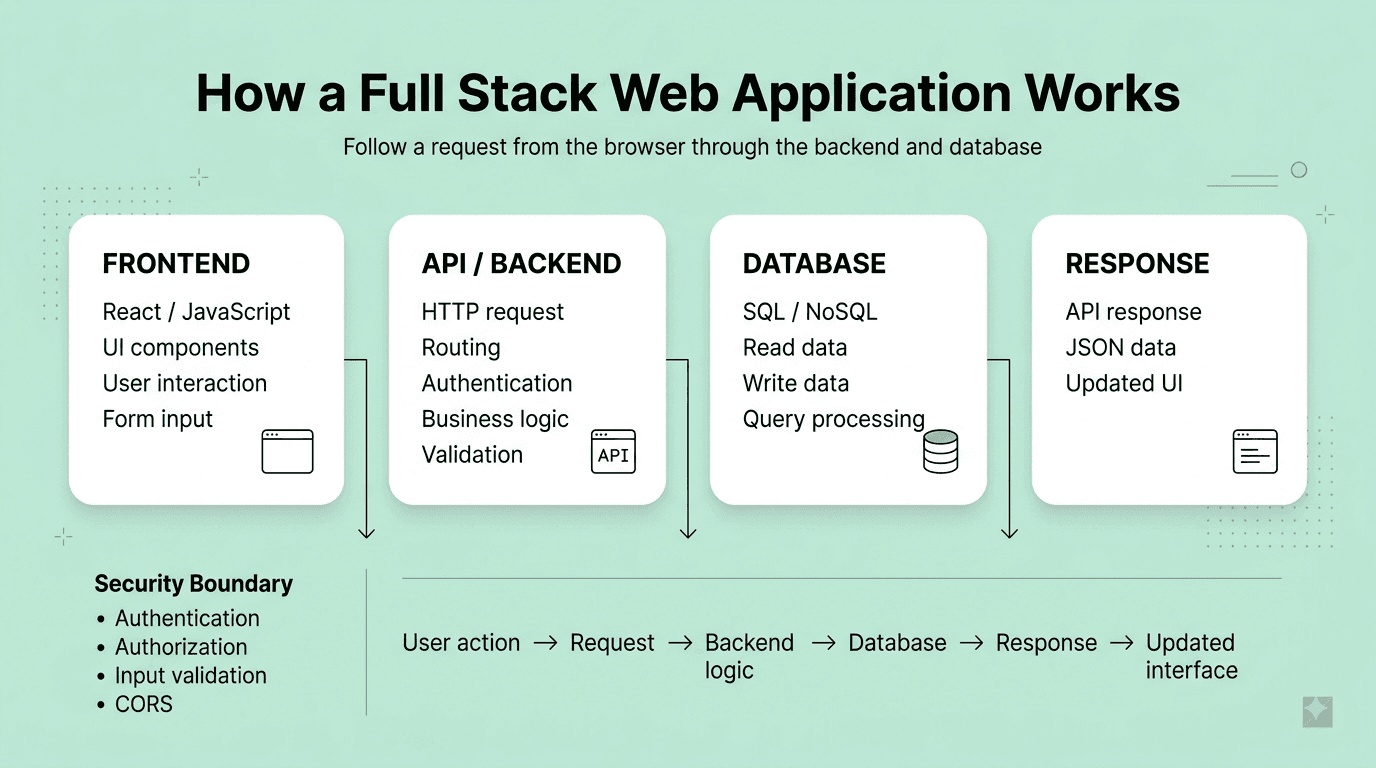
Part 4: Backend Development & API Design
Question 36
Question: What is the difference between REST and GraphQL APIs, and when would you choose one over the other?
Answer: REST exposes multiple fixed endpoints per resource, following standard HTTP methods and status codes, generally simpler to implement, cache (via standard HTTP caching), and reason about for straightforward CRUD operations. GraphQL exposes a single endpoint where clients specify exactly the fields/data they need in a query, reducing over-fetching and under-fetching (fewer round trips for complex, nested data needs) at the cost of added backend complexity (resolver design, potential N+1 query issues) and more complex HTTP-level caching.
Explanation: A very commonly tested architectural comparison question for full stack roles, testing whether the candidate understands real tradeoffs rather than treating either approach as universally superior.
Real-World Example: A mobile app needing to fetch a user's profile along with several related but selectively-needed nested resources (like their recent posts and a few key stats) in a single request benefits significantly from GraphQL's precise, single-request field selection, versus REST potentially requiring several separate round trips or a purpose-built, less flexible custom endpoint.
Common Mistakes: Presenting GraphQL as unconditionally superior without acknowledging its added backend complexity (resolver N+1 problems requiring solutions like DataLoader, and more complex HTTP-level caching due to typically using a single POST endpoint).
Follow-up Questions: How does GraphQL address the N+1 query problem on the backend (DataLoader pattern)? How would you implement caching for a GraphQL API, given it typically doesn't support standard HTTP GET-based caching as naturally as REST? When would you still choose REST over GraphQL for a new project?
Question 37
Question: What is the difference between HTTP status codes 401 and 403?
Answer: A 401 Unauthorized response means the request lacks valid authentication credentials — the client isn't properly identified/authenticated at all (or their credentials are invalid/expired). A 403 Forbidden response means the client is authenticated (properly identified) but doesn't have permission to access the specific requested resource — their identity is known, but their access is explicitly denied for that particular action or resource.
Explanation: A commonly tested, precise API design question, since correctly distinguishing and using these status codes is important for clear, correctly-behaving client-server communication and debugging.
Real-World Example: Attempting to access an account dashboard without being logged in at all correctly returns a 401 (prompting a login flow), while a logged-in regular user attempting to access an admin-only settings page correctly returns a 403 (they're known/authenticated, but simply lack sufficient permission for that specific resource).
Common Mistakes: Using 403 when 401 is actually appropriate (or vice versa), which can confuse client-side error handling logic that might otherwise correctly redirect to a login page specifically for 401 responses versus showing a "you don't have permission" message for 403 responses.
Follow-up Questions: What HTTP status code would you use for a resource that genuinely doesn't exist versus one the user simply doesn't have permission to know exists (some APIs deliberately obscure this distinction for security)? How would your API handle an expired authentication token specifically? What's the difference between authentication and authorization more broadly?
Question 38
Question: How would you design a RESTful API for a resource like a blog's articles, following REST best practices?
Answer: Use resource-based, noun-based URLs (/articles, /articles/{id}) rather than verb-based ones, map standard CRUD operations to appropriate HTTP methods (GET for retrieval, POST for creation, PUT/PATCH for updates, DELETE for removal), use appropriate HTTP status codes for responses (200 for success, 201 for creation, 404 for not found, etc.), support pagination for potentially large collections, and version the API (e.g., via a URL prefix like /v1/) to allow for future breaking changes without disrupting existing clients.
Explanation: A very commonly asked practical API design exercise, testing whether a candidate follows established, well-understood REST conventions that make an API predictable and easy for other developers to work with.
Real-World Example: A well-designed articles API might expose GET /v1/articles?page=2&limit=20 for a paginated list, GET /v1/articles/42 for a single specific article, POST /v1/articles to create a new one, and DELETE /v1/articles/42 to remove one — clear, predictable, and consistent with widely-understood REST conventions.
Common Mistakes: Using verb-based URLs (like /getArticles or /deleteArticle) instead of proper resource-based nouns combined with the appropriate HTTP method, which violates standard REST conventions and makes the API less predictable and intuitive for other developers integrating with it.
Follow-up Questions: How would you design pagination for this API — offset-based or cursor-based, and what are the tradeoffs? How would you handle a nested resource, like comments belonging to a specific article? How would you approach API versioning to support both existing and new client versions during a breaking change?
Question 39
Question: What is middleware in the context of a backend web framework (like Express.js), and how does it work?
Answer: Middleware functions sit in the request-response processing pipeline, each having access to the request and response objects and a next function to pass control to the next middleware in the chain — they're used for cross-cutting concerns like authentication, logging, request body parsing, and error handling, executed in the order they're registered before the final route handler processes the request.
Explanation: A foundational backend web framework concept, essential vocabulary for discussing how most modern web servers structure and process incoming requests.
Real-World Example: A typical Express.js application might chain middleware for logging every incoming request, parsing the JSON request body, verifying an authentication token, and finally handling any errors — each concern cleanly separated into its own reusable, composable middleware function rather than all being handled within each individual route handler.
Common Mistakes: Forgetting to call next() within a middleware function (causing the request to hang indefinitely, since the pipeline never proceeds to the next step), or placing error-handling middleware in the wrong position in the middleware chain (error-handling middleware must typically be registered last, after all other routes and middleware).
Follow-up Questions: How would you write custom authentication middleware that verifies a JWT and attaches the decoded user information to the request object for use by later handlers? How does error-handling middleware differ syntactically from regular middleware in Express? How would you structure middleware to apply only to a specific subset of routes rather than the entire application?
Question 40
Question: What is the difference between synchronous and asynchronous I/O in a backend server (like Node.js), and why does it matter for performance?
Answer: Synchronous I/O operations block the execution thread until they complete, meaning a single-threaded server handling one blocking operation can't process any other requests until it finishes — potentially severely limiting throughput. Asynchronous I/O initiates an operation (like a database query or file read) and immediately continues executing other code, handling the operation's eventual result later via a callback, Promise, or async/await, allowing a single thread to efficiently juggle many concurrent I/O-bound operations without being blocked by any single one.
Explanation: A foundational backend performance concept, especially critical for understanding Node.js's specific non-blocking, single-threaded, event-driven architecture and why it can efficiently handle many concurrent connections despite being single-threaded.
Real-World Example: A Node.js server handling thousands of concurrent requests, each involving a database query, relies fundamentally on asynchronous, non-blocking I/O to avoid one slow query blocking the processing of all other simultaneous requests — using synchronous, blocking database calls in this context would catastrophically limit the server's throughput and responsiveness.
Common Mistakes: Accidentally using a synchronous, blocking version of a function (like Node's fs.readFileSync) within a hot, frequently-executed request handling path, unknowingly blocking the entire single-threaded event loop and severely degrading the server's ability to handle other concurrent requests during that blocking operation.
Follow-up Questions: How does Node.js's event loop enable a single thread to efficiently handle many concurrent I/O operations? What kinds of operations (beyond I/O) can still block Node.js's event loop even with asynchronous I/O in place (hint: CPU-intensive synchronous computation)? How would you handle a genuinely CPU-intensive task in Node.js without blocking the main event loop (hint: worker threads)?
Question 41
Question: How would you implement authentication in a full stack web application?
Answer: Common approaches: session-based authentication (server generates and stores a session, sending a session ID to the client via a cookie, requiring server-side session storage/lookup on each request) or token-based authentication (typically JWT — the server issues a signed, self-contained token after login containing user claims, verified statelessly on each subsequent request without requiring server-side session storage). Best practices include hashing passwords with a strong, slow algorithm (like bcrypt or argon2, never storing plaintext passwords), using HTTPS throughout, and storing sensitive tokens securely (favoring HttpOnly cookies over localStorage to mitigate XSS-based token theft).
Explanation: One of the most commonly asked practical full stack implementation questions, testing both conceptual understanding and awareness of important security best practices around authentication specifically.
Real-World Example: A typical modern single-page application login flow might have the backend verify credentials, issue a short-lived JWT access token (stored in memory or a secure cookie) plus a longer-lived refresh token (stored in an HttpOnly cookie) used to silently obtain new access tokens without requiring the user to repeatedly log in.
Common Mistakes: Storing passwords in plaintext or with a fast, insecure hashing algorithm (like unsalted MD5), or storing sensitive authentication tokens in localStorage, both significant, commonly-tested security vulnerabilities.
Follow-up Questions: What's the difference between session-based and token-based (JWT) authentication in terms of scalability and revocation capability? How would you implement a "logout everywhere" feature given JWTs are inherently stateless and hard to invalidate before their expiration? What's the purpose of a refresh token, and how does it improve security compared to a single long-lived access token?
Question 42
Question: What is CORS, and how would you configure a backend server to handle it correctly?
Answer: CORS (Cross-Origin Resource Sharing) is a browser security mechanism restricting web pages from making requests to a different origin than the one that served the page, unless the server explicitly allows it via specific response headers. A backend server configures CORS by setting headers like Access-Control-Allow-Origin (specifying which origins are permitted), Access-Control-Allow-Methods, and Access-Control-Allow-Headers, typically handled via CORS middleware in most backend frameworks rather than manually setting these headers on every individual route.
Explanation: A very commonly encountered practical full stack development issue, frequently tested since CORS errors are one of the most common early stumbling blocks developers face when connecting a separately-hosted frontend to a backend API.
Real-World Example: A React frontend hosted on app.example.com making API calls to a separately-hosted backend at api.example.com requires the backend to be explicitly configured (typically via CORS middleware) to allow requests specifically from the app.example.com origin, or the browser will block the frontend JavaScript from reading the response.
Common Mistakes: Setting Access-Control-Allow-Origin: * (allowing all origins) on an API handling sensitive, authenticated, credentialed requests, which is a significant security risk — a specific, explicitly allow-listed origin (or a small set of allowed origins) should be used instead for any API handling authenticated user data.
Follow-up Questions: What is a CORS preflight (OPTIONS) request, and under what conditions does the browser send one before the actual request? Why is using a wildcard Access-Control-Allow-Origin particularly risky for credentialed (cookie-based) requests specifically? How would you configure CORS to allow multiple specific, known origins rather than either one single origin or a wildcard?
Question 43
Question: How would you design a database schema and API to handle file uploads (like profile pictures) in a full stack application?
Answer: Rather than storing binary file data directly in the primary application database (which is generally inefficient and doesn't scale well), typically upload the actual file to dedicated object storage (like AWS S3 or a similar service), storing only a reference URL/path (plus relevant metadata like file size and upload date) in the database — the API endpoint handling the upload would validate the file (type, size limits), upload it to object storage, and save the resulting reference in the database.
Explanation: A very commonly asked practical implementation question, testing awareness of established file-handling architecture best practices rather than a naive approach of storing large binary blobs directly in a relational database.
Real-World Example: A social media application's profile picture upload feature typically stores the actual image file in a cloud object storage service (S3 or similar) and saves only the resulting public URL in the user's database record, allowing the image to be efficiently served directly from optimized object storage/CDN infrastructure rather than through the application's own database and server.
Common Mistakes: Storing large binary file data directly as a BLOB in a relational database, which significantly bloats the database size, slows down backups and queries, and generally doesn't scale as well as dedicated object storage designed specifically for this purpose.
Follow-up Questions: How would you validate and restrict uploaded file types and sizes on both the client and server side? How would you generate and use a pre-signed URL to allow the client to upload directly to object storage without routing the actual file bytes through your own backend server? How would you handle image resizing/optimization for different display contexts (thumbnail, full-size)?
Question 44
Question: What is rate limiting, and how would you implement it for an API?
Answer: Rate limiting restricts the number of requests a client can make within a given time window, protecting the API from abuse, accidental overload, and helping ensure fair resource usage across clients. Implementation typically uses an algorithm like token bucket or fixed/sliding window counters, commonly backed by a fast, shared data store like Redis for tracking request counts across potentially multiple server instances, returning a 429 Too Many Requests status code when a client exceeds their allowed limit.
Explanation: A commonly tested practical API design and infrastructure question, important for building resilient, production-ready backend services.
Real-World Example: A public-facing API might limit each API key to 100 requests per minute, using Redis to track and atomically increment a per-key request counter with a corresponding TTL, consistently enforced across all server instances even in a horizontally-scaled, multi-server deployment.
Common Mistakes: Implementing rate limiting using only in-memory counters on a single server instance, which fails to work correctly once the application is horizontally scaled across multiple server instances, since each instance would track its own separate, inconsistent counter.
Follow-up Questions: How would you design rate limiting to work correctly and consistently across multiple horizontally-scaled server instances? What's the difference between the token bucket and sliding window log rate limiting algorithms? How would you communicate rate limit status to API clients (e.g., via response headers)?
Question 45
Question: How would you handle error handling and logging in a production backend application?
Answer: Implement centralized error-handling middleware to catch and consistently format errors across all routes, distinguish between operational errors (expected failures like invalid user input, which should be handled gracefully and communicated clearly to the client) versus programmer errors (genuine bugs, which may warrant a full application restart or crash rather than attempting to continue in a potentially corrupted state), log errors with sufficient context (request details, stack trace, relevant user/request ID) to a centralized logging/monitoring system, and avoid leaking sensitive internal error details (like stack traces or database error messages) directly to end users in production responses.
Explanation: A very practical, commonly tested production-readiness question, testing awareness of robust error handling practices beyond simply making the "happy path" of an application work correctly.
Real-World Example: A production API might return a generic, user-friendly "Something went wrong, please try again" message to the client for an unexpected internal server error while simultaneously logging the full technical error details (including stack trace and relevant context) to a centralized logging/monitoring service (like Sentry or Datadog) for engineers to investigate and debug.
Common Mistakes: Returning raw, detailed internal error messages, stack traces, or database error details directly in API responses to end users, which can both confuse legitimate users and inadvertently leak sensitive internal implementation details useful to a malicious attacker.
Follow-up Questions: How would you distinguish between an error that should be gracefully handled (returning an appropriate error response) versus one severe enough to warrant crashing and automatically restarting the application process? What information would you want to include in a structured log entry for effective later debugging? How would you set up alerting to be proactively notified of a spike in error rates in production?
Question 46
Question: What is dependency injection, and how is it commonly used in backend frameworks?
Answer: Dependency injection supplies a class or function's dependencies from the outside (via constructor, parameter, or a framework's built-in container) rather than having that class/function directly instantiate its own dependencies internally, decoupling components and significantly improving testability, since dependencies (like a database connection) can be easily swapped for mocks/stubs during testing.
Explanation: A commonly tested backend architecture concept, especially relevant for frameworks (like NestJS in the Node.js ecosystem, or Spring in Java) that build dependency injection in as a first-class, core architectural feature.
Real-World Example: A backend service class handling user registration might have a database repository and an email-sending service injected into its constructor rather than creating direct instances of them internally, allowing tests to easily provide mock implementations of both dependencies to test the service's registration logic thoroughly and in complete isolation, without needing a real database or actually sending real emails.
Common Mistakes: Directly instantiating dependencies (like a database connection) hardcoded deep within business logic classes/functions, making the code significantly harder to unit test in isolation without inadvertently also testing (and depending on) the real, concrete dependency.
Follow-up Questions: How does dependency injection specifically improve unit testing compared to hardcoded, directly-instantiated dependencies? What's the difference between constructor injection and other forms of dependency injection? How does a framework's dependency injection "container" typically work under the hood?
Question 47
Question: How would you design an API endpoint to handle a computationally expensive or long-running task (like generating a large report) without blocking the client's request?
Answer: Use an asynchronous processing pattern: the initial API request immediately queues the long-running task (typically via a message queue like RabbitMQ or a background job processor) and returns a quick response (perhaps with a job ID and a 202 Accepted status), while the actual heavy work is processed asynchronously by a separate worker process — the client can then poll a status endpoint using the job ID, or be notified via a webhook or WebSocket connection once the task completes.
Explanation: A very commonly tested practical backend architecture question, testing awareness of asynchronous processing patterns essential for building responsive APIs that don't get blocked or time out on genuinely long-running operations.
Real-World Example: Generating a large, complex financial report or processing a bulk data export is typically handled by immediately queuing the job and returning a job ID to the client, with the actual report generation happening asynchronously in a background worker, and the client polling a /jobs/{id}/status endpoint (or receiving a notification) once the report is ready for download.
Common Mistakes: Attempting to process a genuinely long-running, expensive task synchronously within the original HTTP request-response cycle, risking client-side or gateway-level request timeouts and unnecessarily tying up a server thread/resources for an extended period.
Follow-up Questions: How would you design the status-polling endpoint and communicate progress to the client during a long-running job? What are the tradeoffs between client polling versus using WebSockets or webhooks to notify the client of job completion? How would you handle a failed background job and appropriately communicate that failure back to the client?
Question 48
Question: What is API versioning, and what are the different strategies for implementing it?
Answer: API versioning allows an API to evolve (including breaking changes) over time while still supporting existing client integrations that haven't yet migrated to the newer version. Common strategies include URI versioning (e.g., /v1/articles, simple and highly visible but can lead to significant code duplication across versions), header-based versioning (specifying the desired version in a custom request header, keeping URLs cleaner but less immediately visible/discoverable), and content negotiation via the Accept header (specifying a version within the media type itself).
Explanation: A commonly tested API design and long-term maintainability question, testing forward-thinking awareness of how to evolve an API responsibly without breaking existing client integrations.
Real-World Example: Many well-known public APIs (like Stripe's or GitHub's) use explicit versioning strategies specifically to allow them to introduce breaking changes and new features over time without forcing every single existing client integration to update simultaneously and immediately, giving developers a reasonable, managed transition period.
Common Mistakes: Making breaking changes to an existing, actively-used API endpoint without any versioning strategy in place at all, immediately and unexpectedly breaking every existing client application currently depending on that endpoint's previous behavior.
Follow-up Questions: What are the tradeoffs between URI-based versioning and header-based versioning? How would you handle deprecating and eventually fully sunsetting an older API version responsibly, giving existing clients fair notice and adequate migration time? How does GraphQL's approach to evolving a schema over time differ from typical REST API versioning strategies?
FREE TO USE
8k+ SESSIONS92% FLUENCY4.9★ RATING
Speak With Confidence
Real Conversations. Real Scenarios. Speak until it feels natural.
- Real-Time Speaking Practice
- Guided Conversation Flows
- Instant AI Feedback
Part 5: Databases: SQL & NoSQL
Question 49
Question: What's the difference between SQL and NoSQL databases, and how would you decide which to use for a given project?
Answer: SQL (relational) databases enforce a fixed schema, support strong ACID transactional guarantees, and excel at complex queries/joins over structured, interrelated data. NoSQL databases (document, key-value, wide-column, or graph) offer flexible or schema-less data models and often easier horizontal scalability, typically chosen when data is naturally unstructured or highly variable, access patterns are simple and high-volume, or when massive horizontal scale is a primary architectural requirement from the outset.
Explanation: A very commonly tested full stack architecture decision, testing whether a candidate makes a data-driven, context-appropriate choice rather than defaulting reflexively to whichever database type they happen to be most personally familiar with.
Real-World Example: An e-commerce application's order and payment records (needing strong transactional guarantees and complex relational queries across orders, customers, and inventory) typically fit well with a SQL database, while a product catalog with highly varying, category-specific attributes, or a real-time chat application's message history, often fits more naturally into a flexible NoSQL document store.
Common Mistakes: Choosing a database type purely based on current technology trends or personal familiarity rather than the project's actual specific data structure, consistency requirements, and query pattern needs.
Follow-up Questions: How would you model a many-to-many relationship in a NoSQL document database, given it lacks native join support? When would you actually choose a graph database over a traditional relational one? How do modern SQL databases (with read replicas, sharding) address horizontal scalability concerns that historically favored NoSQL?
Question 50
Question: What is database normalization, and what are the tradeoffs of a denormalized schema?
Answer: Normalization organizes relational data into related tables to minimize redundancy and prevent update/insert/delete anomalies, typically following normal forms up through 3rd normal form in most practical applications. Denormalization intentionally introduces some redundancy to reduce the number of costly joins needed for common queries, improving read performance at the cost of increased storage and more complex, error-prone update logic to keep the redundant data consistent.
Explanation: A foundational database design concept, testing understanding that schema design is fundamentally a tradeoff between write-side data integrity/storage efficiency and read-side query performance, not a simple "more normal is always better" rule.
Real-World Example: A high-traffic content platform's read-heavy article listing page might deliberately denormalize by storing a cached author name directly on each article record (rather than always joining to a separate authors table on every single read), trading a small amount of update complexity (needing to update the cached name if an author's name changes) for significantly faster, simpler common read queries.
Common Mistakes: Treating normalization as strictly, unconditionally better in all cases without recognizing legitimate, common scenarios (like read-heavy reporting or caching use cases) where deliberate denormalization is a reasonable, well-justified design tradeoff.
Follow-up Questions: Can you explain what 3rd normal form specifically requires, with a concrete example of a violation? When would you specifically choose to denormalize a production database schema, and how would you manage keeping the resulting redundant data consistent? What's the difference between a normalized OLTP schema and a typically denormalized OLAP/data warehouse schema?
Question 51
Question: What is a database index, and how does it improve query performance?
Answer: An index is a separate, additional data structure (commonly a B-tree) that maps column values directly to their corresponding row locations, dramatically speeding up lookups and range queries on that column at the cost of additional storage space and somewhat slower write operations (since every index must be correctly updated on every insert, update, or delete affecting the indexed column).
Explanation: A very commonly tested, highly practical database performance concept, essential for any full stack developer expected to write efficient queries and diagnose slow-performing ones in a real production application.
Real-World Example: Adding an index on a frequently-queried email column used for user login lookups can transform a slow full table scan (checking every single row) into a near-instant, efficient lookup on a table containing millions of user records.
Common Mistakes: Assuming that adding more indexes is unconditionally beneficial without acknowledging the real write-performance and storage cost tradeoffs, or not understanding the meaningful difference between a clustered and a non-clustered/secondary index.
Follow-up Questions: What's the difference between a clustered index and a non-clustered (secondary) index? How would you decide which specific columns genuinely warrant an index in a real application? What is a composite (multi-column) index, and how does the specific order of columns within it significantly matter for query performance?
Question 52
Question: How would you diagnose and fix a slow-running SQL query in a production application?
Answer: Approach: use EXPLAIN/EXPLAIN ANALYZE to inspect the actual query execution plan and identify whether it's performing an inefficient full table scan or a poorly-chosen join order, verify appropriate indexes exist on the specific filtered and joined columns, avoid unnecessarily selecting more columns than actually needed (SELECT *), consider rewriting inefficient correlated subqueries as joins where reasonably possible, and consider caching, denormalization, or a read replica for particularly frequent, expensive, read-heavy queries.
Explanation: A very practical, commonly tested full stack troubleshooting question, since diagnosing and resolving real-world database performance issues is a routine and important part of most production backend development work.
Real-World Example: A dashboard endpoint that becomes noticeably slower as the underlying dataset grows over time is often traced, via EXPLAIN ANALYZE, to a missing index on a heavily-filtered column, with the fix being a straightforward, well-targeted index addition that dramatically improves the query's performance.
Common Mistakes: Jumping directly to rewriting application-level code or adding caching layers as an initial fix without first properly diagnosing the actual, underlying root cause of the specific slow query using the database's own query execution plan analysis tools.
Follow-up Questions: How would you identify whether a specific slow query is CPU-bound or I/O-bound, and how might your fix differ between these two cases? What's the N+1 query problem, and how would you specifically detect and fix an occurrence of it in a real application? How would you decide between adding a database index versus introducing an application-level caching layer for a specific slow query?
Question 53
Question: What is a database transaction, and what do the ACID properties mean?
Answer: A database transaction groups multiple operations together to be executed as a single, indivisible logical unit of work. ACID describes the key guarantees provided: Atomicity (the transaction either fully completes or fully rolls back — no partial application), Consistency (a transaction brings the database from one valid state to another, respecting all defined constraints), Isolation (concurrent transactions don't interfere with or observe each other's uncommitted intermediate state), and Durability (once successfully committed, the resulting changes reliably survive any subsequent system failure).
Explanation: A foundational database concept, essential for correctly implementing any operation involving multiple related data changes that must succeed or fail together as a single atomic unit.
Real-World Example: Transferring money between two bank accounts (debiting one account and crediting another) must be wrapped in a single database transaction — if the credit operation fails for any reason after the debit has already succeeded, the entire transaction must roll back completely to avoid the money simply vanishing from the system.
Common Mistakes: Performing multiple related, interdependent database writes (like the bank transfer example) as separate, independent operations without wrapping them properly in an explicit transaction, risking inconsistent, partially-applied data if a failure occurs partway through the sequence of operations.
Follow-up Questions: What are the different transaction isolation levels, and what specific data anomalies (dirty reads, non-repeatable reads, phantom reads) does each level prevent? How would you handle a distributed transaction spanning multiple separate databases or microservices? What's the difference between optimistic and pessimistic locking for handling concurrent updates?
Question 54
Question: How would you model a many-to-many relationship in a relational database?
Answer: Use a junction (association) table containing foreign keys referencing both related tables' primary keys, plus any relationship-specific additional attributes (like a timestamp or a role). For example, students and courses connect through an enrollments junction table containing student_id, course_id, and possibly enrollment_date.
Explanation: A foundational relational database modeling skill, commonly tested via a practical schema design exercise, testing whether a candidate correctly avoids anti-patterns like storing multiple related IDs directly in a single denormalized column.
Real-World Example: A blog platform's tags feature (where each post can have multiple tags, and each tag can apply to multiple posts) requires a post_tags junction table with post_id and tag_id foreign keys, rather than attempting to store a comma-separated list of tag names directly within a single column on the posts table.
Common Mistakes: Attempting to store multiple related IDs as a comma-separated list within a single text column (a common anti-pattern sometimes seen from less experienced developers), which breaks normalization principles entirely and makes querying, filtering, and indexing significantly more difficult and inefficient.
Follow-up Questions: How would you enforce that a specific student can't be enrolled in the exact same course more than once (a duplicate enrollment)? How would you efficiently query for all courses a specific student is currently enrolled in? How does this many-to-many modeling approach change or adapt in a NoSQL document database context?
Question 55
Question: What is database connection pooling, and why is it important for a backend web application?
Answer: Connection pooling maintains a reusable pool of pre-established database connections that application requests can borrow and return, rather than each individual request establishing and tearing down a brand-new, relatively expensive database connection from scratch — significantly improving performance and preventing the application from exhausting the database's typically limited maximum concurrent connection capacity under real production load.
Explanation: A practical, commonly tested backend infrastructure concept, important since establishing a fresh database connection carries real, non-trivial overhead (TCP handshake, authentication) that connection pooling specifically eliminates for the common case of many, frequent requests.
Real-World Example: A Node.js backend handling many concurrent user requests typically uses a connection pool (configured with a sensible maximum pool size) to efficiently reuse a manageable, bounded number of established database connections across all incoming requests, rather than risking overwhelming the database with excessive new connection attempts under high concurrent load.
Common Mistakes: Not configuring an appropriate, well-considered maximum pool size for the specific application's expected traffic and the database's actual connection capacity limits, either wastefully under-utilizing available database capacity (pool too small) or risking overwhelming and exhausting the database's connection limit entirely (pool too large).
Follow-up Questions: How would you determine an appropriate connection pool size for a given application's expected traffic and the database's connection limits? What happens to a request when the connection pool is fully exhausted and no free connections are currently available? How does connection pooling specifically interact with a horizontally-scaled application running many separate server instances simultaneously?
Question 56
Question: What is database sharding, and what are some common sharding strategies?
Answer: Sharding splits a large database horizontally into smaller, independent pieces (shards) distributed across multiple separate database servers, enabling horizontal scaling beyond what a single database server could otherwise handle. Common strategies include range-based sharding (splitting by key ranges, simple to reason about but can create uneven "hotspot" shards), hash-based sharding (hashing the shard key for a more even distribution, but making range queries across shards more difficult), and directory-based sharding (using a separate lookup service to map keys to their specific shard, offering more flexibility at the cost of an added system dependency).
Explanation: A commonly tested database scalability concept for full stack roles working at or anticipating significant scale, testing awareness of the real tradeoffs and genuine operational complexity sharding introduces.
Real-World Example: A large multi-tenant SaaS application often shards its database by tenant/customer ID, deliberately keeping each individual customer's complete data together on a single shard, which both simplifies most application queries (since they rarely need to span across multiple shards) and enables convenient, natural per-tenant horizontal scaling as the customer base grows.
Common Mistakes: Choosing to shard a database prematurely, before it's genuinely necessary, introducing substantial architectural complexity (harder cross-shard queries and transactions, more complex operational maintenance) without yet having an actual corresponding scale problem that specifically requires it.
Follow-up Questions: How would you handle a query or transaction that legitimately needs to span data across multiple different shards? How would you approach adding new shards and rebalancing/migrating existing data as the dataset continues to grow over time? What are some strategies for avoiding a "hot shard" receiving disproportionately more traffic than the other shards?
Question 57
Question: What is an ORM (Object-Relational Mapper), and what are its benefits and drawbacks?
Answer: An ORM maps database tables to application code objects/classes, allowing developers to interact with the database using familiar object-oriented code rather than writing raw SQL queries directly, offering benefits like increased developer productivity, a degree of database-engine portability, and built-in protection against SQL injection for standard, common use cases. Drawbacks include potential performance overhead and inefficiency (especially the N+1 query problem if not used carefully and deliberately), a real risk of generating suboptimal or overly generic SQL for genuinely complex queries, and an additional abstraction layer that can somewhat obscure understanding of exactly what's actually happening at the underlying database level.
Explanation: A very commonly tested practical tooling question, testing whether a candidate has thoughtful, balanced, hands-on judgment about a very commonly used but not universally appropriate tool, rather than uncritically either loving or dismissing ORMs entirely.
Real-World Example: An ORM like Prisma, Sequelize, or TypeORM can significantly speed up development of straightforward CRUD-heavy application features, but a complex analytical reporting query involving numerous joins and aggregations is often more efficiently and clearly written as carefully hand-crafted raw SQL rather than forced awkwardly through the ORM's more generic, general-purpose query-building abstraction.
Common Mistakes: Using an ORM's default, generic querying methods for a genuinely complex operation without carefully checking the actual, resulting SQL query being generated, and consequently unknowingly introducing a significant N+1 query problem or another meaningful performance issue.
Follow-up Questions: How would you specifically identify and diagnose an N+1 query problem introduced unintentionally through ORM usage? When would you choose to drop down to raw SQL instead of relying on the ORM's query builder for a specific, particular query? How does an ORM typically help protect against SQL injection for standard use cases?
Question 58
Question: How would you design a database schema to efficiently support a social media "activity feed" feature?
Answer: Key considerations include the fundamental fan-out tradeoff (precomputing and storing each user's feed directly on write for fast reads, versus computing a user's feed dynamically on read by querying followed users' recent posts, which is cheaper on writes but slower on reads), appropriate indexing on relevant timestamp and user ID columns to efficiently support the necessary chronological queries, and a hybrid approach for "hot," very high-follower-count accounts (like celebrities) to specifically avoid an excessively expensive write fan-out to millions of followers on every single post.
Explanation: A very commonly asked practical database and system design case study specifically combining database schema design with the broader architectural fan-out tradeoff, testing structured thinking about both data modeling and read/write scaling patterns together.
Real-World Example: Twitter's well-known architecture famously uses a hybrid fan-out approach — proactively pushing new posts to regular users' precomputed feeds on write (optimizing for fast reads for typical users), but computing feed content on-demand at read time specifically for celebrity accounts with millions of followers, to avoid the otherwise prohibitively expensive cost of writing that single post out to millions of individual follower feeds simultaneously.
Common Mistakes: Proposing only a single, simple approach without acknowledging the fundamental fan-out tradeoff at all, or failing to specifically address how the design would need to handle the "hot key" celebrity account edge case differently and more carefully than typical, average users.
Follow-up Questions: How would you specifically implement the hybrid approach combining fan-out-on-write with fan-out-on-read for celebrity accounts? How would you handle a user unfollowing another user, and its effect on their previously precomputed feed? How would you incorporate content ranking/relevance beyond simple, pure reverse-chronological ordering into this schema design?
Part 6: System Design & Architecture
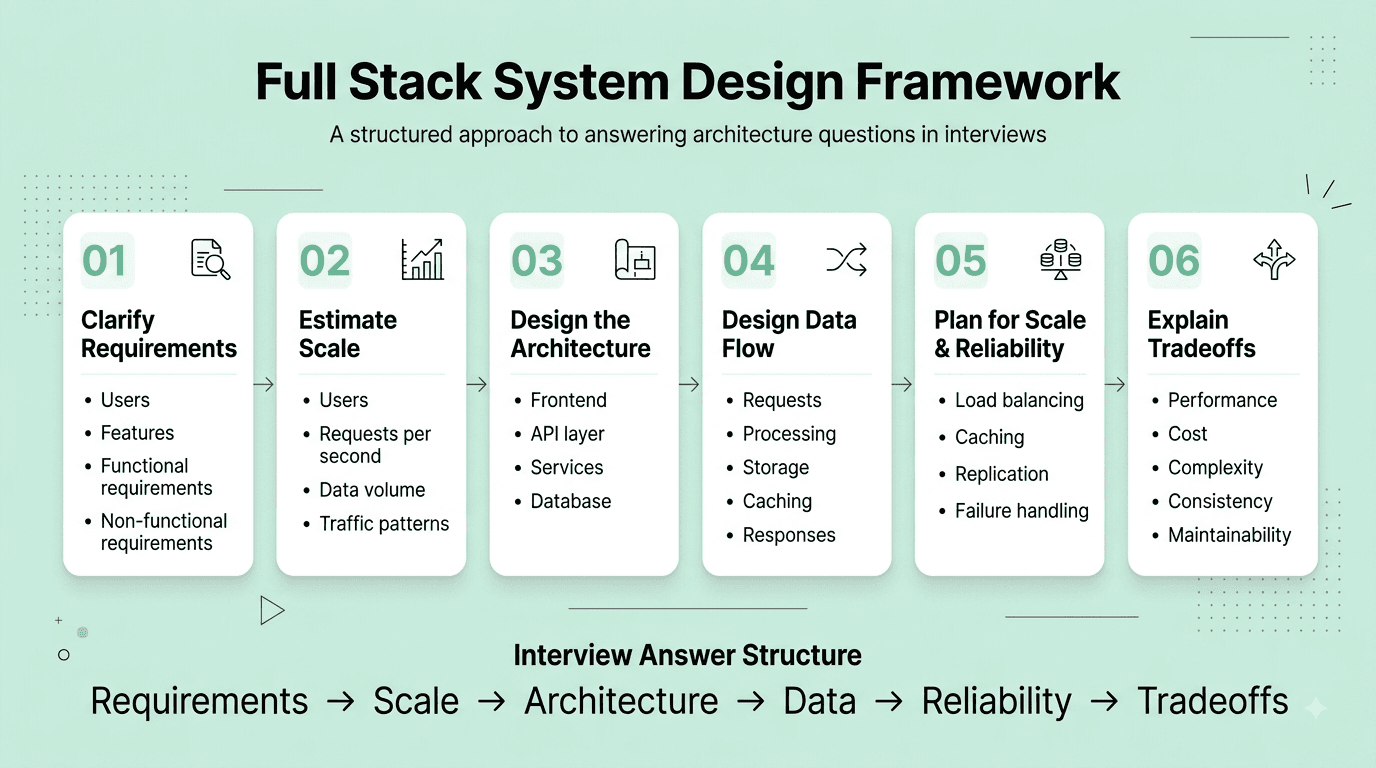
Question 59
Question: How would you approach designing a URL shortener service end-to-end (like bit.ly)?
Answer: Key components: an encoding scheme (base62 encoding of an auto-incrementing ID, or a hash with collision checking) to generate short codes, a fast key-value-style database mapping short codes to original long URLs, a caching layer (like Redis) in front of the database given the extremely read-heavy traffic pattern (far more redirects/reads than new URL creations/writes), and consideration of custom alias support and link expiration as secondary features.
Explanation: One of the most commonly asked introductory system design case studies for full stack roles, testing structured thinking about a bounded, well-scoped problem covering data modeling, read/write tradeoffs, and caching.
Real-World Example: Real URL shortener services typically rely on base62 encoding of an incrementing counter to reliably generate short, compact, collision-free codes, combined with an aggressive caching layer in front of the primary database, since redirect requests (reads) vastly outnumber new link creation requests (writes) in practice.
Common Mistakes: Over-focusing extensively on hash collision handling and encoding scheme minutiae while neglecting to address the more architecturally significant read/write ratio and the resulting critical need for an effective caching strategy.
Follow-up Questions: How would you handle 100,000 redirect requests per second at scale? How would you design the system to prevent malicious actors from using it to generate and distribute phishing or spam links? How would you shard the underlying database as the total number of stored URLs continues to grow significantly over time?
Question 60
Question: How would you design a real-time chat application's architecture (like a simplified Slack or WhatsApp)?
Answer: Core components: WebSocket connections (rather than standard HTTP request/response) to enable low-latency, bidirectional real-time message delivery, a message broker/queue (like Kafka or RabbitMQ) to reliably handle message delivery and fan-out to multiple recipients and connected devices, a database optimized for the write-heavy nature of chat history (often a NoSQL or wide-column store), and a separate mechanism for tracking user online/presence status and delivering push notifications to offline users.
Explanation: A very commonly asked system design case study for full stack roles, specifically testing understanding of real-time, stateful communication patterns that go meaningfully beyond typical stateless HTTP request/response API design.
Real-World Example: Building a real-time chat feature requires fundamentally different infrastructure considerations than a typical stateless REST API, since WebSocket connections are inherently stateful and persistent, requiring careful thought about how to scale and load-balance these long-lived connections effectively across multiple backend server instances.
Common Mistakes: Approaching this design exactly like a typical stateless REST API design exercise without adequately addressing the fundamentally different challenge of maintaining and scaling millions of concurrent, persistent, stateful WebSocket connections across a horizontally-scaled backend infrastructure.
Follow-up Questions: How would you scale WebSocket connections effectively across multiple different backend server instances behind a load balancer? How would you ensure reliable message delivery and correct ordering even if a user's connection temporarily drops and later reconnects? How would you implement and efficiently scale a "typing indicator" feature?
Question 61
Question: What is the difference between horizontal and vertical scaling, and how would you apply each to a full stack web application?
Answer: Vertical scaling increases the resources (CPU, RAM) of a single existing server — straightforward to implement but has a hard physical/cost ceiling and creates a single point of failure. Horizontal scaling adds more server instances and distributes load across them — introduces more architectural complexity (requiring load balancing and often a shift toward stateless application design) but offers far greater potential scale and significantly improved fault tolerance and resilience.
Explanation: A foundational scaling vocabulary question, testing whether a candidate understands the practical operational tradeoffs and complexity horizontal scaling specifically introduces, beyond simply knowing it "scales more."
Real-World Example: A small startup's initial application might scale vertically for a while (simply provisioning a larger database or application server instance) as the simplest, most expedient early solution, but a company operating at significant, sustained scale ultimately needs to scale horizontally across many stateless, load-balanced application server instances to handle its traffic reliably and cost-effectively.
Common Mistakes: Assuming horizontal scaling is unconditionally and always the correct answer without acknowledging the meaningful added architectural complexity it introduces, particularly the need to design the application layer itself to be genuinely stateless in order to scale horizontally effectively.
Follow-up Questions: What specific application design changes are needed to make a stateful application (like one relying heavily on in-memory session storage) horizontally scalable? How does a load balancer specifically work to help enable effective horizontal scaling? How would you approach horizontally scaling the database layer specifically, as opposed to the application/server layer?
Question 62
Question: How would you design a system to efficiently handle image uploads and serving at scale for a photo-sharing application?
Answer: Key components: direct-to-object-storage upload (using pre-signed URLs so the client uploads directly to storage like S3, rather than routing potentially large file bytes through the application's own backend servers), an asynchronous image processing pipeline (triggered after upload) to generate multiple appropriately-sized thumbnails/variants, and a CDN in front of the object storage to efficiently serve images from edge locations geographically close to end users, minimizing latency.
Explanation: A very commonly asked practical system design question, testing understanding of efficient file handling patterns and the appropriate combination of relevant infrastructure components (object storage, CDN, asynchronous processing) working together.
Real-World Example: A real photo-sharing application typically has the client request a secure, temporary, pre-signed upload URL from the backend, then uploads the actual image file bytes directly to object storage using that URL, after which a background worker process automatically generates several appropriately-sized thumbnail variants and the finished images are served globally through a CDN for fast, low-latency access.
Common Mistakes: Routing large uploaded file bytes through the application's own backend servers unnecessarily (rather than uploading directly to object storage), needlessly consuming backend server bandwidth, memory, and processing resources that could otherwise be avoided entirely.
Follow-up Questions: How would you implement and secure a pre-signed URL for direct-to-storage uploads? How would you handle the image thumbnail generation process asynchronously and reliably, including handling failures? How would you design the system to detect and gracefully handle inappropriate or policy-violating uploaded content?
Question 63
Question: What is the difference between a monolithic architecture and a microservices architecture, and how would you decide between them for a new full stack project?
Answer: A monolith is a single, unified deployable application containing all functionality, generally simpler to develop, test, and deploy initially, especially valuable for a small team or an early-stage, still-evolving product. Microservices decompose the application into small, independently deployable services communicating over a network, offering independent scaling and deployment flexibility per service, at the meaningful cost of significantly increased operational complexity (distributed tracing and debugging, network latency between services, and more complex data consistency management across service boundaries).
Explanation: A very commonly tested architectural decision-making question, testing whether a candidate can articulate genuine tradeoffs specific to project context and team maturity, rather than treating microservices as an unconditionally superior "best practice" in all circumstances.
Real-World Example: A small startup team building and iterating rapidly on an early-stage, still-evolving product typically benefits significantly from starting with a well-organized, modular monolith (retaining the flexibility to more easily extract specific services later if and when genuinely needed), rather than prematurely incurring the substantial operational overhead and complexity of a full microservices architecture before the actual organizational or technical need for it has clearly emerged.
Common Mistakes: Recommending a microservices architecture reflexively, by default, for a small team or early-stage product without carefully acknowledging the very real, substantial additional operational complexity and overhead this architectural choice specifically introduces.
Follow-up Questions: How would you decide on appropriate service boundaries if and when eventually breaking apart an existing, growing monolith into microservices? How do microservices typically handle distributed transactions or maintain data consistency spanning multiple separate services? What specific signals would indicate a team is genuinely ready to productively adopt a microservices architecture?
Question 64
Question: How would you design a caching strategy for a full stack web application?
Answer: Consider caching at multiple distinct layers: browser/client-side caching (using appropriate HTTP cache headers for static assets), a CDN for static content and assets served near end users, an application-level cache (like Redis) for frequently-accessed, relatively expensive-to-compute database query results or API responses, and database-level query caching where applicable — with a clear, deliberate strategy for cache invalidation (TTL-based expiration, or explicit invalidation triggered directly on the relevant underlying data changes) to prevent serving problematically stale data.
Explanation: A very commonly tested practical performance and architecture question, testing holistic thinking across the full request path rather than considering caching at only a single isolated layer of the overall system.
Real-World Example: An e-commerce product page might cache static assets (images, CSS, JS) aggressively via CDN with long expiration times, cache frequently-viewed product detail data in Redis with a moderate TTL, while ensuring inventory/stock count data specifically remains fresh and largely uncached (or cached with a very short TTL) given how quickly and consequentially it can change.
Common Mistakes: Applying a single, uniform caching strategy and TTL blanket-wide across all data types without carefully considering that different specific pieces of data have meaningfully different acceptable staleness tolerances and genuinely different appropriate caching needs.
Follow-up Questions: How would you handle cache invalidation specifically when the underlying source data changes, to avoid serving stale results? What is a cache stampede, and how would you prevent one from occurring? How would you decide what specific data is and isn't appropriate to cache at all, given certain use cases genuinely require always-fresh, real-time data?
Question 65
Question: How would you design the architecture for a full stack e-commerce checkout flow, considering reliability and data consistency?
Answer: Key considerations: use database transactions to ensure order creation and inventory deduction happen atomically together, implement idempotency (using a client-generated idempotency key) to safely handle network retries without risking duplicate order creation or double-charging, integrate carefully with a payment processor (typically via their hosted checkout or tokenization approach specifically to avoid your own systems ever directly handling or storing raw, sensitive card details), and design the flow to gracefully handle and clearly communicate various failure points (payment declined, inventory unexpectedly out of stock during checkout, and so on) back to the user.
Explanation: A very commonly asked, practically important full stack system design case study given how common and business-critical checkout/payment flows are, testing understanding of reliability, idempotency, and secure payment handling considerations together.
Real-World Example: A real production checkout flow typically integrates with a payment processor like Stripe using their hosted, tokenized payment approach specifically so sensitive raw card details never actually pass through or touch the merchant's own backend servers directly, while using an idempotency key tied to the specific checkout attempt to safely handle any network retries without any risk of accidentally double-charging the customer.
Common Mistakes: Not properly considering idempotency for payment/order creation requests at all, creating a genuine, significant risk of duplicate orders or double-charging a customer if a network retry occurs (a surprisingly common real-world scenario) during the checkout process.
Follow-up Questions: How would you specifically implement idempotency for the checkout/order-creation endpoint? How would you handle a scenario where the payment step itself succeeds but a subsequent step (like inventory deduction) then unexpectedly fails? How would you avoid ever directly handling or storing raw, sensitive credit card data on your own servers, both for security and PCI compliance reasons?
Question 66
Question: What is a load balancer, and what are the different load balancing algorithms/strategies?
Answer: A load balancer distributes incoming client requests/traffic across multiple backend server instances, improving reliability (avoiding a single point of failure) and enabling effective horizontal scaling. Common algorithms include Round Robin (cycling sequentially through servers), Least Connections (routing to whichever server currently has the fewest active connections, well suited when requests have significantly varying processing durations), and IP Hash (consistently routing a given client to the same specific backend server, useful for session stickiness needs).
Explanation: A foundational infrastructure concept, directly applicable to real production system design and highly relevant to any full stack developer's understanding of how a scaled, deployed application actually works in practice.
Real-World Example: A web application with several backend server instances behind a load balancer configured for least-connections routing would automatically avoid disproportionately overloading any single specific server instance with an unusually large or long-running batch of requests, compared to a simpler round-robin approach that doesn't account for varying request duration.
Common Mistakes: Defaulting to assuming simple round-robin load balancing as a universally sufficient approach without carefully considering whether requests genuinely have significantly unequal processing cost/duration, which would make a different algorithm more appropriate for the specific workload.
Follow-up Questions: What's the meaningful difference between Layer 4 (transport-level) and Layer 7 (application-level) load balancing? How would you achieve "sticky sessions" for a stateful application without necessarily relying on simple IP hashing specifically? How does a load balancer typically detect and correctly route around a currently unhealthy backend server instance?
Question 67
Question: How would you design a notification system (email, push, SMS) for a full stack web application?
Answer: Architecture: an internal notification service/API that accepts notification requests and publishes them to a message queue, separate dedicated worker processes per channel (email, push, SMS) that consume from the queue and integrate with the relevant third-party provider APIs, a template/rendering system for consistent message formatting, and retry logic with exponential backoff specifically for handling transient failures when calling external, third-party notification providers.
Explanation: A commonly asked practical full stack system design question, testing understanding of decoupled, asynchronous architecture and awareness of the real-world reliability considerations involved when integrating with external third-party services.
Real-World Example: Rather than a checkout service directly and synchronously calling an email provider's API inline as part of the checkout request itself (creating tight coupling and a fragile dependency on that email provider's uptime), a well-decoupled architecture publishes a "send confirmation email" event to a queue, which a separate, dedicated email worker service processes independently and asynchronously.
Common Mistakes: Designing this system with tightly-coupled, synchronous calls directly to third-party notification providers inline within critical, primary user-facing request flows (like checkout), creating unnecessary fragility if that specific third-party provider happens to be slow or temporarily unavailable.
Follow-up Questions: How would you handle a situation where a specific third-party notification provider is temporarily down or degraded? How would you prevent sending duplicate notifications for the same underlying triggering event? How would you design the system to respect user notification preferences and opt-out settings consistently across all channels?
Question 68
Question: How would you approach designing a system to support real-time collaborative editing (like Google Docs)?
Answer: This requires handling concurrent edits from multiple users to the same document without conflicts or lost changes, typically using either Operational Transformation (OT — transforming concurrent operations against each other to reconcile them consistently) or, increasingly in modern systems, Conflict-free Replicated Data Types (CRDTs — data structures specifically designed to merge concurrent changes deterministically and consistently without requiring complex central coordination), combined with a WebSocket-based real-time syncing layer to propagate changes between all currently connected collaborators with low latency.
Explanation: An advanced, sophisticated system design question testing awareness of specialized techniques for a genuinely hard, well-known distributed systems problem (concurrent, conflict-free collaborative editing) that goes well beyond typical, more standard CRUD application design.
Real-World Example: Google Docs and similar tools historically pioneered practical, large-scale use of Operational Transformation to enable real-time collaborative editing, while many newer collaborative applications increasingly favor CRDTs specifically for their more elegant, provably consistent mathematical properties around automatically merging concurrent changes.
Common Mistakes: Proposing a naive, simple "last write wins" approach for resolving concurrent edits, which would cause one collaborating user's genuine, legitimate changes to simply and silently disappear if another user happens to save at nearly the same time.
Follow-up Questions: Can you explain, at a high level, how a CRDT specifically ensures that concurrent edits merge consistently and deterministically without any central coordination? What's the fundamental difference between Operational Transformation and CRDTs, and what are the practical tradeoffs between the two general approaches? How would you handle a user who's been offline and made a batch of local edits before reconnecting?
Question 69
Question: How would you approach estimating and planning the technical scope of a new full stack feature during a sprint planning or project scoping session?
Answer: Break the feature down into distinct frontend, backend, and database components, identify genuine technical unknowns or risks upfront (flagging anything that might warrant a small time-boxed technical spike before committing to a full estimate), consider necessary testing and code review time as a real part of the overall estimate (not an afterthought), and communicate a range or a confidence level for the estimate rather than an artificially precise single number, particularly for larger or less well-understood pieces of work.
Explanation: A practical process and planning question, testing organizational and communication skills relevant to working effectively within a real, typical team development workflow, not just pure raw technical execution ability in isolation.
Real-World Example: Scoping a new "export to PDF" feature might reveal a genuine technical unknown around a particular PDF generation library's specific capabilities and limitations, prompting the team to schedule a small time-boxed technical spike first to properly de-risk that specific uncertainty before committing to a full, confident sprint estimate for the complete feature.
Common Mistakes: Providing an artificially precise, single-number estimate without any accompanying acknowledgment of genuine underlying uncertainty or unknowns, which can lead to later problems and friction when the actual work inevitably takes meaningfully longer than that falsely precise original estimate suggested.
Follow-up Questions: How would you communicate a missed deadline or estimate proactively and early to your team and relevant stakeholders? How do you personally factor in appropriate additional time for code review, QA, and testing when estimating? How would you break down a genuinely large, complex feature into smaller, independently deliverable and estimable pieces of work?
Question 70
Question: How would you approach diagnosing a full stack application that's suddenly experiencing high latency in production?
Answer: Systematic approach: check monitoring/observability dashboards first for the affected layer (frontend load times, backend API response times, database query performance, external third-party API dependencies), narrow down whether the issue is isolated to a specific layer or is genuinely broadly affecting the whole system, review recent deployments or configuration changes as a likely, common initial suspect, and check relevant infrastructure metrics (CPU, memory, database connection pool utilization) for a genuine resource exhaustion or bottleneck.
Explanation: A very practical, commonly tested troubleshooting scenario specifically for full stack roles, testing systematic, structured debugging methodology spanning the entire stack rather than immediately guessing at a single specific layer without adequate supporting evidence.
Real-World Example: A sudden, unexpected latency spike traced back to a recent deployment that unintentionally removed a critical database index is a very common, realistic real-world scenario — systematic investigation starting from monitoring dashboards (rather than guessing) would typically reveal the affected specific database query and its meaningfully changed execution plan relatively quickly.
Common Mistakes: Guessing at a likely root cause and immediately attempting a fix without first properly, systematically checking available monitoring and observability data to narrow down which specific layer of the stack is actually genuinely responsible for the increased latency.
Follow-up Questions: What key metrics would you specifically want readily available on a monitoring dashboard to help quickly diagnose this kind of issue? How would you distinguish between a genuine database bottleneck versus a problem in the application server layer itself? How would you safely and quickly roll back a recent, suspect deployment if it's strongly suspected to be the actual root cause?
Part 7: DevOps, Testing & Deployment
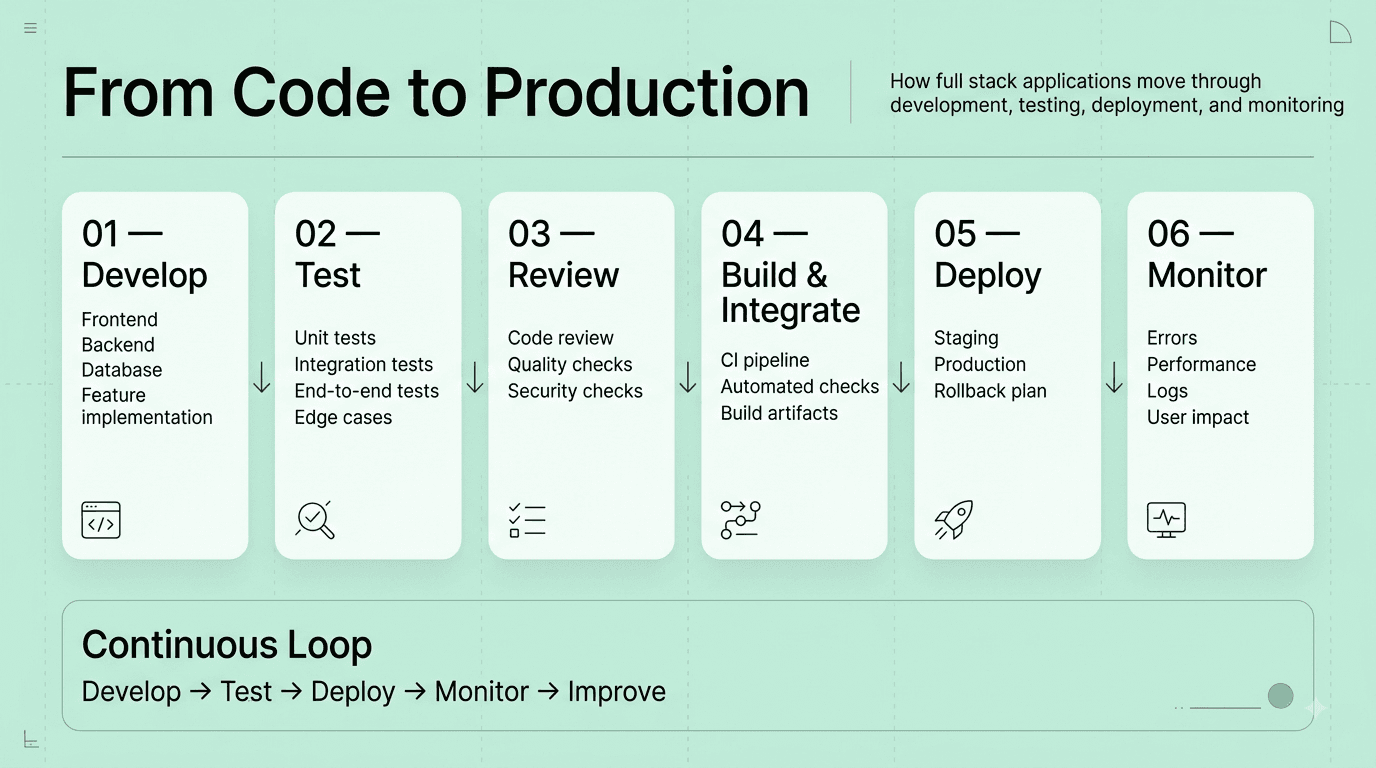
Question 71
Question: What's the difference between unit, integration, and end-to-end (E2E) tests, and what proportion of each would you write for a typical full stack application?
Answer: Unit tests verify individual functions/components in isolation (fast, heavily mocked dependencies). Integration tests verify multiple components or layers working correctly together (like an API endpoint interacting with an actual test database). End-to-end tests verify complete user flows through the fully running, deployed application (slowest and most realistic, but also the most brittle and expensive to maintain). Following the "testing pyramid" principle, most tests should be fast unit tests, a moderate number integration tests, and relatively few, carefully selected E2E tests covering only the most critical user flows.
Explanation: A foundational testing strategy question, testing whether a candidate understands the appropriate cost/confidence tradeoff at each testing layer, rather than either neglecting testing or over-investing narrowly in only one particular layer.
Real-World Example: A checkout flow might have dozens of fast unit tests covering individual pricing/discount calculation logic, several integration tests verifying the checkout API correctly interacts with the database and payment service, and just one or two carefully selected E2E tests confirming the complete, critical happy-path checkout flow works correctly through the actual, fully running application.
Common Mistakes: Over-investing heavily in slow, brittle E2E tests at the expense of fast, cheap unit tests, inverting the testing pyramid into a much less efficient and more maintenance-heavy "ice cream cone" anti-pattern.
Follow-up Questions: How would you handle flaky E2E tests that intermittently and unpredictably fail in your CI pipeline? What's the difference between mocking and stubbing a dependency in a unit test? How would you decide what specifically warrants an integration test versus being adequately covered already by unit tests alone?
Question 72
Question: What is CI/CD, and how would you set up a basic CI/CD pipeline for a full stack application?
Answer: Continuous Integration automatically builds and runs tests against every code commit/pull request to catch integration issues early; Continuous Deployment/Delivery automates the subsequent release process so validated, tested code can be reliably and safely deployed to production. A basic pipeline typically includes: running linters and automated tests on every pull request, building the application (frontend bundle and backend artifacts), and, upon merging to the main branch, automatically deploying to a staging environment for further verification, followed by production deployment (either automatically or with a manual approval gate).
Explanation: Core, foundational DevOps vocabulary and practical setup knowledge relevant to virtually every modern full stack development team, frequently tested for practical familiarity beyond just abstract terminology.
Real-World Example: A typical GitHub Actions or GitLab CI pipeline for a full stack app might run ESLint and the automated test suite on every pull request, and upon a successful merge to the main branch, automatically build and deploy the frontend to a CDN/static hosting provider and the backend to a container platform or serverless hosting environment.
Common Mistakes: Not running the automated test suite as a required, blocking check before allowing a pull request to be merged, allowing genuinely broken or regressive code to be merged into the main branch without adequate, timely detection.
Follow-up Questions: What's the meaningful difference between Continuous Delivery and full Continuous Deployment? How would you design an appropriate rollback strategy for a bad deployment that's discovered only after already being released to production? What is a blue-green deployment, and how does it specifically help meaningfully reduce deployment risk?
Question 73
Question: What is Docker, and why would you use it in a full stack development workflow?
Answer: Docker packages an application together with all of its dependencies and precise runtime environment into a portable, isolated container, ensuring consistent behavior across different environments (a developer's local machine, staging, and production) and eliminating the very common and frustrating "it works on my machine" class of problem entirely.
Explanation: A very commonly tested, practical modern development tooling question, essential for understanding how most modern full stack applications are packaged, deployed, and run consistently in practice.
Real-World Example: A full stack application with a specific required Node.js version, particular database version, and various other precise dependencies can be reliably and consistently run identically on any team member's local development machine, and equally consistently in the production environment, by using Docker containers defined via a shared, version-controlled Dockerfile.
Common Mistakes: Creating an unnecessarily large, bloated Docker image by including unneeded build tools or development-only dependencies in the final production image, rather than using a proper multi-stage build to keep the final production image appropriately lean and minimal.
Follow-up Questions: What is a multi-stage Docker build, and specifically why is it beneficial for a typical full stack application's build process? What's the meaningful difference between Docker and a full container orchestration platform like Kubernetes? How would you appropriately manage environment-specific configuration and secrets when using Docker containers across different environments?
Question 74
Question: How would you write an effective unit test for an asynchronous function that calls an external API?
Answer: Mock the external API dependency (using a library like Jest's mocking utilities, or a dedicated request-mocking library like MSW) rather than making genuine real network calls during the test, allowing you to precisely control the mocked API's response (including specifically testing both success and various realistic failure/error scenarios) and reliably, deterministically assert on your function's resulting behavior — using async/await or returning the resulting promise properly within the test itself to correctly and reliably handle the asynchronous nature of the code under test.
Explanation: A very commonly asked practical, hands-on testing question, testing whether a candidate correctly and reliably handles asynchronous code and external dependencies in tests, rather than writing brittle tests that depend on genuine, real, and unreliable network calls.
Real-World Example: Testing a function that fetches user data from a third-party API would mock that specific API call to return a controlled, predictable success response in one dedicated test case, and separately return a simulated network error or an unexpected error status code in another dedicated test case, thoroughly verifying the function correctly and gracefully handles both realistic scenarios.
Common Mistakes: Writing a test that makes a genuine, real network call to an actual external API, resulting in a test that's slow, unreliable/flaky (dependent on network conditions and external service availability), and potentially costly or otherwise problematic to run repeatedly and frequently as part of a CI pipeline.
Follow-up Questions: What's the meaningful difference between mocking a dependency versus using a dedicated test double/fake implementation? How would you specifically test a function's proper behavior when an awaited promise rejects with an error? What testing tools or specific libraries have you used for mocking HTTP requests in your own past projects?
Question 75
Question: What is infrastructure as code (IaC), and what benefits does it provide?
Answer: IaC defines and manages infrastructure (servers, databases, networking configuration) declaratively through version-controlled configuration files (using tools like Terraform or AWS CloudFormation) rather than manually, imperatively provisioning and configuring resources through a cloud provider's web console — enabling infrastructure changes to be code-reviewed, tested, reliably and consistently reproduced, and easily reverted, just like application code itself.
Explanation: An increasingly important and commonly tested DevOps concept for full stack developers, especially relevant as more developers take on meaningful infrastructure-related responsibilities in the modern industry landscape.
Real-World Example: A team using Terraform to define their complete cloud infrastructure (servers, databases, networking configuration) can reliably reproduce an identical staging environment for realistic testing, and can review infrastructure changes through the exact same familiar pull-request review process already used for application code changes, rather than relying on undocumented, error-prone manual console configuration.
Common Mistakes: Manually provisioning and configuring infrastructure resources directly through a cloud provider's web console without any accompanying version-controlled, documented configuration, making the resulting infrastructure setup difficult to reliably reproduce, audit, or safely and confidently modify later.
Follow-up Questions: How would you handle managing sensitive secrets (like database passwords or API keys) securely within an infrastructure-as-code workflow? What is "configuration drift," and how does adopting IaC specifically help meaningfully prevent it? Have you personally used Terraform or a similar IaC tool — what was your hands-on experience like?
Question 76
Question: How would you approach debugging a bug that only reproduces in production but not in your local development environment?
Answer: Approach: gather all available context first (relevant logs, error tracking/monitoring data, and specifically any meaningful differences between the production and local environments, like differing configuration, data volume, or dependency versions), attempt to identify and isolate a specific environment-related difference that could plausibly explain the discrepancy (production-specific configuration, meaningfully different real data patterns, or a subtle timing/concurrency issue that simply doesn't occur under low local development load), and consider adding additional targeted, safe logging or using a feature flag to more safely gather further diagnostic information directly from production if the issue genuinely can't be reliably reproduced locally through other means.
Explanation: A very common, realistic, and practically important troubleshooting scenario, testing genuine debugging methodology when working without the comfort and convenience of a perfect local reproduction of the reported issue.
Real-World Example: A bug that only manifests in production might be traced to a genuine race condition that only reliably occurs under production's significantly higher real concurrent user load, or to a meaningful, previously unnoticed data edge case present in real production data but simply absent entirely from the more limited, curated local test data typically used during development.
Common Mistakes: Assuming a bug that can't easily be reproduced locally must therefore be a flawed or unreliable bug report, rather than systematically investigating genuine, real, and often subtle environment differences that could plausibly and specifically explain the observed discrepancy in behavior.
Follow-up Questions: How would you safely add temporary diagnostic logging directly to a production environment without introducing new risk to real users while doing so? What monitoring or observability tools have you personally used to help investigate this general kind of production-only issue in a past role? How would you write an effective, reliable regression test once you've finally successfully identified the specific underlying root cause?
Question 77
Question: What is a feature flag, and how would you use one in a full stack deployment workflow?
Answer: A feature flag is a configuration mechanism that allows toggling a specific feature on or off (or gradually rolling it out to a specific subset of users) without requiring a new code deployment, enabling safer, more gradual and controlled rollouts, quick and easy rollback of a newly problematic feature without an emergency code revert and redeploy, and reliable A/B testing of new functionality.
Explanation: A commonly tested modern deployment practice, testing awareness of how experienced teams effectively decouple the technical act of deploying code from the separate, distinct business decision of actually releasing a given feature to real users.
Real-World Example: A new checkout flow redesign might be deployed to production behind a feature flag initially enabled for only 5% of real users, allowing the team to closely monitor its actual real-world impact and quickly, safely disable it entirely if a significant problem is discovered, without needing an urgent, stressful emergency code rollback and redeploy.
Common Mistakes: Allowing feature flags to accumulate indefinitely in the codebase without ever properly cleaning them up once a given feature has been fully, permanently rolled out or definitively abandoned, resulting in significant unnecessary code complexity and technical debt building up meaningfully over time.
Follow-up Questions: How would you design a feature flag system to support fine-grained, gradual percentage-based rollouts to users? How would you ensure feature flags are properly, consistently cleaned up from the codebase once a given feature is fully and permanently launched? What testing considerations arise specifically from having multiple different feature flag states active and interacting simultaneously?
Question 78
Question: What is the difference between blue-green deployment and canary deployment strategies?
Answer: Blue-green deployment maintains two complete, identical production environments (blue and green) — deploying the new version fully to the currently inactive environment, thoroughly testing it, then switching all live traffic over instantly, enabling a very fast and simple rollback (by simply switching back) if a problem is discovered. Canary deployment instead gradually and incrementally shifts a small, controlled percentage of live traffic to the new version first, closely monitoring for any issues, and only then progressively increasing that traffic percentage over time if everything continues to look healthy and stable.
Explanation: A commonly tested deployment strategy comparison, testing understanding of different concrete approaches to meaningfully reducing risk specifically during the deployment process itself.
Real-World Example: A team deploying a significant, potentially risky backend change might use a canary deployment specifically to catch a subtle, previously undetected performance regression by observing detailed metrics from just 5% of live production traffic, before that problematic change is ever fully and completely rolled out to the entire user base.
Common Mistakes: Not being able to clearly articulate the key practical difference between these two related but distinct approaches — blue-green is fundamentally an instant, complete traffic switch between two full environments, while canary is a more gradual, incremental, and closely-monitored traffic shift.
Follow-up Questions: What infrastructure and tooling considerations are specifically needed to properly implement a canary deployment strategy? How would you decide on an appropriate initial canary traffic percentage, and how would you determine when it's genuinely safe to increase it further? What are the relative cost implications of maintaining a full blue-green deployment setup compared to a canary approach?
Question 79
Question: How would you approach writing effective, meaningful code review comments and receiving code review feedback constructively yourself?
Answer: When giving review feedback, focus specifically on correctness, meaningful maintainability, and genuine test coverage rather than purely subjective stylistic preferences (which are ideally automated away via a shared linter/formatter), give clear, specific, and directly actionable feedback while distinguishing clearly between must-fix issues and merely optional suggestions, and frame comments constructively and collaboratively rather than in a way that could reasonably feel overly critical or personal. When receiving feedback, treat it genuinely as an opportunity to improve the resulting code rather than as a personal critique, ask clarifying questions on any points of genuine disagreement, and iterate efficiently and promptly.
Explanation: A behavioral-technical hybrid question testing collaboration and communication skills, which matter just as much as raw individual coding ability in most real, practical full stack team development environments.
Real-World Example: A well-functioning engineering team typically relies on automated linting and code formatting tools to consistently handle stylistic concerns, freeing up human code review time and attention to focus specifically and productively on substantive logic, architecture, and genuine maintainability concerns instead.
Common Mistakes: Giving vague, unclear, and insufficiently specific review feedback (like simply "this is confusing" without further explanation) that isn't genuinely actionable, or being excessively, unhelpfully nitpicky purely about subjective code style while simultaneously missing more substantive underlying logic or design issues.
Follow-up Questions: How would you handle a genuine disagreement with a fellow reviewer about a particular design decision or approach? How do you personally approach reviewing an unusually large pull request effectively and thoroughly? What would you do specifically if you noticed a clear, recurring pattern of similar issues across a particular team member's various pull requests over time?
Question 80
Question: How would you approach optimizing a full stack web application's overall performance, from initial page load to backend response time?
Answer: Holistic approach across the entire stack: on the frontend, minimize and appropriately code-split JavaScript bundles, optimize and appropriately compress images, and leverage browser caching and a CDN effectively; on the backend, profile and optimize genuinely slow database queries, add appropriate caching for expensive or frequently-repeated operations, and ensure efficient use of asynchronous, non-blocking I/O; and across the entire stack, establish proper performance monitoring (like Core Web Vitals for the frontend, and backend response time/latency percentiles) to reliably identify genuine, real bottlenecks with actual supporting data, rather than merely guessing at where performance problems might be occurring.
Explanation: A holistic, comprehensive full stack performance question, testing whether a candidate can reason effectively across the entire application stack rather than narrowly focusing on optimization in only a single specific layer.
Real-World Example: A slow-loading e-commerce product page might benefit meaningfully from several combined full stack optimizations simultaneously: code-splitting the JavaScript bundle so only genuinely necessary code loads immediately, adding an appropriate caching layer for the relevant product data API endpoint, and properly optimizing/compressing the product images — with each specific improvement measured and validated against real user-centric performance metrics.
Common Mistakes: Focusing performance optimization efforts on only a single layer (like only the frontend, or only the backend) without first properly measuring and reliably identifying where the actual, most significant bottleneck genuinely lies across the complete end-to-end request path.
Follow-up Questions: What are Core Web Vitals, and how would you specifically go about measuring and meaningfully improving them for a real application? How would you reliably identify whether a specific slow page load is genuinely caused by a frontend, network, or backend-related bottleneck? What tools have you personally used for performance profiling on both the frontend and backend in your own past work?
Part 8: Security
Question 81
Question: What is Cross-Site Scripting (XSS), and how would you prevent it in a full stack application?
Answer: XSS occurs when an attacker injects malicious JavaScript into a web page that then executes in another user's browser, typically by exploiting an application that renders untrusted, user-supplied input without proper sanitization or escaping. Prevention: properly escape/sanitize any user-generated content before rendering it as HTML, use a framework's built-in, default output escaping behavior (like React automatically escaping content by default, unless you explicitly and deliberately opt out via dangerouslySetInnerHTML), implement a strict Content Security Policy (CSP) header, and store sensitive authentication tokens in HttpOnly cookies specifically to limit their exposure and potential theft even if an XSS vulnerability does exist somewhere in the application.
Explanation: One of the most fundamental and commonly tested web security vulnerabilities, essential foundational knowledge for any full stack developer responsible for building and maintaining a genuinely secure application.
Real-World Example: A comment section that renders user-submitted comment text directly as raw, unescaped HTML without any sanitization would allow a malicious user to submit a comment containing a <script> tag that then executes and potentially steals other visiting users' session cookies or authentication tokens when their browser renders that malicious comment.
Common Mistakes: Using dangerouslySetInnerHTML in React (or an equivalent raw HTML injection mechanism in another framework) to render genuinely untrusted, user-supplied content without first properly sanitizing it with a dedicated, purpose-built sanitization library.
Follow-up Questions: What's the meaningful difference between stored, reflected, and DOM-based XSS? How does a Content Security Policy header specifically help meaningfully mitigate the potential impact of an XSS vulnerability? Why is storing an authentication token in an HttpOnly cookie considered safer against XSS-based theft than storing it in localStorage?
Question 82
Question: What is SQL injection, and how would you prevent it?
Answer: SQL injection occurs when an attacker manipulates a SQL query by injecting malicious SQL code through unsanitized user input directly concatenated into the query string, potentially allowing them to read, modify, or delete unauthorized data. Prevention: always use parameterized queries or prepared statements (which treat user input strictly as data, never as executable code, regardless of its specific content), never directly concatenate raw, untrusted user input into a SQL query string, and apply the principle of least privilege carefully to database user permissions as an important additional defense-in-depth layer.
Explanation: One of the most fundamental, longest-standing, and most commonly tested web security vulnerabilities, essential foundational knowledge given the severe, often catastrophic potential impact of a successful SQL injection attack.
Real-World Example: A poorly-written login query directly and naively concatenating user input (like "SELECT * FROM users WHERE username = '" + username + "'") could allow an attacker to submit a specially crafted username value that fundamentally alters the query's intended logic, potentially bypassing authentication entirely without ever needing to know a genuinely valid password.
Common Mistakes: Directly concatenating or string-interpolating raw user input into a SQL query string instead of properly and consistently using parameterized queries, prepared statements, or an appropriately safe ORM method.
Follow-up Questions: How do parameterized queries specifically prevent SQL injection at a technical level? Does using an ORM entirely and completely eliminate SQL injection risk on its own, or are there still ways it could be inadvertently introduced despite using one? How would you go about auditing an existing, established codebase for potential SQL injection vulnerabilities?
Question 83
Question: What is Cross-Site Request Forgery (CSRF), and how would you protect an application against it?
Answer: CSRF tricks an authenticated user's browser into unknowingly making an unwanted, unintended request to an application they're currently logged into (exploiting the fact that browsers automatically attach relevant cookies to any request sent to that specific domain, regardless of which site actually initiated the request). Protection: use CSRF tokens (a unique, unpredictable, per-session or per-request token that must be correctly included with any genuinely legitimate state-changing request), and configure cookies with the SameSite attribute (restricting whether and when a given cookie is actually sent along with cross-site requests).
Explanation: A commonly tested web security vulnerability, particularly important and relevant for any application that relies on cookie-based session authentication specifically.
Real-World Example: Without adequate CSRF protection in place, a malicious website could embed a hidden auto-submitting form that, when visited by a user who happens to also currently be logged into their bank's website in another browser tab, silently submits a funds transfer request that the bank's server would otherwise, absent proper protection, mistakenly treat as a genuinely legitimate, intentional request from that authenticated user.
Common Mistakes: Relying solely on cookie-based authentication for state-changing operations (like POST/PUT/DELETE requests) without implementing any CSRF token protection or an appropriately restrictive SameSite cookie attribute setting.
Follow-up Questions: How does the SameSite cookie attribute specifically help meaningfully protect against CSRF attacks, and what are the meaningful practical differences between its Strict, Lax, and None values? Why are token-based (JWT) authentication schemes using an Authorization header generally considered somewhat inherently less vulnerable to traditional CSRF than cookie-based session authentication? How would you correctly implement CSRF token validation on both the frontend and backend?
Question 84
Question: How would you securely store and manage sensitive credentials (like API keys and database passwords) in a full stack application?
Answer: Never hardcode sensitive credentials directly in source code (even in files meant to be excluded via .gitignore, given the real, ongoing risk of accidental commits); instead, use environment variables for local development, and a dedicated, purpose-built secrets management service (like AWS Secrets Manager, HashiCorp Vault, or a cloud platform's built-in secrets management feature) for production environments, ensuring secrets are properly encrypted at rest and access is appropriately restricted and audited.
Explanation: A very commonly tested, fundamental security best practice, since accidentally hardcoding and subsequently committing genuine credentials directly into source control is an unfortunately very common and consequential real-world security mistake.
Real-World Example: A publicly accessible GitHub repository accidentally containing a hardcoded, genuinely valid AWS access key can be discovered and actively exploited by automated malicious bots within mere minutes of being pushed and made public, potentially resulting in significant unauthorized cloud infrastructure usage and substantial associated costs before the exposed credential is finally detected and revoked.
Common Mistakes: Committing a .env file containing genuine, real production secrets directly to a source control repository, or hardcoding a sensitive credential directly in application source code even temporarily "just for local testing purposes."
Follow-up Questions: How would you handle securely rotating a compromised or otherwise exposed credential across all environments and services currently using it? What tools or specific approaches have you personally used for secrets management in your own past production applications? How would you specifically prevent secrets from being accidentally committed to source control in the first place (hint: pre-commit hooks, secret-scanning tools)?
Question 85
Question: What is HTTPS, and why is it important for a full stack application, even one that doesn't handle explicitly "sensitive" data?
Answer: HTTPS encrypts all communication between the client and server using TLS, protecting against eavesdropping and man-in-the-middle attacks — important not only for applications explicitly handling obviously sensitive data (like passwords or payment details), but for virtually every application, since it also verifies genuine server identity, prevents malicious tampering with content in transit, is now required by modern browsers for many powerful web platform features (like service workers and geolocation), and is a well-established search ranking factor for SEO purposes.
Explanation: A foundational web security concept, testing whether a candidate understands HTTPS as a genuine baseline requirement for virtually all modern web applications today, not merely an optional nice-to-have reserved only for handling explicitly and obviously sensitive data.
Real-World Example: Even a simple public content website without any user accounts or sensitive user data still benefits significantly from HTTPS, since without it, a user's ISP or anyone else positioned on the network path could potentially inject unwanted, unauthorized ads or malicious tracking scripts directly into the otherwise unencrypted page content in transit.
Common Mistakes: Assuming HTTPS is only genuinely necessary for pages that explicitly handle logins, payments, or other obviously sensitive data, rather than recognizing it as an essential baseline requirement and standard practice for virtually all modern web traffic today.
Follow-up Questions: How does the TLS handshake process actually work at a technical level to establish a genuinely secure connection? What is HSTS (HTTP Strict Transport Security), and what specific additional protection does it provide beyond standard HTTPS alone? How would you handle obtaining and properly, reliably renewing an SSL/TLS certificate for a production application?
Question 86
Question: How would you approach conducting a basic security review of a full stack application before a production launch?
Answer: Systematic review across key areas: authentication and authorization (verifying properly secure password handling, appropriate session/token management, and correct, robust access control enforcement), input validation and sanitization (checking carefully for potential XSS, SQL injection, and other injection vulnerabilities), dependency security (scanning for known vulnerabilities in third-party packages and libraries), secure transport (HTTPS enforced consistently everywhere), secure secrets management, and appropriate rate limiting on sensitive or resource-intensive endpoints — often combined with using an automated security scanning tool as a helpful first pass, in addition to careful manual review.
Explanation: A holistic, practically important pre-launch checklist question, testing whether a candidate has genuine, comprehensive security awareness spanning the entire application rather than being narrowly focused on just one single, specific vulnerability type in isolation.
Real-World Example: A pre-launch security review might specifically use an automated dependency-scanning tool to catch a known critical vulnerability in an outdated third-party library, while manual review separately and additionally catches a more subtle, specific authorization bug allowing a regular authenticated user to inappropriately access another user's private data by simply manipulating a resource ID directly in the request URL.
Common Mistakes: Focusing a security review narrowly on only one specific area (like authentication alone) while completely neglecting other equally important dimensions like proper input validation, sound authorization/access-control logic, or secure dependency management.
Follow-up Questions: What automated security scanning tools have you personally used, and what specific kinds of vulnerabilities are they typically most effective at catching automatically? How would you specifically and thoroughly test for a potential broken access control vulnerability (like an insecure direct object reference)? How would you prioritize which specific identified security issues to fix first if you happen to discover several simultaneously during a review?
Part 8: Security
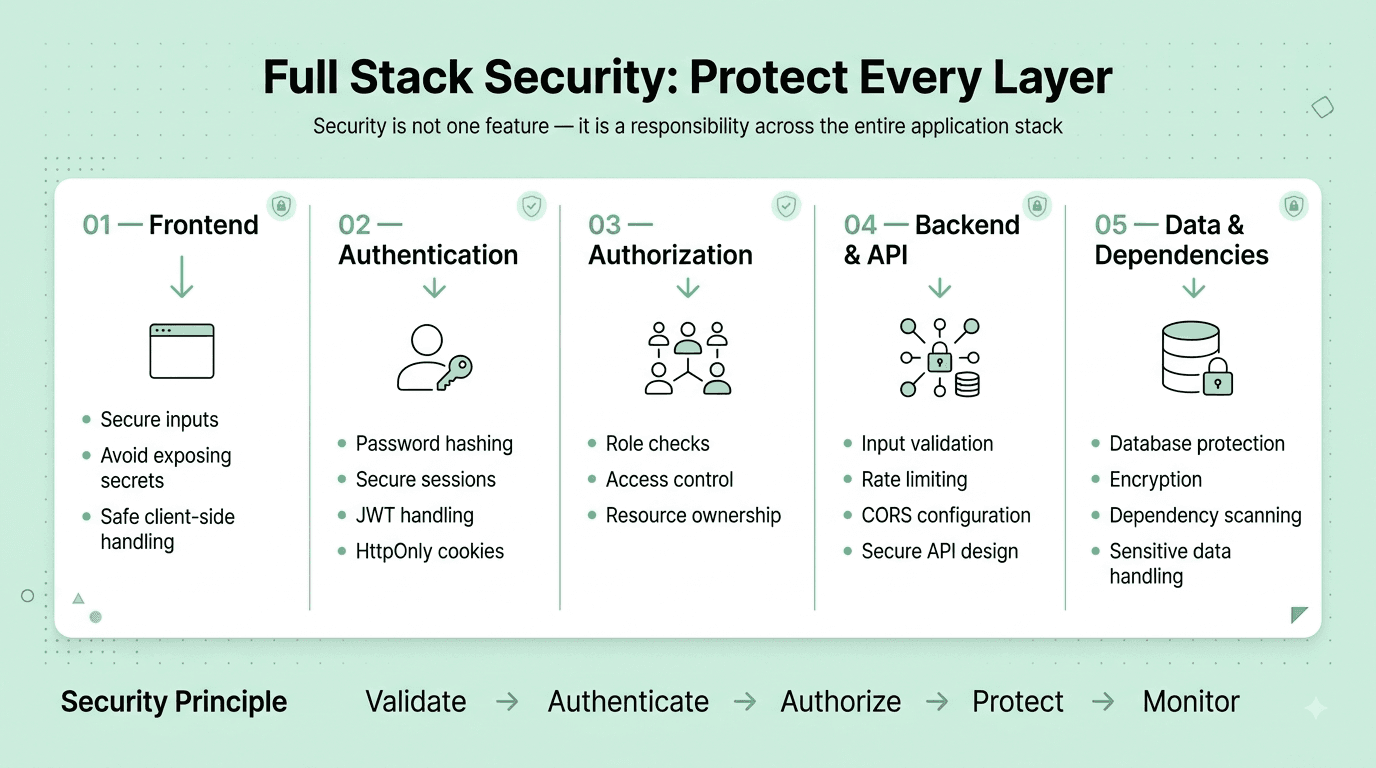
Question 81
Question: What is Cross-Site Scripting (XSS), and how would you prevent it in a full stack application?
Answer: XSS occurs when an attacker injects malicious JavaScript into a web page that then executes in another user's browser, typically by exploiting an application that renders untrusted, user-supplied input without proper sanitization or escaping. Prevention: properly escape/sanitize any user-generated content before rendering it as HTML, use a framework's built-in, default output escaping behavior (like React automatically escaping content by default, unless you explicitly and deliberately opt out via dangerouslySetInnerHTML), implement a strict Content Security Policy (CSP) header, and store sensitive authentication tokens in HttpOnly cookies specifically to limit their exposure and potential theft even if an XSS vulnerability does exist somewhere in the application.
Explanation: One of the most fundamental and commonly tested web security vulnerabilities, essential foundational knowledge for any full stack developer responsible for building and maintaining a genuinely secure application.
Real-World Example: A comment section that renders user-submitted comment text directly as raw, unescaped HTML without any sanitization would allow a malicious user to submit a comment containing a <script> tag that then executes and potentially steals other visiting users' session cookies or authentication tokens when their browser renders that malicious comment.
Common Mistakes: Using dangerouslySetInnerHTML in React (or an equivalent raw HTML injection mechanism in another framework) to render genuinely untrusted, user-supplied content without first properly sanitizing it with a dedicated, purpose-built sanitization library.
Follow-up Questions: What's the meaningful difference between stored, reflected, and DOM-based XSS? How does a Content Security Policy header specifically help meaningfully mitigate the potential impact of an XSS vulnerability? Why is storing an authentication token in an HttpOnly cookie considered safer against XSS-based theft than storing it in localStorage?
Question 82
Question: What is SQL injection, and how would you prevent it?
Answer: SQL injection occurs when an attacker manipulates a SQL query by injecting malicious SQL code through unsanitized user input directly concatenated into the query string, potentially allowing them to read, modify, or delete unauthorized data. Prevention: always use parameterized queries or prepared statements (which treat user input strictly as data, never as executable code, regardless of its specific content), never directly concatenate raw, untrusted user input into a SQL query string, and apply the principle of least privilege carefully to database user permissions as an important additional defense-in-depth layer.
Explanation: One of the most fundamental, longest-standing, and most commonly tested web security vulnerabilities, essential foundational knowledge given the severe, often catastrophic potential impact of a successful SQL injection attack.
Real-World Example: A poorly-written login query directly and naively concatenating user input (like "SELECT * FROM users WHERE username = '" + username + "'") could allow an attacker to submit a specially crafted username value that fundamentally alters the query's intended logic, potentially bypassing authentication entirely without ever needing to know a genuinely valid password.
Common Mistakes: Directly concatenating or string-interpolating raw user input into a SQL query string instead of properly and consistently using parameterized queries, prepared statements, or an appropriately safe ORM method.
Follow-up Questions: How do parameterized queries specifically prevent SQL injection at a technical level? Does using an ORM entirely and completely eliminate SQL injection risk on its own, or are there still ways it could be inadvertently introduced despite using one? How would you go about auditing an existing, established codebase for potential SQL injection vulnerabilities?
Question 83
Question: What is Cross-Site Request Forgery (CSRF), and how would you protect an application against it?
Answer: CSRF tricks an authenticated user's browser into unknowingly making an unwanted, unintended request to an application they're currently logged into (exploiting the fact that browsers automatically attach relevant cookies to any request sent to that specific domain, regardless of which site actually initiated the request). Protection: use CSRF tokens (a unique, unpredictable, per-session or per-request token that must be correctly included with any genuinely legitimate state-changing request), and configure cookies with the SameSite attribute (restricting whether and when a given cookie is actually sent along with cross-site requests).
Explanation: A commonly tested web security vulnerability, particularly important and relevant for any application that relies on cookie-based session authentication specifically.
Real-World Example: Without adequate CSRF protection in place, a malicious website could embed a hidden auto-submitting form that, when visited by a user who happens to also currently be logged into their bank's website in another browser tab, silently submits a funds transfer request that the bank's server would otherwise, absent proper protection, mistakenly treat as a genuinely legitimate, intentional request from that authenticated user.
Common Mistakes: Relying solely on cookie-based authentication for state-changing operations (like POST/PUT/DELETE requests) without implementing any CSRF token protection or an appropriately restrictive SameSite cookie attribute setting.
Follow-up Questions: How does the SameSite cookie attribute specifically help meaningfully protect against CSRF attacks, and what are the meaningful practical differences between its Strict, Lax, and None values? Why are token-based (JWT) authentication schemes using an Authorization header generally considered somewhat inherently less vulnerable to traditional CSRF than cookie-based session authentication? How would you correctly implement CSRF token validation on both the frontend and backend?
Question 84
Question: How would you securely store and manage sensitive credentials (like API keys and database passwords) in a full stack application?
Answer: Never hardcode sensitive credentials directly in source code (even in files meant to be excluded via .gitignore, given the real, ongoing risk of accidental commits); instead, use environment variables for local development, and a dedicated, purpose-built secrets management service (like AWS Secrets Manager, HashiCorp Vault, or a cloud platform's built-in secrets management feature) for production environments, ensuring secrets are properly encrypted at rest and access is appropriately restricted and audited.
Explanation: A very commonly tested, fundamental security best practice, since accidentally hardcoding and subsequently committing genuine credentials directly into source control is an unfortunately very common and consequential real-world security mistake.
Real-World Example: A publicly accessible GitHub repository accidentally containing a hardcoded, genuinely valid AWS access key can be discovered and actively exploited by automated malicious bots within mere minutes of being pushed and made public, potentially resulting in significant unauthorized cloud infrastructure usage and substantial associated costs before the exposed credential is finally detected and revoked.
Common Mistakes: Committing a .env file containing genuine, real production secrets directly to a source control repository, or hardcoding a sensitive credential directly in application source code even temporarily "just for local testing purposes."
Follow-up Questions: How would you handle securely rotating a compromised or otherwise exposed credential across all environments and services currently using it? What tools or specific approaches have you personally used for secrets management in your own past production applications? How would you specifically prevent secrets from being accidentally committed to source control in the first place (hint: pre-commit hooks, secret-scanning tools)?
Question 85
Question: What is HTTPS, and why is it important for a full stack application, even one that doesn't handle explicitly "sensitive" data?
Answer: HTTPS encrypts all communication between the client and server using TLS, protecting against eavesdropping and man-in-the-middle attacks — important not only for applications explicitly handling obviously sensitive data (like passwords or payment details), but for virtually every application, since it also verifies genuine server identity, prevents malicious tampering with content in transit, is now required by modern browsers for many powerful web platform features (like service workers and geolocation), and is a well-established search ranking factor for SEO purposes.
Explanation: A foundational web security concept, testing whether a candidate understands HTTPS as a genuine baseline requirement for virtually all modern web applications today, not merely an optional nice-to-have reserved only for handling explicitly and obviously sensitive data.
Real-World Example: Even a simple public content website without any user accounts or sensitive user data still benefits significantly from HTTPS, since without it, a user's ISP or anyone else positioned on the network path could potentially inject unwanted, unauthorized ads or malicious tracking scripts directly into the otherwise unencrypted page content in transit.
Common Mistakes: Assuming HTTPS is only genuinely necessary for pages that explicitly handle logins, payments, or other obviously sensitive data, rather than recognizing it as an essential baseline requirement and standard practice for virtually all modern web traffic today.
Follow-up Questions: How does the TLS handshake process actually work at a technical level to establish a genuinely secure connection? What is HSTS (HTTP Strict Transport Security), and what specific additional protection does it provide beyond standard HTTPS alone? How would you handle obtaining and properly, reliably renewing an SSL/TLS certificate for a production application?
Question 86
Question: How would you approach conducting a basic security review of a full stack application before a production launch?
Answer: Systematic review across key areas: authentication and authorization (verifying properly secure password handling, appropriate session/token management, and correct, robust access control enforcement), input validation and sanitization (checking carefully for potential XSS, SQL injection, and other injection vulnerabilities), dependency security (scanning for known vulnerabilities in third-party packages and libraries), secure transport (HTTPS enforced consistently everywhere), secure secrets management, and appropriate rate limiting on sensitive or resource-intensive endpoints — often combined with using an automated security scanning tool as a helpful first pass, in addition to careful manual review.
Explanation: A holistic, practically important pre-launch checklist question, testing whether a candidate has genuine, comprehensive security awareness spanning the entire application rather than being narrowly focused on just one single, specific vulnerability type in isolation.
Real-World Example: A pre-launch security review might specifically use an automated dependency-scanning tool to catch a known critical vulnerability in an outdated third-party library, while manual review separately and additionally catches a more subtle, specific authorization bug allowing a regular authenticated user to inappropriately access another user's private data by simply manipulating a resource ID directly in the request URL.
Common Mistakes: Focusing a security review narrowly on only one specific area (like authentication alone) while completely neglecting other equally important dimensions like proper input validation, sound authorization/access-control logic, or secure dependency management.
Follow-up Questions: What automated security scanning tools have you personally used, and what specific kinds of vulnerabilities are they typically most effective at catching automatically? How would you specifically and thoroughly test for a potential broken access control vulnerability (like an insecure direct object reference)? How would you prioritize which specific identified security issues to fix first if you happen to discover several simultaneously during a review?
Part 9: Scenario-Based & Behavioral Questions
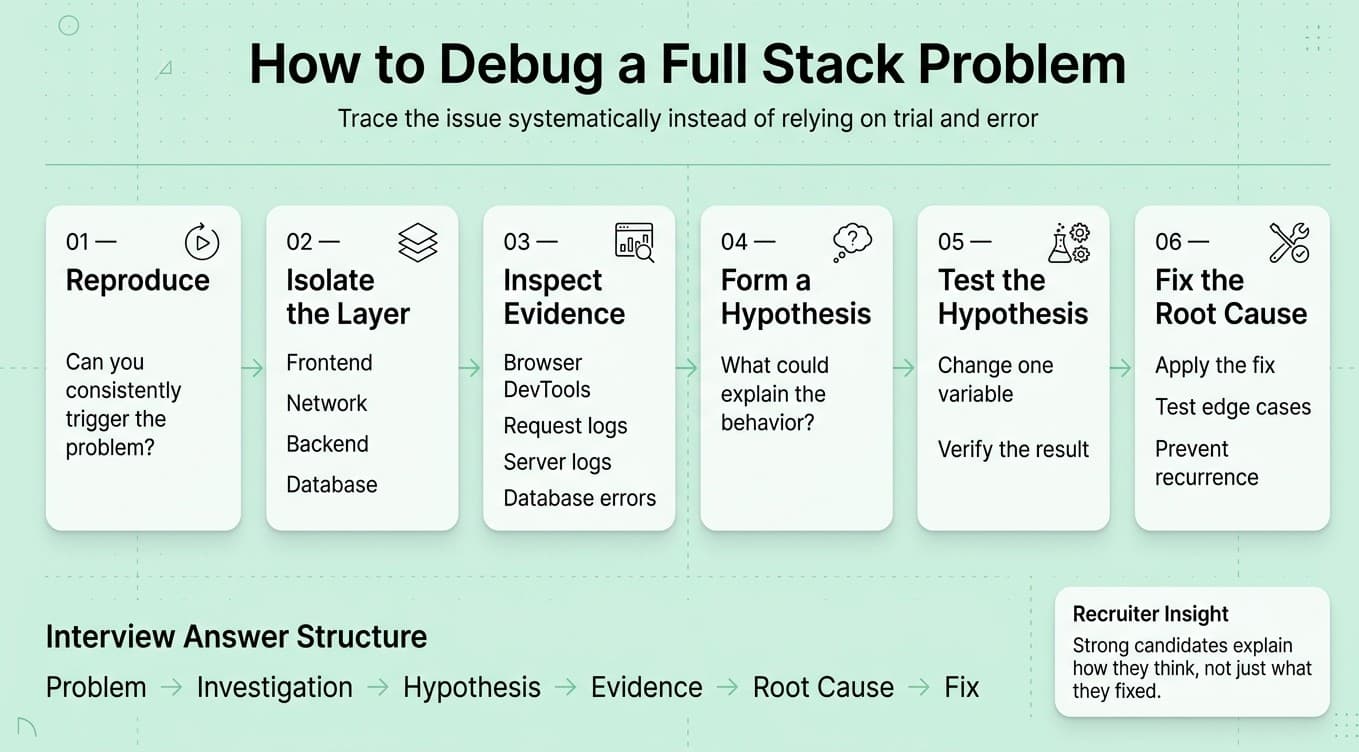
Question 87
Question: Tell me about a time you had to work across the full stack (both frontend and backend) to deliver a feature. How did you approach it?
Answer: A strong answer describes a structured approach: starting with a clear understanding of the feature's requirements and how data would need to flow between frontend and backend, designing the API contract collaboratively (or independently, if working solo) before diving into implementation details, building and testing each layer methodically, and specifically discussing how integration between the layers was verified and any cross-layer bugs were debugged.
Explanation: A very common behavioral question specifically for full stack roles, testing genuine end-to-end ownership and the ability to reason coherently across the entire stack rather than only deep expertise narrowly confined to a single layer.
Real-World Example: A candidate might describe building a new user dashboard feature by first sketching out and agreeing on the required API response shape needed by the frontend, then implementing the backend endpoint and database query, and finally building the frontend component to consume it — catching and resolving a data-shape mismatch during integration testing before ever reaching production.
Common Mistakes: Describing work that was actually narrowly confined to only one single layer (frontend or backend) despite the question specifically asking about genuine full stack, cross-layer work, or being unable to articulate any specific challenges or considerations that arose from the necessary frontend-backend integration itself.
Follow-up Questions: How did you specifically decide on the API contract/shape between the frontend and backend before beginning implementation? What was the most challenging cross-layer integration bug you encountered during that project, and how did you ultimately debug and resolve it? How do you generally personally approach deciding where specific business logic should live — frontend or backend?
Question 88
Question: Describe a time you had to debug a difficult, hard-to-reproduce bug that spanned multiple layers of the stack (e.g., frontend, backend, and database).
Answer: A strong answer describes a systematic debugging methodology: reproducing the issue as reliably and consistently as possible first, methodically narrowing down which specific layer the actual root cause originated in (using logging, browser dev tools, and backend/database monitoring together), forming and then rigorously testing specific hypotheses one at a time, and ultimately identifying and properly fixing the true underlying root cause, not merely a surface-level symptom.
Explanation: Tests genuine systematic problem-solving skill and technical depth specifically spanning the entire stack, an important and very common differentiator for full stack roles given how frequently real-world production bugs cross multiple layers.
Real-World Example: A candidate might describe an intermittent bug where certain form submissions appeared to silently fail, eventually tracing it through the frontend network tab, to backend request logs, and finally to a database constraint violation only occurring for a specific, previously-unconsidered edge case in the input data — illustrating a methodical, multi-layer investigation process.
Common Mistakes: Describing an unsystematic, essentially "trial and error" debugging approach without a clear, coherent methodology, or being unable to clearly and specifically explain what the ultimate actual root cause of the bug turned out to be.
Follow-up Questions: What tools did you specifically use at each individual layer to help narrow down and isolate where the actual problem was originating? How did you ultimately confirm you had genuinely found and fixed the true root cause, rather than merely a surface-level symptom of a deeper issue? What did you personally change in your development or testing process afterward specifically to help catch similar issues earlier in the future?
Question 89
Question: How do you decide where specific business logic should live — in the frontend, the backend, or split between both?
Answer: As a general guiding principle, critical business logic (particularly anything involving data validation, authorization/security checks, or financial calculations) should always live on the backend, since frontend code is fully visible to and can be freely manipulated by any end user and therefore can never be safely, fully trusted for genuinely critical enforcement. The frontend can and often should duplicate some of that same validation logic purely for immediate UX responsiveness (like providing instant form validation feedback), but the backend must always independently re-validate and enforce it as the ultimate, authoritative source of truth.
Explanation: A very commonly tested architectural judgment question specifically for full stack roles, testing understanding of the fundamental security and trust boundary that inherently exists between client and server.
Real-World Example: A discount code validation feature might display immediate, responsive frontend feedback for obviously improved user experience (like an invalid format), but the backend must always independently and authoritatively re-verify the discount code's genuine validity and eligibility before ever actually applying it to an order — a malicious user could otherwise bypass frontend-only validation entirely by directly and simply calling the API themselves.
Common Mistakes: Implementing genuinely critical validation or authorization logic only on the frontend without any corresponding backend enforcement, creating a significant security vulnerability that a technically knowledgeable malicious user could straightforwardly bypass entirely by directly interacting with the API.
Follow-up Questions: Can you give a specific example of business logic you'd be comfortable implementing only on the frontend, without any backend duplication? How do you handle keeping frontend and backend validation logic reasonably consistent with each other over time as an application evolves? How does this general principle change, if at all, in a server-rendered application compared to a typical single-page application architecture?
Question 90
Question: Tell me about a time you had to learn a new technology or framework quickly to complete a full stack project.
Answer: A strong answer describes an efficient, structured learning approach (identifying the specific core concepts genuinely needed for the task at hand first, rather than attempting to master the entire technology comprehensively upfront, building a small proof-of-concept to validate key assumptions before committing to the full implementation, and leveraging official documentation or knowledgeable colleagues effectively), combined with concrete evidence of successfully and effectively applying that new technology to deliver real, genuine value on the actual project under real time constraints.
Explanation: Tests learning agility, a particularly important and frequently tested trait for full stack developers given the sheer breadth of technologies (frontend frameworks, backend languages, databases, infrastructure tools) they're routinely expected to work across.
Real-World Example: A candidate might describe needing to quickly learn a new frontend state management library for a specific project, building a small, focused proof-of-concept first to validate their core understanding of its key concepts and patterns before confidently committing to using it throughout the larger, full production feature.
Common Mistakes: Describing a vague or overly generic learning process without any concrete evidence of successfully and effectively applying that newly learned technology to deliver genuine, real value on the actual project under genuine real-world time constraints.
Follow-up Questions: How do you personally decide what specifically to prioritize learning first when facing a genuinely unfamiliar new technology under real time pressure? What resources do you typically turn to first when learning something new? How do you personally evaluate whether a new technology or specific approach is genuinely production-ready before committing to using it for a real, live project?
Question 91
Question: Describe a situation where you disagreed with a technical decision (like a chosen framework, architecture, or specific approach) made by your team or a senior colleague.
Answer: A strong answer describes voicing genuine disagreement constructively and specifically, backed by clear, concrete reasoning or supporting evidence (rather than merely personal preference alone), remaining genuinely open to being wrong or to considering additional context or constraints the other person may have that the candidate didn't previously fully know about, and ultimately either reaching a genuinely shared, mutual agreement or professionally committing fully to the team's final decision even if it wasn't ultimately the candidate's own personally preferred original choice.
Explanation: Tests communication, collaboration, and professional maturity — an important, very common differentiator for team fit and effective long-term collaboration, separate and distinct from raw individual technical skill alone.
Real-World Example: A candidate might describe disagreeing with a team's choice of a particular frontend framework for a new, greenlit project, presenting relevant supporting data or genuine concerns, and — after the team ultimately still chose the original framework for reasons the candidate hadn't previously fully considered — fully and professionally committing to helping make that specific choice succeed regardless.
Common Mistakes: Choosing a described example where the candidate was simply, unambiguously "right" and the team was simply "wrong," with no real nuance or acknowledgment of valid alternative perspectives, or an example that instead reflects poorly on collaboration (like continuing to resist or undermine an already-made team decision after the fact).
Follow-up Questions: How did you specifically know when it was genuinely time to stop actively pushing your position and instead fully accept and commit to the team's ultimate decision? What would you have done differently if that particular decision had later turned out badly in practice? How do you generally personally handle situations where you're overruled on a technical matter you feel genuinely strongly about?
Question 92
Question: How would you approach onboarding onto an existing, unfamiliar full stack codebase you've just joined?
Answer: A strong approach includes: getting the application running fully and successfully locally as an immediate first step, reading through existing documentation (and proactively helping meaningfully improve it if genuinely lacking or outdated), tracing through a few representative, complete end-to-end user flows across the entire stack to build genuine understanding of how the pieces fit together, asking specifically targeted, well-considered questions of existing team members rather than either staying silently stuck or, conversely, asking overly broad and unfocused questions, and starting with smaller, well-scoped, lower-risk tasks specifically to build confidence and genuine familiarity before confidently taking on larger, more complex, and higher-risk work.
Explanation: A common and practically important scenario question, especially relevant for full stack roles given the sheer number of interconnected moving pieces (frontend, backend, database, infrastructure) typically involved in getting genuinely comfortable and productive in a new, unfamiliar codebase.
Real-World Example: A candidate might describe their systematic approach to a new job by first tracing a single, complete request end-to-end — from an initial frontend user action, through the relevant backend API endpoint, all the way down to the underlying database query — as an effective, concrete way to build genuine, holistic understanding of the overall system's actual architecture and internal workings.
Common Mistakes: Describing a passive approach of simply reading extensively through code in isolation without any hands-on, active engagement (like actually running the application locally, or making small initial changes) to help build genuine, practical, working understanding of the system.
Follow-up Questions: How would you specifically approach a situation where the existing codebase has little to no meaningful documentation at all? How do you personally balance moving efficiently and quickly to become productive against the real risk of breaking something in an unfamiliar system you don't yet fully understand? What specific questions would you prioritize asking existing team members first during your initial onboarding period?
Question 93
Question: Tell me about a time you had to balance technical debt against shipping a feature on a tight deadline.
Answer: A strong answer describes a clear-eyed, honest assessment of the specific tradeoff involved (what shortcut is genuinely being taken, and what its real, concrete future cost is likely to be), transparent communication of that tradeoff to the relevant team/stakeholders (rather than silently and unilaterally cutting corners without anyone else's awareness or explicit agreement), and — ideally — a concrete plan or explicit follow-up commitment to properly address the resulting technical debt afterward, once the immediate deadline pressure has genuinely passed.
Explanation: Tests pragmatic engineering judgment and honest communication under real, common real-world time pressure — a very frequent and realistic tension in full stack development work specifically.
Real-World Example: A candidate might describe deliberately hardcoding a specific business rule to meet an urgent, hard deadline, explicitly and transparently flagging it as a known, deliberate piece of technical debt (via a clearly commented TODO and a corresponding tracked ticket) to properly refactor into a more general, configurable solution once initial user feedback had validated the underlying feature's approach.
Common Mistakes: Silently cutting significant corners without transparently communicating the resulting tradeoff to the team, or conversely refusing to make any reasonable, pragmatic tradeoffs at all even when a hard, genuinely fixed deadline reasonably requires some degree of thoughtful pragmatism.
Follow-up Questions: How do you personally decide which specific corners are genuinely reasonable and appropriate to cut under real deadline pressure, versus which absolutely shouldn't be? How do you effectively ensure technical debt you've deliberately and knowingly taken on doesn't simply get silently forgotten and never actually addressed afterward? How do you communicate this kind of pragmatic tradeoff decision effectively to a non-technical stakeholder or product manager?
Question 94
Question: How do you stay organized when working on multiple full stack features or tasks simultaneously?
Answer: A strong answer describes a concrete personal system (like a task tracker, clear and deliberate prioritization based on genuine business impact and urgency, and regular status check-ins with the team), the discipline to genuinely avoid excessive context-switching where reasonably possible (since switching between frontend and backend work, or between entirely different features, carries real, non-trivial mental overhead), and proactive, transparent communication of realistic timelines and any necessary tradeoffs when facing genuinely competing priorities.
Explanation: Tests practical time-management and self-management skills, relevant since full stack developers frequently juggle work spanning multiple different layers and technologies simultaneously, which can meaningfully compound typical task-switching costs beyond what's typical in a more narrowly-scoped role.
Real-World Example: A candidate might describe deliberately batching similar types of work together (like completing all planned backend API changes for several features first, before then separately switching to focus on frontend implementation), specifically to minimize the real cognitive overhead of frequently context-switching between fundamentally different languages, tools, and mental models throughout the day.
Common Mistakes: Describing an unstructured, purely reactive, ad hoc approach with no real, coherent system at all, or one that relies purely on individually working excessive hours to absorb unlimited additional work rather than actively and thoughtfully managing scope and stakeholder expectations proactively.
Follow-up Questions: How do you specifically handle a new, urgent request that threatens to meaningfully derail already-committed, in-progress work? What tools or systems have you personally used to track and effectively prioritize your own work? How do you personally manage and mitigate the real mental cost of frequently context-switching between frontend and backend work throughout a typical day?
Part 10: Recent Industry Trends
Part 10: Recent Industry Trends
Question 95
Question: How are AI coding assistants (like GitHub Copilot or similar tools) changing full stack development practice?
Answer: AI coding assistants increasingly accelerate writing boilerplate code, generating initial test scaffolding, and drafting first-pass implementations of common, well-understood patterns — shifting a developer's core value further toward system design, careful code review, and critically validating AI-generated code for subtle correctness, security, and architectural fit issues, since AI-generated code still requires genuine human judgment and cannot be blindly trusted or merged without proper review.
Explanation: A highly current and increasingly frequently tested trend question, testing whether a candidate has genuine, thoughtful, hands-on perspective on how these tools fit into real, practical development workflows today.
Real-World Example: Many full stack developers now routinely use AI coding assistants to quickly scaffold a new API endpoint's basic boilerplate structure or generate an initial draft of unit tests, then apply their own careful judgment and domain expertise to review, refine, and properly validate the correctness of that AI-generated code before ultimately committing it.
Common Mistakes: Either dismissing these tools as irrelevant to genuine, "real" development work, or conversely describing an uncritical, blind trust in AI-generated code without any meaningful independent review or validation step.
Follow-up Questions: How do you personally validate that AI-generated code is genuinely correct and appropriately secure before actually merging it? What are the specific risks of over-relying on AI coding assistants, particularly for junior developers still actively building foundational skills? How do you think core full stack development skill requirements will likely continue to shift as these tools mature further?
Question 96
Question: What is the growing role of edge computing and edge functions in modern full stack architecture?
Answer: Edge computing runs application logic at CDN edge locations physically closer to end users, rather than at a single centralized origin server, meaningfully reducing latency for certain specific workloads (like authentication checks, request redirects, or basic personalization logic) at the cost of a more limited runtime environment and the added architectural complexity of properly reasoning about globally distributed, eventually-consistent state.
Explanation: Tests awareness of an evolving infrastructure trend directly and increasingly relevant to modern full stack web performance and deployment architecture decisions.
Real-World Example: Platforms like Vercel Edge Functions or Cloudflare Workers let full stack developers run lightweight backend logic (like geolocation-based redirects or A/B test assignment) at edge locations distributed globally, meaningfully shaving latency off requests compared to always routing through a single, centralized origin server.
Common Mistakes: Treating edge computing as an unconditional, universal replacement for traditional centralized backend architecture, without properly acknowledging its real, practical constraints (limited compute/memory, more difficult access to a centralized database with low enough latency, cold-start considerations).
Follow-up Questions: What kinds of specific workloads are genuinely well-suited to edge functions, and which clearly aren't? How would you handle a genuine need for centralized database access from within an edge function, given the inherent latency to a centralized database? Have you personally worked with any edge computing platforms — what was your hands-on experience like?
Question 97
Question: How is the rise of meta-frameworks (like Next.js, Remix, or Nuxt) changing full stack JavaScript development?
Answer: Meta-frameworks built on top of underlying UI libraries (like React or Vue) provide integrated, opinionated solutions for routing, data fetching, and multiple flexible rendering strategies (SSR, SSG, and CSR, often combinable even within a single application), significantly reducing the substantial configuration and architectural decision-making burden that was previously required when manually assembling these various pieces together from scratch, and increasingly blurring the traditional, previously clearer line between frontend and backend development.
Explanation: A very current and increasingly commonly tested trend question, testing familiarity with the modern JavaScript full stack tooling landscape that a very large proportion of new projects are actively adopting today.
Real-World Example: A Next.js application can define API routes directly alongside its frontend React pages within the very same project and codebase, allowing a single full stack developer to build and reason about both a page's frontend UI and its corresponding backend data-fetching logic together, in a genuinely unified, cohesive development workflow.
Common Mistakes: Not being familiar with any meta-framework at all despite them now being extremely widely adopted and commonly used across the modern industry, or not understanding the genuine practical benefits they specifically provide over manually assembling a comparable custom setup entirely from scratch.
Follow-up Questions: What specific benefits does a framework like Next.js provide over a manually, custom-assembled React application built entirely from scratch? How does a meta-framework's file-based routing convention typically work? Have you personally used a meta-framework like Next.js or Remix in production — what was your hands-on experience like?
Question 98
Question: What is the growing importance of Web Components and how do they relate to (or differ from) framework-specific components like those in React?
Answer: Web Components are a set of native, standardized browser APIs (Custom Elements, Shadow DOM, and HTML Templates) that allow creating genuinely reusable, encapsulated custom HTML elements that work natively in any framework or even with no framework at all, unlike framework-specific components (like React components) which are inherently tied to and only usable within that particular framework's own specific ecosystem and rendering model.
Explanation: Tests awareness of a native web platform standard that offers a genuinely framework-agnostic alternative or complement to the framework-specific component models most full stack developers are typically much more directly familiar with day-to-day.
Real-World Example: A large enterprise organization with multiple different teams using different frontend frameworks across their various products might build a shared design system's core components as genuinely framework-agnostic Web Components specifically to ensure true consistent reusability across all of those different frameworks, rather than needing to separately build and maintain multiple different framework-specific versions of the exact same component.
Common Mistakes: Assuming Web Components are essentially just another competing frontend framework similar to React or Vue, rather than correctly understanding them as a genuinely different, lower-level native browser standard that can actually be used either alongside or in combination with those existing frameworks.
Follow-up Questions: What are the practical tradeoffs of building a component using native Web Components compared to using a framework-specific component (like a React component)? How does the Shadow DOM specifically help provide genuine styling encapsulation for a Web Component? Have you personally worked with Web Components directly in a real project — what was your hands-on experience like?
Question 99
Question: How is the growing focus on Core Web Vitals and overall web performance affecting full stack development priorities?
Answer: Core Web Vitals (Largest Contentful Paint, Interaction to Next Paint, and Cumulative Layout Shift) are now well-established, standardized metrics that meaningfully affect both genuine user experience and search engine ranking, driving full stack teams to more deliberately prioritize performance considerations across the entire stack — from backend response times and appropriate caching strategies, through frontend code-splitting and image optimization, all the way to careful, deliberate layout stability considerations during initial page load.
Explanation: Tests awareness of an increasingly business-critical performance measurement framework directly and materially relevant to modern full stack development priorities and practices.
Real-World Example: An e-commerce site experiencing a poor Cumulative Layout Shift score (caused, for example, by images loading without explicitly reserved space, causing surrounding page content to visibly shift as they load in) might see both a measurably degraded user experience and a genuinely negative impact on their search engine ranking, motivating a concrete, prioritized fix like properly specifying explicit image dimensions upfront.
Common Mistakes: Not being familiar with the specific Core Web Vitals metrics at all despite their now widespread and growing importance to both user experience and SEO in the modern web development industry.
Follow-up Questions: What specific full stack changes would you make to meaningfully improve a poor Largest Contentful Paint score? How would you measure and effectively monitor Core Web Vitals for a real, live production application over time? What's the difference between lab-based (synthetic) and field-based (real user) performance measurement approaches?
Question 100
Question: How do you personally stay current with the rapidly evolving full stack development landscape (new frameworks, tools, and best practices)?
Answer: A strong answer describes a concrete, sustainable, ongoing approach: following relevant technical blogs, newsletters, or specific respected voices in the community, participating in relevant developer communities, hands-on experimentation with promising new tools or techniques on personal side projects, and periodically and critically reassessing whether a given newly emerging tool or technique is genuinely worth adopting into regular, everyday practice versus representing more transient, short-lived hype.
Explanation: A very common closing question testing genuine intellectual curiosity and a professional growth mindset, particularly important given how unusually quickly the full stack JavaScript ecosystem specifically continues to evolve.
Real-World Example: A candidate might describe regularly reading specific technical newsletters or following particular respected developers, combined with periodically building small, focused personal side projects specifically to gain genuine hands-on familiarity with a new tool or framework before ever considering recommending its adoption for real, production use at work.
Common Mistakes: Giving a vague, generic answer ("I just try to keep up with things") without providing any specific, concrete examples of resources, communities, or particular recent tools/techniques genuinely learned and thoughtfully evaluated.
Follow-up Questions: What's a specific new tool or technique you've learned about and evaluated recently, and how did you personally decide whether it was genuinely worth adopting? Can you name a few specific resources (blogs, newsletters, communities) you personally follow regularly? How do you personally decide which emerging trends are genuinely worth investing meaningful time in learning deeply versus which are more likely to be short-lived hype?
How to Use This Guide
- Don't memorize word-for-word. Use the "Explanation" sections to build genuine understanding, then practice explaining answers in your own words out loud.
- Prioritize by role emphasis. Frontend-heavy roles should weight Parts 1, 2, and 3 more heavily; backend-heavy roles should emphasize Parts 4, 5, and 6; roles at companies with mature infrastructure should focus extra attention on Parts 7 and 8.
- Practice the coding and hands-on questions. Reading isn't enough for Parts 2, 3, and 4 in particular — actually write and run the code, including edge cases, ideally under mild time pressure to simulate a live technical screen or pairing exercise.
- Work through the system design questions out loud. For Part 6's open-ended architecture questions, practice structuring your answer verbally (clarify requirements, estimate scale, propose a high-level design, deep-dive on key components, discuss tradeoffs) since interviewers evaluate your structured thinking process as much as your final answer.
- Prepare your own stories for the behavioral questions. Prepare 5-6 real stories from your own experience that can flexibly answer multiple questions in Part 9, since most behavioral questions are variations on a smaller set of underlying themes.
- Use follow-up questions as a self-check. After answering a question, try answering its follow-ups too — this is usually where interviews go deeper and where candidates get caught unprepared.