Loading...
Contents
Top 100 Python Developer Interview Questions
Aug 14, 2026143 min readUpdated Sep 23, 2026
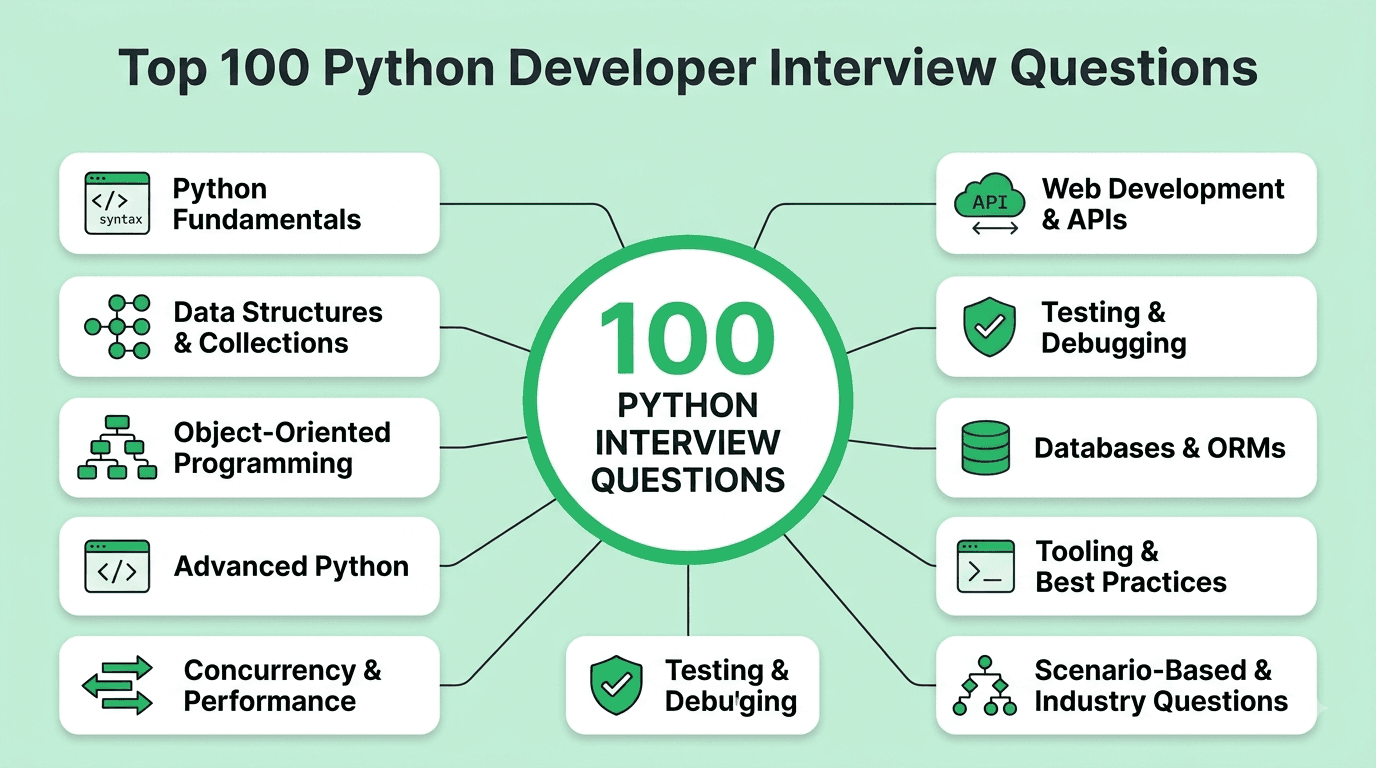
This guide covers the 100 most important Python developer interview questions, organized by topic and roughly ordered by frequency/importance within each category, moving from language fundamentals through advanced features, concurrency, web development, and current industry trends.
Categories:
Python Fundamentals (Q1-15)
Data Structures & Collections (Q16-25)
Object-Oriented Programming in Python (Q26-35)
Advanced Python Features: Decorators, Generators & Context Managers (Q36-45)
Concurrency & Performance (Q46-55)
Web Development & APIs (Q56-65)
Testing & Debugging (Q66-73)
Databases & ORMs (Q74-80)
Tooling, Packaging & Best Practices (Q81-88)
Scenario-Based, Behavioral & Industry Trends (Q89-100)
Read More: How to prepare for python developer interview in 2026
FREE TO USE
25K+ INTERVIEWS4.8★ RATING68% IMPROVEMENT
Crack Your Dream Job
Real Interviews. Real Pressure. Practice until it feels easy.
- Seamless Interview Experience
- Resume & JD Questions
- Instant Personalized Feedback
Part 1: Python Fundamentals
Question 1
Question: What is the difference between a list and a tuple in Python?
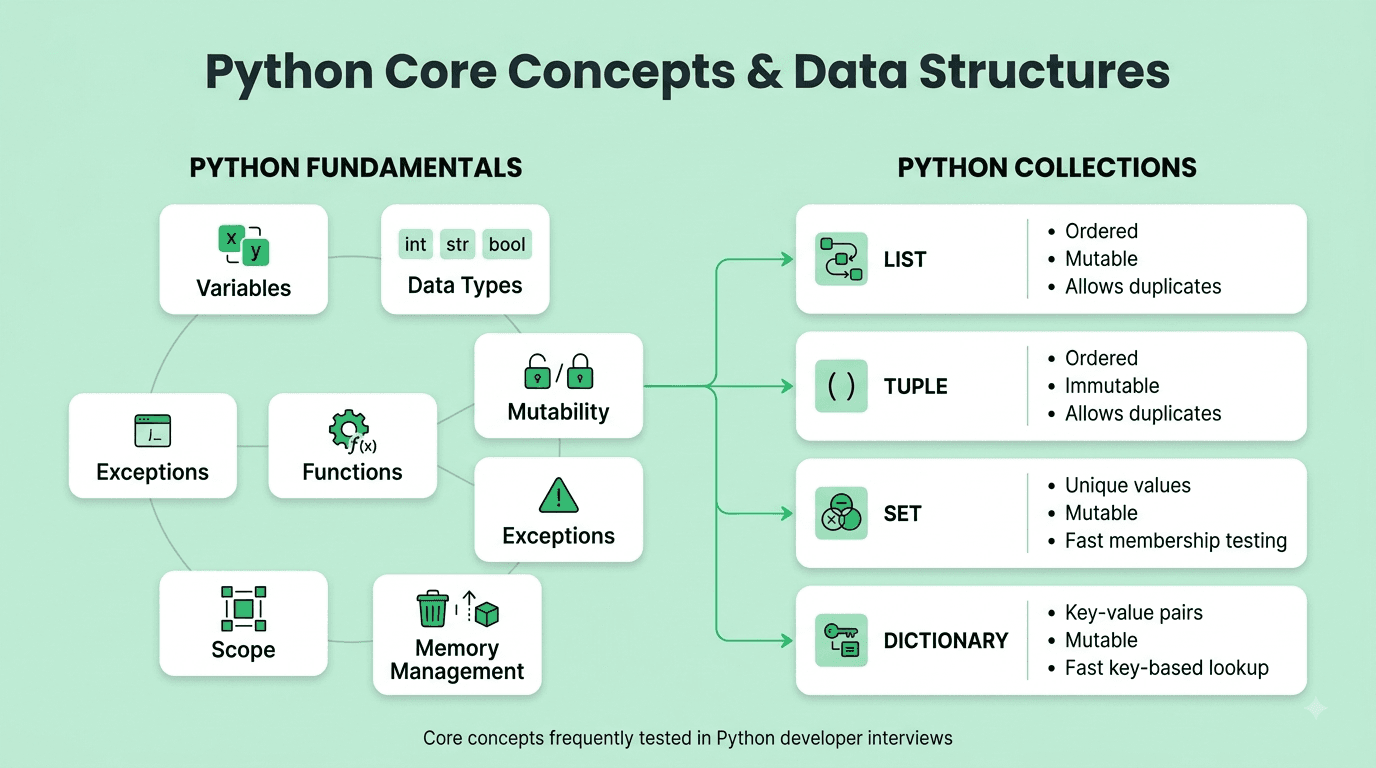
Answer: A list is mutable (elements can be added, removed, or changed after creation) and defined with square brackets, while a tuple is immutable (once created, its contents cannot be changed) and defined with parentheses. Tuples are generally slightly faster and more memory-efficient than lists, and their immutability makes them hashable (usable as dictionary keys or set elements) as long as all their contents are also hashable.
Explanation: A foundational Python question testing understanding of mutability, one of the most important concepts underlying correct and predictable Python code.
Real-World Example: Coordinates like (latitude, longitude) are commonly represented as a tuple since they represent a fixed, logically immutable pair of values, while a list is more appropriate for a shopping cart's items, which naturally need to be added to and removed from over time.
Common Mistakes: Attempting to modify a tuple's contents directly (e.g., my_tuple[0] = 5), which raises a TypeError, or not realizing that a tuple containing a mutable object (like a list) still allows that inner mutable object's contents to be changed, even though the tuple's own structure remains fixed.
Follow-up Questions: Why are tuples hashable while lists are not? What's the performance difference between iterating over a list versus a tuple? How would you convert between a list and a tuple?
Question 2
Question: Explain Python's memory management model — how are variables and objects related?
Answer: In Python, variables are references (labels/names) pointing to objects stored in memory, not containers holding the values directly — assigning a variable to another variable copies the reference, not the underlying object, so both variables point to the same object in memory. Python manages memory automatically primarily through reference counting (an object is deallocated once its reference count drops to zero) combined with a cyclic garbage collector to detect and clean up reference cycles that reference counting alone can't resolve.
Explanation: A foundational Python concept, essential for correctly understanding mutability, aliasing, and function argument passing behavior — a very commonly tested area of confusion, especially for those coming from other languages.
Real-World Example: Passing a list into a function and modifying it in place inside that function affects the original list outside the function too, since both the outer and inner variable names reference the exact same underlying list object in memory — a common source of confusing bugs for developers unfamiliar with this reference-based model.
Common Mistakes: Assuming b = a creates an independent copy of a's value, then being surprised when modifying b's mutable contents also unexpectedly affects a, since both names actually reference the identical underlying object.
Follow-up Questions: What's the difference between a shallow copy and a deep copy, and when would you need each? How does Python's cyclic garbage collector specifically handle reference cycles that plain reference counting alone cannot resolve? What does the is operator check for, compared to ==?
Question 3
Question: What is the difference between is and == in Python?
Answer: == checks for value equality (whether two objects have the same value/content, using the object's __eq__ method), while is checks for identity (whether two variables reference the exact same object in memory, using the object's id()).
Explanation: A very commonly tested, precise distinction, especially important given some subtle and potentially confusing Python behaviors (like small integer and string interning) that can make is appear to "work" for equality checks in some cases when it actually shouldn't be relied upon.
Real-World Example: Checking whether a variable is None should always use is None (checking identity against the single, unique None singleton object) rather than == None, both as an established best practice and because a custom object could technically override __eq__ in a way that produces unexpected results with ==.
Common Mistakes: Using is to compare two values for equality (like comparing two separately-created strings or lists with equal content) instead of ==, which can appear to work correctly for small integers or short strings due to Python's internal interning optimizations, but will unpredictably fail for larger values or non-interned objects.
Follow-up Questions: Why does a = 5; b = 5; a is b typically return True for small integers, but the equivalent often returns False for larger integers? What is string interning, and how does it relate to this behavior? Why is is None specifically preferred over == None as a best practice?
Question 4
Question: What are Python's built-in data types, and how would you check the type of a given variable?
Answer: Common built-in types include numeric types (int, float, complex), sequence types (str, list, tuple), mapping type (dict), set types (set, frozenset), and Boolean (bool). You can check a variable's type using type(variable) (returns the exact type) or isinstance(variable, SomeType) (checks whether the variable is an instance of a type or any of its subclasses, generally the more idiomatic and preferred approach).
Explanation: A foundational Python vocabulary question, also testing awareness of the more idiomatic, Pythonic approach (isinstance) for type checking versus the less flexible type() equality comparison.
Real-World Example: Validating that a function's input argument is genuinely a list (or any list subclass) before processing it is best done with isinstance(arg, list) rather than type(arg) == list, since the latter would incorrectly reject a valid instance of a custom list subclass.
Common Mistakes: Using type(x) == list for type checking instead of isinstance(x, list), which unnecessarily and incorrectly excludes valid subclasses of the expected type.
Follow-up Questions: What's the difference between isinstance() and type() specifically regarding inheritance and subclasses? How would you check if a variable is one of several possible types at once? What is duck typing, and how does it relate to (or contrast with) explicit type checking in Python?
Question 5
Question: What is the difference between deep copy and shallow copy in Python?
Answer: A shallow copy (via copy.copy() or slicing) creates a new outer object but populates it with references to the same nested/inner objects as the original — modifying a nested mutable object within the shallow copy also affects the original. A deep copy (via copy.deepcopy()) recursively copies all nested objects as well, creating a fully independent copy where no data is shared with the original at any level.
Explanation: A very commonly tested practical concept, since misunderstanding this distinction is a frequent, real source of subtle bugs when working with nested mutable data structures.
Real-World Example: Copying a list of dictionaries with a shallow copy still leaves the individual dictionaries shared between the original and the copy — modifying a value inside one of those dictionaries via the "copy" would unexpectedly also modify the corresponding dictionary in the original list.
Common Mistakes: Using a shallow copy (or simple slicing, new_list = old_list[:]) when a fully independent deep copy was actually needed, leading to unexpected, hard-to-trace mutations propagating back to the original data structure.
Follow-up Questions: How would you implement a simple deep copy manually without using the copy module? What performance cost does copy.deepcopy() typically carry compared to a shallow copy, especially for large or deeply nested structures? How does Python handle deep copying an object containing a circular reference to itself?
Question 6
Question: What is duck typing, and how does it relate to Python's approach to types?
Answer: Duck typing is the principle that an object's suitability for a given operation is determined by whether it has the necessary methods/behavior ("if it walks like a duck and quacks like a duck, it's a duck"), rather than its explicit declared type or class hierarchy — Python, as a dynamically-typed language, generally favors this behavior-focused approach over strict, explicit type checking.
Explanation: A foundational Python philosophy question, testing understanding of how Python's dynamic typing shapes idiomatic code design, particularly relevant to writing flexible, reusable functions.
Real-World Example: A function that iterates over any "file-like" object only needs that object to support a .read() method — it doesn't matter whether the object is an actual file, an in-memory io.StringIO buffer, or a custom class, as long as it correctly implements the expected interface/behavior.
Common Mistakes: Writing unnecessarily restrictive code with explicit isinstance() type checks when duck typing (simply calling the needed method and letting Python raise a natural error if it's genuinely unsupported) would be more idiomatic, flexible, and "Pythonic."
Follow-up Questions: How does duck typing relate to Python's Abstract Base Classes (ABCs), which allow more formalized "structural" type checking? What is "EAFP" ("easier to ask forgiveness than permission"), and how does it relate to duck typing as a broader Python philosophy? How does Python's optional type hinting system (via typing) interact with duck typing?
Question 7
Question: What is the difference between *args and **kwargs in a Python function definition?
Answer: *args allows a function to accept any number of additional positional arguments, collected into a tuple within the function. **kwargs allows a function to accept any number of additional keyword arguments, collected into a dictionary within the function — both provide flexibility for functions that need to accept a variable, not-fully-predetermined number of arguments.
Explanation: A very commonly tested, foundational Python syntax question, essential for understanding flexible function signatures commonly seen throughout Python codebases and libraries.
Real-World Example: A decorator function wrapping an arbitrary target function typically uses *args, **kwargs in its inner wrapper function specifically to transparently forward whatever arguments the original, wrapped function was actually called with, regardless of that function's specific signature.
Common Mistakes: Confusing the specific names args and kwargs as required, fixed keywords (they're simply a very common naming convention — the actual required syntax is the * and ** prefixes themselves, not these particular variable names).
Follow-up Questions: How would you call a function using an existing list and dictionary to unpack them as its actual positional and keyword arguments? Can you use *args and **kwargs together in a single function definition, and in what specific order must they appear? How do these interact with explicitly named, regular parameters in the same function signature?
Question 8
Question: What are Python's mutable default argument pitfalls, and how would you avoid them?
Answer: Using a mutable object (like a list or dictionary) as a default argument value is a well-known Python pitfall, since the default value is created only once, at function definition time, and then shared and persisted across all subsequent calls that don't explicitly provide their own value for that argument — leading to surprising, unintended behavior if the function mutates that shared default object. The standard fix is to use None as the default value instead, and then explicitly create a genuinely new, fresh mutable object inside the function body if the argument wasn't provided.
Explanation: One of the most famous and commonly tested Python "gotchas," frequently used specifically to test whether a candidate has genuine hands-on Python experience versus only superficial, textbook-level familiarity.
Real-World Example: A function defined as def add_item(item, items=[]): items.append(item); return items will unexpectedly and incorrectly accumulate items across completely separate, unrelated function calls that don't explicitly pass their own list, since that same single default empty list object is being silently reused and mutated across all of those calls.
Common Mistakes: Using a mutable default argument (list, dict, or set) directly without being aware of this well-known pitfall, leading to hard-to-diagnose, non-obvious bugs that only manifest after multiple function calls.
Follow-up Questions: Why specifically does this problem occur — what does it reveal about exactly when Python default argument values are actually evaluated? How would you correctly rewrite the example function above to avoid this specific pitfall? Are immutable default arguments (like an integer or string) subject to this same particular problem?
Question 9
Question: What is the Global Interpreter Lock (GIL), and how does it affect multithreaded Python programs?
Answer: The GIL is a mutex specific to CPython (the standard, most common Python implementation) that allows only one thread to execute Python bytecode at any given single moment, even on a multi-core machine — this means genuinely CPU-bound multithreaded Python code generally doesn't achieve true parallel speedup from adding more threads, though I/O-bound multithreaded code can still benefit significantly, since the GIL is released during I/O wait operations.
Explanation: One of the most commonly tested and important CPython-specific implementation details, essential for correctly reasoning about concurrency strategy choices in real, practical Python applications.
Real-World Example: A CPU-intensive image processing task won't meaningfully speed up by simply using Python's threading module due to the GIL, and should instead use the multiprocessing module (which uses separate, independent processes each with their own individual Python interpreter and GIL) to achieve genuine parallel execution across multiple CPU cores.
Common Mistakes: Using Python's threading module expecting genuine, true parallel speedup for CPU-bound work, then being confused when performance doesn't meaningfully improve (or can even slightly worsen due to thread-switching overhead) compared to a straightforward single-threaded equivalent implementation.
Follow-up Questions: Why does the GIL still allow I/O-bound multithreaded code to genuinely benefit from using multiple threads, despite the GIL's general restriction? How does the multiprocessing module specifically get around the GIL's fundamental limitation? What is the ongoing, publicly discussed effort to potentially remove the GIL from future CPython versions (PEP 703), and what would that specifically mean for Python's concurrency model?
Question 10
Question: What is the difference between range() in Python 2 and Python 3, and why does it matter?
Answer: In Python 2, range() immediately generated and returned a fully materialized list in memory, while xrange() was the memory-efficient, lazy alternative. In Python 3, range() itself now returns a lazy, memory-efficient range object (similar in spirit to Python 2's xrange()) that generates values on demand as needed, rather than eagerly pre-computing and storing the entire sequence in memory upfront.
Explanation: A commonly tested question testing awareness of an important, meaningful Python 2 to Python 3 behavioral change, and more broadly testing understanding of lazy versus eager evaluation as a general Python concept.
Real-World Example: Iterating over range(10_000_000) in Python 3 uses only a small, constant, fixed amount of memory regardless of the range's actual size, since values are generated lazily on demand one at a time as the loop iterates, rather than requiring an enormous list of ten million actual integers to be fully created and held in memory all at once upfront.
Common Mistakes: Assuming range() in Python 3 still eagerly creates and returns a full list (as it historically did in Python 2), and consequently being confused when type(range(10)) returns <class 'range'> rather than the list type some might mistakenly expect.
Follow-up Questions: How would you convert a Python 3 range object into an actual, concrete list if you specifically needed one? What are some other similarly "lazy" iterable-producing built-ins or standard library functions in modern Python (like map(), filter(), or zip())? What are the specific memory and performance benefits of this kind of lazy evaluation approach more generally?
Question 11
Question: What is the difference between __str__ and __repr__ in Python?
Answer: __str__ defines the "informal," readable string representation of an object intended primarily for end-user display purposes (called by str() and implicitly by print()), while __repr__ defines the "official," more precise and typically more detailed string representation intended primarily for developers and debugging purposes (called by repr(), and used as the fallback if __str__ isn't explicitly defined) — ideally, __repr__ should return a string that, if evaluated as genuine Python code, could recreate an equivalent object.
Explanation: A commonly tested Python "dunder" (double-underscore/magic) method question, testing understanding of Python's object representation and debugging conventions.
Real-World Example: A custom Point class might define __str__ to return a clean, user-friendly "(3, 4)" for display purposes, while its __repr__ returns the more explicit and unambiguous "Point(x=3, y=4)", which is especially useful and informative when inspecting objects directly within a debugger, a REPL session, or when printed as part of a list/collection of such objects.
Common Mistakes: Defining only __str__ without also defining __repr__ (or vice versa), missing that Python automatically falls back to using __repr__ for str() if __str__ isn't explicitly defined, but the reverse fallback doesn't occur.
Follow-up Questions: What is the default __repr__ output for a custom class that hasn't explicitly defined either method? Why is it generally considered good, recommended practice to always define at least __repr__ for your own custom classes? How does __repr__ specifically affect how objects are displayed when printed as elements within a list or other container?
Question 12
Question: How does Python's exception handling work, and what's the difference between except Exception and a bare except:?
Answer: Python uses try/except/else/finally blocks to handle exceptions — code that might raise an error goes in try, exception handling logic goes in one or more except clauses (ideally catching specific exception types), else runs only if no exception occurred, and finally always runs regardless of whether an exception occurred or not, typically used for essential cleanup logic. except Exception catches most standard runtime exceptions but deliberately excludes lower-level system-exiting exceptions like SystemExit and KeyboardInterrupt, while a bare except: (with no specified exception type at all) catches genuinely everything, including those system-level exceptions, which is generally considered a significant anti-pattern since it can inadvertently prevent a program from being cleanly interrupted or properly exited.
Explanation: A foundational Python control flow question, testing both basic mechanical knowledge and best-practices judgment around genuinely appropriate, specific exception handling.
Real-World Example: A robust file-processing script should catch specific expected exceptions like FileNotFoundError and PermissionError individually and handle each appropriately, rather than using an overly broad, catch-all except: clause that could inadvertently silently swallow completely unrelated bugs (or even prevent the user from cleanly interrupting the script with Ctrl+C).
Common Mistakes: Using a broad, non-specific except Exception: (or, worse, a completely bare except:) that silently swallows and hides genuinely unexpected errors, making bugs significantly harder to properly detect, diagnose, and fix.
Follow-up Questions: What's the difference between except Exception as e: and a bare except: specifically in terms of which exceptions each one actually catches? How would you re-raise a caught exception while still preserving its original traceback information? What is exception chaining (using raise ... from ...), and when would you specifically use it?
Question 13
Question: What are Python's string formatting options, and which is generally preferred in modern Python?
Answer: Python offers several string formatting approaches: old-style % formatting (legacy, generally discouraged in modern code), .format() method calls, and f-strings (formatted string literals, introduced in Python 3.6). F-strings are now generally the preferred, most idiomatic modern approach, since they're typically more readable (embedding the actual expression directly within the string itself) and also meaningfully faster at runtime than the other alternative approaches.
Explanation: A commonly tested practical Python syntax question, also testing awareness of current, up-to-date Python best practices and idiomatic style.
Real-World Example: Formatting a log message combining several variables is much more concise and immediately readable with an f-string (f"User {user_id} logged in at {timestamp}") compared to the more verbose, less directly readable equivalent .format() or old-style % formatting approaches.
Common Mistakes: Continuing to use older, legacy % formatting or .format() by habit in new, modern code without being aware that f-strings are now both more readable and measurably more performant in most typical common cases.
Follow-up Questions: How would you use an f-string to control the number of decimal places displayed for a floating-point number? Can you embed a genuine function call or a more complex expression directly within an f-string? What's the performance difference between f-strings and the older .format() method, and why does that meaningful difference exist?
Question 14
Question: What is list comprehension, and when would you use one instead of a traditional for loop?
Answer: A list comprehension provides a concise, single-line syntax for creating a new list by applying an expression to each element of an iterable, optionally with a filtering condition (e.g., [x**2 for x in range(10) if x % 2 == 0]) — generally more readable and often somewhat faster than the equivalent explicit for loop with repeated .append() calls, though excessively complex or deeply nested comprehensions can actually hurt readability and should instead be broken back out into a more traditional, clearer for loop.
Explanation: A very commonly tested, idiomatic Python feature, testing both correct syntax knowledge and, importantly, good judgment about when a comprehension genuinely improves versus actively hurts code readability.
Real-World Example: Filtering and transforming a list of numbers to extract only the even values, then squaring each remaining one, is naturally, concisely, and very readably expressed in a single-line list comprehension, versus a more verbose multi-line equivalent for loop with an explicit .append() call for each qualifying value.
Common Mistakes: Writing an excessively complex, deeply nested list comprehension (multiple nested loops and conditions all crammed together) that sacrifices genuine readability purely for unnecessary brevity, making it significantly harder for other developers to correctly understand and safely maintain.
Follow-up Questions: How would you write a dictionary comprehension or a set comprehension, and how does their syntax differ from a list comprehension? What's the meaningful performance difference between a list comprehension and an equivalent generator expression? At what point of genuine complexity would you personally choose to break a comprehension back out into a more traditional, explicit for loop instead?
Question 15
Question: What is Python's PEP 8, and why is following a consistent style guide important?
Answer: PEP 8 is Python's official style guide, providing conventions for code layout, naming (like snake_case for functions/variables, PascalCase for classes), whitespace usage, and other stylistic recommendations — following it (typically enforced via an automated linter/formatter like flake8, black, or ruff) improves code readability and consistency across a codebase and team, making it meaningfully easier for other developers to read, review, and confidently maintain shared code.
Explanation: A foundational best-practices question, testing whether a candidate has genuine real-world team development experience and awareness of the practical, collaborative importance of consistent code style, beyond purely functional code correctness alone.
Real-World Example: A team consistently using an automated formatter like black combined with a linter like flake8 or ruff as an integrated, required part of their CI pipeline eliminates unproductive, purely stylistic debates during code review entirely, allowing reviewers to focus their valuable time and attention specifically on genuine logic, architecture, and correctness concerns instead.
Common Mistakes: Not following any consistent style convention at all within a shared codebase, or manually enforcing style purely through tedious, error-prone, and often contentious human code review rather than using efficient, consistent, and objective automated tooling.
Follow-up Questions: What specific automated tools have you personally used to enforce PEP 8 compliance in a real project? How would you configure a pre-commit hook to automatically run a formatter before every commit? What's the difference between a linter (which flags potential issues) and a formatter (which automatically fixes formatting)?
Part 2: Data Structures & Collections
Question 16
Question: What is the time complexity of common dictionary operations in Python, and how does a dictionary achieve this?
Answer: Dictionary lookups, insertions, and deletions are all O(1) on average, achieved because Python dictionaries are implemented as hash tables — a key's hash value determines which internal bucket/slot it's stored in, allowing near-direct access without needing to scan through other entries. In the worst case (many hash collisions), these operations can degrade to O(n), though this is rare in practice with Python's well-designed hashing implementation.
Explanation: A very commonly tested practical Python data structures question, essential for understanding why dictionaries are typically the right choice for fast lookups compared to a list.
Real-World Example: Looking up a user's profile data by their unique user ID in a dictionary keyed by that ID is dramatically faster (O(1)) than searching through a list of user objects checking each one's ID individually (O(n)), especially significant as the number of users grows large.
Common Mistakes: Using a list combined with a linear search (an in check, or manually iterating) to look up items by some key/identifier, when a dictionary would provide dramatically better O(1) average-case lookup performance instead.
Follow-up Questions: What makes an object hashable in Python, and why must dictionary keys specifically be hashable? How does Python's dictionary handle hash collisions internally? Since Python 3.7, dictionaries maintain insertion order — how does this differ from earlier Python versions, and does it affect the underlying implementation's performance characteristics?
Question 17
Question: What is the difference between a set and a frozenset in Python?
Answer: A set is a mutable, unordered collection of unique, hashable elements, supporting operations like adding and removing elements after creation. A frozenset is the immutable counterpart — once created, its elements cannot be changed, which also makes a frozenset itself hashable and therefore usable as a dictionary key or as an element within another set, unlike a regular mutable set.
Explanation: A commonly tested data structures question, testing understanding of both sets' core use case (fast membership testing and deduplication) and the specific mutability distinction relevant to their use as dictionary keys.
Real-World Example: Deduplicating a large list of user IDs efficiently is a classic set use case, while using a group of unique tags as a dictionary key (which requires the key to be hashable, ruling out a regular mutable set) specifically calls for a frozenset instead.
Common Mistakes: Attempting to use a regular, mutable set directly as a dictionary key or as an element within another set, which raises a TypeError since regular sets are unhashable due to their mutability.
Follow-up Questions: What is the time complexity of a membership test (in) on a set compared to a list, and why does that meaningful performance difference exist? How would you efficiently find the intersection, union, or difference between two sets? Why must set elements themselves be hashable?
Question 18
Question: What is a Python generator, and how does it differ from a regular function that returns a list?
Answer: A generator function uses the yield keyword instead of return, producing a sequence of values lazily, one at a time, on demand, rather than computing and returning the complete collection all at once upfront — this makes generators highly memory-efficient for working with large or even conceptually infinite sequences, since only one value needs to be held in memory at any given moment, rather than the entire resulting collection.
Explanation: One of the most fundamental and commonly tested Python-specific features, testing understanding of lazy evaluation and its significant, practical memory efficiency benefits for real-world data processing tasks.
Real-World Example: Processing a massive log file line by line is far more memory-efficient using a generator that yields one processed line at a time, rather than a function that reads and returns the entire file's contents as a single, potentially enormous list held fully in memory all at once.
Common Mistakes: Using a regular function that builds and returns a complete list when a generator would be significantly more appropriate and memory-efficient for processing very large or streaming datasets, unnecessarily consuming excessive memory.
Follow-up Questions: What is a generator expression, and how does its syntax differ from a list comprehension? Can you iterate over a generator's produced values more than once — why or why not? How would you use the yield from syntax to delegate to another nested generator?
Question 19
Question: What's the difference between deque (from the collections module) and a regular Python list?
Answer: A deque (double-ended queue) is optimized for fast O(1) appends and pops from both the beginning and the end of the collection, while a regular list has O(1) append/pop performance only at the end — a list's insert/pop from the beginning is O(n), since it requires shifting every other subsequent element in memory.
Explanation: A commonly tested practical data structures question, testing awareness of a very useful but somewhat less well-known standard library data structure that's ideally suited for a very common, specific class of problems.
Real-World Example: Implementing a sliding window algorithm, an undo/redo history, or a simple task queue where items are frequently added and removed efficiently from both ends is a natural, well-suited use case for collections.deque rather than a regular list, which would perform poorly (O(n) per operation) for frequent operations specifically at the beginning of the collection.
Common Mistakes: Using a regular Python list with repeated .insert(0, item) or .pop(0) calls in a performance-sensitive context, not realizing this specific pattern is O(n) per individual operation on a list, versus the much more efficient O(1) equivalent operations available on a deque.
Follow-up Questions: How would you implement a fixed-size, automatically-evicting circular buffer using a deque (hint: the maxlen parameter)? What other useful, purpose-built data structures does the collections module provide (like Counter, defaultdict, namedtuple)? When would you still prefer a regular list over a deque for a given specific use case?
Question 20
Question: What is collections.defaultdict, and what problem does it solve?
Answer: defaultdict is a dictionary subclass that automatically creates and inserts a default value (generated by a specified factory function) for any key that's accessed but doesn't yet exist, eliminating the need for repetitive, manual existence-checking code (like if key not in dict: dict[key] = []) before appending to or otherwise using a dictionary value.
Explanation: A very commonly used and tested standard library convenience feature, testing familiarity with genuinely practical, idiomatic Python tools that meaningfully simplify very common everyday coding patterns.
Real-World Example: Grouping a list of items by some shared category is much more concise using defaultdict(list) (allowing you to directly call .append() on any category key, even one encountered for the very first time, without any preliminary existence check) compared to manually checking for and initializing an empty list for every new, previously-unseen category key.
Common Mistakes: Continuing to use verbose manual existence-checking (if key not in my_dict: my_dict[key] = []) throughout code, unaware that defaultdict (or the dict.setdefault() method as a lighter-weight alternative) could meaningfully simplify and clean up this very common, repetitive pattern.
Follow-up Questions: How does defaultdict's specific factory function argument work — what exactly gets passed to it, and when precisely is it actually called? What's the difference between using defaultdict and using the plain dict.setdefault() method to achieve a broadly similar overall effect? How would you use defaultdict(int) specifically for counting occurrences (though Counter is often even more directly suited to that particular purpose)?
Question 21
Question: What is collections.Counter, and what common problems does it help solve?
Answer: Counter is a dictionary subclass specifically designed for counting hashable objects, automatically tallying occurrences when initialized from an iterable, and providing convenient additional methods like .most_common(n) to efficiently retrieve the n most frequently occurring elements.
Explanation: A commonly tested, genuinely practical standard library tool, testing familiarity with idiomatic Python approaches to a very common everyday task (counting/tallying occurrences) that's otherwise fairly tedious and repetitive to implement correctly and efficiently from scratch.
Real-World Example: Finding the most frequently occurring words in a large body of text is very concisely and efficiently accomplished with Counter(words).most_common(10), rather than manually implementing an equivalent word-counting and subsequent sorting logic entirely from scratch.
Common Mistakes: Manually implementing counting logic using a plain dictionary with repetitive existence-checking, instead of using the significantly more concise, readable, and purpose-built Counter class specifically designed for this exact common task.
Follow-up Questions: How would you use Counter to find the difference in element counts between two separate collections? What does adding or subtracting two Counter objects together actually do? How would you use Counter to efficiently check whether one string is a valid anagram of another?
Question 22
Question: What is the difference between shallow equality (==) and deep equality when comparing nested data structures in Python?
Answer: Python's == operator, when applied to built-in container types like lists, tuples, and dictionaries, actually performs a recursive, element-by-element (effectively "deep") value comparison by default already — two lists are considered equal via == if they have the same length and all their corresponding elements are also equal (recursively, if those elements are themselves containers), not merely if they happen to be the exact same object in memory.
Explanation: A commonly tested, somewhat subtle Python behavior, since many candidates coming from other programming languages incorrectly assume == on containers performs only a shallow, reference-based comparison by default, when Python's built-in containers actually already implement genuinely deep, recursive value-based equality out of the box.
Real-World Example: Comparing two separately, independently constructed nested lists like [1, [2, 3]] == [1, [2, 3]] correctly returns True in Python, since == recursively compares the actual contained values at every level, not simply whether the two outer lists happen to be the exact same object in memory.
Common Mistakes: Assuming a custom-defined class's instances will also automatically support this same kind of deep, meaningful value-based equality via == by default, without realizing that custom classes must explicitly define their own __eq__ method to get this same value-based (rather than default identity-based) comparison behavior for their own defined objects.
Follow-up Questions: How would you implement a custom __eq__ method for one of your own classes to support meaningful value-based equality comparison? What's the relationship and required consistency between correctly implementing __eq__ and also correctly implementing __hash__ for a given custom class? How does Python's == behave differently when comparing objects of two genuinely different, unrelated types?
Question 23
Question: How would you efficiently remove duplicate elements from a list while preserving the original order?
Answer: In Python 3.7+, you can use list(dict.fromkeys(my_list)), which leverages dictionaries' guaranteed insertion-order preservation (since Python 3.7) combined with their automatic key uniqueness to efficiently deduplicate while preserving the original relative order — this is generally more efficient than a manual approach using a helper set combined with a list comprehension checking membership on every iteration.
Explanation: A commonly asked practical coding exercise testing awareness of an idiomatic, efficient Python technique for a very frequently needed real-world data cleaning task.
Real-World Example: Deduplicating a list of user-submitted email addresses while carefully preserving the original submission order (which might matter for a "recently used" style feature) is a direct, common real-world application of exactly this specific technique.
Common Mistakes: Using list(set(my_list)) to deduplicate, which is simpler to write but does not preserve the original element order at all, since sets in Python are fundamentally unordered collections.
Follow-up Questions: What is the time complexity of the dict.fromkeys() deduplication approach? How would you deduplicate a list of unhashable items (like a list of lists), given they can't be directly used as dictionary keys? How would you deduplicate based on only a specific derived property or key of each more complex item, rather than the item's full, complete value?
Question 24
Question: What is the difference between .append() and .extend() on a Python list?
Answer: .append(item) adds its single argument as one new element at the end of the list (even if that argument itself happens to be a list, it gets added as one single nested element, not individually unpacked). .extend(iterable) iterates over its argument and adds each of its individual, resulting elements separately to the end of the list, effectively concatenating the two sequences together.
Explanation: A very commonly tested, foundational Python list method question, testing precise, correct understanding of a frequently and easily confused method pair.
Real-World Example: Combining results collected in batches from several separate function calls (each individually returning a list of items) into one single, unified flat list requires using .extend() on each batch, since using .append() instead would incorrectly produce a list of separate lists (a nested structure) rather than one single flat list containing all the individual items.
Common Mistakes: Using .append() when .extend() was actually intended, resulting in an unintentionally and incorrectly nested list structure rather than the desired single, flat list of individual items.
Follow-up Questions: How does the += operator behave when used with lists, and how does its specific behavior relate to .extend()? What's the meaningful time complexity difference between repeatedly calling .append() in a loop versus building an entirely new list via a list comprehension? How would you insert an item at a specific index position within a list, rather than only appending it to the very end?
Question 25
Question: What is a namedtuple, and when would you use one instead of a regular class or a plain dictionary?
Answer: collections.namedtuple creates a lightweight, immutable tuple subclass with meaningfully named fields, allowing genuinely readable attribute-style access (like point.x) while retaining all the memory efficiency and immutability benefits of a regular tuple — a good, lightweight choice for simple, immutable data records that don't specifically need the fuller behavior, methods, or complexity of a full custom class.
Explanation: A commonly tested, practical standard library feature, testing awareness of a useful, idiomatic middle-ground option between a plain, unstructured tuple and a full custom class definition.
Real-World Example: Representing a simple RGB color value as Color = namedtuple('Color', ['red', 'green', 'blue']) provides genuinely clear, self-documenting, readable attribute access (color.red) while remaining lightweight, efficient, and immutable, generally more appropriate for this simple use case than defining an entire full custom class.
Common Mistakes: Defining an entire full custom class with a complete __init__ method purely for a simple, immutable data record that a much simpler and more lightweight namedtuple (or, in modern Python, a dataclass) would handle just as well, with meaningfully less boilerplate code required.
Follow-up Questions: How does a namedtuple compare to Python's newer dataclasses module (introduced in Python 3.7), and when would you specifically prefer one over the other? How would you convert an existing namedtuple instance into a regular, plain dictionary? Can you add custom methods to a namedtuple, and if so, how?
Part 3: Object-Oriented Programming in Python
Question 26
Question: What is the difference between a class method, a static method, and an instance method in Python?
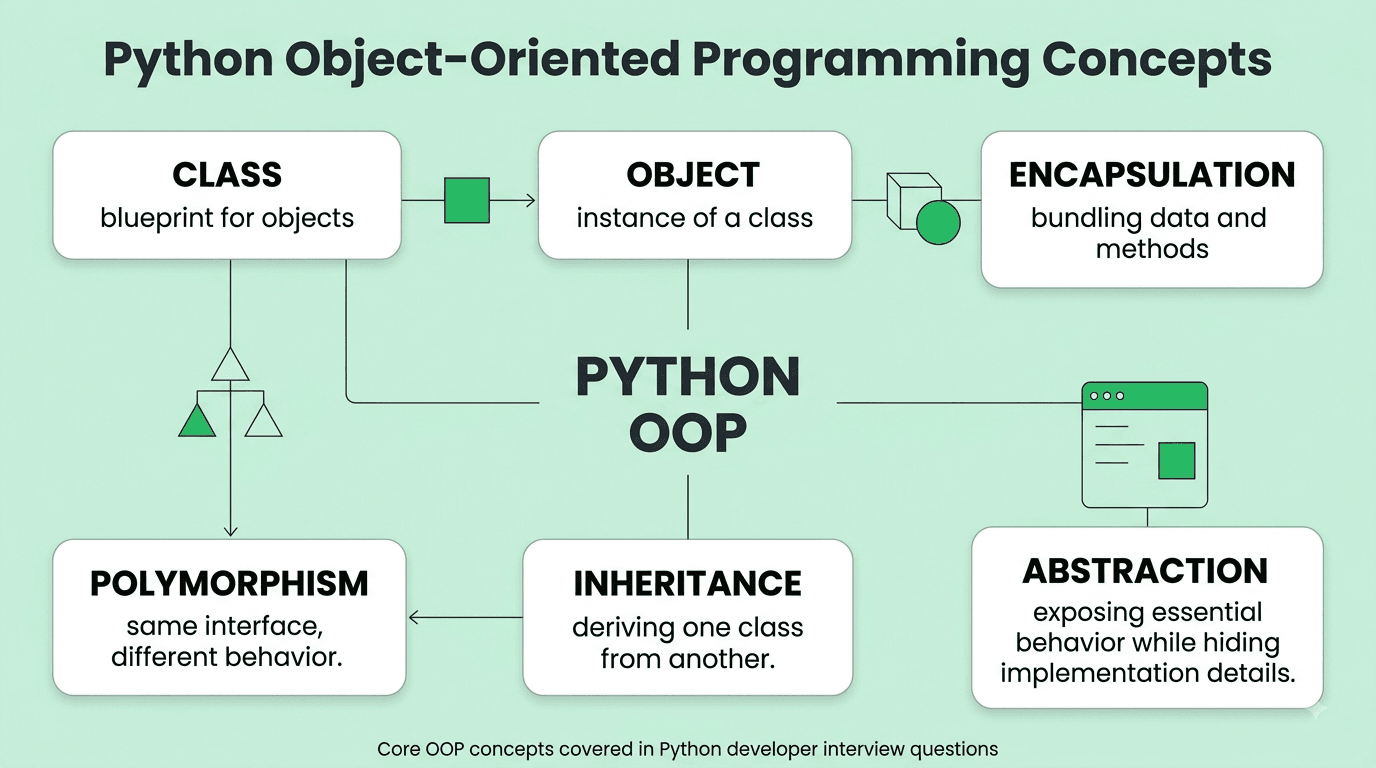
Answer: An instance method (the default, most common type) takes self as its first parameter, operating on a specific individual instance and having access to that instance's own attributes. A class method (decorated with @classmethod) takes cls (the class itself) as its first parameter instead, typically used for alternative constructors or operations that logically apply at the class level rather than to any one specific instance. A static method (decorated with @staticmethod) takes neither self nor cls, behaving essentially like a regular, independent function that's simply logically namespaced within the class for organizational purposes.
Explanation: A very commonly tested, foundational Python OOP question, testing precise understanding of when and why each of these three distinct method types is genuinely appropriate to use.
Real-World Example: A Pizza class might use a @classmethod named from_json() as an alternative constructor to create a properly initialized instance directly from JSON data, while a @staticmethod named calculate_tax() might perform a related utility calculation that doesn't actually need access to any specific pizza instance's own individual data at all.
Common Mistakes: Using a @staticmethod when a @classmethod would actually be more appropriate (for example, needing access to the class itself specifically to support proper subclassing behavior, like correctly returning an instance of whatever specific subclass a method was actually called on).
Follow-up Questions: Why would you specifically use a @classmethod rather than a @staticmethod to implement an alternative constructor pattern? How does a @classmethod correctly behave differently when called on a subclass rather than directly on the original base class? When would you choose a @staticmethod over simply defining a completely separate, standalone module-level function instead?
Question 27
Question: What is method resolution order (MRO) in Python, and how does it relate to multiple inheritance?
Answer: MRO defines the specific, well-defined order in which Python searches through a class's inheritance hierarchy (including all its various parent classes) to find a particular requested method or attribute, especially critical and relevant in cases of multiple inheritance where more than one distinct parent class might define the exact same-named method. Python uses the C3 linearization algorithm to compute this order consistently and predictably, viewable directly via a class's __mro__ attribute or the mro() method.
Explanation: A more advanced, but still commonly tested, Python OOP concept, particularly relevant for correctly and predictably understanding multiple inheritance scenarios and the specific behavior of the super() built-in function.
Real-World Example: A class inheriting from two separate parent classes that each independently define a same-named speak() method will use Python's specific MRO algorithm to consistently determine exactly which particular parent class's version of that method actually gets called first when invoked on the child class.
Common Mistakes: Assuming multiple inheritance in Python behaves simply according to a naive left-to-right, purely linear search order without properly accounting for Python's more sophisticated C3 linearization algorithm, which can produce a more complex, non-obvious resolution order in certain more complex, non-trivial inheritance hierarchies (particularly "diamond" shaped ones).
Follow-up Questions: How would you programmatically view a specific class's actual computed MRO? How does super() specifically use the MRO to determine exactly which parent class's method it should ultimately call next in the chain? What is the "diamond problem" in multiple inheritance, and how does Python's specific MRO algorithm elegantly help resolve it?
Question 28
Question: What is the difference between __init__ and __new__ in Python?
Answer: __new__ is a static method responsible for actually creating and returning a new instance of the class (called before __init__), while __init__ is an instance method responsible for initializing that already-created instance's attributes (called immediately after __new__ returns, with the newly created instance passed to it as self) — __new__ is rarely overridden in typical everyday application code, but is important specifically for implementing certain advanced patterns like true singletons or when properly subclassing an immutable built-in type.
Explanation: A more advanced, but occasionally tested, Python OOP concept, testing understanding of Python's actual underlying two-step object instantiation process, which many developers never need to think about directly in typical day-to-day usage.
Real-World Example: Implementing a genuine singleton pattern (ensuring only one single instance of a class can ever actually exist) typically requires overriding __new__ specifically to check whether an instance already exists and, if so, simply return that same existing instance instead of ever creating an entirely new one.
Common Mistakes: Attempting to override __new__ for typical, everyday initialization logic that would be far more appropriately and simply handled within the standard __init__ method instead, unnecessarily and needlessly complicating the class's actual instantiation process.
Follow-up Questions: Why would you specifically need to override __new__ rather than __init__ when properly subclassing an immutable built-in type like str or tuple? How would you correctly implement a genuine singleton pattern using __new__? What specific arguments does __new__ actually receive, and how do they relate to the arguments subsequently passed along to __init__?
Question 29
Question: What are Python properties (@property), and why would you use one instead of a simple public attribute?
Answer: The @property decorator allows a method to be accessed using simple, direct attribute-style syntax (without needing explicit parentheses to call it), enabling controlled access to an object's underlying data — allowing you to add validation logic, computed/derived values, or genuine encapsulation, all while still preserving the same simple, clean attribute-access syntax for the class's actual users/consumers, without requiring them to change how they interact with it even if the internal implementation later changes.
Explanation: A very commonly tested, idiomatic Python OOP feature, particularly testing understanding of how Python elegantly achieves proper encapsulation without requiring verbose, boilerplate-heavy explicit getter/setter methods as commonly required in some other object-oriented programming languages.
Real-World Example: A Circle class might expose a radius as a regular, simple public attribute, but define area as a @property that's dynamically and automatically computed on-the-fly from the current radius value whenever it's accessed, ensuring the reported area always correctly and automatically stays consistent with the radius, even if the radius value happens to change later after the object was first created.
Common Mistakes: Writing explicit, verbose get_x() and set_x() getter/setter methods in the Java/C++ style, out of habit from other programming languages, rather than using Python's more idiomatic, elegant @property decorator that provides equivalent controlled access using much cleaner, simpler attribute-style syntax.
Follow-up Questions: How would you define a corresponding setter for a property, allowing controlled assignment/validation logic when a value is actually set (not just read)? How would you make a property genuinely read-only (with no corresponding setter defined at all)? What's the specific performance cost, if any, of using a @property compared to directly accessing a plain, simple attribute?
Question 30
Question: What is the difference between composition and inheritance in Python, and when would you choose one over the other?
Answer: Inheritance creates an "is-a" relationship, where a subclass extends and directly reuses a parent class's existing behavior and structure. Composition instead creates a "has-a" relationship, building more complex objects by combining and delegating to smaller, independent, self-contained component objects. Composition is generally favored in modern software design for its greater flexibility and looser coupling, avoiding deep, fragile, and hard-to-modify inheritance hierarchies.
Explanation: A very commonly tested Python (and general OOP) design principle question, testing whether a candidate can identify and avoid a very common, real-world design anti-pattern (overusing inheritance purely for convenient code reuse rather than genuine, logically appropriate "is-a" modeling).
Real-World Example: Rather than a Car class inheriting directly from both an Engine class and a Wheels class (which doesn't genuinely reflect a real "is-a" relationship at all), a Car class should instead be composed of an Engine instance and Wheels instances as its constituent attributes/components, correctly and more accurately reflecting a genuine "has-a" relationship.
Common Mistakes: Defaulting reflexively to inheritance purely for the sake of convenient code reuse without carefully considering whether a genuine, logically appropriate "is-a" relationship actually and legitimately holds, leading over time to increasingly fragile, tightly-coupled, and hard-to-maintain class hierarchies.
Follow-up Questions: Can you give a concrete example from your own past work where you specifically refactored inheritance-based code into composition-based code instead, and why? How does composition specifically help improve unit testing compared to a comparable inheritance-based design? What is a Python "mixin" class, and how does it represent a reasonable, useful middle ground between pure inheritance and pure composition?
Question 31
Question: What is a metaclass in Python, and when (if ever) would you actually need to use one?
Answer: A metaclass is "the class of a class" — it defines how a class itself behaves and is actually constructed (just as a regular class defines how its own instances behave), with type being the default, built-in metaclass for virtually all ordinary Python classes. Metaclasses are a genuinely advanced, relatively rarely needed feature, typically used only for sophisticated framework-level code (like automatically registering all subclasses of a base class, or enforcing certain specific structural constraints across an entire class hierarchy) — most application-level, everyday code never actually needs to define or directly use a custom metaclass at all.
Explanation: An advanced, less frequently but still occasionally tested Python concept, testing genuine depth of understanding of Python's underlying object model, though also testing good practical judgment about the real, appropriate scope of when metaclasses are actually genuinely necessary versus needless added complexity.
Real-World Example: Django's well-known and widely-used ORM uses a custom metaclass internally, behind the scenes, to automatically and elegantly convert simple, declarative model class attribute definitions into actual, fully corresponding database field definitions and behavior — a genuinely sophisticated framework-level use case that's a good example of when metaclasses provide real, meaningful, and justified value.
Common Mistakes: Reaching for a custom metaclass to solve a problem that a much simpler tool — like a class decorator, a @classmethod, or standard inheritance — could handle just as effectively and with meaningfully less overall complexity, unnecessarily complicating the resulting code.
Follow-up Questions: How would you define and specify a custom metaclass for a given class in Python? What's a practical, real-world example of when you might genuinely need a metaclass rather than a simpler, lighter-weight alternative approach? How does Python's __init_subclass__ hook (introduced in Python 3.6) provide a simpler, often-preferable alternative to a full custom metaclass for many genuinely common use cases?
Question 32
Question: What are abstract base classes (ABCs) in Python, and why would you use one?
Answer: Abstract base classes (defined via the abc module) define a required, formal interface that concrete subclasses must properly implement, preventing the abstract base class itself from ever being directly instantiated and enforcing that specific required methods (marked with @abstractmethod) are genuinely implemented by any and all concrete subclasses — providing a more structured, formal, and explicitly enforced alternative to Python's typically more implicit, informal duck typing approach.
Explanation: A commonly tested Python OOP concept, testing understanding of when explicit interface enforcement is genuinely valuable and appropriate versus simply relying on Python's more typical implicit duck typing conventions.
Real-World Example: A plugin system might define an abstract Plugin base class requiring all properly compliant concrete plugins to correctly implement a required run() method, ensuring at genuine instantiation time (rather than only failing much later, unpredictably, at actual runtime when the method happens to first be called) that any new plugin correctly satisfies the expected, required interface.
Common Mistakes: Using an ABC purely reflexively as a matter of habit for every single class hierarchy, even in simpler cases where Python's default, more lightweight duck typing approach would be entirely sufficient and less unnecessarily formal/verbose for the actual situation at hand.
Follow-up Questions: What happens if you actually attempt to instantiate a concrete subclass that hasn't fully implemented all of its parent ABC's required abstract methods? How do ABCs specifically relate to and interact with Python's typing.Protocol (structural typing), introduced more recently? Can an abstract base class also define concrete, non-abstract methods with real, actual implementation logic alongside its abstract ones?
Question 33
Question: What is operator overloading in Python, and how would you implement it for a custom class?
Answer: Operator overloading allows custom classes to define their own specific behavior for built-in Python operators (like +, ==, <) by implementing the corresponding special "dunder" methods (like __add__, __eq__, __lt__), allowing custom objects to be used naturally and intuitively with standard Python operator syntax rather than requiring awkward, explicit method calls instead.
Explanation: A commonly tested Python OOP feature, testing familiarity with Python's data model and the specific dunder method naming conventions underlying this behavior.
Real-World Example: A custom Vector class implementing __add__ allows genuinely natural, intuitive usage like vector1 + vector2 to correctly perform proper vector addition, rather than requiring more awkward, explicit syntax like vector1.add(vector2) instead.
Common Mistakes: Implementing __eq__ for genuine, correct value-based equality comparison without also correspondingly implementing (or explicitly setting to None) __hash__, which can lead to genuinely inconsistent, buggy, and confusing behavior if instances of that class are later used as dictionary keys or set elements.
Follow-up Questions: What is the specific, required relationship and consistency contract between correctly implementing __eq__ and __hash__ together for a well-behaved custom class? How would you implement comparison operators (<, >, etc.) for a custom class, and how does functools.total_ordering conveniently help reduce required boilerplate for this? What happens if you implement __add__ but the other object being added happens to be an unsupported, incompatible type?
Question 34
Question: What is a Python dataclass, and what problem does it solve?
Answer: The @dataclass decorator (introduced in Python 3.7) automatically generates common boilerplate methods for classes primarily intended to store structured data — including __init__, __repr__, and __eq__ — based simply on declared class-level type-annotated attributes, significantly reducing the repetitive, boilerplate code that would otherwise be required to write these standard methods manually for every simple data-holding class.
Explanation: A very commonly tested, modern Python convenience feature, testing awareness of current idiomatic best practices for cleanly defining simple, structured data-holding classes.
Real-World Example: A dataclass defining a Point with x and y fields automatically and correctly gets a working __init__ constructor, a genuinely useful, readable __repr__ for debugging output, and correct, proper value-based equality comparison via __eq__ — all completely for free, without the developer needing to write any of that otherwise-repetitive boilerplate code manually themselves.
Common Mistakes: Manually writing out full boilerplate __init__, __repr__, and __eq__ methods for a genuinely simple data class in modern Python (3.7+), when @dataclass would accomplish the exact same thing far more concisely, cleanly, and with meaningfully less error-prone repetitive code required.
Follow-up Questions: How would you make a dataclass immutable (similar in spirit to a namedtuple), using the frozen=True parameter? How does a dataclass specifically handle a mutable default value (like a list) for one of its fields, given the well-known general Python mutable default argument pitfall discussed earlier? How does a dataclass compare in practice to using Pydantic's BaseModel for structured data, particularly regarding runtime data validation capability?
Question 35
Question: How would you implement a custom context manager in Python (both class-based and using contextlib)?
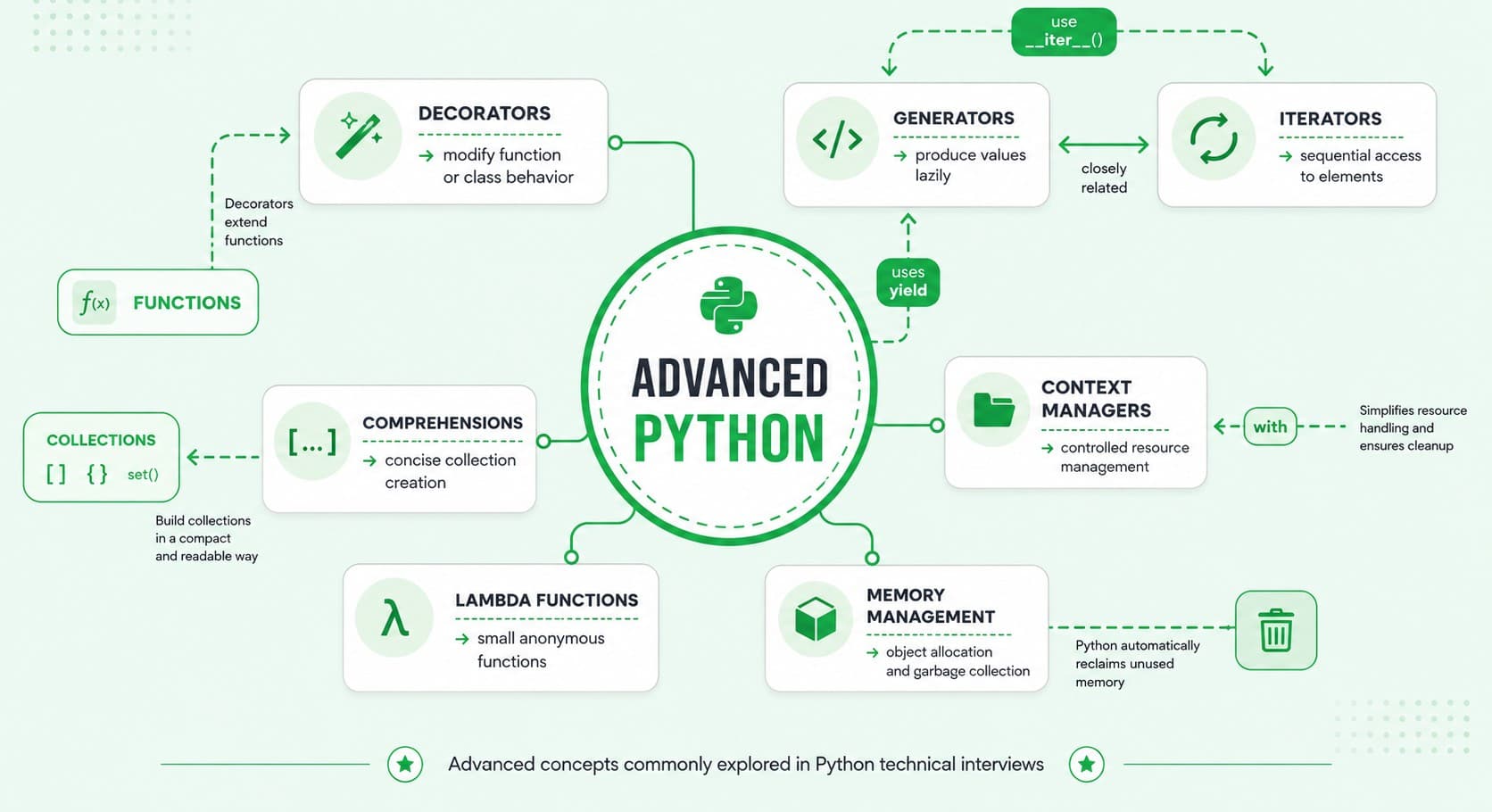
Answer: A class-based context manager implements __enter__ (returning the resource/value to be used, executed when the with block begins) and __exit__ (handling any necessary cleanup logic, executed reliably when the with block ends, regardless of whether it completed normally or an exception occurred within it). Alternatively, the @contextlib.contextmanager decorator allows writing a context manager far more concisely as a single generator function, using yield to clearly mark the specific point where the actual with block's code executes, with any setup logic placed before the yield and cleanup logic placed after it.
Explanation: A very commonly tested, practical Python feature, essential for properly and reliably managing resources (like files, network connections, or locks) that genuinely need guaranteed cleanup regardless of whether an error occurs during their use.
Real-World Example: A custom context manager might handle acquiring and reliably releasing a database connection, or temporarily and safely changing the current working directory for the specific duration of a with block before automatically and reliably reverting it back afterward, regardless of whether an error happened to occur during that block.
Common Mistakes: Manually managing a resource's setup and required teardown logic using a plain try/finally block scattered repeatedly throughout the code, rather than properly encapsulating that same reusable setup/teardown logic once within a clean, reusable context manager.
Follow-up Questions: How would you correctly handle and appropriately respond to an exception that occurs specifically within the with block, from within your context manager's __exit__ method (and what does its specific boolean return value actually control)? What's the practical, meaningful difference between a class-based context manager and one implemented using @contextlib.contextmanager? How would you implement a context manager that can be correctly and safely reused multiple times, versus one that's only safely usable a single time?
Part 4: Advanced Python Features: Decorators, Generators & Context Managers
Question 36
Question: What is a decorator in Python, and how would you write a simple custom one?
Answer: A decorator is a function that takes another function (or class) as its input and returns a modified or enhanced version of it, allowing you to cleanly add extra behavior (like logging, timing, authentication checks, or caching) around a function without directly modifying that function's own internal code — applied using the convenient @decorator_name syntax directly above a function definition.
Explanation: One of the most fundamental, distinctively Pythonic, and very commonly tested advanced language features, essential for understanding a very large amount of real-world Python code, especially in popular web frameworks and other common libraries.
Real-World Example: A @login_required decorator commonly used in web frameworks wraps a specific view function to check a user's authentication status before actually allowing the wrapped, underlying function to execute, cleanly and reusably separating that cross-cutting authentication concern from the view's own core, specific business logic.
Common Mistakes: Forgetting to use functools.wraps inside a custom decorator's inner wrapper function, which causes the resulting decorated function to unhelpfully lose its original name, docstring, and other important metadata (as seen via introspection or by debugging/documentation tools).
Follow-up Questions: How would you write a decorator that itself accepts additional configuration arguments (a "decorator factory")? What does functools.wraps specifically do, and why is properly using it generally considered such important, standard best practice? How would you apply multiple different decorators to a single function, and in what specific order do they actually get correctly applied?
Question 37
Question: How would you write a decorator that measures and logs a function's execution time?
Answer: Define a decorator function that, in its inner wrapper function, records the current time immediately before calling the original wrapped function, calls that original function normally (capturing and preserving its actual return value), records the time again immediately afterward, logs the calculated resulting time difference, and finally returns the original function's captured return value — using functools.wraps to properly preserve the original function's name and other metadata throughout.
Explanation: A very commonly asked practical hands-on coding exercise, testing genuine, correct decorator implementation skill on an immediately practical, realistic, and directly useful example.
Real-World Example: Development teams commonly use exactly this kind of timing decorator during performance profiling and debugging efforts to quickly and easily identify which specific functions in a codebase are unexpectedly slow, without needing to manually and repetitively add timing code directly inside each individual function being investigated.
Common Mistakes: Forgetting to properly return the original wrapped function's actual return value from within the wrapper (silently discarding and losing it entirely), or using time.time() instead of the generally more precise and appropriate time.perf_counter() specifically for accurate performance measurement purposes.
Follow-up Questions: How would you modify this decorator to also work correctly and properly with async functions? How would you make this timing decorator conditionally toggleable via an additional parameter, without needing to fully remove it from the code entirely when not actively needed? How would you handle correctly and safely capturing an exception that occurs during the wrapped function's actual execution, while still properly logging the elapsed time even in that specific failure case?
Question 38
Question: What is memoization, and how would you implement it in Python (both manually and using functools)?
Answer: Memoization caches a function's previously computed results, keyed by its specific input arguments, to avoid redundant, expensive recomputation for identical, previously-seen inputs. You can implement it manually with a decorator using a dictionary to store cached previous results, or, much more simply and idiomatically, use the built-in functools.lru_cache decorator, which provides an efficient, production-ready implementation with configurable cache size limits, completely out of the box with no custom code required.
Explanation: A very commonly tested practical Python performance optimization technique, testing both genuine understanding of the underlying core concept and, importantly, awareness of Python's excellent, readily-available built-in tooling for this exact common purpose.
Real-World Example: A recursive Fibonacci function without any memoization has exponential O(2^n) time complexity due to extensive redundant recomputation, but simply adding @functools.lru_cache reduces it dramatically to linear O(n) time, since each distinct, unique input value only ever needs to be genuinely computed once.
Common Mistakes: Manually implementing memoization from scratch using a plain, unbounded dictionary without any cache size limit, when functools.lru_cache (with its convenient, sensible built-in maxsize parameter to help control memory usage) would be significantly simpler, safer, and more appropriate for most typical real-world use cases.
Follow-up Questions: What are the specific limitations of functools.lru_cache — what types of function arguments does it require in order to work correctly? How would you appropriately clear a function's existing memoization cache if genuinely needed? How does memoization specifically interact with mutable function arguments, and what potential correctness problems could that particular combination cause?
Question 39
Question: What is the difference between a generator function and a generator expression?
Answer: A generator function is defined using def and contains at least one yield statement somewhere within its body, while a generator expression provides a similarly lazy, memory-efficient equivalent using a syntax visually very similar to a list comprehension, but using parentheses instead of square brackets (e.g., (x**2 for x in range(10))) — both ultimately produce a genuine generator object, but a generator expression is generally more concise and convenient specifically for simpler, single-expression cases.
Explanation: A commonly tested Python syntax question, testing understanding of two closely related but syntactically distinct ways of achieving the exact same fundamental underlying lazy-evaluation behavior.
Real-World Example: Summing the squares of a very large range of numbers is memory-efficiently accomplished with sum(x**2 for x in range(1_000_000)) using a generator expression, avoiding ever needing to construct and hold an entire large intermediate list of one million actual squared values in memory all at once.
Common Mistakes: Unnecessarily wrapping a generator expression in an explicit list comprehension (using square brackets) when the lazy, memory-efficient generator version would work perfectly well and be considerably more memory-efficient for the specific situation at hand, especially when the resulting full list of values genuinely isn't ever needed all at once.
Follow-up Questions: Can you pass a generator expression directly as a function argument without needing any additional, extra parentheses around it? What happens if you attempt to iterate over an already fully-exhausted generator a second time? How would you convert a generator into a fully-realized concrete list if you specifically needed one for some reason?
Question 40
Question: How would you use yield from in a Python generator, and what problem does it solve?
Answer: yield from delegates iteration to another nested iterable or sub-generator, automatically and correctly yielding each of its individual values in turn, without requiring an explicit manual loop to do so — this both simplifies the required code and also correctly and transparently handles more complex aspects like properly propagating sent values and exceptions back and forth between the caller and that specific inner sub-generator.
Explanation: A more advanced generator feature, testing deeper understanding of generator composition and delegation beyond the more basic, introductory generator use cases.
Real-World Example: A generator function that needs to yield values from several different nested sub-generators in sequence (like flattening a nested, hierarchical directory tree structure) can use yield from for each individual nested sub-generator, rather than needing to write out a more verbose, explicit manual for loop with an inner yield for each and every one of them.
Common Mistakes: Manually writing out a full explicit for item in sub_generator: yield item loop instead of using the more concise, idiomatic, and equally effective yield from sub_generator shorthand available for this exact common purpose.
Follow-up Questions: How does yield from specifically handle correctly propagating a value sent into the outer generator (via .send()) down to the inner sub-generator? How would you use yield from to properly and cleanly implement a recursive generator (like one that flattens an arbitrarily deeply nested list structure)? What's the actual return value of a yield from expression itself?
Question 41
Question: What is the difference between @staticmethod, a module-level function, and a nested function inside another function?
Answer: A @staticmethod is logically namespaced within a class (accessed via ClassName.method() or instance.method()) but otherwise behaves essentially like a regular, independent function, without receiving any automatic implicit self or cls argument. A module-level function exists directly at the top level of a module, accessible from anywhere that properly imports that module. A nested function is defined entirely within another enclosing function's own local scope, only accessible from within that specific enclosing function (though it can be usefully returned from it, as commonly seen in closures and decorator implementations).
Explanation: A commonly tested Python scoping and code organization question, testing genuine understanding of where and why to properly organize different pieces of related functionality.
Real-World Example: A validation helper function used only internally within one single specific method might be defined as a nested function specifically to keep it appropriately private and cleanly scoped, while a genuinely more broadly reusable utility function shared meaningfully across multiple different modules would more appropriately be defined at the module level instead.
Common Mistakes: Overusing @staticmethod for functionality that has genuinely no meaningful logical relationship to the specific class it's defined within at all, when a plain, independent module-level function would actually be clearer, more appropriate, and more discoverable.
Follow-up Questions
How does a nested function's specific access to its enclosing function's local variables relate to the broader concept of closures? When would you specifically choose a @staticmethod over an equivalent plain module-level function, given they behave quite similarly in practice? How does Python's LEGB (Local, Enclosing, Global, Built-in) scope resolution rule specifically apply to a nested function?
Question 42
Question: What is Python's with statement, and how does it relate to resource management best practices?
Answer: The with statement provides a clean, reliable syntax for properly managing resources that need guaranteed setup and teardown/cleanup logic (like files, network connections, or locks), using a context manager to ensure the resource's cleanup code always reliably runs when the block exits — whether it exits normally or due to an exception being raised within it — eliminating the meaningful risk of resource leaks that could otherwise occur if manual cleanup code were forgotten or accidentally skipped due to an early, unexpected error.
Explanation: A very commonly tested, idiomatic Python best-practices question, essential for writing genuinely robust, reliable code that correctly and safely manages external resources.
Real-World Example: Opening a file using with open('file.txt') as f: guarantees the file is properly and automatically closed once the block exits, even if an exception occurs somewhere partway through reading or processing its contents — compared to manually calling f.close() at the very end, which could easily and unintentionally be skipped entirely if an earlier, unexpected error occurs first.
Common Mistakes: Manually opening a file (or other similar resource) without using a with block at all, and then forgetting to properly close it in every possible code path, particularly including various less obvious error-handling paths that are easy to overlook.
Follow-up Questions: How would you use a with statement to properly manage multiple separate resources simultaneously within a single statement? What happens internally, in terms of __enter__ and __exit__, when an exception is raised somewhere inside a with block? How would you implement a custom context manager specifically to properly and safely manage a database transaction (committing on success, or automatically rolling back on any failure)?
Question 43
Question: What is monkey patching in Python, and what are its risks?
Answer: Monkey patching is dynamically modifying or extending a class or module's existing behavior at runtime (after it has already been originally defined/loaded), typically by directly reassigning one of its existing methods or attributes to something different — while occasionally genuinely useful (particularly for testing purposes, like temporarily replacing a specific function with a mock), it's generally considered a risky practice for regular production code, since it can make overall program behavior significantly harder to reason about, trace, and predict, and can potentially create subtle, hard-to-diagnose conflicts if multiple different parts of a codebase happen to inconsistently or independently patch the exact same thing.
Explanation: A commonly tested, somewhat advanced Python dynamism question, testing awareness of both a genuinely powerful language capability and, importantly, mature, practical judgment about when it's actually appropriate to use it versus when it should generally be avoided.
Real-World Example: Unit tests very commonly and appropriately use monkey patching (often conveniently via the unittest.mock module's patch functionality) to temporarily replace a genuine external API call with a fully controlled, predictable mock response specifically for the reliable, isolated duration of a given test, without ever needing to modify the actual original source code being tested at all.
Common Mistakes: Using monkey patching in regular production application code (rather than appropriately confining its use to legitimate testing scenarios) to work around some underlying, more fundamental design problem, rather than properly and more sustainably fixing that actual underlying root design issue directly and correctly.
Follow-up Questions: How would you use unittest.mock.patch to properly and safely mock a specific function for the duration of a single given test? What are the genuine, concrete risks of monkey patching a widely and commonly used third-party library's internal behavior in your own regular application code? Can you give a specific, legitimate, appropriate use case for monkey patching beyond just testing scenarios?
Question 44
Question: What is the difference between @property and Python's __getattr__/__setattr__ magic methods for controlling attribute access?
Answer: @property provides fine-grained, targeted control over access to one single, specific, individually named attribute. __getattr__ is called automatically only when a genuinely normal, standard attribute lookup would otherwise fail entirely (i.e., the attribute genuinely doesn't already exist through the object's normal, regular attribute resolution process), allowing dynamic, on-the-fly, "catch-all" attribute generation. __setattr__ intercepts every single attribute assignment made on an object, allowing centralized custom logic (like consistent validation or logging) to be applied uniformly across all attribute assignments at once, rather than needing individual per-attribute property definitions for each one separately.
Explanation: A more advanced Python OOP question, testing precise, nuanced understanding of several different, related mechanisms Python provides for meaningfully customizing attribute access behavior, and genuine judgment about when each specific one is actually the most appropriate tool for a given situation.
Real-World Example: A configuration object that needs to dynamically support many arbitrary, not-fully-predetermined attribute names (potentially loaded dynamically from an external file at runtime) might reasonably use __getattr__ for that flexible, catch-all case, while a class needing validation logic for just one single, specific, well-known attribute (like ensuring an age value is always non-negative) would more appropriately use a simple, targeted @property instead.
Common Mistakes: Overusing __getattr__/__setattr__ for situations that would actually be handled more clearly, simply, and appropriately with individual, explicit @property definitions instead, unnecessarily and needlessly obscuring the resulting class's genuinely intended, discoverable public interface.
Follow-up Questions: What's the meaningful difference between __getattr__ and __getattribute__, and specifically when is each one actually called? How would you avoid a subtle, easy-to-create infinite recursion bug when properly implementing a custom __setattr__ method? When would dynamic, catch-all attribute access genuinely be the appropriate, correct design choice compared to a more explicit, well-defined set of individually declared attributes?
Question 45
Question: What is type hinting in Python, and what are its benefits given Python remains a fundamentally dynamically-typed language?
Answer: Type hints (introduced in Python 3.5 via the typing module and PEP 484) allow optionally annotating variables, function parameters, and return values with their genuinely expected types, without actually enforcing them at runtime by default (Python itself doesn't natively check them during normal execution) — their real, practical value comes from enabling static type checkers (like mypy or pyright) to catch a meaningful class of type-related bugs before runtime, improving IDE autocomplete and inline documentation quality, and generally making a codebase's genuinely intended behavior and contracts significantly clearer and more explicit for other developers.
Explanation: An increasingly important and very commonly tested modern Python practice, testing awareness of how the broader Python community and ecosystem has evolved toward embracing significantly more robust tooling and stronger correctness guarantees, even while still fundamentally retaining Python's core underlying dynamic typing nature.
Real-World Example: A function properly annotated as def process(items: list[str]) -> dict[str, int]: clearly and explicitly documents its genuinely expected input and output types directly in the function's own signature, and a static type checker like mypy can then reliably catch a caller mistakenly passing an incompatible, wrong-typed argument well before that bug could ever actually reach runtime and manifest as a real, live production error.
Common Mistakes: Assuming type hints are genuinely and actively enforced by the Python interpreter itself at runtime (they generally are not, by default), leading to a false, misplaced sense of runtime type safety without an actual, separate static type checker tool being properly integrated into the development and CI workflow to meaningfully verify them.
Follow-up Questions: How would you properly set up and run mypy as part of a project's CI pipeline to actually enforce these declared type hints? What is Optional[X] (or the newer X | None syntax), and specifically when and why would you use it? How do type hints for more complex generic types (like a properly generic container class) actually work in Python?
FREE TO USE
8k+ SESSIONS92% FLUENCY4.9★ RATING
Speak With Confidence
Real Conversations. Real Scenarios. Speak until it feels natural.
- Real-Time Speaking Practice
- Guided Conversation Flows
- Instant AI Feedback
Part 5: Concurrency & Performance
Question 46
Question: What is the difference between threading, multiprocessing, and asyncio in Python, and when would you use each?
Answer: threading uses multiple OS-level threads within a single process, useful for I/O-bound tasks (since the GIL is released during I/O waits) but not for genuinely CPU-bound work due to the GIL's restriction. multiprocessing uses separate, independent OS processes, each with its own Python interpreter and memory space, genuinely bypassing the GIL entirely and enabling true parallel execution well-suited for CPU-bound work, though at the cost of higher memory usage and more complex inter-process communication. asyncio uses a single-threaded, cooperative-multitasking event loop for highly efficient, non-blocking I/O-bound concurrency, well-suited for a very large number of concurrent I/O-bound operations (like many simultaneous network connections) without the meaningful overhead of managing many separate actual OS threads.
Explanation: One of the single most important and commonly tested Python concurrency questions, since correctly choosing the appropriate concurrency model for a given specific workload type is essential for writing genuinely performant Python code.
Real-World Example: A web scraper making thousands of concurrent HTTP requests is very well suited to asyncio (efficient, lightweight I/O-bound concurrency), while a CPU-intensive image processing pipeline processing many images in parallel is much better suited to multiprocessing to genuinely and fully utilize multiple available CPU cores in true, actual parallel execution.
Common Mistakes: Using threading for genuinely CPU-bound work expecting real, true parallel speedup, then being confused when performance doesn't meaningfully improve at all due to the GIL's fundamental restriction on true parallel bytecode execution within a single process.
Follow-up Questions: How would you decide between asyncio and threading specifically for an I/O-bound workload — what are the real, practical tradeoffs between the two different approaches? How does multiprocessing specifically handle sharing and communicating data between its separate, independent processes? Can you meaningfully combine asyncio with multiprocessing in the same application, and if so, in what kind of scenario would that combination actually make sense?
Question 47
Question: How does Python's asyncio event loop work, and how would you write a simple asynchronous function?
Answer: The asyncio event loop manages and schedules the execution of multiple coroutines, running one at a time but efficiently switching between them specifically whenever the currently executing one hits an await point on some I/O operation, allowing many concurrent operations to make meaningful, efficient progress without ever requiring genuinely separate OS threads. An async function is defined using async def, and any calls to other async operations within it are properly awaited using the await keyword.
Explanation: A very commonly tested modern Python concurrency concept, essential given asyncio's widespread and growing adoption in contemporary Python web frameworks and other I/O-heavy applications.
Real-World Example: An async web server handling many simultaneous client requests can efficiently process a very large number of concurrent database queries or external API calls using asyncio, since while one particular request's database query is actively awaiting its own I/O response, the event loop can productively switch over to processing an entirely different request in the meantime.
Common Mistakes: Calling a blocking, synchronous function (like a genuinely CPU-bound calculation, or a traditional, non-async blocking library call) directly from within an async function without properly delegating it to a separate thread or process pool, which unintentionally blocks the entire single event loop and defeats the whole fundamental purpose and benefit of using asyncio at all.
Follow-up Questions: How would you properly run multiple independent async coroutines genuinely concurrently using asyncio.gather()? How would you correctly handle a genuinely CPU-bound or blocking synchronous operation from within an otherwise async codebase, without blocking the entire event loop? What's the meaningful, practical difference between a coroutine and a genuine Python generator, given their outwardly similar syntax?
Question 48
Question: How would you profile a Python program to identify performance bottlenecks?
Answer: Use Python's built-in cProfile module to get a detailed function-level breakdown of exactly where time is genuinely being spent throughout the program, or a line-by-line profiler (like line_profiler) for more granular detail specifically within one particular already-identified function of interest, or a memory profiler (like memory_profiler) specifically if memory usage, rather than raw execution time, is the actual primary suspected concern — the systematic, general goal is always to measure and identify the real bottleneck with concrete, actual data first, rather than relying purely on intuition or guesswork about what's likely slow.
Explanation: A very commonly tested, highly practical performance question, testing systematic debugging methodology genuinely grounded in actual measurement rather than unverified guessing.
Real-World Example: Profiling a genuinely slow data processing script with cProfile might reveal that 90% of the total execution time is actually being spent in one single, specific function performing repeated, redundant string concatenation, immediately and clearly pointing toward switching to a more efficient approach (like using str.join() instead) as the appropriate, well-targeted fix.
Common Mistakes: Attempting to optimize code purely based on intuition about what "seems slow" without first properly profiling to confirm the actual, real bottleneck, potentially wasting significant time and effort optimizing a part of the code that genuinely isn't the actual primary performance issue at all.
Follow-up Questions: What's the meaningful practical difference between cProfile and line_profiler in terms of the specific granularity of detail each one provides? How would you use the output of cProfile (perhaps combined with a visualization tool like snakeviz) to more easily and clearly identify the actual specific bottleneck? How would you specifically profile an asyncio-based application, given profiling concurrent, asynchronous code can be somewhat more inherently complex than profiling simpler, purely synchronous code?
Question 49
Question: What is the difference between a race condition and a deadlock in concurrent Python programming?
Answer: A race condition occurs when the correctness of a program's outcome depends unpredictably on the specific relative timing of concurrent operations, typically caused by unsynchronized, uncoordinated access to some shared mutable state. A deadlock occurs when two or more threads/processes are each indefinitely waiting for a resource currently held by the other, creating a circular waiting dependency where neither can ever actually proceed further.
Explanation: A foundational concurrency concept, testing understanding of two of the most common and consequential classes of bugs that can occur in genuinely concurrent Python programs.
Real-World Example: A race condition might occur if two separate threads both simultaneously read a shared counter's current value, each independently increment it, and then both write their own resulting incremented value back — potentially causing one of the two increments to be silently lost entirely, depending purely on the exact, unpredictable relative timing of the two threads' operations.
Common Mistakes: Accessing and modifying shared mutable state from multiple concurrent threads without using an appropriate lock (like threading.Lock) or another suitable synchronization primitive to properly and safely protect that shared, concurrently-accessed state.
Follow-up Questions: How would you use threading.Lock to properly prevent a specific race condition on some shared piece of state? What specific conditions must simultaneously be true for a genuine deadlock to actually occur? How would you meaningfully debug and detect a suspected race condition, given they're often notoriously intermittent and genuinely difficult to reliably reproduce?
Question 50
Question: How would you optimize a Python program that's found to be too slow?
Answer: Systematic approach: first profile to properly identify the actual bottleneck (not merely guessing at it), then consider algorithmic improvements (choosing a more efficient underlying algorithm or appropriate data structure, generally the highest-leverage fix), leveraging built-in functions and libraries implemented in C (like NumPy for numerical work, which is dramatically faster than equivalent pure Python loops), using appropriate caching/memoization for genuinely redundant computations, and, only if genuinely still necessary after all those steps, considering more involved approaches like Cython, multiprocessing for CPU-bound work, or rewriting only the specific critical hot path in a faster compiled language.
Explanation: A holistic, comprehensive Python performance question, testing whether a candidate has a genuinely systematic, well-prioritized optimization strategy, rather than jumping immediately to premature or inappropriately complex optimizations.
Real-World Example: A slow data processing script performing extensive numerical computation using plain Python loops over lists can very often achieve a dramatic, order-of-magnitude speedup simply by switching to vectorized NumPy array operations, which are internally implemented in highly optimized C and avoid the substantial overhead inherent to Python's own interpreter loop.
Common Mistakes: Jumping straight to a more complex, higher-effort optimization approach (like rewriting a performance-critical piece in Cython or C) before first properly exhausting genuinely simpler, more readily accessible options like better algorithm/data structure selection or effectively leveraging existing, already-optimized libraries like NumPy.
Follow-up Questions: Can you give a concrete example from your own past work where switching to a more efficient data structure meaningfully and substantially improved a program's overall performance? How would you decide when it's genuinely, appropriately time to consider Cython or writing a C extension for a specific critical piece of Python code? What's the real, meaningful performance benefit of NumPy's vectorized array operations specifically compared to equivalent native Python loops, and precisely why does that significant difference actually exist?
Question 51
Question: What is the difference between multiprocessing.Pool and concurrent.futures.ProcessPoolExecutor?
Answer: Both provide convenient, higher-level abstractions for genuinely parallelizing work across multiple separate processes, but concurrent.futures offers a more modern, unified, and consistent interface shared with ThreadPoolExecutor (making it meaningfully easier to switch between thread-based and process-based parallelism with only relatively minor code changes required), while multiprocessing.Pool is the somewhat older, more original API, offering slightly different, somewhat lower-level convenience methods (like .map(), .apply(), and .apply_async()).
Explanation: A commonly tested practical Python concurrency question, testing genuine familiarity with the standard library's actually available parallel processing tools and their meaningful, real practical differences.
Real-World Example: A data pipeline that might potentially need to switch between thread-based parallelism (for I/O-bound work) and process-based parallelism (for CPU-bound work) depending on the specific workload benefits significantly from concurrent.futures's genuinely unified, consistent interface, since switching between ThreadPoolExecutor and ProcessPoolExecutor requires only a relatively minimal, small code change.
Common Mistakes: Not being aware that concurrent.futures exists at all as a more modern, generally recommended alternative, and instead always defaulting reflexively to the somewhat older multiprocessing.Pool API purely out of unexamined habit or unfamiliarity with the newer option.
Follow-up Questions: How would you properly use ProcessPoolExecutor.map() to genuinely parallelize a CPU-bound function across a list of many different inputs? What specific data serialization requirements (via pickle) exist when passing arguments to and results back from a separate process? How would you properly handle a genuine exception that occurs within a specific worker process, and correctly propagate it back to the calling, orchestrating main process?
Question 52
Question: What is the difference between __slots__ and a regular class's default attribute storage, and when would you use __slots__?
Answer: By default, Python class instances store their individual attributes in a per-instance dictionary (__dict__), which offers full, complete flexibility for dynamically adding new attributes at any time, but does carry some genuine memory overhead. Defining __slots__ (specifying a fixed, explicit list of allowed attribute names) instead prevents that default per-instance dictionary from being created at all, meaningfully reducing memory usage — particularly beneficial and impactful when creating a very large number of instances of a given simple class.
Explanation: A commonly tested, practical Python memory optimization technique, testing awareness of a genuinely useful but somewhat less commonly known feature specifically valuable for memory-constrained or very high-instance-count applications.
Real-World Example: A class representing individual points in a massive dataset containing millions of instances could achieve significant, meaningful memory savings by defining __slots__ = ['x', 'y'], avoiding the otherwise substantial cumulative overhead of a full, separate per-instance __dict__ for each and every one of those millions of individual point instances.
Common Mistakes: Using __slots__ on a class that genuinely needs the flexibility to dynamically add arbitrary new attributes at runtime, which would then unexpectedly and incorrectly raise an AttributeError for any attribute not already explicitly declared upfront in the __slots__ list.
Follow-up Questions: How does __slots__ specifically interact with inheritance, particularly if only some classes within a given hierarchy properly define it while others don't? What are the real, measurable, and quantifiable memory savings you might typically expect from properly using __slots__ for a genuinely large number of simple instances? Can a class using __slots__ still support properties and other dunder methods normally, without significant additional restriction?
Question 53
Question: How would you handle a memory leak in a long-running Python application?
Answer: Approach: use a memory profiling tool (like tracemalloc, Python's own built-in memory tracing module, or a more specialized third-party tool like objgraph) to track genuine memory usage growth over time and specifically identify which particular objects are unexpectedly and problematically accumulating without ever being properly released, check carefully for common, well-known culprits (like growing global caches or collections without any bound, lingering event listener/callback references that are never properly cleaned up, or genuine circular references specifically involving objects that also define a custom __del__ method, which the cyclic garbage collector historically handled somewhat less reliably), and use gc.collect() combined with gc.get_objects() to further investigate and manually identify any genuinely uncollected, lingering objects.
Explanation: A very practical, commonly tested troubleshooting scenario, since diagnosing and properly fixing memory leaks in genuinely long-running Python applications (like a persistent web server) is an important, real, and non-trivial practical skill.
Real-World Example: A long-running web server's memory usage steadily and continuously growing over time might be traced back to a global, module-level cache dictionary that's continually and repeatedly added to on every incoming request but is never actually cleared or bounded in any way, eventually and inevitably exhausting available system memory if left unaddressed.
Common Mistakes: Assuming Python's automatic garbage collection entirely and completely eliminates any real possibility of memory leaks, without recognizing that lingering, unintentional references (like unbounded global caches or forgotten, un-cleaned-up event listeners) can still genuinely and meaningfully prevent otherwise-unused objects from ever actually being properly collected and released.
Follow-up Questions: How would you specifically use tracemalloc to take and meaningfully compare memory usage snapshots at different points in time to help pinpoint a suspected leak? What role does Python's cyclic garbage collector specifically play in handling reference cycles that plain, simple reference counting alone genuinely cannot resolve on its own? How would you go about writing an effective, genuinely reliable regression test specifically to help catch a memory leak before it could ever reach production?
Question 54
Question: What is the difference between is comparison performance and == comparison performance in Python, and when might this actually matter?
Answer: is comparison checks object identity via a simple, direct, and very fast pointer/memory-address comparison, making it consistently and predictably O(1). == comparison instead calls the object's own __eq__ method, whose actual performance genuinely depends entirely on that specific method's own implementation — for simple, small primitive types this difference is negligible in practice, but for large, complex objects (like sizable lists or dictionaries), == may need to perform a comparatively much more expensive, deep recursive comparison across the entire object's contents.
Explanation: A more nuanced, subtle performance question, testing genuine understanding of the real underlying performance implications of these two frequently and easily conflated comparison operators.
Real-World Example: Checking whether a variable is specifically None should always use the faster, simpler is None (an O(1) identity check) rather than == None, both as an established idiomatic best practice and because it also correctly avoids the small added, unnecessary overhead of unnecessarily invoking a full, more complex __eq__ method call in that specific common case.
Common Mistakes: Using == where is would genuinely be both more appropriate and meaningfully more efficient (like checking specifically for None, or comparing against a known, unique singleton sentinel value), unnecessarily incurring a small but genuinely avoidable performance cost in a case where identity comparison is actually the semantically and logically correct choice anyway.
Follow-up Questions: Why is checking specifically if x is None: considered more idiomatically correct than if x == None:, beyond purely the minor performance consideration alone? How would you correctly implement __eq__ for a custom class in a way that remains efficient even for genuinely large, complex objects? What's the specific performance cost of Python's default __eq__ implementation (inherited from object) for a custom class that hasn't explicitly overridden it itself?
Question 55
Question: How would you efficiently process a very large file that doesn't comfortably fit entirely in memory?
Answer: Process the file line by line (or in fixed, manageable chunks) using Python's built-in, inherently lazy file iteration (for line in file:), or a generator-based processing pipeline, rather than reading the file's entire contents into memory all at once via .read() or .readlines() — this keeps memory usage roughly constant and bounded regardless of the file's actual total overall size, since only one line or one chunk genuinely needs to be held in memory at any single given moment during processing.
Explanation: A very commonly tested, highly practical performance and memory-management question, since processing large files while properly and carefully respecting genuine memory constraints is an extremely common and important real-world task.
Real-World Example: Processing a multi-gigabyte log file to count occurrences of a specific error pattern is very efficiently and safely accomplished by iterating through it line by line using Python's built-in, lazy file iteration, maintaining consistently low, bounded, and predictable memory usage throughout the entire process regardless of how large the log file actually happens to be.
Common Mistakes: Using .readlines() or .read() to eagerly load an entire potentially very large file into memory all at once as a first, seemingly simple step, which can cause the program to run out of available memory entirely or perform very poorly for genuinely large files.
Follow-up Questions: How would you process an extremely large CSV file efficiently, specifically using the csv module's own built-in, inherently lazy row iteration capability? How would you process a large file's chunks genuinely in parallel across multiple separate worker processes? How would you handle a large file that's actively still being written to by another separate process while you're simultaneously attempting to read from it?
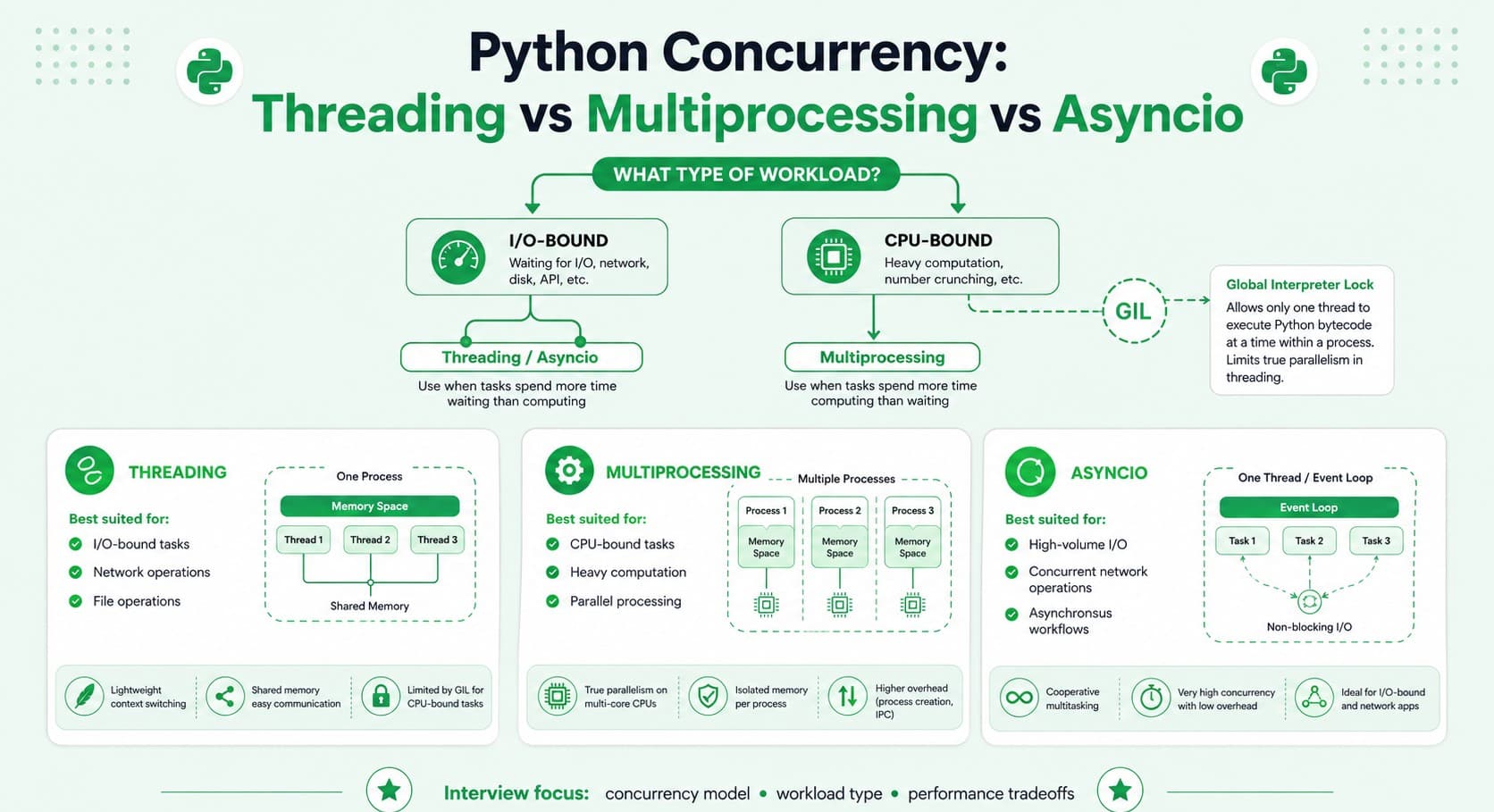
Part 6: Web Development & APIs
Question 56
Question: What is the difference between Django, Flask, and FastAPI, and how would you decide which to use for a given project?
Answer: Django is a full-featured, "batteries-included" framework providing an ORM, admin panel, authentication, and a well-defined, opinionated project structure out of the box — well suited for larger, more full-featured, traditional web applications needing many of these built-in features. Flask is a lightweight, minimalist microframework providing core routing and request-handling functionality while leaving most other architectural decisions (ORM choice, project structure) up to the developer — well suited for smaller applications, simpler APIs, or situations genuinely needing more architectural flexibility. FastAPI is a more modern, high-performance framework specifically built around Python's type hints, offering automatic request validation, interactive API documentation generation, and native asyncio support — particularly well suited for building performant, well-documented APIs.
Explanation: A very commonly tested Python web framework comparison question, testing whether a candidate makes a genuinely informed, project-appropriate framework choice rather than defaulting reflexively to whichever one they simply happen to be most personally familiar with.
Real-World Example: A content-heavy website needing a built-in admin interface for non-technical content editors is well suited to Django's comprehensive, built-in admin panel, while a small, focused, performance-critical microservice API is often better suited to FastAPI's lightweight nature, native async support, and automatic request validation and documentation generation.
Common Mistakes: Choosing Django for a simple, small microservice that doesn't genuinely need most of its extensive built-in features, unnecessarily incurring meaningful added complexity and overhead relative to the project's actual real requirements.
Follow-up Questions: How does FastAPI specifically use Python's type hints to enable automatic request validation and API documentation generation? What is Django's ORM, and how does it meaningfully compare to using SQLAlchemy (a common choice with Flask or FastAPI)? When would you specifically choose Flask over FastAPI for a new project today?
Question 57
Question: How would you design and implement a RESTful API endpoint in Python (e.g., using Flask or FastAPI)?
Answer: Define a route mapping a specific URL pattern and HTTP method to a handler function, validate and appropriately parse the incoming request (path parameters, query parameters, and/or request body), execute the relevant business logic (typically interacting with a database or other service), and return an appropriately structured response with the correct corresponding HTTP status code — following standard REST conventions (resource-based URLs, proper use of HTTP methods) and using appropriate error handling for genuinely invalid requests or unexpected internal errors.
Explanation: A very commonly asked practical, hands-on implementation question, testing genuine ability to translate API design principles into actual, working Python code using a real, familiar framework.
Real-World Example: A FastAPI endpoint for retrieving a specific user might be defined as @app.get("/users/{user_id}") with a Pydantic response model for automatic validation and consistent serialization, correctly returning a 404 status code with an appropriate error message if the requested user genuinely doesn't exist in the database.
Common Mistakes: Not properly validating incoming request data before actually using it in subsequent business logic or database queries, or returning an inappropriate, generic HTTP status code (like always returning 200 even for a genuine error condition) rather than following proper REST conventions.
Follow-up Questions: How would you handle input validation for a request body using a specific framework's own particular tools (like Pydantic models in FastAPI, or a dedicated validation library in Flask)? How would you implement pagination for an endpoint returning a genuinely large collection of results? How would you properly and consistently structure error responses across your entire API for predictable, consistent client-side error handling?
Question 58
Question: What is WSGI, and how does it differ from ASGI?
Answer: WSGI (Web Server Gateway Interface) is the traditional, long-standing standard interface between Python web applications and synchronous web servers, handling one single request at a time per worker in a blocking, synchronous manner. ASGI (Asynchronous Server Gateway Interface) is the newer, more modern standard supporting both traditional synchronous applications and, importantly, genuinely asynchronous applications, enabling efficient handling of WebSockets, long-lived connections, and highly concurrent I/O-bound requests using asyncio.
Explanation: A commonly tested Python web infrastructure question, essential for understanding the underlying mechanics of how Python web applications actually and fundamentally interface with real web servers, and why newer async frameworks like FastAPI specifically require ASGI rather than the older, traditional WSGI standard.
Real-World Example: A traditional Flask or Django application (in its default configuration) is typically served using a WSGI-compliant server like Gunicorn, while a FastAPI application, given it's fundamentally and natively built around asyncio, requires an ASGI-compliant server like Uvicorn specifically in order to actually work correctly and take proper advantage of its native async capabilities.
Common Mistakes: Attempting to serve an inherently async application (like one built with FastAPI) using an incompatible traditional WSGI server, which fundamentally cannot properly and correctly support that application's native asynchronous request-handling behavior.
Follow-up Questions: Can Django (traditionally a WSGI-based framework) now also fully support ASGI, and if so, what does that specifically enable? What specific advantages does ASGI meaningfully provide for handling long-lived connections like WebSockets, compared to the older, more limited traditional WSGI standard? What are some commonly used, well-known WSGI and ASGI server implementations you're personally familiar with?
Question 59
Question: How would you implement authentication in a Python web API?
Answer: Common approaches: session-based authentication (the server maintains and stores session state, sending a corresponding session ID to the client via a cookie), token-based authentication (typically JWT — the server issues a signed, stateless token after successful login, subsequently verified independently on each following request without requiring server-side session storage), or delegating entirely to a dedicated, established third-party authentication provider (like Auth0 or a similar service). Regardless of the specific chosen approach, best practices include always hashing passwords with a strong, deliberately slow algorithm (like bcrypt), enforcing HTTPS everywhere, and properly, securely storing any sensitive tokens.
Explanation: A very commonly tested, practically important full stack/backend implementation question, testing both genuine conceptual understanding and awareness of important, commonly-tested security best practices specifically around authentication.
Real-World Example: A FastAPI application implementing JWT-based authentication typically issues a signed access token upon successful login, subsequently verified via a dependency function properly injected into any protected route that specifically requires authentication, cleanly and reusably separating that particular concern from each individual endpoint's own core business logic.
Common Mistakes: Storing passwords in plaintext, or using a fast, generally insecure hashing algorithm (like unsalted MD5 or SHA-1) rather than a properly slow, deliberately computationally expensive algorithm specifically designed for secure password storage (like bcrypt or argon2).
Follow-up Questions: How would you implement and properly use JWT-based authentication specifically in FastAPI, using its built-in dependency injection system? How would you securely handle a "logout" for a stateless, inherently hard-to-invalidate JWT-based authentication scheme? What's the meaningful practical difference between session-based and token-based authentication regarding overall system scalability?
Question 60
Question: How would you handle and validate incoming request data in a Python API to prevent malformed or malicious input?
Answer: Use a dedicated schema/data validation library (like Pydantic, which FastAPI uses natively and automatically, or Marshmallow with Flask) to explicitly define the genuinely expected shape, specific types, and any additional constraints of incoming request data, automatically rejecting and clearly reporting any malformed input with an appropriate, informative error response before that data ever reaches your actual core business logic — this both meaningfully improves security (preventing various forms of injection or unexpected type-confusion errors) and significantly improves overall code robustness against genuinely malformed or unexpected input.
Explanation: A very commonly tested practical API implementation question, testing awareness of established best practices for robust, secure, and reliable input handling.
Real-World Example: A FastAPI endpoint defining a Pydantic model for its expected request body automatically returns a clear, properly structured 422 validation error response if a client submits a request missing a genuinely required field or providing a field with an incorrect, mismatched data type, without the developer needing to write any explicit manual validation logic themselves at all.
Common Mistakes: Trusting incoming request data implicitly, without any proper validation, and then directly using it in subsequent business logic or database queries, creating a meaningful risk of both genuine application bugs and potential security vulnerabilities.
Follow-up Questions: How would you define a Pydantic model with custom, more complex validation logic beyond simply the basic type checking it provides automatically out of the box? How would you handle validating and processing nested, more complex request data structures? How would you provide clear, genuinely helpful and informative error messages back to API consumers when their specific request data actually fails validation?
Question 61
Question: How would you write a Python script to consume a paginated REST API and collect all the results?
Answer: Write a loop that repeatedly makes requests to the API, incrementing the page number (or following a returned "next page" URL/cursor token) on each subsequent iteration, accumulating the results from each individual page into a single combined collection, and continuing until the API indicates no further pages remain (either via an empty results page, an explicit "no next page" indicator, or a total-count-based stopping condition) — ideally also handling rate limiting (respecting the API's specified rate limits, potentially adding a deliberate small delay between successive requests) and any transient network errors gracefully along the way.
Explanation: A very commonly asked, practical, hands-on coding exercise directly relevant to common everyday backend/data engineering work involving external API integration.
Real-World Example: Consuming a paginated GitHub API endpoint to retrieve a complete list of all of a user's repositories requires exactly this kind of loop, correctly and reliably following each page's next link (typically provided directly in the response headers) until the API indicates there are genuinely no more pages of results left to fetch.
Common Mistakes: Not properly handling rate limiting at all, resulting in the script being unexpectedly and abruptly throttled or entirely blocked by the API partway through, or not properly handling a transient network error occurring partway through the pagination loop, causing the entire script to crash and lose all of its already fetched progress up to that point.
Follow-up Questions: How would you handle a rate-limited API response (typically indicated by an HTTP 429 status code) gracefully within your pagination loop? How would you make this pagination process significantly faster using asyncio to genuinely fetch multiple pages concurrently, rather than strictly one at a time sequentially? How would you make this script properly resumable, allowing it to pick back up from where it previously left off if it happens to be interrupted partway through?
Question 62
Question: What is middleware in a Python web framework, and how would you implement custom logging middleware?
Answer: Middleware sits in the request/response processing pipeline, executing common logic either before a request reaches its specific intended route handler, after a response leaves it, or both — used for cross-cutting concerns like logging, authentication, or CORS handling. Custom logging middleware would typically record relevant details about each incoming request (like its method, path, and timestamp) before it's processed, and then log the resulting response's status code and total elapsed processing time once that processing has genuinely completed.
Explanation: A commonly tested backend framework concept, testing understanding of how to cleanly implement genuinely cross-cutting concerns without needing to repeat the exact same logic individually within every single separate route handler throughout the application.
Real-World Example: A FastAPI or Flask application's custom logging middleware might record structured information for every single incoming request (method, path, response status, and elapsed processing time), which is enormously useful for later debugging issues and for ongoing production monitoring and observability purposes.
Common Mistakes: Duplicating the exact same logging (or authentication, or other similar cross-cutting) logic individually within every single route handler throughout the application, rather than properly centralizing it just once within reusable, appropriately-scoped middleware.
Follow-up Questions: How would you write middleware specifically in FastAPI using its @app.middleware("http") decorator? How would you handle an exception that occurs somewhere within a route handler from within your custom middleware itself? How would you apply middleware selectively to only a specific subset of routes, rather than uniformly across the entire application?
Question 63
Question: How would you handle background/asynchronous tasks in a Python web application (like sending a confirmation email after user registration)?
Answer: Rather than performing a slow, potentially unreliable background operation synchronously within the main request/response cycle (which would unnecessarily and undesirably delay the actual response sent back to the user), offload it to a background task — either using a framework's own lightweight built-in background task feature (like FastAPI's BackgroundTasks) for simpler, less critical cases, or a more robust, dedicated task queue system (like Celery combined with Redis or RabbitMQ as the underlying message broker) for more demanding cases genuinely requiring retries, proper scheduling, or reliable execution across multiple separate worker processes.
Explanation: A very commonly asked practical implementation question, testing awareness of asynchronous processing patterns essential for building genuinely responsive web applications that don't unnecessarily block on slow, non-critical-path operations.
Real-World Example: A user registration endpoint might immediately and promptly return a success response to the user while a background task (handled by Celery) separately and asynchronously sends the actual confirmation email, avoiding any unnecessary delay to the user-facing response while that potentially slower email-sending operation completes independently in the background.
Common Mistakes: Performing a genuinely slow operation (like sending an email, or generating a large report) synchronously within the main request-handling flow, unnecessarily and unhelpfully delaying the response sent back to the user for an operation that genuinely doesn't need to block that specific response at all.
Follow-up Questions: What are the meaningful practical tradeoffs between a framework's simpler built-in background task feature versus a more robust, full-featured, dedicated task queue system like Celery? How would you handle retrying a background task that happens to fail on its first attempt? How would you monitor and track the actual current status of a long-running background task from the client side?
Question 64
Question: How would you write a Python script to interact with a third-party REST API, including proper error handling?
Answer: Use the requests library (or httpx for genuine async support) to make the actual HTTP requests, checking the response's status code and properly and explicitly handling different meaningful categories of errors (client errors in the 4xx range, server errors in the 5xx range, and genuine network-level connection errors) appropriately and distinctly, implementing retry logic with exponential backoff specifically for transient failures, and properly setting reasonable request timeouts to avoid the script hanging indefinitely if the external API happens to become unresponsive.
Explanation: A very commonly asked, highly practical coding exercise, testing genuine real-world robustness considerations that go well beyond simply making the API call's fundamental "happy path" work correctly in isolation.
Real-World Example: A script integrating with a payment provider's API needs genuinely careful, thoughtful error handling to correctly distinguish between a definitively failed transaction (which shouldn't ever be blindly retried, to avoid a potential duplicate charge) and a transient network timeout (which reasonably could be safely retried), a meaningful and important distinction with real, significant financial consequences if handled incorrectly.
Common Mistakes: Not setting an explicit request timeout at all, risking the script hanging indefinitely if the external API becomes unresponsive or unreachable, or blindly and indiscriminately retrying every single type of failure without properly distinguishing between genuinely transient, safely-retryable errors and permanent, definitively non-retryable ones.
Follow-up Questions: How would you implement exponential backoff with jitter for your specific retry logic? How would you handle a rate-limited API response gracefully and appropriately within your error handling? What's the meaningful, practical difference between using the synchronous requests library and the async-capable httpx library for this kind of external API integration task?
Question 65
Question: How would you design a Python API to support file uploads securely and efficiently?
Answer: Validate the uploaded file's type and size before accepting and further processing it, stream the file's actual content directly to storage (rather than loading the entire file fully into memory all at once, which is particularly important and necessary for potentially large file uploads), store the actual file in dedicated object storage (like S3) rather than directly in the primary application database, and scan for potential malware or otherwise validate the file's genuine actual content type where appropriate and warranted (rather than trusting only the client-supplied, and therefore potentially misleading or falsified, file extension or content-type header).
Explanation: A commonly tested practical implementation question specifically combining backend API design with genuinely important security and performance considerations.
Real-World Example: A FastAPI endpoint accepting profile picture uploads would validate the file's actual real content type (not merely trusting the client-supplied filename extension, which can easily and trivially be spoofed or falsified), enforce a reasonable maximum file size limit, and stream the resulting validated file directly to S3 rather than loading its entire, potentially large content fully into the application server's own memory all at once.
Common Mistakes: Trusting a client-supplied file extension or content-type header alone as sufficient, reliable proof of a file's actual genuine type, without independently verifying its actual real content — a known and meaningful security risk that a malicious user could otherwise potentially exploit.
Follow-up Questions: How would you properly validate a file's actual genuine content type independently, beyond simply trusting its client-supplied filename extension? How would you handle streaming a very large file upload efficiently without loading its entire content into memory all at once? How would you implement upload progress tracking for a large file being uploaded by a client?
Part 7: Testing & Debugging
Question 66
Question: What is the difference between unittest and pytest, and which would you choose for a new Python project?
Answer: unittest is Python's built-in testing framework, following a more verbose, class-based, JUnit-inspired style requiring test methods to be defined within a TestCase subclass. pytest is a widely popular third-party testing framework offering a more concise, function-based approach, simple assert statement usage (rather than requiring specific assertion methods like assertEqual), powerful fixture support for test setup/teardown, and a rich plugin ecosystem — generally the preferred, more commonly used modern choice for new Python projects due to its significantly improved ergonomics and genuinely more readable resulting test output.
Explanation: A very commonly tested, practical testing tooling question, testing familiarity with the current, modern Python testing ecosystem and genuine awareness of why pytest has become the de facto standard choice for most contemporary Python projects.
Real-World Example: A pytest test can simply use a plain assert result == expected statement, with pytest automatically providing a clear, detailed, and genuinely helpful failure message showing exactly what specifically differed, while the equivalent unittest test requires the more verbose, explicit self.assertEqual(result, expected) method call instead.
Common Mistakes: Not being aware that pytest can actually run existing unittest-style tests without requiring any modification at all, making migration to pytest from an existing unittest-based codebase considerably easier and more incremental than many candidates might initially assume.
Follow-up Questions: What are pytest fixtures, and how do they specifically help with test setup and teardown compared to unittest's class-based setUp/tearDown methods? How would you parametrize a test to run the same test logic against multiple different sets of input values? What pytest plugins have you personally used, and what specific functionality did they provide?
Question 67
Question: How would you use unittest.mock (or pytest's equivalent) to properly test a function that depends on an external API call?
Answer: Use unittest.mock.patch (or the pytest-mock plugin's mocker fixture) to temporarily replace the actual external API call with a controlled, fully predictable mock object during the specific test, configuring that mock's return value (or its raised side effect/exception) to precisely simulate different specific scenarios (success, various failure modes) without ever making a genuine real network call during the actual test run itself.
Explanation: A very commonly tested, highly practical testing technique, essential for writing genuinely fast, reliable, and properly isolated unit tests for code that has external dependencies.
Real-World Example: Testing a function that fetches and processes user data from a third-party API would mock that specific external API call to return a controlled, predetermined, fixed sample response, allowing the test to reliably and deterministically verify the function's own data processing logic in complete isolation, entirely independent of the actual external API's real current availability or behavior.
Common Mistakes: Writing a test that makes a genuine real network call to an actual live external API, resulting in a test that's slow, unreliable/flaky (dependent on network conditions and external service availability), and potentially costly or otherwise problematic to run frequently and repeatedly as part of a CI pipeline.
Follow-up Questions: What's the meaningful practical difference between mock.Mock and mock.MagicMock? How would you use mock.patch specifically as a context manager versus as a function decorator, and when might you prefer one particular approach over the other? How would you properly verify that a specific mocked function was actually called with the exact particular arguments you genuinely expected?
Question 68
Question: What is test-driven development (TDD), and what are its genuine benefits and potential drawbacks?
Answer: TDD is a development approach where you first write a failing test defining the desired, intended behavior before writing any actual corresponding implementation code, then write just enough minimal implementation code to make that specific test pass, and finally refactor the resulting code while continuously keeping all tests passing throughout. Benefits include generally higher resulting test coverage, code that's naturally and inherently designed to be testable from the very outset, and a tight, immediate feedback loop. Potential drawbacks include a real, sometimes significant upfront time investment and the genuine risk of over-testing implementation details rather than focusing specifically on meaningful, durable behavior.
Explanation: A commonly tested software development methodology question, testing awareness of a well-known development practice along with genuine, balanced, practical judgment about its real, actual tradeoffs rather than treating it as an unconditional, universal best practice in all situations.
Real-World Example: A developer implementing a new pricing calculation function using TDD would first write a test asserting the expected calculated output for a specific known input, watch that test correctly and predictably fail (since no implementation exists yet), and then write the minimal implementation code genuinely necessary to make that specific test pass, naturally and organically building up the function's overall correct behavior incrementally through this repeated cycle.
Common Mistakes: Treating TDD as a rigid, universally mandatory practice for absolutely every single situation without acknowledging that it's not always genuinely the most appropriate or efficient approach — for example, for highly exploratory, still-uncertain prototyping work where the actual desired behavior itself genuinely isn't yet well-defined or fully understood upfront.
Follow-up Questions: Can you walk me through a specific example from your own past work where you personally used TDD to help implement a particular feature? What are the genuine, practical challenges of applying TDD to code that has significant external dependencies (like a database or a third-party API)? How does TDD specifically relate to the broader, related practice of behavior-driven development (BDD)?
Question 69
Question: How would you debug a Python script that's producing an unexpected result, without using print() statements?
Answer: Use Python's built-in debugger (pdb, or the more modern, improved breakpoint() built-in introduced in Python 3.7) to pause execution at a genuinely specific point and interactively inspect variable values, step through the code line by line, and evaluate arbitrary expressions directly within that paused context — alternatively, use an IDE's own built-in graphical debugger for a more visual, interactive equivalent debugging experience.
Explanation: A very commonly tested, practical debugging skill, testing whether a candidate has genuine experience with more efficient, systematic debugging tools beyond the admittedly common but ultimately more limited practice of simply scattering print() statements throughout the code.
Real-World Example: Inserting a breakpoint() call immediately before a specific line producing an unexpected result allows a developer to interactively inspect the exact current values of all relevant local variables at precisely that point, dramatically speeding up root-cause diagnosis compared to repeatedly adding, running, and then removing numerous individual print() statements throughout the code.
Common Mistakes: Relying exclusively on print() statements for all debugging, which is often considerably slower and generally less effective than using a genuine interactive debugger, particularly for tracking down more complex bugs involving multiple interacting variables or a non-obvious, hard-to-trace program execution path.
Follow-up Questions: What are some of the most useful and commonly-used pdb commands you personally rely on (like n for next, s for step, c for continue)? How would you debug an issue that only occurs specifically in a production environment, where directly attaching an interactive debugger genuinely isn't practically feasible? How does conditional breakpointing (pausing execution only when a specific condition is actually met) help meaningfully when debugging an issue occurring somewhere deep inside a large loop?
Question 70
Question: What is a fixture in pytest, and how would you use one to set up and tear down test data?
Answer: A pytest fixture is a function decorated with @pytest.fixture that provides reusable setup (and, if needed, corresponding teardown) logic for tests, injected automatically into any test function that simply declares it as a parameter — fixtures can have different, configurable scopes (function, class, module, or session) controlling precisely how frequently they're actually re-created versus efficiently reused across multiple different tests.
Explanation: A very commonly tested pytest-specific feature, essential for writing clean, well-organized, and properly reusable test setup and teardown logic without excessive code duplication across many individual tests.
Real-World Example: A fixture might provide a fresh, clean database connection for each individual test function (using function scope for genuine isolation between different tests) or, alternatively, a single more expensive, shared resource (like a properly configured test database schema) created just once per entire test session for meaningfully improved overall test suite performance, using session scope instead.
Common Mistakes: Not properly using an appropriate fixture scope for a given specific situation — for example, unnecessarily recreating a genuinely expensive resource for every single individual test when a broader, shared scope (like module or session) would be both perfectly sufficient and considerably more efficient overall.
Follow-up Questions: How would you properly implement teardown logic within a fixture (hint: using yield instead of return within the fixture function itself)? How do fixtures support dependency injection, allowing one fixture to itself depend on and build upon another separate fixture? How would you share a particular fixture across multiple different test files within a larger overall project?
Question 71
Question: How would you measure and improve code coverage for a Python project?
Answer: Use a tool like coverage.py (often integrated directly with pytest via the pytest-cov plugin) to measure precisely what percentage of your codebase is actually genuinely executed and exercised by your existing test suite, then review the resulting coverage report to specifically identify meaningfully under-tested or entirely untested code paths, prioritizing writing additional new tests for the most genuinely critical or highest-risk of those specifically identified gaps, while also recognizing that achieving 100% raw coverage doesn't automatically or necessarily guarantee genuinely correct or thoroughly meaningful test coverage.
Explanation: A commonly tested testing practice question, testing both genuine practical tooling familiarity and, importantly, mature judgment about the real, actual meaning and inherent limitations of pure code coverage as a metric.
Real-World Example: A coverage report might reveal that a specific critical error-handling code branch is genuinely never actually exercised by the current existing test suite at all, prompting the team to specifically add a targeted new test that deliberately triggers that particular error condition to properly and thoroughly verify it's actually handled correctly.
Common Mistakes: Treating 100% raw code coverage as an unconditional end goal in itself, without recognizing that coverage alone only measures whether a given line of code was genuinely executed at all during testing, not whether it was actually meaningfully and thoroughly tested with a properly comprehensive and representative range of different, realistic input scenarios and edge cases.
Follow-up Questions: What's a specific realistic scenario where a codebase could have 100% raw code coverage yet still contain a genuine, undetected bug? How would you meaningfully integrate a required minimum code coverage threshold check directly into a CI pipeline? How would you specifically prioritize which particular under-tested areas of a codebase to focus additional new test-writing effort on first?
Question 72
Question: How would you write an effective, well-designed unit test for a function that has side effects (like writing to a file or a database)?
Answer: Isolate the function's core underlying logic from its specific side effects where reasonably possible (for example, by cleanly separating pure calculation logic from actual I/O operations), and mock the actual side-effect-producing dependency (the file system, database connection, etc.) during testing to verify the function correctly calls it with the genuinely expected arguments, without actually needing to perform the real, live side effect itself during the test run — for genuine integration tests that specifically do need to verify real actual behavior, use a dedicated, isolated test database or a temporary file system location specifically created and cleaned up for that particular test's own use.
Explanation: A very commonly tested practical testing question, testing understanding of how to properly write tests that are both genuinely fast and reliably repeatable despite testing code that inherently interacts with external, stateful systems.
Real-World Example: Testing a function that writes structured processed data to a database might mock the actual database call itself for a fast, focused unit test verifying the resulting correct data transformation logic, while a separate, distinct integration test uses a genuinely real (but properly isolated) test database specifically to verify the actual full end-to-end write behavior genuinely and correctly works as intended.
Common Mistakes: Writing tests that actually perform real side effects against genuinely shared, non-isolated resources (like a shared development database), which can cause tests to interfere unpredictably with each other, or leave behind lingering test data that unexpectedly and confusingly affects subsequent, later test runs.
Follow-up Questions: How would you use a temporary directory (via Python's tempfile module, or pytest's built-in tmp_path fixture) to properly and safely test file-writing behavior without genuinely affecting the real file system? How would you structure and properly set up a dedicated, isolated test database specifically for reliable, repeatable integration testing purposes? How do you personally decide what should be covered by a fast, focused unit test with mocking versus a slower, more thorough integration test using real dependencies?
Question 73
Question: How would you approach debugging a Python application that's crashing intermittently in production but works correctly and reliably in your local testing environment?
Answer: Approach: gather and carefully review all available production logs, error tracking data (from a tool like Sentry), and any relevant stack traces first, look carefully for meaningful differences between the production and local environments (differing configuration, genuinely different real data patterns, higher actual concurrent load, or different dependency versions), consider whether the issue might specifically be a race condition or a resource exhaustion problem that only reliably manifests under genuine production-level load or scale, and consider adding additional targeted, safe logging (or using a feature flag) to more safely gather further diagnostic information directly from production if the specific issue genuinely can't be reliably reproduced through other, safer means.
Explanation: A very common, realistic, and practically important troubleshooting scenario, testing systematic debugging methodology specifically when working without the comfort and convenience of a perfect, reliable local reproduction of the reported issue.
Real-World Example: An intermittent production crash might be traced to a genuine race condition that only reliably occurs under production's significantly higher real concurrent request volume, or to a specific unhandled edge case present in genuine, real production data that simply happens to be entirely absent from the more limited, curated sample data typically used during local development and testing.
Common Mistakes: Assuming an issue that can't easily be reliably reproduced locally must therefore somehow be a flawed, inaccurate, or unreliable bug report, rather than systematically and carefully investigating genuine, real environment differences that could plausibly and specifically explain the observed discrepancy in actual behavior.
Follow-up Questions: What specific logging or monitoring tools have you personally used to help investigate this general kind of intermittent production-only issue in a past role? How would you safely add temporary diagnostic logging directly to a live production environment without introducing meaningful new risk to real users while doing so? How would you write an effective, genuinely reliable regression test once you've finally successfully identified the specific underlying root cause?
Part 8: Databases & ORMs
Question 74
Question: What is an ORM, and what are the benefits and drawbacks of using one (like SQLAlchemy or Django's ORM) in a Python project?
Answer: An ORM (Object-Relational Mapper) maps database tables to Python classes/objects, allowing developers to interact with the database using familiar Python code rather than writing raw SQL queries directly. Benefits include increased developer productivity for common CRUD operations, a degree of database-engine portability, and built-in protection against SQL injection for standard, typical use cases. Drawbacks include potential performance overhead, a genuine risk of the well-known N+1 query problem if not used carefully and deliberately, and occasionally generating suboptimal SQL for genuinely complex queries that might be more efficiently and clearly expressed as carefully hand-written raw SQL instead.
Explanation: A very commonly tested practical Python tooling question, testing balanced, genuinely hands-on judgment about a very widely used but not universally, unconditionally appropriate tool for every single situation.
Real-World Example: SQLAlchemy (a very popular and widely used Python ORM) significantly speeds up development of straightforward CRUD-heavy application features, but a complex analytical reporting query involving numerous joins and aggregations is often more efficiently and clearly written as carefully hand-crafted raw SQL, executed directly through SQLAlchemy's own lower-level "core" functionality, rather than being awkwardly forced through its higher-level, more generic ORM query-building abstraction.
Common Mistakes: Using an ORM's default, generic querying methods for a genuinely complex operation without carefully checking the actual, resulting SQL query being generated behind the scenes, and consequently unknowingly introducing a significant N+1 query problem or another meaningful, unnoticed performance issue.
Follow-up Questions: How would you specifically identify and diagnose an N+1 query problem introduced unintentionally through ORM usage in a Python application? When would you choose to drop down to raw SQL (or SQLAlchemy's lower-level core API) instead of relying on the higher-level ORM's query builder for a specific particular query? How does SQLAlchemy's session object specifically manage and track database transactions?
Question 75
Question: How would you connect to and query a SQL database from Python, both using raw SQL and using an ORM?
Answer: Using raw SQL: establish a database connection using an appropriate driver library (like psycopg2 for PostgreSQL), create a cursor, execute a parameterized query (never directly string-concatenating user input, to properly prevent SQL injection), and fetch the resulting rows. Using an ORM like SQLAlchemy: define a proper model class mapping to the relevant database table, then query using the ORM's own Pythonic query API (like session.query(User).filter_by(email=email).first()), which internally and automatically handles the actual underlying SQL generation and execution on your behalf.
Explanation: A very commonly asked, practical hands-on coding question, testing genuine fluency with both the lower-level, direct database interaction approach and the higher-level, more abstracted ORM approach.
Real-World Example: A simple, straightforward data migration script might reasonably use raw SQL directly for maximum, fine-grained control and full transparency over exactly what's happening, while a typical web application's everyday, ongoing CRUD operations more commonly and conveniently use an ORM for improved overall developer productivity and code maintainability.
Common Mistakes: Directly concatenating raw, untrusted user input into a SQL query string when using raw SQL, rather than properly and consistently using parameterized queries — a serious, significant, and unfortunately still surprisingly common SQL injection security vulnerability.
Follow-up Questions: How would you properly use a parameterized query to safely and correctly prevent SQL injection when working directly with raw SQL? How would you handle managing database connection pooling correctly and efficiently, both when using raw SQL directly and when using an ORM like SQLAlchemy? How would you properly execute a database transaction spanning multiple related SQL statements, ensuring they all correctly succeed or fail together as one single atomic, indivisible unit?
Question 76
Question: How would you diagnose and fix an N+1 query problem in a Django or SQLAlchemy application?
Answer: Diagnose by examining the actual generated SQL queries (via Django's own built-in debug toolbar, or SQLAlchemy's query logging), specifically looking for a genuinely suspicious pattern of one initial query followed immediately by many additional, repeated similar queries (one separate query per resulting row from that first, initial query). Fix by using eager loading — Django's select_related() (for foreign key/one-to-one relationships, using an efficient SQL JOIN) or prefetch_related() (for many-to-many or reverse foreign key relationships, using a separate, efficient batched query), or SQLAlchemy's equivalent joinedload() or selectinload() options — to properly fetch all genuinely needed related data upfront in just one or two total efficient queries, rather than one separate additional query per individual row.
Explanation: An extremely common, real-world performance bug and a very frequently tested question specifically for Python backend/full stack roles working with an ORM, since this specific pattern is a very common and often initially hidden real-world performance issue.
Real-World Example: Rendering a list of 100 blog posts along with each individual post's specific author information without using select_related('author') in Django would trigger 1 initial query to fetch the 100 posts themselves, followed by 100 additional separate queries (one per individual post) to fetch each one's specific author — 101 total queries where properly just 1 single, efficient query (using a JOIN) would have sufficed instead.
Common Mistakes: Not recognizing the N+1 pattern at all in ORM-generated code (since it's often effectively hidden behind the ORM's own convenient abstraction layer), or over-correcting by eagerly loading unnecessary, unused related data on every single query by default "just in case," causing unnecessary wasted data transfer and reduced overall query performance.
Follow-up Questions: What's the meaningful, practical difference between Django's select_related() and prefetch_related(), and specifically when would you use each one? How would you use Django's built-in debug toolbar (or SQLAlchemy's own query logging) to actually detect this N+1 pattern occurring in your own application? How would you write an automated test specifically to catch and prevent an unexpected N+1 query regression from being accidentally introduced in the future?
Question 77
Question: How would you handle a database migration in a Python project (e.g., using Django migrations or Alembic)?
Answer: Use a dedicated, purpose-built migration tool (Django's own built-in migration system, or Alembic when using SQLAlchemy) to properly generate a version-controlled migration file capturing the specific intended schema change, review that generated migration carefully before actually applying it (particularly for potentially destructive changes, like genuinely dropping a column), and apply it consistently and reliably across all environments (development, staging, production) using the tool's own standard migration commands, keeping the migration history itself properly version-controlled alongside the actual application code.
Explanation: A very commonly tested practical database management skill, essential for safely and reliably evolving a database schema over time as an application's requirements naturally continue to change and grow.
Real-World Example: Adding a new required field to an existing Django model requires generating a proper migration file (via python manage.py makemigrations), which then needs to properly address how to correctly handle any existing rows that don't yet have a value for that specific new field (typically by providing a sensible default value, or by making the new field nullable).
Common Mistakes: Manually and directly modifying the database schema outside of the project's own established migration system, causing the actual live database's schema to become inconsistent and drift meaningfully out of sync with the migration history that's supposed to properly and reliably track it.
Follow-up Questions: How would you safely handle a migration that needs to both change a column's data type and also simultaneously transform its existing data? How would you properly roll back a migration that's already been applied but subsequently discovered to be genuinely problematic? How would you handle running database migrations safely and reliably as part of an automated, zero-downtime deployment pipeline?
Question 78
Question: How would you optimize a Python application's database access patterns for better overall performance?
Answer: Approaches include: adding appropriate database indexes on frequently-queried columns, using an ORM's eager-loading features to avoid the N+1 query problem, adding an appropriate application-level caching layer (like Redis) for frequently-accessed but genuinely rarely-changing data, using connection pooling to efficiently avoid the meaningful overhead of repeatedly establishing new database connections, and, where genuinely appropriate for the situation, batching multiple individual database writes together into fewer, more efficient combined operations rather than performing them one at a time individually.
Explanation: A holistic, comprehensive practical performance question, testing whether a candidate can reason effectively across several different, complementary optimization strategies rather than narrowly focusing on just one single specific technique in isolation.
Real-World Example: A data import script inserting 10,000 individual records one at a time using separate individual INSERT statements would perform dramatically better using a proper batched/bulk insert operation instead (like SQLAlchemy's bulk_insert_mappings(), or Django's bulk_create()), significantly reducing the total number of separate individual round trips required to the actual database.
Common Mistakes: Performing many individual, separate database write operations in a tight loop when a single, more efficient batched/bulk operation would accomplish the exact same overall task considerably more efficiently and with meaningfully less total overhead.
Follow-up Questions: How would you decide between adding a database index versus introducing an application-level caching layer for a specific slow, frequently-run query? How would you properly measure the actual real performance impact of a given specific database optimization you're considering, before and after applying it? What's the meaningful, practical difference between bulk operations and individual operations in terms of their actual underlying database transaction behavior?
Question 79
Question: How would you handle database connection management in a Python web application to avoid connection exhaustion?
Answer: Use connection pooling (either the database driver's own built-in pooling, or the web framework/ORM's own pooling functionality) to reuse a bounded, well-managed set of established connections across incoming requests, rather than establishing a brand-new database connection for every single individual request — properly configuring an appropriate maximum pool size based on both the database's own actual connection limit and the application's genuinely expected concurrent traffic and load, and ensuring connections are always properly and reliably released back to the pool after each individual use, typically through the use of a context manager to properly guarantee this.
Explanation: A practical, commonly tested backend infrastructure concept specifically for Python web applications, important since improper connection management is a genuinely very common real-world cause of production outages under significant load.
Real-World Example: A Flask application using SQLAlchemy's built-in connection pooling can efficiently and reliably handle many concurrent requests by reusing a well-managed, bounded set of existing database connections, whereas naively establishing a fresh new connection for every single incoming request could easily and quickly exhaust the database's own actual maximum allowed connection limit under any genuinely significant, realistic traffic load.
Common Mistakes: Not properly releasing a database connection back to the pool after it's finished being used (for example, forgetting to properly close a session, or not correctly and consistently using a context manager to reliably guarantee this happens), gradually and eventually leading to connection pool exhaustion over time as the application continues running.
Follow-up Questions: How would you determine an appropriate connection pool size for a given specific application's genuinely expected traffic and the database's own actual connection limits? What happens to an incoming request when the connection pool is genuinely fully exhausted and no free connections are currently available? How does connection pooling specifically interact with a horizontally-scaled application running many separate server instances simultaneously?
Question 80
Question: How would you design a Python data model to represent a many-to-many relationship using SQLAlchemy or Django's ORM?
Answer: In Django, define a ManyToManyField on one of the two related models (Django then automatically creates and manages the necessary underlying junction table for you behind the scenes), optionally specifying a custom "through" model if the actual relationship itself genuinely needs additional attributes beyond simply the two foreign keys. In SQLAlchemy, explicitly define an association table (typically using Table) with foreign keys properly referencing both related models, then use the relationship() function with the secondary parameter to properly and correctly establish the many-to-many relationship between them.
Explanation: A commonly tested, practical ORM-specific data modeling question, testing genuine hands-on familiarity with how each specific major Python ORM handles this extremely common relational database modeling pattern.
Real-World Example: Modeling students and courses (where each individual student can enroll in multiple different courses, and each individual course can have multiple different enrolled students) in Django is straightforwardly accomplished with a ManyToManyField, using a custom "through" model specifically if you also genuinely need to track additional relationship-specific data like a precise enrollment date.
Common Mistakes: Not properly understanding when a custom "through"/association model is genuinely necessary (specifically when the relationship itself needs additional attributes beyond simply linking the two related entities together) versus when the ORM's own simpler, default many-to-many handling is perfectly sufficient on its own.
Follow-up Questions: How would you properly query for all courses a specific student is currently enrolled in, using each specific ORM's own particular idiomatic syntax? How would you add a genuinely custom attribute (like a specific enrollment date) to this many-to-many relationship? How does Django's ManyToManyField specifically differ, behind the scenes, from SQLAlchemy's more explicit, manually-defined association table approach?
Part 9: Tooling, Packaging & Best Practices
Question 81
Question: What is a Python virtual environment, and why is using one considered a best practice?
Answer: A virtual environment creates an isolated Python installation with its own genuinely independent set of installed packages, separate and distinct from the system's own global Python installation and from any other project's separate virtual environment — this prevents dependency version conflicts between different projects (each requiring potentially different, incompatible versions of the exact same shared package) and keeps a project's specific dependencies cleanly reproducible and properly, explicitly documented.
Explanation: A very foundational, essential Python development practice, universally and consistently tested since working without virtual environments is a very common and problematic mistake, particularly among less experienced Python developers.
Real-World Example: Working on two entirely separate projects that each require genuinely different, incompatible major versions of the same shared library (like Django 3 for one project versus Django 4 for another) is only cleanly possible using separate virtual environments for each individual project — attempting to install both conflicting versions globally would simply and directly conflict with each other.
Common Mistakes: Installing project dependencies globally system-wide (outside of any properly isolated virtual environment), which can lead to genuine, real conflicts between different unrelated projects' differing dependency requirements and generally makes a specific project's actual full dependency list considerably less clear, explicit, and properly reproducible for others.
Follow-up Questions: What's the meaningful practical difference between venv (Python's own built-in virtual environment tool), virtualenv, and conda? How would you properly and reliably share your project's exact specific dependencies with another developer (hint: requirements.txt, or a more modern tool like Poetry)? How do modern Python packaging tools like Poetry or uv meaningfully improve upon the more traditional pip plus venv combined workflow?
Question 82
Question: What is the difference between pip freeze and a properly maintained requirements.txt (or a modern tool like Poetry's pyproject.toml)?
Answer: pip freeze outputs a complete, exhaustive list of every single package currently installed in the active environment, including all of your project's transitive (indirect) dependencies with their exact, precisely pinned specific versions — useful for genuinely exact reproducibility, but can make it considerably harder to distinguish your project's actual direct, top-level dependencies from all of its many indirect, transitive ones. A properly, thoughtfully hand-maintained requirements.txt (or a more modern tool like Poetry, which cleanly and clearly separates your direct dependencies from an automatically generated, separate lock file) more clearly and explicitly documents your project's actual genuine direct dependencies while still enabling fully exact, reproducible installs via that separate lock file.
Explanation: A commonly tested, practical Python packaging and dependency management question, testing awareness of established best practices for properly and clearly managing a project's dependencies over its full ongoing lifetime.
Real-World Example: A pip freeze output might list 50 total individual packages (including many transitive dependencies) when your project actually only directly and explicitly depends on 5 of them, making it considerably harder for another developer to quickly and clearly understand at a glance what your project's actual real, direct dependencies genuinely are, and why each specific listed package is actually present at all.
Common Mistakes: Relying purely on pip freeze output as your project's primary, sole dependency specification without any clearer separation between your genuinely direct dependencies and your many indirect, transitive ones, making future dependency upgrades and general maintenance considerably more confusing and error-prone than necessary.
Follow-up Questions: How does Poetry's separate pyproject.toml and poetry.lock file pairing specifically improve on the more traditional single, combined requirements.txt approach? How would you properly and safely upgrade a single specific dependency without unintentionally and inadvertently affecting all of your project's other, unrelated dependencies at the same time? What is a "lock file," and specifically why does it matter for genuinely ensuring reliable, reproducible builds across different environments?
Question 83
Question: How would you structure a Python project for a production-grade application (directory layout, configuration management, etc.)?
Answer: A typical, well-organized structure separates the actual application source code (often within a dedicated src/ directory), tests (in a separate, corresponding tests/ directory), configuration (using environment variables for genuinely environment-specific values, ideally validated through a library like Pydantic's settings management), and includes a properly comprehensive README, a clearly and explicitly declared dependency file, and a corresponding CI configuration — organized in a way that clearly and cleanly separates genuinely distinct concerns and makes the overall codebase easy for other developers to navigate, understand, and confidently work within.
Explanation: A commonly tested, practical project organization question, testing whether a candidate has genuine, real-world experience building and properly maintaining production-grade applications, rather than experience limited only to smaller, single-file scripts.
Real-World Example: A well-organized Python web application project might separate its actual business logic into a clean, distinct services/ module, its specific database models into a separate models/ module, and its API route definitions into yet another separate routes/ or api/ module, rather than cramming absolutely everything together into one single, large, and unwieldy monolithic file.
Common Mistakes: Hardcoding genuinely environment-specific configuration values (like a database connection URL) directly within the application's own source code rather than properly and cleanly loading them from environment variables or a similarly appropriate external, environment-specific configuration mechanism.
Follow-up Questions: How would you properly manage different configuration values across development, staging, and production environments? How would you structure a genuinely larger Python project to properly and cleanly support multiple distinct, independently deployable services or components? What's your personal, general approach to organizing and structuring test files relative to the corresponding actual application source code they're testing?
Question 84
Question: What is the difference between pip and conda, and when would you use each?
Answer: pip is Python's standard, most widely-used package installer, primarily installing pure Python packages (and packages with precompiled binary wheels) directly from PyPI. conda is a more general-purpose, language-agnostic package and environment manager that can also properly install non-Python system-level dependencies and precompiled binaries (particularly valuable and important for complex scientific computing packages with tricky compiled dependencies, like certain specific versions of NumPy or TensorFlow) — conda is especially popular and commonly used specifically within the broader data science and scientific computing community for this exact reason.
Explanation: A commonly tested Python packaging ecosystem question, testing genuine awareness of when conda's particular, specific strengths (handling complex non-Python dependencies) genuinely matter for a given project's specific needs, versus when the more standard pip is perfectly sufficient on its own.
Real-World Example: A data science project depending on a specific version of a scientific computing library with tricky underlying C/Fortran dependencies might genuinely benefit from conda's superior binary package management specifically for that particular library, while a typical, standard web application with primarily pure Python dependencies works perfectly well and is often simpler using standard pip alone.
Common Mistakes: Mixing pip and conda package installations somewhat carelessly within the exact same environment without a clear, deliberate, and consistent strategy, which can occasionally lead to genuine dependency conflicts or environment corruption issues if not handled thoughtfully and carefully.
Follow-up Questions: Why is conda particularly popular and commonly favored specifically within the data science community? How would you properly and safely combine pip and conda within the same single environment, if genuinely necessary for a given specific project? What are some modern, newer alternatives to both pip and conda (like uv or mamba) that you're personally aware of?
Question 85
Question: How would you write clean, maintainable, "Pythonic" code? What specific principles would you follow?
Answer: Follow PEP 8 for consistent style (ideally enforced automatically via a linter/formatter), favor genuine readability and explicit clarity over unnecessary cleverness or excessive brevity ("explicit is better than implicit," directly per the Zen of Python), use meaningful, descriptive and self-documenting variable and function names, keep functions appropriately small and each properly focused on doing just one single, well-defined thing, use Python's own idiomatic built-in constructs and standard library tools (list comprehensions, context managers, appropriate standard library data structures) rather than needlessly and unnecessarily reinventing them from scratch, and write genuinely clear, focused, and meaningfully useful docstrings and type hints for any genuinely public-facing functions.
Explanation: A commonly tested, holistic best-practices question, testing whether a candidate genuinely internalizes Python's own broader design philosophy and community-established conventions, rather than simply writing code that happens to be merely functionally correct.
Real-World Example: Rather than writing if len(my_list) == 0: to check for emptiness, idiomatic Python simply uses if not my_list:, leveraging Python's own natural truthiness conventions for genuinely improved readability and conciseness.
Common Mistakes: Writing Python code that closely and unnecessarily mimics patterns and idioms genuinely more common and natural in another programming language (like unnecessarily verbose, explicit index-based iteration when Python's own natural, direct iteration would be considerably cleaner, simpler, and more idiomatic).
Follow-up Questions: Can you name a few specific principles directly from the well-known "Zen of Python" (accessible via import this), and briefly explain what each one specifically means in practice? How would you meaningfully balance writing genuinely concise, idiomatic code against maintaining overall readability for other developers who might be considerably less experienced with Python's own particular idioms? What linting and formatting tools do you personally use to help consistently enforce good, idiomatic style?
Question 86
Question: How would you handle logging in a production Python application?
Answer: Use Python's built-in logging module (rather than simple print() statements) configured with an appropriate log level, a properly structured log format (ideally including a timestamp, log level, and genuinely relevant context), and appropriate handlers to send logs to the correct destination (console, a file, or, more commonly in production, a centralized logging/observability service) — using distinct, different log levels (DEBUG, INFO, WARNING, ERROR, CRITICAL) appropriately and consistently to allow proper, meaningful filtering by genuine actual severity.
Explanation: A very commonly tested, practical production-readiness question, testing awareness of established, robust logging practices essential for effectively debugging and properly monitoring a genuinely real, live production application.
Real-World Example: A production web application might log incoming requests at the INFO level, unexpected but genuinely recoverable issues at the WARNING level, and any unhandled exceptions at the ERROR level, with all of these structured logs sent to a centralized logging service (like Datadog or a similar tool) specifically for effective searching, meaningful alerting, and ongoing overall monitoring.
Common Mistakes: Using print() statements for logging in production code, which doesn't support proper log levels, structured formatting, or straightforward configurable routing to an appropriate genuine logging destination, and is generally very difficult to properly and effectively manage at any real, meaningful production scale.
Follow-up Questions: How would you configure Python's logging module to output genuinely structured JSON logs, specifically for easier downstream parsing by a log aggregation tool? What's the meaningful, practical difference between a logger's effective level and a specific handler's own separate level within Python's logging module? How would you avoid accidentally logging genuinely sensitive information (like a password or an API key) in your application's log output?
Question 87
Question: How would you package and distribute a Python library for other developers to install and use?
Answer: Structure the project properly with a pyproject.toml (the modern, now-standard approach, superseding the older setup.py) defining the package's metadata, dependencies, and build configuration, write clear and comprehensive documentation (typically including a README along with proper docstrings throughout), include a genuinely comprehensive automated test suite, and build and then publish the resulting package to PyPI (Python Package Index) using a tool like twine, allowing other developers to straightforwardly install it via a simple pip install.
Explanation: A commonly tested, practical packaging and distribution question, testing genuine awareness of the modern Python packaging ecosystem and its currently established best practices for properly and reliably sharing reusable code with others.
Real-World Example: A team building a genuinely reusable internal utility library across multiple different projects might package and publish it to a private, internal package index (rather than the fully public PyPI), allowing all of those different projects to consistently and reliably install and depend on that exact same shared, versioned library rather than each one separately duplicating and copy-pasting the same underlying code independently.
Common Mistakes: Not properly and clearly specifying version constraints for a package's own dependencies, potentially causing meaningful, unexpected breaking changes for downstream users when one of those underlying dependencies later happens to release an incompatible, breaking new major version.
Follow-up Questions: What's the meaningful, practical difference between the older setup.py approach and the more modern, now-standard pyproject.toml approach to Python packaging? How would you properly version your own package following semantic versioning conventions? How would you set up an automated CI pipeline to properly test and then automatically publish a new package release whenever a new git tag is pushed?
Question 88
Question: How would you set up pre-commit hooks for a Python project, and why would you use them?
Answer: Pre-commit hooks (commonly managed via the pre-commit framework) automatically run a defined, configured set of checks (like a linter, formatter, and type checker) locally before a commit is actually allowed to be finalized, catching genuine, real code quality issues early — before that code is even pushed, and well before it would otherwise reach a slower, more expensive CI pipeline — providing immediate, fast feedback directly to the individual developer.
Explanation: A commonly tested, practical developer workflow tooling question, testing genuine awareness of established practices that meaningfully improve overall code quality and consistency across an entire development team.
Real-World Example: A team configuring pre-commit hooks to automatically run black (a code formatter) and ruff (a fast, modern linter) ensures every single commit consistently and automatically meets the team's established style standards, without ever needing to rely on manual, tedious, and often contentious human code review specifically and solely for catching purely stylistic issues.
Common Mistakes: Not actually using pre-commit hooks at all, and instead relying purely on a slower, more expensive CI pipeline (or, worse, purely manual human code review) to eventually catch basic, easily-preventable code quality issues considerably later in the overall development process than would otherwise be genuinely necessary.
Follow-up Questions: How would you configure a .pre-commit-config.yaml file to run a specific set of desired checks (like black, ruff, and mypy) automatically before every commit? How would you handle a situation where a pre-commit hook genuinely fails, blocking a developer's attempted commit? How do pre-commit hooks specifically complement, rather than fully replace, a more thorough and comprehensive CI pipeline?
Part 10: Scenario-Based, Behavioral & Industry Trends
Question 89
Question: Tell me about a time you had to optimize a genuinely slow piece of Python code. What was your approach and the resulting outcome?
Answer: A strong answer describes a systematic approach: profiling first to genuinely identify the actual bottleneck (rather than guessing), explaining the specific root cause found (an inefficient algorithm, an N+1 query, unnecessary repeated computation, etc.), the specific fix applied, and, importantly, quantifying the resulting concrete improvement (like "reduced processing time from 45 seconds to 2 seconds").
Explanation: A very commonly asked behavioral/technical hybrid question for Python developer roles, testing both genuine technical depth and the ability to clearly communicate a structured problem-solving process with a concrete, measurable outcome.
Real-World Example: A candidate might describe profiling a slow data processing script with cProfile, discovering the bottleneck was a repeated, redundant database query executed inside a loop, and fixing it by batching that data retrieval into a single upfront query, reducing overall runtime by a large, specific, and clearly measurable margin.
Common Mistakes: Describing an optimization made purely based on intuition or a guess about what "seemed slow" without first genuinely profiling to confirm the actual bottleneck, or failing to quantify the resulting improvement with any concrete before/after numbers.
Follow-up Questions: How did you specifically confirm your fix genuinely resolved the underlying performance issue, rather than simply appearing to help? What tools did you specifically use to profile the code? Would you have approached this differently if you'd had significantly less time available to investigate and fix it?
Question 90
Question: Describe a time you had to debug a particularly difficult or subtle bug in a Python codebase you didn't originally write.
Answer: A strong answer describes a systematic debugging methodology: reproducing the issue reliably first, using appropriate tools (a debugger, logging, or careful code reading) to methodically narrow down the actual root cause, forming and testing specific hypotheses along the way, and ultimately identifying and properly fixing the genuine underlying issue — while also describing how the candidate built sufficient understanding of unfamiliar code they didn't originally write themselves.
Explanation: Tests genuine systematic problem-solving skill and the ability to work effectively and confidently within an unfamiliar, inherited codebase, a very common and realistic real-world scenario for Python developers joining an existing team or project.
Real-World Example: A candidate might describe tracking down an intermittent bug eventually traced to the classic Python mutable default argument pitfall, buried deep within a large, unfamiliar legacy codebase, requiring careful, methodical code reading combined with an interactive debugger to correctly identify the actual, non-obvious root cause.
Common Mistakes: Describing an unsystematic, essentially "trial and error" debugging approach without a clear, coherent methodology, or being unable to clearly and specifically articulate what the ultimate actual root cause of the bug genuinely turned out to be.
Follow-up Questions: How did you build sufficient understanding of the unfamiliar codebase to actually diagnose this specific issue? What tools did you specifically use during your investigation? What did you personally change in your own process afterward specifically to help catch similar issues more quickly in the future?
Question 91
Question: How do you personally approach code review, both when reviewing others' Python code and when receiving feedback on your own?
Answer: A strong answer describes focusing review feedback specifically on correctness, meaningful maintainability, and genuine adherence to established Python idioms and best practices (rather than purely subjective stylistic preferences, ideally automated away via a linter/formatter), giving clear, specific, and directly actionable feedback, and, when receiving feedback themselves, treating it genuinely as an opportunity to improve the resulting code rather than as a personal critique.
Explanation: A common behavioral question testing collaboration and communication skills, which matter just as much as raw individual technical Python skill in most real, practical team development environments.
Real-World Example: A candidate might describe specifically flagging a mutable default argument during a code review (a well-known, genuine Python-specific bug risk) with a clear, concrete explanation and a suggested fix, rather than simply stating "this looks wrong" without any further, more helpful, actionable explanation.
Common Mistakes: Describing review feedback that's purely stylistic and subjective in nature without any genuine substantive technical value, or being unable to describe how they personally handle receiving critical feedback constructively themselves.
Follow-up Questions: How do you handle a genuine disagreement with a fellow reviewer about a particular Python-specific idiom or approach? What Python-specific issues do you personally find yourself flagging most frequently during code review? How do you balance encouraging idiomatic, "Pythonic" code against not being unnecessarily, excessively nitpicky about pure style?
Question 92
Question: Tell me about a time you had to make a tradeoff between writing more "Pythonic," concise code and writing more explicit, verbose code for the sake of clarity.
Answer: A strong answer describes a specific example where the candidate genuinely weighed conciseness against readability for a particular audience or specific context, ultimately explaining their reasoning for whichever choice they made and, ideally, describing how that decision was actually received by their team.
Explanation: Tests practical judgment about code readability, a genuinely important and often underappreciated skill specifically for Python developers given the language's own strong cultural emphasis on both conciseness and readability simultaneously.
Real-World Example: A candidate might describe choosing to break an unnecessarily complex, deeply nested list comprehension back out into a more traditional, explicit for loop specifically because the team's other developers were relatively newer to Python and would likely find the more traditional, explicit version considerably easier to read, understand, and maintain going forward.
Common Mistakes: Describing a decision made purely based on personal preference alone without any genuine consideration of the broader team's own skill level, the codebase's specific context, or long-term maintainability implications.
Follow-up Questions: How do you generally personally decide when a list comprehension (or other similarly concise Python idiom) has become too complex and should be broken back out into a clearer, more explicit and traditional form instead? How do you balance writing idiomatic Python against onboarding developers who might be considerably newer to the language? Would you make the same specific choice again if you faced that particular situation today?
Question 93
Question: How would you approach mentoring a junior developer who's new to Python but experienced in another programming language?
Answer: A strong answer describes helping the developer specifically understand Python's own distinct idioms and philosophy (rather than simply directly translating patterns from their previous language), pointing them toward genuinely well-known Python-specific pitfalls (like the mutable default argument issue), pairing on real code together, and encouraging them to actively read idiomatic, well-written existing Python code as a genuinely effective way to help internalize the language's own particular conventions.
Explanation: A common behavioral question testing mentorship and communication skills, particularly relevant for more senior Python developer roles.
Real-World Example: A candidate might describe specifically helping a developer coming from Java understand why Python favors composition and duck typing over more rigid, formal interface declarations, using a concrete, real code example from an actual shared project to help illustrate that broader, more fundamental conceptual point.
Common Mistakes: Describing an overly abstract, purely theoretical mentoring approach without any concrete, specific examples of actual guidance given, or failing to acknowledge that developers experienced in another language often bring genuinely valuable transferable skills that shouldn't simply be dismissed or overlooked.
Follow-up Questions: What specific Python-specific pitfalls do you find developers coming from other languages most commonly and predictably run into? How do you personally balance correcting a specific mistake in the moment against actually explaining the deeper, more fundamental underlying concept behind it? How do you know when a junior developer has genuinely internalized a new concept versus simply memorized the specific correction you gave them?
Question 94
Question: How do you personally decide when to reach for a third-party library versus implementing something yourself in pure Python?
Answer: A strong answer describes weighing factors like the library's overall maturity and genuine ongoing maintenance status, the actual real complexity of the specific problem being solved (simple, well-understood problems may genuinely not warrant an added external dependency at all), the resulting added dependency's overall long-term maintenance burden and potential associated security risk, and whether the specific functionality genuinely represents core, differentiated business logic (which is often better implemented and controlled in-house) versus a generic, well-understood, and already well-solved problem (better and more efficiently handled by an existing, established library).
Explanation: Tests practical engineering judgment, an important and frequently tested skill for Python developers given the language's genuinely enormous and rich third-party package ecosystem.
Real-World Example: A candidate might describe choosing to use the well-established requests library rather than reimplementing HTTP client functionality from scratch (a well-solved, generic problem with a mature, trusted existing solution), while choosing to implement a specific piece of core, differentiated business logic in-house rather than depending on some smaller, less well-maintained, and potentially riskier third-party package for that particular purpose.
Common Mistakes: Reflexively adding a new external dependency for every single small problem without any genuine, careful consideration of the added long-term maintenance burden and potential real security risk, or, conversely, reinventing genuinely well-solved, well-understood problems unnecessarily from scratch rather than appropriately leveraging an already mature, well-established existing library.
Follow-up Questions: How do you personally evaluate whether a specific third-party package is genuinely trustworthy and well-maintained before actually adding it as a new dependency? Can you describe a specific situation where you chose to implement something yourself rather than use an available existing library, and why? How do you handle a situation where a dependency you're already relying on becomes genuinely unmaintained or effectively abandoned over time?
Question 95
Question: How is the Python type-hinting ecosystem (and static type checking more broadly) continuing to evolve, and how has it changed how you personally approach writing Python code?
Answer: Python's type-hinting system has continued to mature significantly with each new release, adding increasingly more expressive and sophisticated typing features (like structural typing via Protocol, and generics), and tools like mypy, pyright, and ruff have become considerably faster and more genuinely widely adopted across the broader Python ecosystem — many teams now treat comprehensive type hints as a genuine, essential best practice for larger, more collaborative production codebases, meaningfully catching real bugs before runtime and significantly improving overall IDE tooling and support.
Explanation: A very current and increasingly frequently tested trend question, testing whether a candidate has genuine, up-to-date awareness of how modern Python development practices have meaningfully evolved in recent years.
Real-World Example: Many larger, more mature Python codebases now run mypy (or the newer, faster pyright) as a required, blocking check within their CI pipeline, catching a meaningful, genuine class of type-related bugs (like passing an incorrect, incompatible argument type) well before that code could ever actually reach production and manifest as a real, live issue.
Common Mistakes: Being unaware of or dismissive toward Python's modern type-hinting ecosystem entirely, given its now widespread, mainstream, and continuing to grow adoption across much of the broader professional Python development community.
Follow-up Questions: How would you gradually and incrementally introduce type hints and static type checking into a genuinely large, existing untyped legacy codebase? What's your personal, honest opinion on the appropriate, correct level of type-hinting strictness for a typical, real-world project? How do type hints specifically interact with and relate to Python's own fundamentally dynamic runtime typing nature?
Question 96
Question: How are Python performance improvements in recent CPython releases (like the ongoing "Faster CPython" project) affecting how you think about Python's suitability for performance-sensitive applications?
Answer: Recent CPython releases (starting notably with Python 3.11) have delivered significant, measurable interpreter-level performance improvements through the ongoing "Faster CPython" project, meaningfully narrowing (though genuinely not fully eliminating) the historical performance gap between Python and other, faster compiled or JIT-compiled languages for many typical common workloads — while dedicated efforts to eventually remove the GIL entirely (via PEP 703, offering an optional, experimental "free-threaded" build) are also actively ongoing and could substantially and meaningfully change Python's overall concurrency story for genuinely CPU-bound multithreaded work in the future.
Explanation: A highly current and increasingly frequently tested trend question, testing genuine, up-to-date awareness of Python's own ongoing evolution as a language and runtime, directly relevant to informed technology choices for genuinely performance-sensitive projects.
Real-World Example: Many teams that previously might have felt compelled to rewrite genuinely performance-critical Python components in a faster language like Rust or C++ may now reasonably reconsider that specific decision, given the meaningful cumulative performance gains delivered across several recent, successive CPython releases.
Common Mistakes: Relying purely on outdated, no-longer-current information about Python's overall performance characteristics without being aware of these meaningful, genuinely significant recent and ongoing improvements to the language's underlying core interpreter.
Follow-up Questions: What is PEP 703, and what would truly and fully removing the GIL specifically mean for Python's overall concurrency model going forward? How would you personally decide whether a genuinely performance-critical component should be optimized within pure Python versus rewritten in a faster, lower-level language? Have you personally used or evaluated the experimental free-threaded CPython build yet — what was your hands-on experience like?
Question 97
Question: How is Python's growing role in AI/ML and data science continuing to shape the broader Python developer ecosystem and toolchain?
Answer: Python's dominant, continuing position as the primary language for AI/ML and data science work has driven significant, ongoing investment in its broader surrounding ecosystem — including genuinely faster package managers (like uv), improved and more sophisticated dependency resolution tools, and considerably better support for properly managing complex binary dependencies (like GPU-accelerated libraries) — benefits that meaningfully extend well beyond AI/ML specifically to improve the overall Python developer experience for essentially all Python developers, regardless of their own particular specific domain or focus area.
Explanation: Tests awareness of how Python's dominant position in one particular rapidly-growing domain (AI/ML) is meaningfully influencing and improving broader language and tooling investment for the entire Python ecosystem overall.
Real-World Example: The newer uv package manager (built in Rust, and dramatically faster than traditional pip) emerged partly in direct response to genuine, real pain points around slow, cumbersome dependency resolution and installation that were particularly acute and painful within complex data science and ML environments specifically, but the resulting tool now meaningfully and directly benefits essentially all Python developers across every domain.
Common Mistakes: Assuming Python's growing AI/ML-related tooling investment is narrowly, exclusively relevant only to data scientists specifically, without recognizing the meaningful broader ecosystem-wide improvements and benefits this ongoing investment has genuinely driven for the language as a whole.
Follow-up Questions: Have you personally used any of these newer, faster Python tooling improvements (like uv or ruff) in your own recent work — what was your hands-on experience like? How do you think Python's continuing dominant position in AI/ML specifically will further shape the broader language's own future ongoing development and evolution? What genuine tradeoffs, if any, do you see in Python's own continuing growing complexity as its underlying ecosystem itself continues to grow?
Question 98
Question: How are Python web frameworks and tooling adapting to the growing importance of building and integrating AI/LLM-powered features into applications?
Answer: Python web frameworks (particularly FastAPI, given its native, first-class async support) are increasingly commonly used as the natural backend layer for AI-powered applications, integrating with LLM APIs, vector databases, and RAG-based retrieval pipelines — the broader Python ecosystem has correspondingly seen rapid growth in dedicated libraries and tools (like LangChain, LlamaIndex, and various vector database client libraries) specifically supporting this fast-growing category of application.
Explanation: A highly current and increasingly frequently tested trend question, testing whether a candidate has genuine, hands-on awareness of how Python development practice is actively evolving in direct response to the rapid, ongoing growth of practical AI application development.
Real-World Example: A Python backend service powering an AI-driven customer support chatbot might use FastAPI (specifically for its native async support, well suited to efficiently handling the inherently latency-sensitive nature of LLM API calls) combined with a vector database client library to properly implement retrieval-augmented generation for that specific application.
Common Mistakes: Being entirely unfamiliar with this now rapidly-growing area of Python development, given its meaningfully increasing relevance and genuine importance across a very large and still-growing portion of the current broader Python job market.
Follow-up Questions: Have you personally worked with any AI/LLM integration libraries in Python (like LangChain or a similar tool) — what was your hands-on experience like? Why is native asyncio support particularly valuable and important specifically for AI-powered application backends? How would you handle rate limiting and properly managing the real cost of LLM API calls within a Python backend application?
Question 99
Question: How do you personally decide when a Python codebase has grown complex enough to warrant introducing static type checking, more comprehensive documentation, or additional formal architectural structure?
Answer: A strong answer describes concrete, practical signals to genuinely watch for: growing team size (where implicit, tribal knowledge no longer scales well or reliably), increasing frequency of genuine bugs specifically traceable to type-related mismatches, difficulty onboarding new developers efficiently, or the codebase's own growing size and complexity genuinely making it harder to confidently reason about correctness without more formal, explicit structure and tooling in place.
Explanation: Tests mature, practical engineering judgment about appropriately, proportionally scaling process and tooling investment specifically in direct response to a project's own genuine, real, and growing needs, rather than either over-engineering prematurely or under-investing for too long.
Real-World Example: A small, personal side project or an early, still-rapidly-evolving prototype genuinely may not need comprehensive type hints or extensive documentation, but as that same project grows to involve multiple collaborating developers and evolves into genuine, real production use, investing meaningfully in type checking and documentation typically pays off substantially and increasingly over time as the codebase and team continue to grow.
Common Mistakes: Either over-engineering a genuinely small, simple project with unnecessary, premature process and tooling overhead, or, conversely, under-investing in genuinely necessary structure and tooling for a rapidly-growing, increasingly complex project well past the point where that additional investment would clearly and obviously have already paid for itself many times over.
Follow-up Questions: Can you describe a specific real project where you personally decided it was genuinely time to introduce more formal type checking or additional architectural structure — what were the actual, specific triggers or signals that prompted that decision? How do you personally communicate the value and genuine business case for this kind of tooling investment to a less technical stakeholder or manager? What's your own personal default starting point for a brand-new Python project today?
Question 100
Question: How do you personally stay current with the ongoing evolution of the Python language and its broader surrounding ecosystem?
Answer: A strong answer describes a concrete, sustainable, ongoing approach: following the official Python release notes and "What's New" documentation for each new release, reading relevant technical blogs or specific respected voices within the broader Python community, participating in relevant developer communities, hands-on experimentation with new language features or tools on personal side projects, and periodically and critically reassessing whether a given newly emerging tool or specific technique is genuinely worth adopting into regular, everyday practice versus representing more transient, short-lived hype.
Explanation: A very common closing question testing genuine intellectual curiosity and a professional growth mindset, particularly important given how actively and continuously the Python language and its surrounding ecosystem itself continue to meaningfully evolve.
Real-World Example: A candidate might describe regularly reading the official Python release notes for each new version, combined with periodically experimenting hands-on with a promising new tool (like uv or a new standard library feature) on a personal side project specifically to gain genuine hands-on familiarity before ever considering recommending its adoption for real, production use at work.
Common Mistakes: Giving a vague, generic answer ("I just try to keep up with things") without providing any specific, concrete examples of resources, communities, or particular recent language features/tools genuinely learned and thoughtfully evaluated.
Follow-up Questions: What's a specific new Python language feature or tool you've learned about and evaluated recently, and how did you personally decide whether it was genuinely worth adopting? Can you name a few specific resources (blogs, newsletters, communities) you personally follow regularly? How do you personally decide which emerging Python ecosystem trends are genuinely worth investing meaningful time in learning deeply versus which are more likely to be short-lived hype?
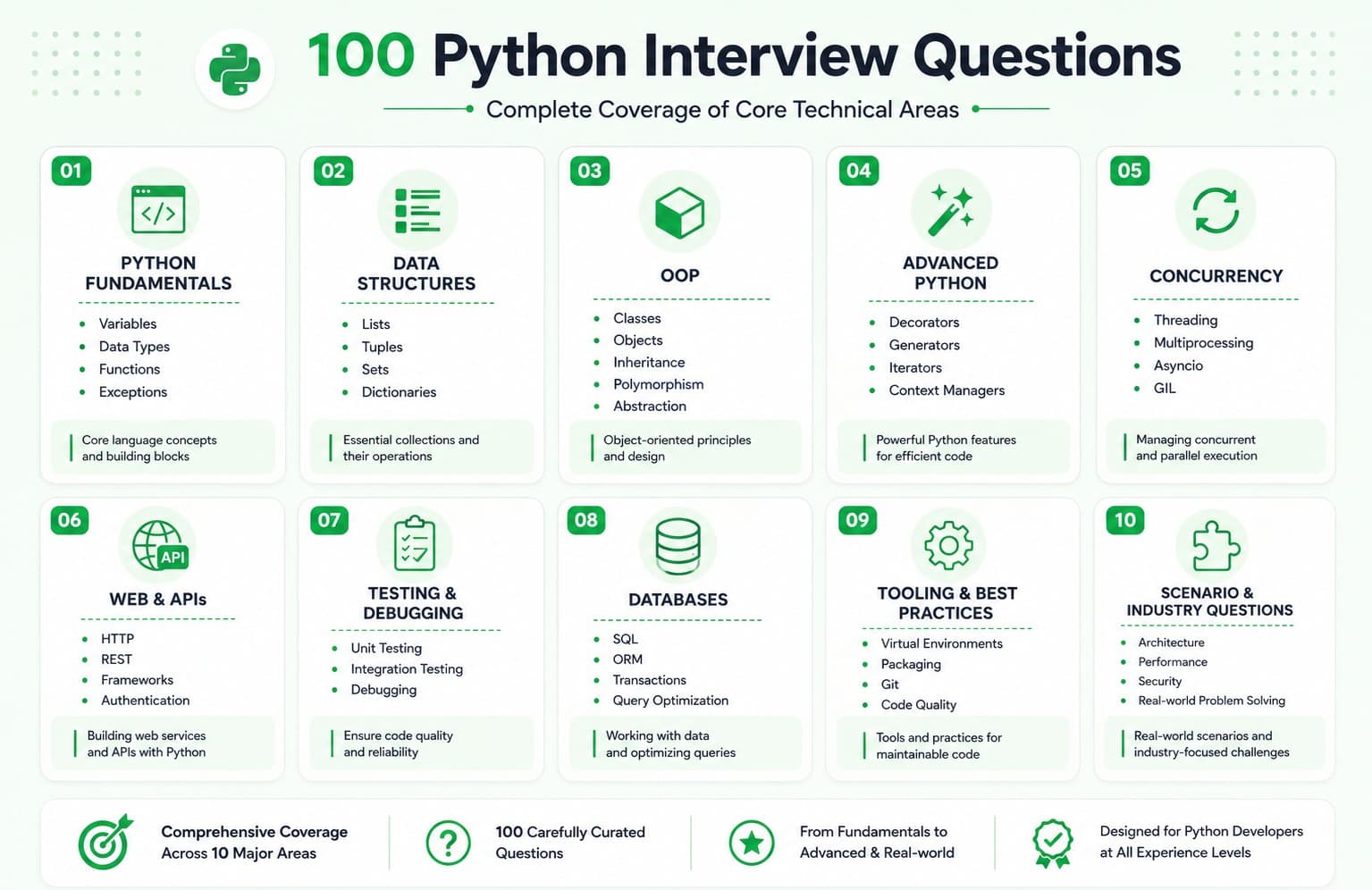
How to Use This Guide
Don't memorize word-for-word. Use the "Explanation" sections to build genuine understanding, then practice explaining answers in your own words out loud.
Prioritize by role emphasis. Backend/web-focused roles should weight Parts 6, 7, and 8 more heavily; roles involving significant concurrency or performance work should emphasize Part 5; roles at companies with mature engineering practices should focus extra attention on Parts 7 and 9.
Practice the coding questions hands-on. Reading isn't enough for Parts 1-5 in particular actually write and run the code, including edge cases, ideally under mild time pressure to simulate a live technical screen or pairing exercise.
Know the classic "gotchas" cold. Questions like mutable default arguments, the GIL, and
isvs==come up extremely frequently, make sure you can not only answer them but demonstrate the behavior live if asked to write code.Prepare your own stories for the behavioral questions. Prepare 5-6 real stories from your own experience that can flexibly answer multiple questions in Part 10, since most behavioral questions are variations on a smaller set of underlying themes.
Use follow-up questions as a self-check. After answering a question, try answering its follow-ups too, this is usually where interviews go deeper and where candidates get caught unprepared.
Practice for python developer interview with Mocklingo mock interview
More Blogs


Sep 28, 2026
Machine Learning Engineer Interview Preparation Guide: A Complete Roadmap for 2026
27 min read