Loading...
Contents
Top 50 Java Developer Interview Questions
Oct 10, 2026181 min read
A Comprehensive Preparation Guide
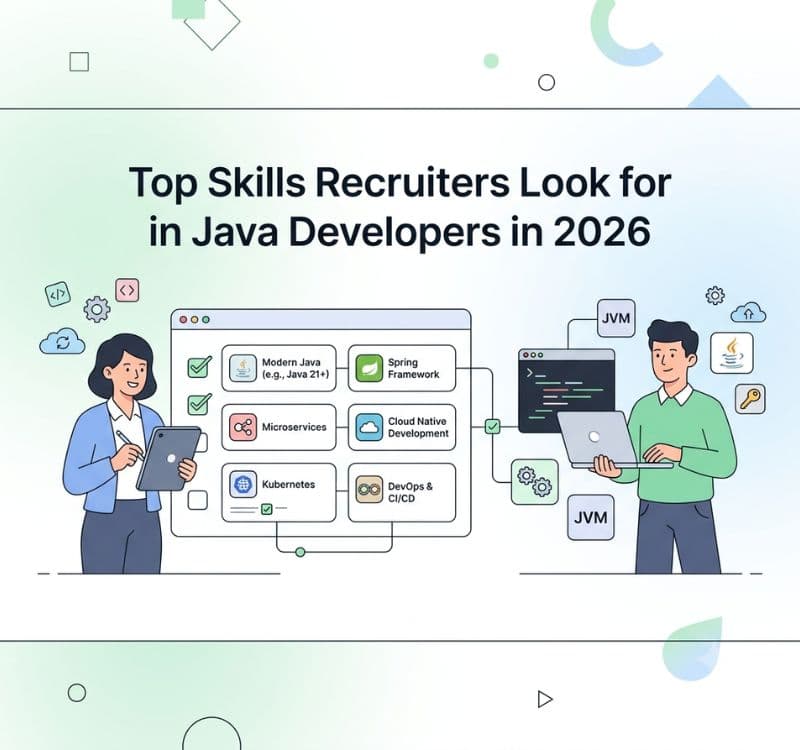
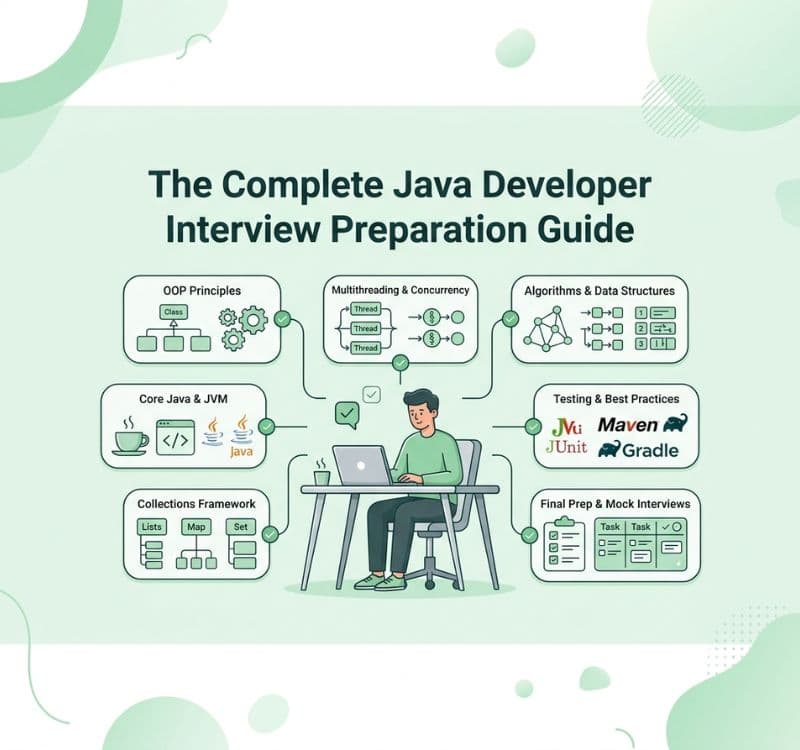
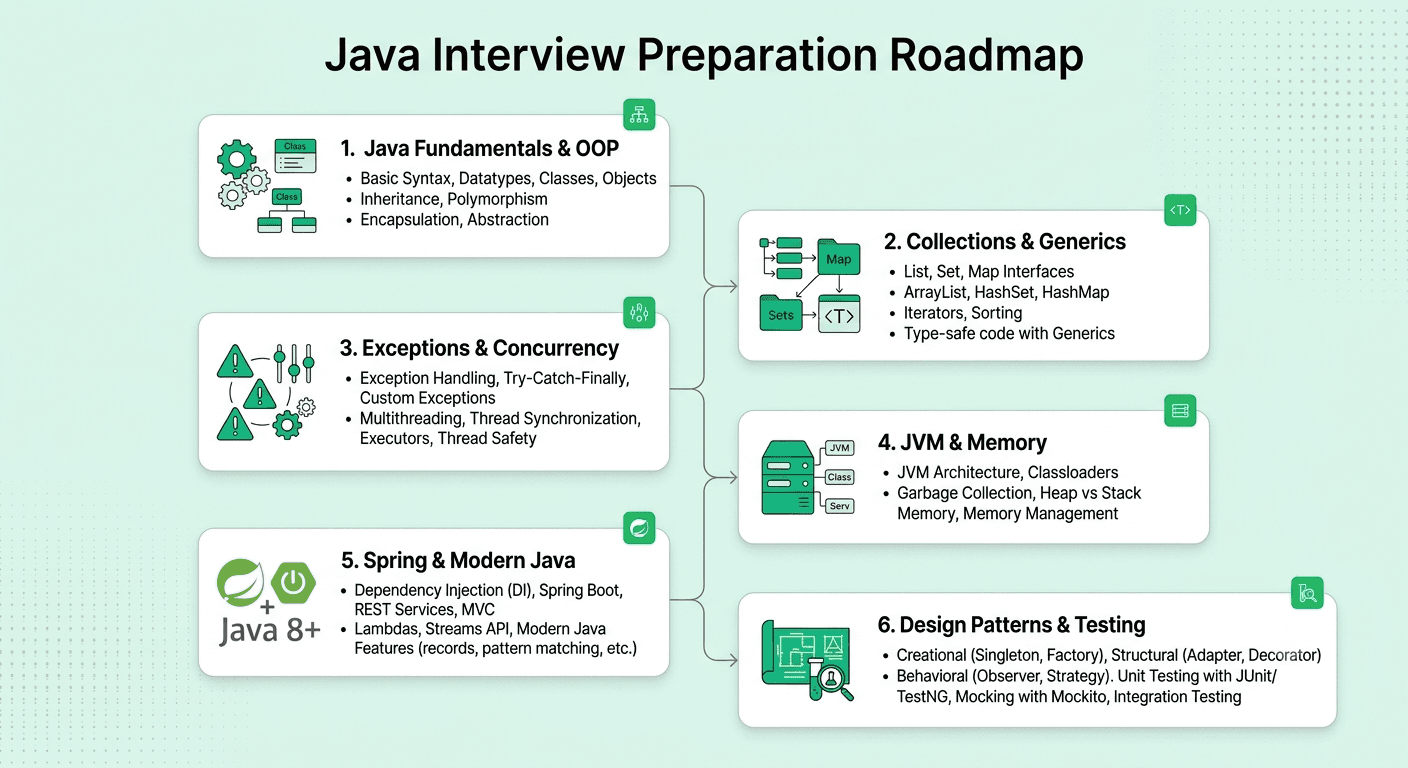
This guide covers the 50 most important Java developer interview questions, organized by topic and roughly ordered by frequency/importance within each category, moving from language fundamentals through collections, concurrency, the JVM, the Spring ecosystem, and current industry trends.
Categories:
Java Fundamentals & OOP (Q1-10)
Collections Framework & Generics (Q11-18)
Exception Handling & Multithreading/Concurrency (Q19-28)
JVM Internals & Memory Management (Q29-34)
Spring Framework & Modern Java (Q35-44)
Design Patterns, Testing & Industry Trends (Q45-50)
FREE TO USE
25K+ INTERVIEWS4.8★ RATING68% IMPROVEMENT
Crack Your Dream Job
Real Interviews. Real Pressure. Practice until it feels easy.
- Seamless Interview Experience
- Resume & JD Questions
- Instant Personalized Feedback
Part 1: Java Fundamentals & OOP
Question 1
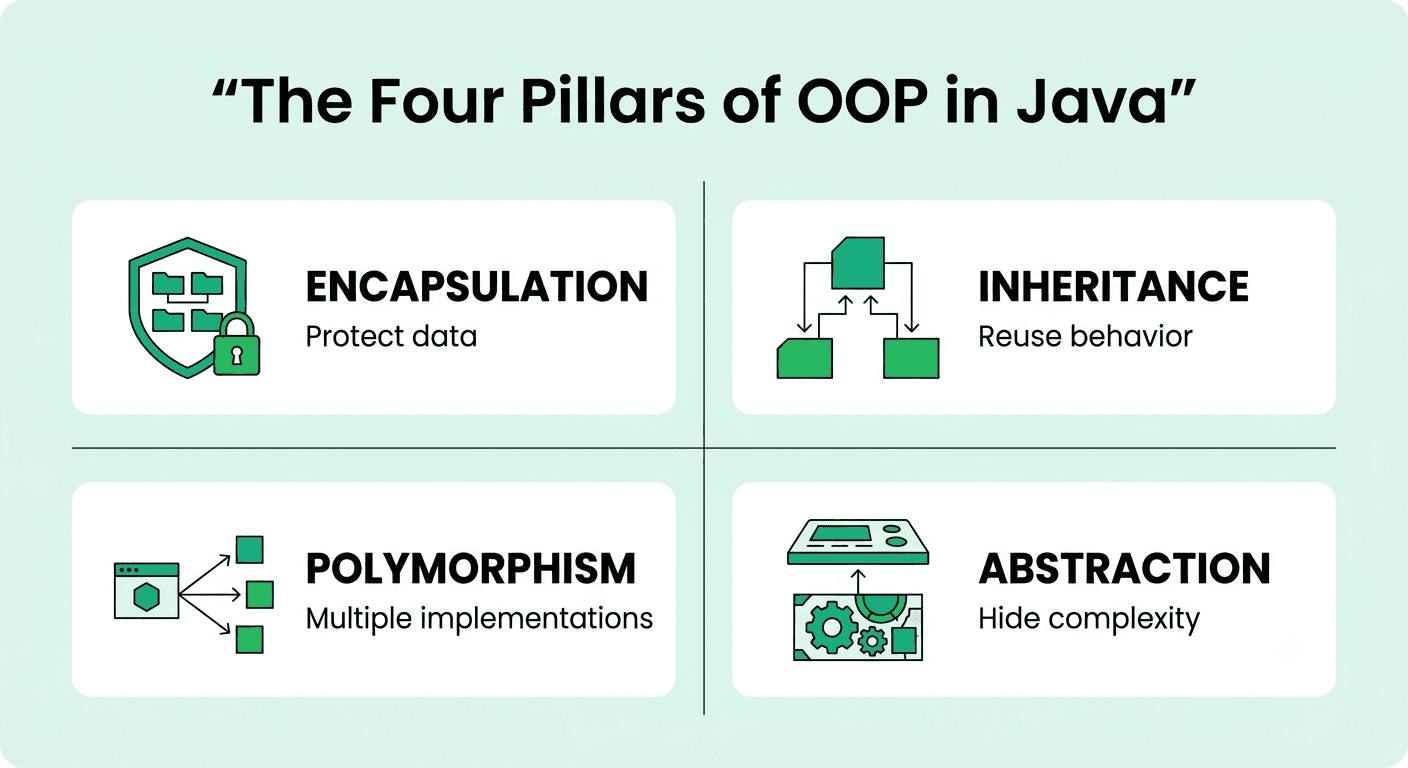
Question: What are the four main principles of object-oriented programming, and how does Java support each?
Answer: Encapsulation (bundling data and methods, restricting direct access via private fields and public getters/setters), inheritance (deriving new classes from existing ones using extends), polymorphism (objects of different types responding differently to the same method call, via overriding and interfaces), and abstraction (exposing essential behavior while hiding implementation, via abstract classes and interfaces).
Explanation: A foundational, near-universally asked opening question, testing whether a candidate can connect each principle to concrete Java language features rather than reciting definitions alone.
Real-World Example: A PaymentMethod interface implemented by CreditCard, PayPal, and BankTransfer classes demonstrates abstraction and polymorphism together, letting a processPayment(PaymentMethod method) function work with any implementation without knowing its concrete type.
Common Mistakes: Giving textbook definitions without Java-specific examples, or confusing polymorphism with simple method overloading alone, missing runtime dynamic dispatch via overriding.
Follow-up Questions: What's the difference between compile-time and runtime polymorphism in Java? When would you favor composition over inheritance? What's an example of a Java design decision that caused a problem in a project you've worked on?
Question 2
Question: What is the difference between == and .equals() in Java?
Answer: == compares reference equality for objects (whether two references point to the exact same object in memory), or value equality for primitives. .equals() compares logical/value equality as defined by the class's own implementation of that method, Object's default .equals() falls back to reference equality unless a class explicitly overrides it (as String and most wrapper classes do).
Explanation: A very commonly tested, foundational Java question, since confusing these two is a frequent, real source of subtle bugs, especially with String comparison.
Real-World Example: Comparing two separately-created String objects with identical content using == can return false (different objects in memory) while .equals() correctly returns true, a classic interview gotcha directly relevant to real code correctness.
Common Mistakes: Using == to compare String or other object values for equality instead of .equals(), producing inconsistent, hard-to-debug behavior depending on whether string literals happen to be interned.
Follow-up Questions: What is string interning, and how does it affect == comparison for string literals specifically? What's the contract between .equals() and .hashCode(), and why must they be overridden together? How does == behave for boxed Integer objects within and outside the cached range (-128 to 127)?
Question 3
Question: What is the difference between an abstract class and an interface in Java?
Answer: An abstract class can have both implemented and unimplemented (abstract) methods, hold instance state via fields, and a class can extend only one abstract class. An interface traditionally declared only method signatures, though modern Java (8+) allows default and static methods with implementation, a class can implement multiple interfaces, enabling a form of multiple inheritance of type that single inheritance via classes doesn't allow.
Explanation: A very commonly tested, foundational OOP question specific to Java's type system, testing awareness of both the classic distinction and how modern Java (default methods) has blurred it somewhat.
Real-World Example: A Shape abstract class might implement a shared describe() method while leaving area() abstract for subclasses, while a Comparable interface defines only a contract that many unrelated classes can implement without any shared implementation inheritance.
Common Mistakes: Saying interfaces can't have any implementation at all, without acknowledging default and static methods introduced in Java 8, or not knowing why a class can implement multiple interfaces but extend only one class.
Follow-up Questions: What is the diamond problem, and how does Java resolve it for default methods from multiple interfaces? When would you choose an abstract class over an interface for a given design? What's a marker interface, and can you give an example?
Question 4
Question: What is method overloading versus method overriding?
Answer: Overloading defines multiple methods with the same name but different parameter lists within the same class, resolved at compile time based on the argument types provided. Overriding redefines a parent class's method in a subclass with the same signature, resolved at runtime via dynamic dispatch based on the object's actual runtime type.
Explanation: A basic but frequently tested distinction, also connecting to the broader concept of polymorphism.
Real-World Example: A Logger class might overload log() to accept a string, an exception, or both, while a subclass FileLogger might override a base log() method to write to disk instead of the console.
Common Mistakes: Confusing which is resolved at compile-time versus runtime, or forgetting that overloading requires a different parameter list (not just a different return type).
Follow-up Questions: Can you overload a method based on return type alone? What is a covariant return type in overriding? How does the @Override annotation help catch a common overriding mistake at compile time?
Question 5
Question: What is the difference between final, finally, and finalize() in Java?
Answer: final is a keyword used to declare a constant variable, prevent method overriding, or prevent class inheritance. finally is a block that always executes after a try/catch, regardless of whether an exception occurred, typically used for cleanup. finalize() is a deprecated method once called by the garbage collector before reclaiming an object's memory, now discouraged in favor of try-with-resources and explicit cleanup.
Explanation: A very commonly tested vocabulary question, testing precise knowledge of three similarly-named but functionally unrelated Java keywords/methods.
Real-World Example: A database connection should be closed using a finally block (or, more idiomatically, try-with-resources) to guarantee cleanup even if an exception occurs mid-operation, rather than relying on the now-deprecated and unreliable finalize() method.
Common Mistakes: Relying on finalize() for genuinely important cleanup logic, not realizing it's deprecated and its execution timing (or whether it runs at all) is unreliable.
Follow-up Questions: Why is finalize() deprecated, and what should be used instead for resource cleanup? What happens if an exception is thrown inside a finally block? Can a final variable's underlying object still be mutated, even though the reference itself can't be reassigned?
Question 6
Question: What is the difference between checked and unchecked exceptions in Java?
Answer: Checked exceptions (subclasses of Exception but not RuntimeException) must be either caught or declared in a method's throws clause at compile time, representing conditions a well-written application should anticipate and recover from. Unchecked exceptions (subclasses of RuntimeException) don't require explicit handling, typically representing programming errors that shouldn't normally occur if the code is correct.
Explanation: A very commonly tested Java-specific exception handling distinction, essential for understanding Java's compile-time enforcement of certain error handling.
Real-World Example: IOException (checked) must be explicitly handled when reading a file, since file I/O failures are a genuinely expected, recoverable condition, while NullPointerException (unchecked) typically indicates a programming bug that should be fixed rather than routinely caught.
Common Mistakes: Overusing checked exceptions for conditions that are genuinely unrecoverable programming errors, or catching and silently swallowing exceptions just to satisfy the compiler without meaningful handling.
Follow-up Questions: What's the debate around checked exceptions in the broader Java community, and why have some newer APIs moved away from them? How would you create a custom checked exception? What's the difference between Error and Exception in Java's exception hierarchy?
Question 7
Question: What is the difference between a constructor and a method in Java?
Answer: A constructor initializes a newly created object, has the same name as the class, has no return type (not even void), and is invoked automatically via new. A method defines reusable behavior, has its own name (which can match the class name but isn't required to), has a return type, and must be explicitly called.
Explanation: A foundational Java question, essential vocabulary for understanding object instantiation.
Real-World Example: A User class's constructor User(String name, String email) initializes the required fields at object creation time, while a separate method like updateEmail(String newEmail) can be called later, any number of times, to modify that already-constructed object's state.
Common Mistakes: Not knowing that a constructor can be overloaded (multiple constructors with different parameter lists) just like a regular method, or forgetting that a class gets an implicit default no-argument constructor if no constructor is explicitly defined.
Follow-up Questions: What happens if you define any constructor explicitly, does the implicit default constructor still exist? How would you call one constructor from another within the same class (constructor chaining)? What's the difference between this() and super() calls within a constructor?
Question 8
Question: What is the significance of the static keyword in Java?
Answer: static members (fields, methods, or nested classes) belong to the class itself rather than to any individual instance, shared across all instances and accessible without creating an object, a static field has exactly one copy shared by the whole class, and a static method can't access non-static (instance) members directly since it has no implicit reference to any specific instance.
Explanation: A foundational, very commonly tested Java keyword, essential vocabulary for understanding class-level versus instance-level members.
Real-World Example: A utility class like Math consists entirely of static methods (Math.sqrt(), Math.max()) since they don't need any per-instance state, and a counter tracking "total objects created" across an entire class is naturally implemented as a static field incremented in the constructor.
Common Mistakes: Attempting to access an instance (non-static) field or method directly from within a static method, which fails to compile since a static context has no implicit this reference.
Follow-up Questions: What is a static initializer block, and when does it run relative to instance initialization? Can a static method be overridden, why or why not? How would you implement a singleton pattern using a static field?
Question 9
Question: What is the difference between composition and inheritance, and when would you choose one over the other in Java?
Answer: Inheritance creates an "is-a" relationship where a subclass extends and directly reuses a parent class's behavior. Composition creates a "has-a" relationship, building more complex objects by combining smaller, independent component objects. Composition is generally favored for its greater flexibility and looser coupling, avoiding deep, fragile inheritance hierarchies, while inheritance is appropriate only when a genuine, stable "is-a" relationship truly holds.
Explanation: A very commonly tested design principle question, testing whether a candidate can identify and avoid a common real-world anti-pattern of overusing inheritance purely for code reuse.
Real-World Example: Rather than a Car class inheriting from both an Engine class and Wheels class (which doesn't reflect a genuine "is-a" relationship), a Car should be composed of Engine and Wheels instances as its constituent fields, correctly reflecting a "has-a" relationship.
Common Mistakes: Defaulting to inheritance purely for convenient code reuse without considering whether a genuine "is-a" relationship actually and logically holds, leading to fragile, tightly-coupled class hierarchies over time.
Follow-up Questions: What is the "fragile base class" problem, and how does composition help avoid it? How does favoring composition improve unit testing compared to inheritance-heavy designs? Can you give an example from your own experience where you refactored inheritance into composition?
Question 10
Question: What is immutability in Java, and how would you design an immutable class?
Answer: An immutable object's state cannot be changed after construction, designed by declaring the class final (preventing subclassing that could add mutability), making all fields private final, providing no setters, ensuring any mutable field (like a collection or array) is defensively copied on both input and output, and fully initializing all state within the constructor.
Explanation: A very commonly tested, practical Java design question, essential given immutability's role in thread safety and predictable code behavior.
Real-World Example: Java's own String class is immutable, any operation that appears to "modify" a string (like .concat()) actually returns a new String object, leaving the original unchanged, which is why strings are safe to share freely across threads without synchronization.
Common Mistakes: Making all fields final but forgetting to defensively copy a mutable field (like a List or Date passed into the constructor), which still allows external code to mutate the object's internal state indirectly through that shared reference.
Follow-up Questions: Why are immutable objects inherently thread-safe? How would you implement an immutable class that contains a mutable field like a List? What are the performance tradeoffs of immutability, especially for objects that are frequently "modified" (recreated)?
Part 2: Collections Framework & Generics
Question 11
Question: What is the difference between ArrayList and LinkedList in Java?
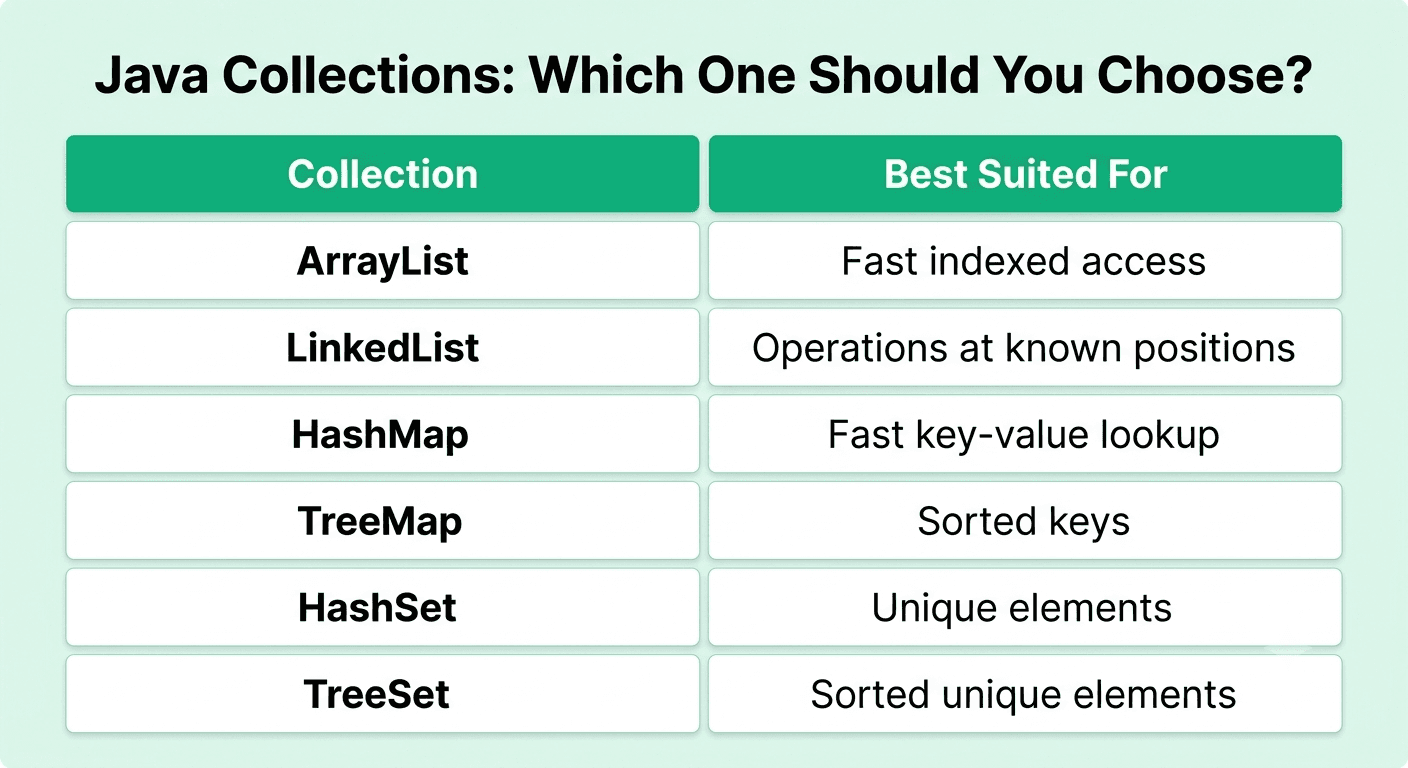
Answer: ArrayList is backed by a dynamically-resizing array, offering O(1) indexed access but O(n) insertion/deletion in the middle (requiring shifting elements). LinkedList is backed by a doubly-linked list, offering O(1) insertion/deletion at a known position (given a reference to it) but O(n) indexed access, since it requires traversing from an end.
Explanation: A very commonly tested data structure comparison, testing whether a candidate matches the right collection type to the actual access pattern needed.
Real-World Example: A list that's frequently accessed by index (like rendering a table's rows) performs better with ArrayList, while a list with frequent insertions/removals at the beginning or in the middle (like a task queue) may perform better with LinkedList, though ArrayDeque is often actually preferred over LinkedList for queue-like use cases in modern Java.
Common Mistakes: Defaulting to LinkedList assuming it's generally faster for insertions without considering that ArrayList's cache locality often makes it faster in practice for many realistic workloads despite the theoretical complexity difference.
Follow-up Questions: Why does ArrayList often outperform LinkedList in practice despite its theoretically worse insertion complexity? What's the time complexity of adding an element to the end of an ArrayList, and why is it amortized O(1) rather than strictly O(1)? When would you choose ArrayDeque over LinkedList?
Question 12
Question: What is the difference between HashMap, LinkedHashMap, and TreeMap?
Answer: HashMap offers average O(1) lookup/insert but no guaranteed iteration order. LinkedHashMap maintains insertion order (or optionally access order) while still offering similar O(1) performance, at the cost of slightly more memory overhead for the underlying linked structure. TreeMap maintains keys in sorted order (via a red-black tree), offering O(log n) operations but enabling ordered traversal and range queries that the other two can't efficiently provide.
Explanation: A very commonly tested Java Collections Framework question, testing whether a candidate matches the right map implementation to the actual ordering and performance requirements.
Real-World Example: An LRU cache implementation commonly uses LinkedHashMap with access-order enabled, since it naturally maintains the most-recently-accessed-last ordering needed for efficient eviction of the least-recently-used entry.
Common Mistakes: Using HashMap when a specific, meaningful iteration order is actually required, then being surprised by unpredictable ordering behavior.
Follow-up Questions: How would you implement an LRU cache using LinkedHashMap? What's the time complexity of TreeMap's operations, and why is it slower than HashMap's average case? How does HashMap actually handle collisions internally?
Question 13
Question: How does HashMap work internally in Java, and what happens when a hash collision occurs?
Answer: HashMap stores key-value pairs in an array of buckets, with a key's hashCode() determining which bucket it's placed in, when two different keys hash to the same bucket (a collision), Java (since version 8) handles it via a linked list of entries in that bucket, or, if a bucket grows beyond a threshold (8 entries) and the underlying array is sufficiently large, converts that bucket's structure to a balanced red-black tree for improved worst-case lookup performance.
Explanation: A very commonly tested, deeper internals question, testing whether a candidate understands the actual mechanism rather than just "it's fast" at a superficial level.
Real-World Example: A poorly-designed hashCode() implementation that returns the same value for many different objects would cause excessive collisions, degrading HashMap performance from average O(1) toward O(n) (or O(log n) with Java 8+'s treeification) for that specific, badly-distributed set of keys.
Common Mistakes: Not knowing about Java 8's bucket treeification optimization for handling severe collision scenarios, or not understanding why a poor hashCode() implementation directly degrades HashMap performance.
Follow-up Questions: What is the contract between hashCode() and equals(), and why must they be consistent for correct HashMap behavior? How does HashMap resize (rehash) when it grows beyond its load factor? What happens if you use a mutable object as a HashMap key and then mutate it after insertion?
Question 14
Question: What is the difference between Comparable and Comparator in Java?
Answer: Comparable defines a class's single, natural ordering via its compareTo() method, implemented by the class itself. Comparator defines an external, separate ordering logic via compare(), allowing multiple different sorting strategies for the same class without modifying the class itself, and letting you sort objects of a class that doesn't implement Comparable at all.
Explanation: A very commonly tested Java Collections question, testing understanding of when a class's intrinsic ordering is sufficient versus when a flexible, external ordering is needed.
Real-World Example: A Person class might implement Comparable to define natural ordering by age, while a separate Comparator<Person> could be defined to sort by name instead, used selectively depending on the specific sorting need at a given point in the code.
Common Mistakes: Not knowing how to write a Comparator using Java 8's lambda or method reference syntax (like Comparator.comparing(Person::getName)), relying only on the older, more verbose anonymous class syntax.
Follow-up Questions: How would you chain multiple comparators together to sort by one field, then break ties with another? How would you sort a list in descending order using a Comparator? What does compareTo() need to return, and what does each possible sign (negative, zero, positive) signify?
Question 15
Question: What are Java Generics, and what problem do they solve?
Answer: Generics allow classes, interfaces, and methods to be parameterized by type, providing compile-time type safety and eliminating the need for explicit casting, solving the problem of pre-generics Java code using raw types (like a List holding Object), which deferred type errors to runtime (via a ClassCastException) instead of catching them safely at compile time.
Explanation: A very commonly tested, foundational Java language feature, essential for understanding modern, type-safe Java code.
Real-World Example: A List<String> guarantees at compile time that only String objects can be added and retrieved without casting, whereas a pre-generics raw List would allow any object type to be added, risking a runtime ClassCastException only discovered much later when an incompatible object is retrieved and cast.
Common Mistakes: Not understanding type erasure, that generic type information is removed at compile time and isn't available at runtime, leading to confusion about certain generics limitations (like not being able to create a generic array directly).
Follow-up Questions: What is type erasure, and what specific limitations does it impose on generics in Java? What's the difference between <? extends T> and <? super T> bounded wildcards, and when would you use each? Why can't you create an instance of a generic type parameter directly (like new T())?
Question 16
Question: What is the difference between Iterator and ListIterator?
Answer: Iterator provides forward-only traversal of any Collection, with the ability to remove the current element during iteration. ListIterator (available only for List implementations) extends Iterator with the ability to traverse in both directions, to add or replace elements during iteration, and to retrieve the current index position.
Explanation: A commonly tested, more specific Collections Framework question, testing precise knowledge of the capabilities each iterator type actually provides.
Real-World Example: Safely removing elements from a list while iterating over it (which would throw a ConcurrentModificationException if done via the list's own .remove() method during a for-each loop) requires using the Iterator's own .remove() method instead.
Common Mistakes: Attempting to modify a collection directly (via the collection's own methods, not the iterator's) while iterating over it with a for-each loop, causing a ConcurrentModificationException.
Follow-up Questions: Why does modifying a collection directly during a for-each loop throw a ConcurrentModificationException? How would you safely add an element to a list while iterating over it using ListIterator? What's the fail-fast versus fail-safe iterator distinction, and which Java collections exhibit each behavior?
Question 17
Question: What is the Java Streams API, and how would you use it to process a collection?
Answer: The Streams API (introduced in Java 8) provides a functional-style, declarative way to process sequences of elements through a pipeline of operations, intermediate operations (like filter, map, sorted) that are lazily evaluated and return a new stream, and a terminal operation (like collect, forEach, reduce) that actually triggers the pipeline's execution and produces a result.
Explanation: A very commonly tested, modern Java feature, essential given how widely Streams are used in current idiomatic Java code for collection processing.
Real-World Example: Filtering a list of employees for those earning above a threshold, then extracting and collecting just their names into a new list, is concisely expressed as employees.stream().filter(e -> e.getSalary() > threshold).map(Employee::getName).collect(Collectors.toList()), far more declarative than an equivalent manual loop.
Common Mistakes: Not understanding that intermediate operations are lazy and only actually execute when a terminal operation is called, or attempting to reuse an already-consumed stream (streams can only be traversed once).
Follow-up Questions: What's the difference between a sequential and a parallel stream, and when would you use parallelStream()? How would you use Collectors.groupingBy() to group a stream's elements by a specific property? Why can't you reuse a stream after a terminal operation has been called on it?
Question 18
Question: What is the difference between HashSet, LinkedHashSet, and TreeSet?
Answer: HashSet offers average O(1) membership testing and insertion but no guaranteed iteration order, backed internally by a HashMap. LinkedHashSet maintains insertion order while retaining similar O(1) performance. TreeSet maintains elements in sorted order (via a red-black tree, like TreeMap), offering O(log n) operations but supporting ordered traversal and range queries.
Explanation: A commonly tested Collections Framework question, directly parallel to the earlier Map comparison, testing understanding of the Set equivalents.
Real-World Example: Deduplicating a large list of user IDs where order doesn't matter is efficiently handled with HashSet, while maintaining a sorted, deduplicated set of scores for a leaderboard benefits from TreeSet's automatic ordering and range-query capability (like finding all scores above a threshold).
Common Mistakes: Not knowing that elements added to a TreeSet must be mutually comparable (either implementing Comparable or supplied with a Comparator), causing a runtime exception if this requirement isn't met.
Follow-up Questions: How would you find all elements within a specific range using TreeSet? What happens if you try to add a null element to a TreeSet? How does HashSet actually use HashMap internally to implement its own behavior?
Part 3: Exception Handling & Multithreading/Concurrency
Question 19
Question: What is the difference between throw and throws in Java?
Answer: throw is used within a method body to actually throw a specific exception instance at that point in the code. throws is used in a method's signature to declare that the method might throw a specific checked exception, informing callers they need to handle or further propagate it.
Explanation: A foundational, commonly tested Java exception handling vocabulary question, testing basic but essential precision about these similarly-named keywords.
Real-World Example: A method readFile() throws IOException declares in its signature that it might throw an IOException, while inside its implementation, a specific line like throw new IOException("File not found") actually creates and throws that exception instance when the error condition occurs.
Common Mistakes: Confusing the two keywords, or not understanding that only checked exceptions (not unchecked ones) must be declared with throws.
Follow-up Questions: Can you declare throws for an unchecked exception, and would that be useful or necessary? How would you create and throw a custom exception class? What's exception chaining, and how would you implement it using the exception constructor that accepts a cause?
Question 20
Question: What is a thread in Java, and what are the different ways to create one?
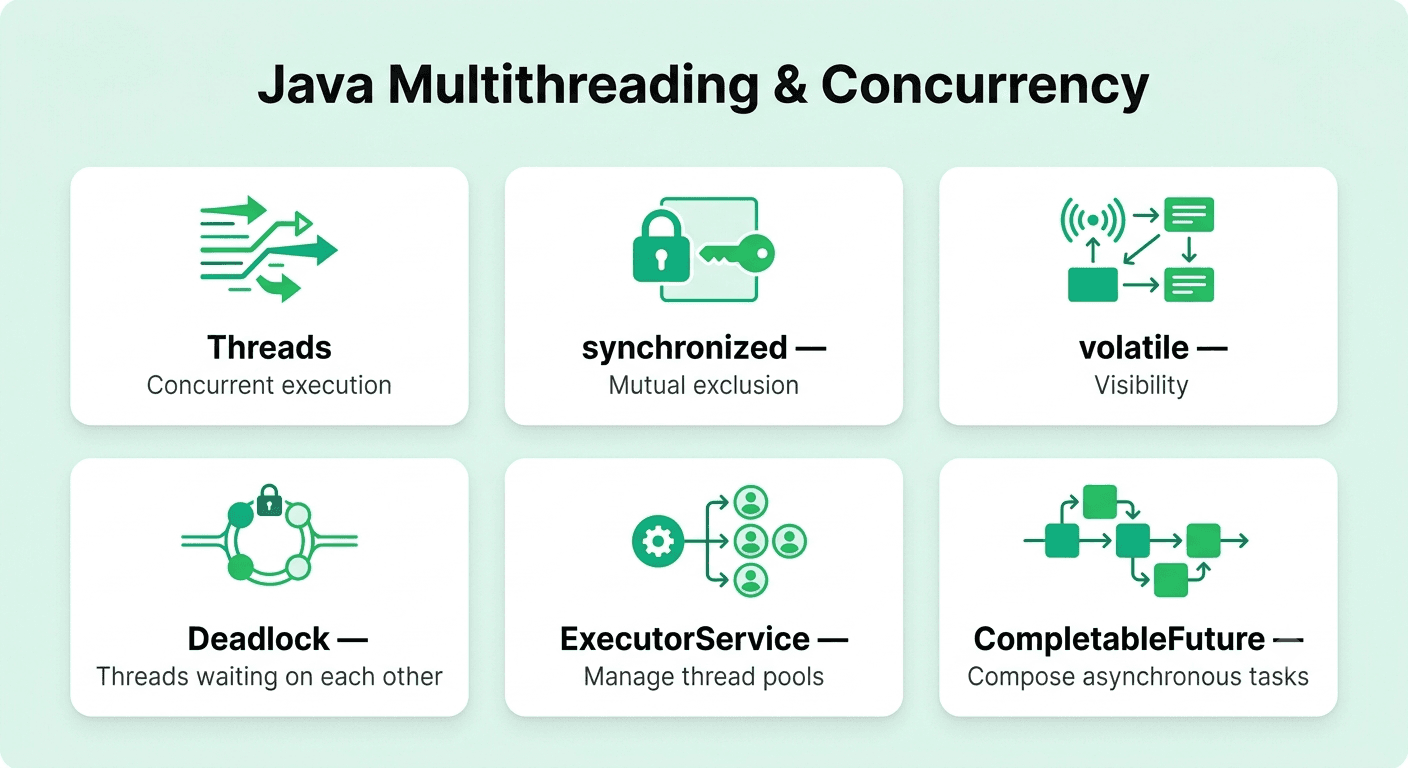
Answer: A thread is an independent path of execution within a process, allowing concurrent execution of code. Java provides two primary ways to create a thread: extending the Thread class and overriding its run() method, or implementing the Runnable interface and passing it to a Thread constructor, implementing Runnable is generally preferred since it allows the class to still extend another class (Java doesn't support multiple inheritance) and better separates the task from the thread execution mechanism.
Explanation: A foundational, very commonly tested concurrency question, essential vocabulary for discussing multithreaded Java programming.
Real-World Example: A background task downloading a file while keeping a GUI responsive might be implemented as a class implementing Runnable, passed to a Thread (or, more commonly in modern code, submitted to an ExecutorService), rather than extending Thread directly.
Common Mistakes: Calling run() directly instead of start(), which executes the code synchronously on the current thread rather than actually starting a new thread of execution.
Follow-up Questions: What's the difference between calling .start() and .run() on a Thread object? Why is implementing Runnable generally preferred over extending Thread? What is a daemon thread, and how does it differ from a regular thread?
Question 21
Question: What is the synchronized keyword in Java, and how does it help prevent race conditions?
Answer: synchronized ensures that only one thread at a time can execute a given block of code or method for a specific object's monitor lock, preventing multiple threads from concurrently modifying shared mutable state in a way that would produce an inconsistent or incorrect result, applied either to an entire method (locking on the instance, or the class for a static method) or to a specific block of code with an explicitly specified lock object.
Explanation: A very commonly tested foundational Java concurrency mechanism, essential for understanding how to safely manage shared mutable state across threads.
Real-World Example: A shared bank account balance being concurrently modified by multiple threads performing withdrawals needs the withdrawal logic wrapped in a synchronized block to prevent a race condition where two simultaneous withdrawals might both read the same initial balance before either writes back their result, incorrectly allowing an overdraft.
Common Mistakes: Synchronizing on the wrong object (like a newly-created object instead of a genuinely shared one), which fails to actually provide the intended mutual exclusion since different threads would be locking on different monitor objects.
Follow-up Questions: What's the performance cost of using synchronized, and how would you minimize it? What's the difference between synchronizing on an instance versus a class (for a static method)? How does synchronized relate to and differ from using an explicit java.util.concurrent.locks.Lock?
Question 22
Question: What is a deadlock, and how would you prevent one in a Java application?
Answer: A deadlock occurs when two or more threads are each waiting indefinitely for a resource (lock) held by the other, creating a circular wait where neither can ever proceed. Prevention strategies include acquiring locks in a consistent, globally-agreed order across all threads, using a timeout when attempting to acquire a lock (via tryLock()), and minimizing the scope and duration of locking where possible.
Explanation: A very commonly tested concurrency problem, testing both theoretical understanding and practical prevention strategies.
Real-World Example: Two threads each transferring money between the same two accounts but acquiring locks in opposite order (one locks account A then B, the other locks B then A) can deadlock, ensuring both threads consistently acquire locks in the same global order (like always locking the account with the lower ID first) prevents this specific deadlock pattern.
Common Mistakes: Not recognizing the specific pattern of inconsistent lock acquisition order as the actual root cause of a deadlock, and instead attempting an unreliable workaround rather than fixing the actual ordering issue.
Follow-up Questions: What are the four necessary conditions for a deadlock to occur (mutual exclusion, hold and wait, no preemption, circular wait)? How would Lock.tryLock() with a timeout help you recover from a potential deadlock rather than just avoiding it? How would you use a thread dump to diagnose an actual deadlock in a running application?
Question 23
Question: What is the Java Memory Model, and why does volatile matter for multithreaded code?
Answer: The Java Memory Model defines how threads interact with shared memory, including when changes made by one thread become visible to others, without proper synchronization, a thread might read a stale, cached value of a variable rather than the actual latest value written by another thread. The volatile keyword ensures that reads and writes to a variable go directly to main memory (not a thread-local cache), guaranteeing visibility of updates across threads, though it does not provide atomicity for compound operations like increment.
Explanation: A more advanced, but increasingly commonly tested, concurrency concept, testing deeper understanding of memory visibility beyond just mutual exclusion.
Real-World Example: A boolean flag used by one thread to signal another thread to stop a loop (while (!stopRequested) { ... }) must be declared volatile, or the reading thread might never actually see the updated value due to caching, causing the loop to run indefinitely despite the flag being set.
Common Mistakes: Using volatile for a compound operation like count++ and assuming it's now thread-safe, not realizing volatile only guarantees visibility, not atomicity, a genuinely atomic increment requires synchronized or an AtomicInteger.
Follow-up Questions: Why doesn't volatile make a compound operation like increment thread-safe? What's the difference between volatile and synchronized in terms of what guarantees each actually provides? How does java.util.concurrent.atomic.AtomicInteger achieve thread-safe increments without using traditional locking?
Question 24
Question: What is the java.util.concurrent package, and what key utilities does it provide?
Answer: java.util.concurrent provides higher-level, more robust concurrency utilities than manually managing threads and synchronized blocks directly, including ExecutorService for managing thread pools, ConcurrentHashMap for a thread-safe map with better performance than externally synchronizing a regular HashMap, CountDownLatch and CyclicBarrier for thread coordination, and Atomic* classes for lock-free, thread-safe operations on single variables.
Explanation: A very commonly tested, practical modern Java concurrency question, testing awareness of the idiomatic, higher-level tools generally preferred over raw Thread and synchronized usage in modern code.
Real-World Example: A web server handling many concurrent requests would typically use an ExecutorService with a fixed-size thread pool to manage request-handling threads efficiently, rather than manually creating and managing a new raw Thread object for every single incoming request.
Common Mistakes: Manually creating and managing raw Thread objects directly in modern code rather than using an ExecutorService, missing out on better resource management, reusability, and lifecycle control.
Follow-up Questions: What's the difference between Executors.newFixedThreadPool() and Executors.newCachedThreadPool()? How does ConcurrentHashMap achieve better concurrent performance than a synchronized-wrapped HashMap? What is a Future, and how does it relate to submitting a task to an ExecutorService?
Question 25
Question: What is the difference between Callable and Runnable in Java?
Answer: Runnable represents a task with no return value and that cannot throw a checked exception (its run() method returns void). Callable represents a task that returns a result (via its call() method) and can throw a checked exception, making it more suitable when a task's outcome needs to be retrieved, typically via a Future when submitted to an ExecutorService.
Explanation: A commonly tested, practical concurrency API question, testing understanding of when the more flexible Callable is needed over the simpler Runnable.
Real-World Example: A task that fetches data from a remote service and needs to return that data to the calling code would use Callable<Data> submitted to an ExecutorService, retrieving the eventual result via the returned Future<Data>'s .get() method.
Common Mistakes: Using Runnable for a task that genuinely needs to return a result, then resorting to an awkward workaround (like a mutable shared variable) instead of simply using Callable.
Follow-up Questions: How would you retrieve the result of a submitted Callable task, and what happens if you call .get() before the task has completed? How would you handle a Callable task that throws an exception? What's the difference between Future and CompletableFuture?
Question 26
Question: What is CompletableFuture, and how does it improve on the basic Future interface?
Answer: CompletableFuture extends Future with the ability to compose, chain, and combine asynchronous operations declaratively (using methods like thenApply, thenCompose, and thenCombine), and to explicitly complete a future programmatically, basic Future only supports blocking retrieval of a result via .get(), with no built-in way to chain subsequent operations or combine multiple futures without manual, often awkward coordination.
Explanation: A commonly tested, more advanced modern Java concurrency feature, testing awareness of how asynchronous programming has evolved beyond the basic Future interface.
Real-World Example: A workflow that fetches a user's profile, then uses that result to fetch their orders, then combines both into a final response can be expressed cleanly as a chain of thenCompose/thenCombine calls on CompletableFuture, rather than nested blocking calls or manual thread coordination.
Common Mistakes: Calling .get() on a CompletableFuture immediately, which blocks the calling thread and defeats much of the purpose of using asynchronous composition in the first place.
Follow-up Questions: What's the difference between thenApply and thenCompose, and when would you use each? How would you handle an exception that occurs partway through a chain of CompletableFuture operations? How would you combine the results of several independent CompletableFuture operations running in parallel?
Question 27
Question: What is a race condition, and how would you debug one in a Java application?
Answer: A race condition occurs when the correctness of a program depends on the unpredictable relative timing of concurrent operations on shared mutable state. Debugging typically involves reviewing code for shared mutable state accessed without proper synchronization, using tools like thread dumps or a dedicated concurrency testing/analysis tool, and attempting to reproduce the issue under controlled, stress-tested concurrent load since race conditions are often intermittent and hard to reliably reproduce.
Explanation: A very commonly tested practical concurrency troubleshooting question, since race conditions are notoriously hard to reproduce and debug in real applications.
Real-World Example: A "check-then-act" bug, like checking if a username is available and then inserting it as two separate, non-atomic steps, allows two concurrent signup requests to both pass the check and create duplicate accounts, a classic race condition fixable with a unique database constraint or proper synchronization.
Common Mistakes: Describing only the concept without a concrete debugging strategy, or assuming a race condition is reliably reproducible in a standard debugger, when it's often intermittent and timing-dependent.
Follow-up Questions: How would you write a test that reliably reproduces a specific race condition? What's the difference between a race condition and a data race specifically? What tools have you used to help detect concurrency issues in a Java application?
Question 28
Question: What is the difference between a thread pool's newFixedThreadPool and newCachedThreadPool, and how would you choose between them?
Answer: newFixedThreadPool(n) creates a pool with a fixed number of threads, queueing additional tasks when all threads are busy, predictable resource usage, well suited for a known, bounded level of concurrent work. newCachedThreadPool() creates threads as needed and reuses idle ones, with no upper bound by default, well suited for many short-lived, bursty tasks, but risking unbounded thread creation under sustained heavy load if not carefully monitored.
Explanation: A commonly tested, practical concurrency configuration question, testing whether a candidate can match thread pool configuration to actual workload characteristics.
Real-World Example: A server with a known, steady level of concurrent request processing might use a fixed thread pool sized to match available CPU cores for CPU-bound work, while a cached thread pool might better suit a bursty background job processor handling many brief, intermittent tasks.
Common Mistakes: Using newCachedThreadPool() in a production system without any bound or monitoring, risking unbounded thread creation and resource exhaustion under an unexpected sustained load spike.
Follow-up Questions: How would you size a fixed thread pool appropriately for a CPU-bound workload versus an I/O-bound workload? What happens to a submitted task when a fixed thread pool's queue is also full? How would you create a thread pool with more fine-grained control over its queue and rejection policy, beyond the Executors factory methods?
Part 4: JVM Internals & Memory Management
Question 29
Question: What is the difference between the JVM, JRE, and JDK?
Answer: The JVM (Java Virtual Machine) executes compiled Java bytecode, providing platform independence. The JRE (Java Runtime Environment) packages the JVM along with the core class libraries needed to run Java applications. The JDK (Java Development Kit) packages the JRE along with development tools (compiler, debugger) needed to actually write and build Java applications, not just run them.
Explanation: A very foundational, extremely commonly tested Java vocabulary question, essential basic knowledge for anyone claiming Java experience.
Real-World Example: A production server running a compiled Java application only needs the JRE (or just the JVM with the application's bundled dependencies) installed, while a developer's machine needs the full JDK to actually compile and build that application from source.
Common Mistakes: Confusing the three terms or being unable to clearly articulate the containment relationship between them (JDK contains JRE, which contains JVM).
Follow-up Questions: How does the JVM enable Java's "write once, run anywhere" platform independence? What is bytecode, and how does it relate to the compilation and execution process? What's the difference between the standard JVM (HotSpot) and alternative JVM implementations?
Question 30
Question: How does Java's garbage collection work, and what are the main generational memory regions?
Answer: Java's garbage collector automatically reclaims memory for objects no longer reachable from any live reference, primarily using a generational approach based on the observation that most objects die young, the Young Generation (further divided into Eden and Survivor spaces) holds newly-created objects and is collected frequently via fast "minor GC" cycles, while the Old Generation holds longer-lived objects that have survived several minor GC cycles, collected less frequently via more expensive "major GC" cycles.
Explanation: A very commonly tested foundational JVM memory management concept, essential for understanding Java application performance characteristics.
Real-World Example: A web application handling many short-lived request-scoped objects benefits significantly from the generational collector's efficient handling of the Young Generation, since most of those objects become garbage almost immediately after the request completes, without needing an expensive full-heap collection.
Common Mistakes: Not being able to explain why the generational hypothesis (most objects die young) specifically motivates this generational design, beyond just naming the memory regions.
Follow-up Questions: What triggers a minor GC versus a major (or full) GC? What is a "stop-the-world" pause, and how do modern garbage collectors try to minimize it? What garbage collectors (like G1, ZGC, or Shenandoah) have you worked with, and how do they differ in their tradeoffs?
Question 31
Question: What is the difference between the stack and the heap in Java's memory model?
Answer: The stack stores method call frames, including local primitive variables and object references, with automatic, fast allocation and deallocation tied to method execution, each thread has its own separate stack. The heap stores all actual object instances and arrays, shared across all threads, managed by the garbage collector rather than being automatically cleaned up when a method returns.
Explanation: A very foundational, extremely commonly tested JVM memory concept, essential for understanding Java's actual memory allocation behavior.
Real-World Example: A local int variable inside a method lives entirely on the stack and is automatically removed when the method returns, while an object created with new inside that same method lives on the heap, and the reference variable on the stack simply points to it, the object itself persists on the heap until no longer reachable, regardless of the method's own completion.
Common Mistakes: Not understanding that an object reference variable lives on the stack while the actual object it points to lives on the heap, conflating the two.
Follow-up Questions: Why is stack memory allocation generally faster than heap allocation? What causes a StackOverflowError, and how does it typically occur (like unbounded recursion)? What causes an OutOfMemoryError, and what are its different specific variants?
Question 32
Question: What is the difference between a memory leak in Java and in a language without garbage collection (like C++)?
Answer: In a language without garbage collection, a memory leak typically occurs from simply forgetting to free allocated memory. In Java, memory leaks occur despite automatic garbage collection, caused by unintentionally retained references (like a growing static collection that's never cleared, or an un-removed event listener) that prevent the garbage collector from ever reclaiming otherwise-unused objects, since they remain technically reachable.
Explanation: A commonly tested, more nuanced question testing whether a candidate understands that garbage collection reduces but doesn't eliminate memory leak risk.
Real-World Example: A long-running application maintaining a static Map cache that's continually added to but never cleared or bounded will gradually and steadily leak memory, since those cached objects remain reachable (and thus un-collectible) through the static reference, eventually exhausting available heap memory.
Common Mistakes: Assuming Java's garbage collection makes memory leaks impossible, without recognizing that lingering, unintentional references can still prevent otherwise-unused objects from ever being reclaimed.
Follow-up Questions: What is a WeakReference, and how can it help prevent a specific kind of memory leak (like in a cache)? How would you use a heap dump analysis tool to diagnose a suspected memory leak in a running application? Can you give another common real-world cause of a Java memory leak beyond an unbounded static collection?
Question 33
Question: What is class loading in Java, and what are the three built-in class loaders?
Answer: Class loading is the process by which the JVM dynamically loads compiled .class files into memory as needed, following a delegation hierarchy: the Bootstrap ClassLoader loads core Java platform classes, the Extension (Platform) ClassLoader loads classes from extension directories, and the Application (System) ClassLoader loads classes from the application's own classpath, each loader delegates to its parent first, only loading a class itself if the parent couldn't find it.
Explanation: A commonly tested, more advanced JVM internals question, testing deeper awareness of how Java actually locates and loads classes at runtime.
Real-World Example: This parent-delegation model is why an application can't accidentally override a core Java class like java.lang.String simply by defining its own class with that same fully-qualified name on the application classpath, the Bootstrap ClassLoader's core classes always take precedence due to the delegation order.
Common Mistakes: Not understanding the delegation model (child asks parent first), or being unable to explain why this model provides a meaningful security and consistency benefit.
Follow-up Questions: Why does the parent-delegation model help prevent a malicious or accidental override of core Java classes? What is a ClassNotFoundException versus a NoClassDefFoundError, and when does each actually occur? How would you write a custom class loader, and what's a real-world use case for doing so?
Question 34
Question: What is the difference between heap memory and metaspace (or, historically, PermGen) in the JVM?
Answer: Heap memory stores actual object instances. Metaspace (which replaced the older PermGen in Java 8) stores class metadata, the actual compiled structure and bytecode information for loaded classes, using native memory rather than being a fixed part of the JVM's configured heap size, which largely eliminated the common OutOfMemoryError: PermGen space issue that plagued applications dynamically loading many classes in earlier Java versions.
Explanation: A commonly tested, more advanced JVM memory region question, testing awareness of how class metadata storage differs from regular object heap storage, and a meaningful historical JVM change.
Real-World Example: Applications that dynamically generate and load many classes at runtime (like certain frameworks using heavy proxy generation) previously risked exhausting the fixed-size PermGen space in older Java versions, an issue largely alleviated by Metaspace's ability to grow using native memory in Java 8 and later.
Common Mistakes: Referring to PermGen as still being current in modern Java, not knowing it was replaced by Metaspace starting in Java 8.
Follow-up Questions: Why did Metaspace's use of native memory (rather than a fixed heap allocation) help reduce OutOfMemoryError issues related to class metadata? Can Metaspace still run out of memory, and under what circumstances? How would you configure a maximum size for Metaspace if genuinely needed?
FREE TO USE
8k+ SESSIONS92% FLUENCY4.9★ RATING
Speak With Confidence
Real Conversations. Real Scenarios. Speak until it feels natural.
- Real-Time Speaking Practice
- Guided Conversation Flows
- Instant AI Feedback
Part 5: Spring Framework & Modern Java
Question 35
Question: What is dependency injection, and how does the Spring Framework implement it?
Answer: Dependency injection supplies a class's dependencies from the outside (via constructor, setter, or field injection) rather than having the class directly instantiate its own dependencies internally, decoupling components and significantly improving testability. Spring implements this through its IoC (Inversion of Control) container, which manages the lifecycle of beans (Spring-managed objects) and automatically injects their declared dependencies based on configuration (annotations, XML, or Java config classes).
Explanation: A very commonly tested, foundational Spring concept, essential given how central dependency injection is to the entire framework's design philosophy.
Real-World Example: A UserService class annotated with @Service and depending on a UserRepository can have that repository automatically injected by Spring via constructor injection, rather than the service creating its own repository instance directly, allowing a mock repository to be easily substituted during testing.
Common Mistakes: Defaulting to field injection (@Autowired directly on a field) out of convenience, without recognizing that constructor injection is now generally considered best practice for better testability and making dependencies explicit and immutable.
Follow-up Questions: Why is constructor injection generally preferred over field injection in modern Spring applications? What's the difference between @Component, @Service, and @Repository annotations, given they're functionally similar? How does Spring resolve which bean to inject when multiple candidates implement the same interface?
Question 36
Question: What is the difference between Spring and Spring Boot?
Answer: Spring is a comprehensive framework providing core capabilities like dependency injection, AOP, and various modules for web development, data access, and more, historically requiring significant manual XML or Java-based configuration. Spring Boot builds on top of Spring, providing auto-configuration, embedded servers, and opinionated sensible defaults, dramatically reducing the boilerplate configuration needed to get a production-ready Spring application running quickly.
Explanation: A very commonly tested, foundational question for modern Java backend roles, essential given how dominant Spring Boot has become for new Spring-based projects.
Real-World Example: Setting up a basic REST API with traditional Spring historically required substantial manual configuration of a servlet container, dispatcher servlet, and various beans, while Spring Boot's auto-configuration and embedded Tomcat server let a developer get an equivalent, production-ready application running with dramatically less boilerplate setup.
Common Mistakes: Treating Spring and Spring Boot as entirely separate, competing frameworks rather than understanding Spring Boot as an opinionated, convenience-focused layer built directly on top of the core Spring framework.
Follow-up Questions: What does Spring Boot's auto-configuration mechanism actually do under the hood? How would you override a Spring Boot auto-configured default with your own custom configuration? What is a Spring Boot "starter" dependency, and how does it simplify dependency management?
Question 37
Question: What is the difference between @Component, @Service, @Repository, and @Controller annotations in Spring?
Answer: All four are specializations of the generic @Component annotation, marking a class as a Spring-managed bean to be automatically detected and registered via component scanning, @Service semantically marks a business/service-layer class, @Repository marks a data-access-layer class (and additionally enables automatic translation of persistence-related exceptions into Spring's unified exception hierarchy), and @Controller (or @RestController) marks a web layer class handling HTTP requests.
Explanation: A very commonly tested, practical Spring annotation question, testing whether a candidate understands both the functional equivalence and the meaningful semantic/functional differences between these commonly-used stereotypes.
Real-World Example: A typical layered Spring application would annotate its data access classes with @Repository, its business logic classes with @Service, and its REST endpoint classes with @RestController, clearly communicating each class's architectural role while also gaining @Repository's specific exception translation benefit.
Common Mistakes: Not knowing that @Repository provides an actual functional benefit (exception translation) beyond pure semantic labeling, unlike the purely semantic distinction between @Service and a generic @Component.
Follow-up Questions: What specific additional functionality does @Repository provide beyond component scanning registration? What's the difference between @Controller and @RestController? How does Spring's component scanning actually discover and register these annotated classes at startup?
Question 38
Question: What is Spring's bean lifecycle, and how would you hook into it?
Answer: A Spring bean's lifecycle involves instantiation, dependency injection, any configured initialization callbacks (via @PostConstruct, implementing InitializingBean, or a configured init method), the bean being ready for use, and eventually, destruction callbacks (via @PreDestroy, implementing DisposableBean, or a configured destroy method) when the application context shuts down.
Explanation: A commonly tested, practical Spring internals question, testing understanding of how to hook custom logic into bean creation and teardown.
Real-World Example: A bean managing a connection pool might use @PostConstruct to establish initial connections once all its dependencies have been injected, and @PreDestroy to cleanly close those connections when the application shuts down.
Common Mistakes: Attempting to use a bean's dependencies within the constructor itself before Spring has actually completed dependency injection, rather than using a proper @PostConstruct method that's guaranteed to run only after injection is complete.
Follow-up Questions: Why would you use @PostConstruct instead of just putting initialization logic directly in the constructor? What's the difference between @PostConstruct and implementing the InitializingBean interface's afterPropertiesSet() method? How does Spring's bean scope (singleton versus prototype) affect this lifecycle?
Question 39
Question: What is the difference between singleton and prototype bean scope in Spring?
Answer: A singleton-scoped bean (the default) has exactly one shared instance per Spring container, reused for every injection point. A prototype-scoped bean creates a brand-new instance every time it's requested or injected, singleton is appropriate for stateless, shared services, while prototype is appropriate for beans that hold mutable, request-specific or otherwise non-shareable state.
Explanation: A very commonly tested Spring configuration concept, essential for understanding a subtle but important source of bugs if the wrong scope is used for stateful beans.
Real-World Example: A stateless UserService is correctly singleton-scoped (one shared instance is perfectly safe since it holds no per-request mutable state), while a bean representing an in-progress, stateful multi-step wizard form would need prototype scope to avoid different users or requests incorrectly sharing and corrupting the same mutable instance.
Common Mistakes: Using the default singleton scope for a bean that actually holds mutable, request-specific state, causing data to be unexpectedly shared (and corrupted) across unrelated requests or users.
Follow-up Questions: What other bean scopes does Spring provide beyond singleton and prototype (like request or session scope)? How would you inject a prototype-scoped bean into a singleton-scoped bean correctly, given the scope mismatch challenge this creates? How would you verify a bean's actual configured scope?
Question 40
Question: How would you implement a RESTful API endpoint using Spring Boot?
Answer: Annotate a class with @RestController, define a method annotated with an appropriate HTTP method mapping (@GetMapping, @PostMapping, etc.) specifying the URL path, use @PathVariable or @RequestParam to extract path/query parameters, @RequestBody to deserialize a request body into a Java object, and return the response body directly (Spring automatically serializes it to JSON by default) with an appropriate ResponseEntity to control the HTTP status code when needed.
Explanation: A very commonly asked, practical hands-on implementation question, testing genuine ability to translate API design into actual working Spring Boot code.
Real-World Example: A @GetMapping("/users/{id}") method using @PathVariable Long id to look up and return a specific user, wrapped in a ResponseEntity that returns a 404 status if the user genuinely isn't found, is a very standard, representative Spring Boot REST endpoint pattern.
Common Mistakes: Not properly validating incoming request data (like using @Valid with a properly annotated request DTO) before using it in business logic, or returning an inappropriate default HTTP status code rather than one reflecting the actual outcome.
Follow-up Questions: How would you validate a request body using Spring's validation annotations (@NotNull, @Size, etc.)? How would you implement centralized, consistent exception handling across all your REST endpoints (hint: @ControllerAdvice)? How would you version this API to support a future breaking change?
Question 41
Question: What is Spring Data JPA, and how does it simplify database access?
Answer: Spring Data JPA builds on top of JPA/Hibernate, providing repository interfaces (like JpaRepository) that automatically implement common CRUD operations and allow custom queries to be defined simply by following a method naming convention (like findByEmailAndActiveTrue), or via the @Query annotation for more complex cases, dramatically reducing the boilerplate code needed for standard data access patterns.
Explanation: A very commonly tested, practical Spring ecosystem question, essential given how widely Spring Data JPA is used for data access in Spring applications.
Real-World Example: Defining interface UserRepository extends JpaRepository<User, Long> { Optional<User> findByEmail(String email); } automatically provides a fully working implementation of that custom query method (and all standard CRUD operations) without the developer writing any actual SQL or implementation code at all.
Common Mistakes: Not understanding the method naming convention well enough to write more complex derived queries correctly, or overusing it for a genuinely complex query that would be more clearly and efficiently expressed with @Query or the Criteria API instead.
Follow-up Questions: How would you write a custom query using @Query when the method naming convention becomes impractical for a complex query? What's the N+1 query problem, and how might it arise when using Spring Data JPA relationships? How would you handle pagination using Spring Data JPA's built-in Pageable support?
Question 42
Question: What are Java Lambda expressions, and how do they relate to functional interfaces?
Answer: A lambda expression provides a concise syntax for implementing a functional interface (an interface with exactly one abstract method) inline, without needing a full named class or anonymous class implementation, the lambda's parameters and body implement that single abstract method directly, inferred from the target functional interface's signature.
Explanation: A very commonly tested, foundational modern Java feature (introduced in Java 8), essential for understanding idiomatic modern Java code, especially in combination with the Streams API.
Real-World Example: Sorting a list of strings by length can be expressed concisely as list.sort((a, b) -> a.length() - b.length()), implementing the Comparator functional interface's single compare method inline, rather than requiring a separate named class or verbose anonymous class.
Common Mistakes: Not knowing what makes an interface a valid "functional interface" (exactly one abstract method), or being unable to explain how a lambda's parameters and return type are inferred from the target interface.
Follow-up Questions: What is the @FunctionalInterface annotation, and what does it actually enforce? Can you name a few of Java's built-in functional interfaces (like Function, Predicate, Supplier, Consumer) and their use cases? How do lambda expressions capture variables from their enclosing scope, and why must those variables be effectively final?
Question 43
Question: What is the Optional class in Java, and what problem does it solve?
Answer: Optional<T> is a container object that may or may not hold a non-null value, providing an explicit, type-safe way to represent the possible absence of a value, solving the problem of ambiguous or easily-forgotten null checks, since a method returning Optional<T> makes the possibility of "no result" explicit in its signature, and Optional's methods encourage handling that absence deliberately rather than risking an unexpected NullPointerException.
Explanation: A very commonly tested, modern Java feature, essential for understanding idiomatic null-handling in contemporary Java code.
Real-World Example: A repository method Optional<User> findByEmail(String email) makes it explicit to callers that a user might not be found for a given email, encouraging them to handle that case explicitly (via .orElseThrow(), .map(), or similar), rather than a plain User return type that implicitly might be null with no compiler-enforced reminder to check.
Common Mistakes: Calling .get() directly on an Optional without first checking .isPresent() or using a safer alternative, effectively reintroducing the same kind of unchecked-null risk Optional was meant to help prevent in the first place.
Follow-up Questions: What's the difference between .orElse() and .orElseGet(), and why might that difference matter for performance? How would you chain operations on an Optional using .map() and .filter()? Should Optional be used for method parameters or class fields, why is this generally discouraged?
Question 44
Question: What are Java Records (introduced in Java 16), and what problem do they solve?
Answer: A record is a concise way to declare an immutable data-carrier class, automatically generating a constructor, accessor methods, equals(), hashCode(), and toString() based on its declared components, solving the problem of the significant, repetitive boilerplate traditionally needed to write a simple immutable data class by hand in Java.
Explanation: A commonly tested, very modern Java language feature, testing whether a candidate stays current with recent Java releases beyond just the long-standing Java 8 features.
Real-World Example: record Point(int x, int y) {} automatically provides a constructor, getX()/getY()-equivalent accessors (actually named x() and y()), proper value-based equals()/hashCode(), and a readable toString(), replacing what would otherwise be dozens of lines of manually-written, repetitive boilerplate code.
Common Mistakes: Not being aware of records at all despite them being a significant, now well-established modern Java feature, or attempting to use a record for a genuinely mutable entity, which fundamentally conflicts with its inherent immutability.
Follow-up Questions: Can a record implement an interface, and can it have additional methods beyond its automatically-generated ones? How does a record's automatically-generated equals() method compare two record instances? When would you still choose a traditional class over a record for a data-carrying use case?
Part 6: Design Patterns, Testing & Industry Trends
Question 45
Question: What is the Singleton design pattern, and how would you implement it correctly in a thread-safe way in Java?
Answer: The Singleton pattern ensures a class has only one instance and provides a global access point to it, a thread-safe implementation can use an enum (the simplest, inherently thread-safe and serialization-safe approach), a static final field initialized eagerly at class loading, or double-checked locking with a volatile field for lazy initialization that's still safe under concurrent access.
Explanation: A very commonly tested design pattern question, specifically testing whether a candidate knows how to implement it correctly in a genuinely thread-safe way, not just the basic, unsafe version.
Real-World Example: A configuration manager or logging service is often implemented as a singleton, though modern Spring applications typically achieve the same effect more idiomatically through a singleton-scoped Spring bean rather than manually coding the classic Singleton pattern by hand.
Common Mistakes: Implementing a naive, non-thread-safe singleton with a simple null check before creating the instance, which can allow multiple threads to simultaneously create separate instances under concurrent access.
Follow-up Questions: Why does double-checked locking require the instance field to be declared volatile? Why is using an enum often considered the simplest, safest way to implement a singleton in Java? What are the downsides or criticisms of the Singleton pattern as a design choice in general?
Question 46
Question: What is the difference between the Factory pattern and the Builder pattern?
Answer: The Factory pattern delegates object creation to a dedicated method or class, typically used when creation logic is non-trivial or depends on some runtime condition determining which concrete type to instantiate. The Builder pattern constructs a complex object step by step through a fluent, chainable interface, typically used when an object has many optional parameters or a construction process that benefits from being broken into clear, readable, sequential steps.
Explanation: A commonly tested design pattern comparison, testing whether a candidate understands these as solving genuinely different problems rather than interchangeable creational patterns.
Real-World Example: A NotificationFactory might return an EmailNotification or SmsNotification instance based on a user's preference (Factory pattern), while constructing a complex HttpRequest object with many optional headers, parameters, and a body is more naturally expressed with a fluent HttpRequest.builder().header(...).body(...).build() call chain (Builder pattern).
Common Mistakes: Using a Factory pattern for an object with many optional configuration parameters, resulting in an unwieldy constructor or factory method with a huge number of parameters that a Builder would express far more readably.
Follow-up Questions: How would you implement the Builder pattern for an immutable class with several optional fields? What's the difference between the Factory Method pattern and the Abstract Factory pattern? When would a simple constructor be preferable to either of these patterns?
Question 47
Question: What is the difference between JUnit and Mockito, and how would you use them together?
Answer: JUnit is a testing framework providing the structure for writing and running tests (test methods, assertions, lifecycle annotations like @BeforeEach). Mockito is a mocking framework used alongside JUnit to create mock objects standing in for a class's real dependencies, allowing a unit test to verify a class's behavior in genuine isolation from those dependencies' actual implementations.
Explanation: A very commonly tested, practical Java testing question, essential given how ubiquitous this specific combination is in real-world Java testing practice.
Real-World Example: Testing a UserService class that depends on a UserRepository would use Mockito to create a mock UserRepository returning controlled, predictable test data, allowing the JUnit test to verify the service's own business logic in isolation, without needing an actual real database connection.
Common Mistakes: Writing tests that depend on real, concrete implementations of a class's dependencies (like an actual database) rather than properly mocking them, resulting in slower, less isolated, and potentially flaky tests.
Follow-up Questions: How would you use Mockito's verify() method to confirm a mocked dependency's method was actually called with specific expected arguments? What's the difference between a mock and a spy in Mockito? How would you test a method that has a void return type but produces an important side effect?
Question 48
Question: What is the SOLID principles acronym, and can you briefly explain each principle?
Answer: Single Responsibility (a class should have one reason to change), Open/Closed (open for extension, closed for modification), Liskov Substitution (subtypes must be substitutable for their base types without breaking correctness), Interface Segregation (prefer several specific interfaces over one large, general one), and Dependency Inversion (depend on abstractions, not concrete implementations).
Explanation: A very commonly tested object-oriented design principles question, core to writing maintainable Java code and frequently probed for real, concrete code examples, not just the acronym recitation.
Real-World Example: A ReportGenerator class that both computes report data and formats it as PDF violates Single Responsibility; splitting it into a ReportCalculator and ReportFormatter fixes it, each having exactly one clear reason to change.
Common Mistakes: Reciting the acronym without being able to identify a concrete violation in actual code, or over-applying SOLID principles leading to excessive, unnecessary abstraction for a genuinely simple problem.
Follow-up Questions: Can you refactor this specific class to better follow Single Responsibility? How does Dependency Inversion specifically enable easier unit testing through mocking? What's an example of violating Liskov Substitution, and what practical problems does that violation cause?
Question 49
Question: How is Java continuing to evolve with its new release cadence, and what recent language features should a Java developer know in 2026?
Answer: Java's shift to a faster, predictable six-month release cadence (since Java 9) has accelerated the pace of meaningful new language features, recent notable additions include records (concise immutable data classes), sealed classes (restricting which classes can extend or implement a given type), pattern matching for switch (more expressive, exhaustive conditional logic), virtual threads (lightweight, JVM-managed threads dramatically simplifying highly concurrent code under Project Loom), and enhanced String formatting and text blocks for multi-line strings.
Explanation: A highly current and increasingly frequently tested trend question, testing whether a candidate has genuine, up-to-date awareness of how modern Java has evolved well beyond the long-standing Java 8 feature set many developers' knowledge still centers on.
Real-World Example: Virtual threads (finalized in Java 21) let a developer write simple, traditional blocking-style code (one thread per request) that scales to handle enormous numbers of concurrent connections efficiently, since the JVM manages many lightweight virtual threads atop a much smaller number of actual OS threads, without needing to rewrite the application using complex reactive/asynchronous programming models.
Common Mistakes: Only being familiar with Java 8-era features (lambdas, Streams, Optional) without any awareness of more recent language evolution, suggesting the candidate hasn't kept pace with the platform's continuing development.
Follow-up Questions: How do virtual threads differ from traditional platform threads, and what problem do they specifically solve? What is a sealed class, and how does it improve exhaustiveness checking when combined with pattern matching in a switch expression? Which Java LTS version does your current or most recent project actually target, and why?
Question 50
Question: How do you personally stay current with the evolving Java ecosystem, given its faster release cadence and continuing evolution?
Answer: A strong answer describes a concrete, ongoing approach: following the official JEP (JDK Enhancement Proposal) process and release notes for each new version, reading relevant technical blogs or respected voices within the Java community, experimenting hands-on with new language features and ecosystem tools (like newer Spring Boot versions or build tool updates) on personal or work projects, and periodically and critically reassessing whether a given newly emerging feature or tool is genuinely worth adopting into regular practice.
Explanation: A very common closing question testing genuine intellectual curiosity and professional growth mindset, particularly relevant given how much faster the Java platform now evolves compared to its earlier history.
Real-World Example: A candidate might describe regularly reviewing JEP summaries for each new Java release, combined with periodically experimenting hands-on with a new language feature (like virtual threads) on a personal project to build genuine practical understanding before recommending its adoption at work.
Common Mistakes: Giving a vague, generic answer without any specific, concrete examples of resources, communities, or particular recent language or ecosystem developments genuinely learned and evaluated.
Follow-up Questions: What's a specific recent Java language feature or ecosystem development you've found particularly interesting, and why? Can you name a few specific resources (blogs, newsletters, communities) you personally follow regularly? How do you decide which new Java version to actually target for a real production project, given the faster LTS cadence?
How to Use This Guide
Don't memorize word-for-word. Use the "Explanation" sections to build genuine understanding, then practice explaining answers in your own words out loud.
Code the hands-on questions. For Parts 2, 3, and 5 in particular, actually write and run the code (a custom equals/hashCode, a thread pool configuration, a REST endpoint) rather than only reading about it.
Know the modern baseline. Interviewers increasingly expect comfort with Streams, lambdas, Optional, and Spring Boot as the default, while still understanding the classic fundamentals (collections internals, concurrency primitives, JVM memory model) that underlie them.
Be ready to discuss recent Java versions. Virtual threads, records, sealed classes, and pattern matching are now common interview topics, not just Java 8 features.
Use follow-up questions as a self-check. After answering a question, try answering its follow-ups too, this is usually where interviews go deeper and where candidates get caught unprepared.
Good luck with your interview preparation.