Loading...
Contents
Cursor AI vs Claude Code: Best AI Coding Assistant for Python Developers
Jun 27, 202625 min readUpdated Oct 2, 2026
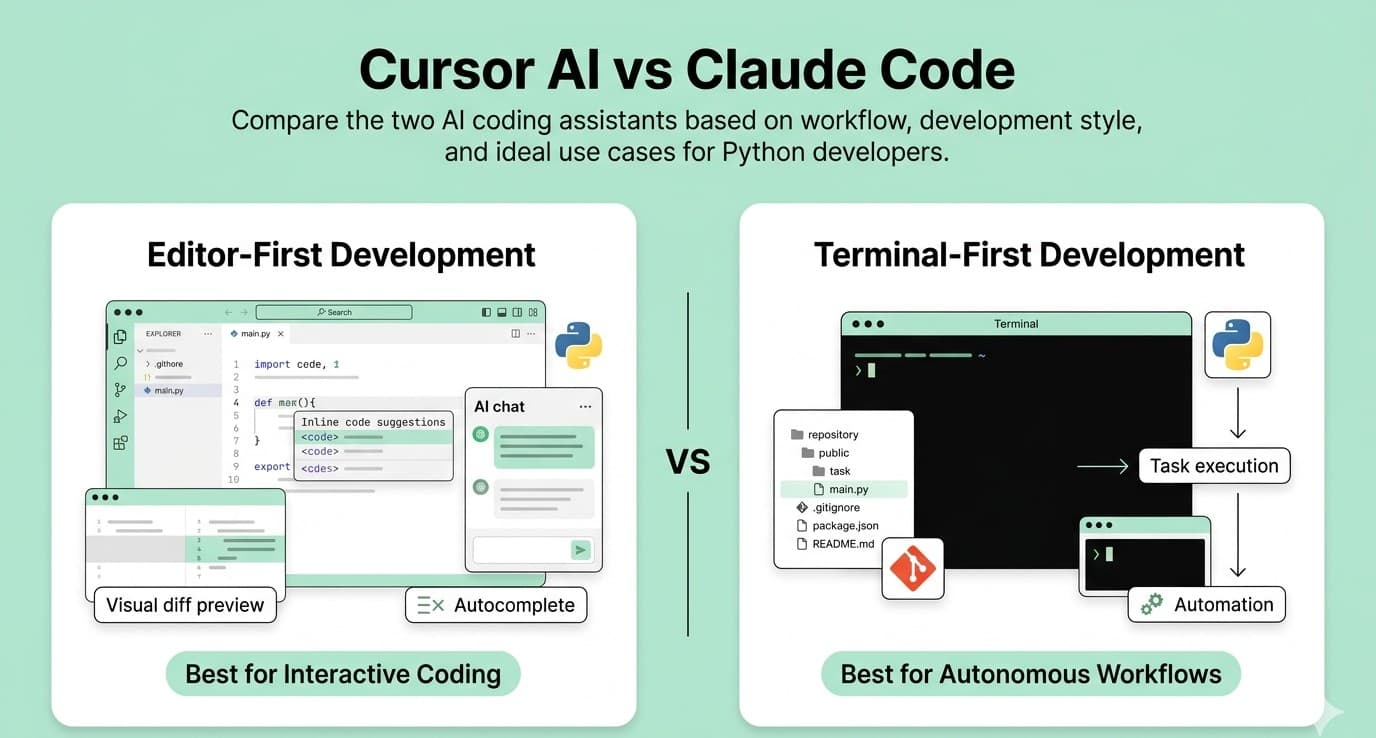
If you're trying to decide between Cursor AI and Claude Code, the answer depends less on features and more on how you actually write code. Cursor is built around the editor experience. It helps you write, refactor, and review code without leaving your IDE. Claude Code takes a different approach. It works more like an autonomous coding agent that can understand an entire codebase, execute tasks across multiple files, and fit naturally into terminal-based workflows. Both tools are powerful. Both can save time. But they solve different problems. This guide breaks down where each one shines, where each one falls short, and which type of Python developer is likely to benefit most from each.
FREE TO USE
25K+ INTERVIEWS4.8★ RATING68% IMPROVEMENT
Crack Your Dream Job
Real Interviews. Real Pressure. Practice until it feels easy.
- Seamless Interview Experience
- Resume & JD Questions
- Instant Personalized Feedback
Why This Comparison Matters
Most Python developers spend their day moving between multiple environments. You might write code in VS Code, run tests in a terminal, inspect logs in another window, push changes to GitHub, and then debug issues inside a cloud environment. Modern AI coding assistants promise to reduce that context switching and speed up development. The challenge is that many comparison articles focus on feature checklists rather than real workflows. The question isn't: "Which tool has more features?" The better question is: "Which tool fits the way I already work?" That distinction makes all the difference.
Understanding the Core Difference
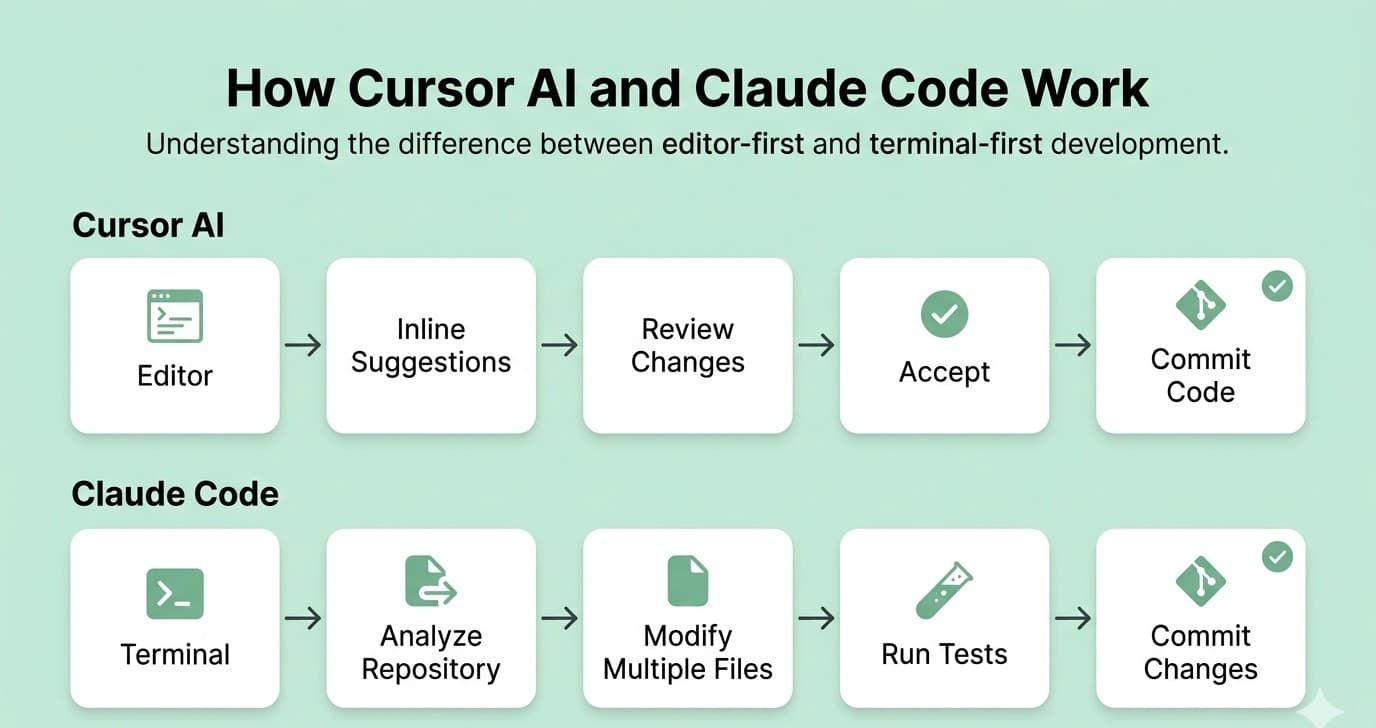
Before comparing features, it's important to understand what each tool was designed to do. Cursor is essentially an AI-native version of VS Code. If you're already comfortable with VS Code, the transition feels almost effortless. The editor includes: Inline code suggestions AI chat inside the IDE Multi-file editing through Agent Mode Visual diffs before accepting changes Built-in code review assistance Browser previews for frontend workflows Everything happens inside the editor. The experience is designed to keep you focused on the code you're actively writing. Claude Code was designed with a different philosophy. Instead of centering the editor, it centers the project. Running inside the terminal, Claude Code can: Explore large codebases Understand relationships across files Generate and modify code Run tests Analyze failures Create pull requests Automate repetitive development tasks While it now integrates with popular IDEs, its strengths still come from its terminal-first design. For many backend and infrastructure engineers, that feels much closer to how they already work.Cursor
Claude Code
The Difference Python Developers Actually Feel
Feature comparisons often miss the practical distinction. Cursor feels like an intelligent pair programmer sitting beside you. Claude Code feels more like an engineering assistant that can take ownership of a task. Consider a few common Python scenarios: If you're: Building a Django view Creating a FastAPI endpoint Refactoring models Writing business logic Cursor generally feels faster. You see suggestions directly in the editor, review changes visually, and stay focused on the file you're working in. For example, while building a FastAPI API, I asked Cursor to refactor a route that had grown beyond 150 lines. Instead of manually moving validation, database calls, and response formatting into separate functions, Cursor suggested a cleaner structure and showed the changes as a visual diff. The entire refactor took a few minutes rather than an hour of repetitive editing. If you're: Running test suites Working with Docker containers Managing CI/CD pipelines Debugging across multiple services Updating several files at once Claude Code often has the advantage. One situation where Claude Code stands out is large project maintenance. Imagine a Python service where a configuration value needs to be renamed across dozens of files. Instead of manually searching, updating imports, fixing references, and running tests one step at a time, Claude Code can handle much of that workflow from the terminal and verify the changes before you review them. Because it operates naturally from the terminal, it can execute broader tasks without requiring constant interaction. This becomes especially valuable when development extends beyond a single file or editor window.Writing Application Code
Managing Larger Workflows
Pricing: What You Actually Need to Know
On the surface, the pricing looks similar. Both tools offer entry-level plans around the $20 per month mark. The difference appears when usage increases. Cursor uses a credit-based model. That means: More powerful models consume credits faster Heavy usage can lead to additional costs Usage patterns directly affect monthly spending For occasional developers, this usually isn't a problem. For developers who spend most of the day coding with AI assistance, costs can become less predictable. Claude Code primarily relies on usage limits rather than a pure credit system. The upside is predictability. The downside is that during intense development sessions, those limits can occasionally feel restrictive. For casual or moderate usage, cost shouldn't be the deciding factor. For heavy daily usage, it's worth estimating your actual workload because both tools can become significantly more expensive than their advertised starting plans.Cursor Pricing
Claude Code Pricing
The Practical Takeaway
FREE TO USE
8k+ SESSIONS92% FLUENCY4.9★ RATING
Speak With Confidence
Real Conversations. Real Scenarios. Speak until it feels natural.
- Real-Time Speaking Practice
- Guided Conversation Flows
- Instant AI Feedback
Context Window: An Underrated Advantage for Claude Code
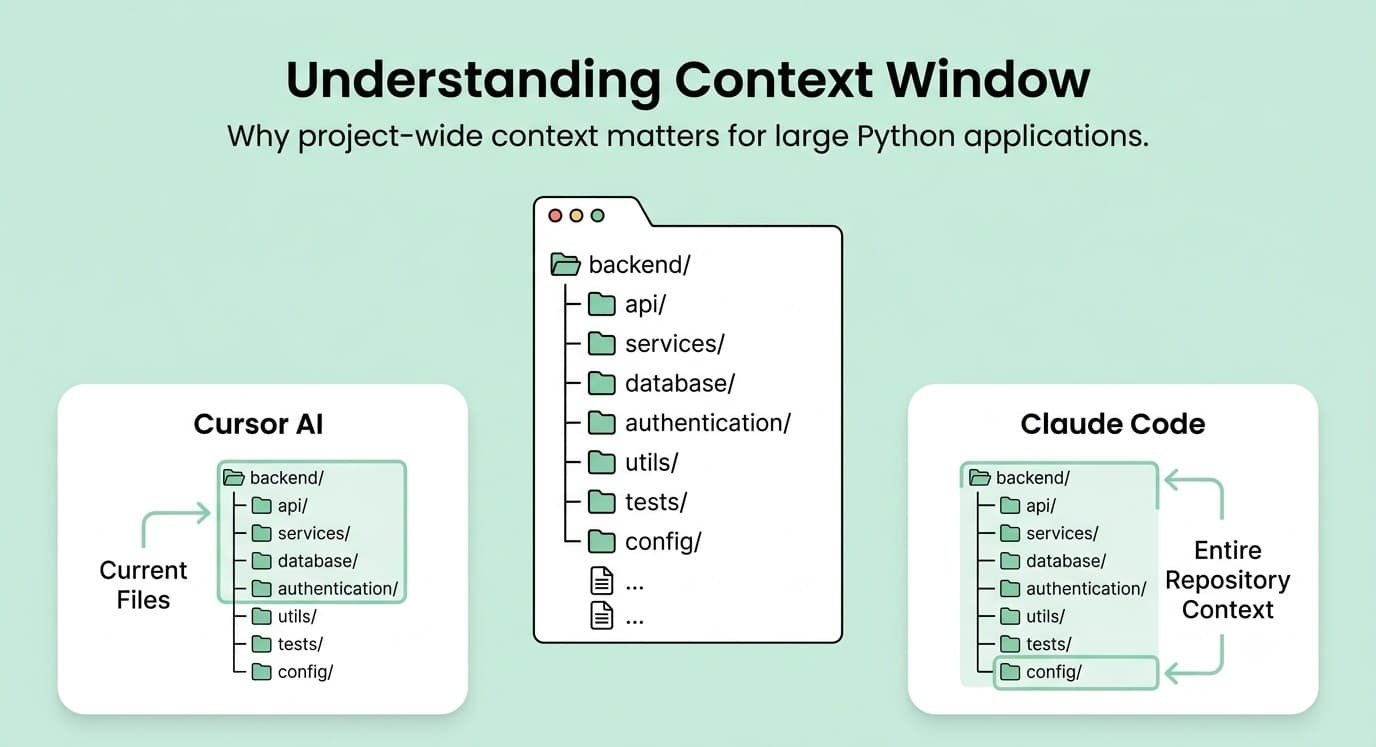
One area that doesn't get enough attention is context. Context determines how much of your project the AI can understand at one time. For small scripts, this barely matters. For larger Python applications, it matters a lot. Think about: Large Django projects Microservice architectures Data engineering platforms Machine learning pipelines Monorepos When code is spread across many files and directories, maintaining project-wide awareness becomes increasingly important. Claude Code tends to perform particularly well in these situations because it handles large project context more consistently. For developers working on complex systems rather than isolated files, that can be a meaningful advantage.
Model Flexibility: Where Cursor Stands Out
One of Cursor's biggest strengths is flexibility. You aren't tied to a single AI model. Depending on your plan, you can switch between different models based on the task at hand. That flexibility can be useful when: One model handles debugging better Another generates cleaner code A cheaper model is sufficient for routine tasks Developers who enjoy optimizing their workflow usually appreciate this level of control. Claude Code takes the opposite approach. Everything revolves around Claude models. The experience is simpler and more consistent, but there is less room for experimentation. Neither approach is inherently better. It depends on whether you value flexibility or simplicity.
What Developers Get Wrong
One misconception appears in almost every AI coding discussion. People assume the tool determines the quality of the code. In reality, the quality of the result usually depends more on the quality of the instruction. A vague prompt produces vague code. A well-structured prompt produces better outcomes regardless of which tool you're using. After spending time with both products, many developers reach a similar conclusion: The difference in code quality is much smaller than the difference in workflow. That's why personal preference plays such a large role in this decision. The best tool is usually the one that fits naturally into your development process.
Which Tool Should You Choose?
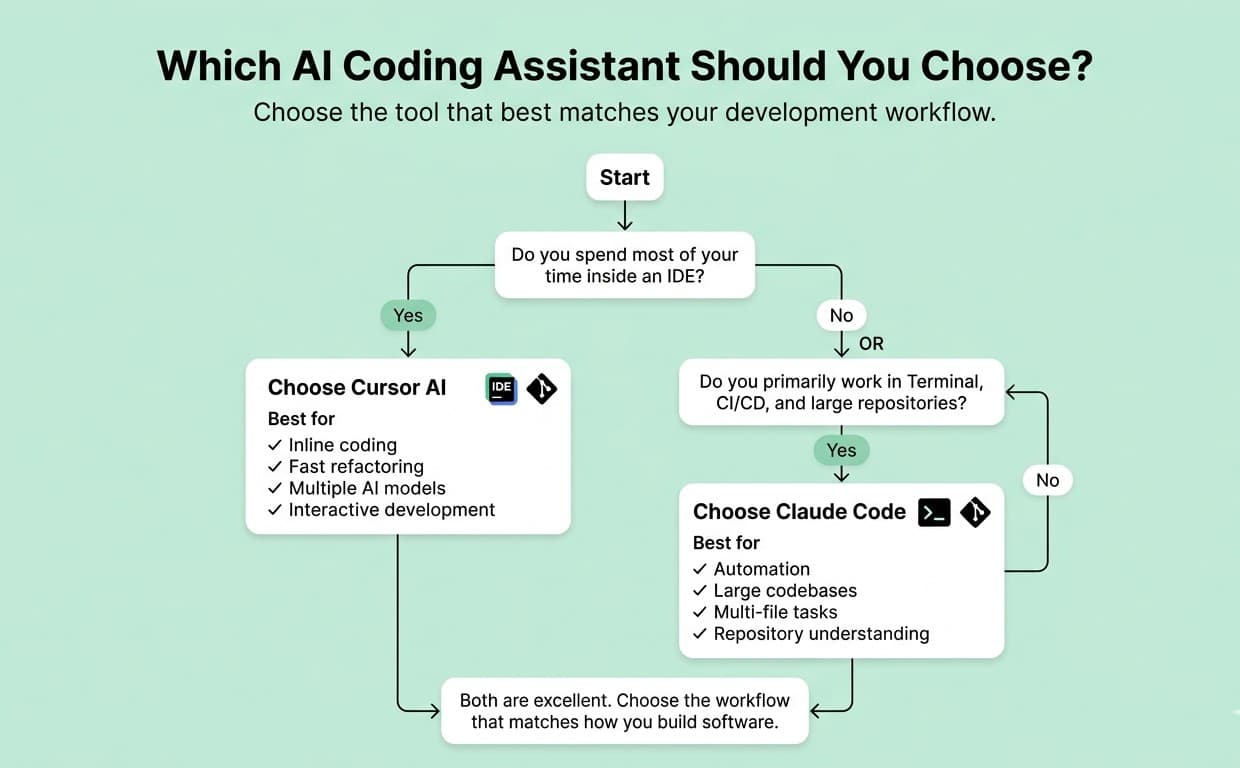
You: Spend most of your time inside an IDE Prefer visual workflows Want inline code generation Like reviewing changes before applying them Want access to multiple AI models Are newer to terminal-heavy development Cursor feels natural because it enhances the workflow you already use. You: Are comfortable working from the terminal Manage large codebases Work across multiple services and repositories Depend heavily on automation Use CI/CD pipelines regularly Want more autonomous task execution Claude Code becomes particularly valuable when development extends beyond writing code in a single editor window. Many experienced developers end up combining tools. A common workflow looks like: Cursor for day-to-day coding Claude Code for architecture analysis Claude Code for large refactors Cursor for implementation and iteration The combination can be extremely effective if the additional subscription cost makes sense for your situation.Choose Cursor If:
Choose Claude Code If:
Consider Using Both If:
A Reality Check on AI Productivity
There is one final point worth mentioning. AI coding tools are marketed as massive productivity multipliers. The reality is more nuanced. The developers who get the most value from these tools don't treat them as replacements for engineering judgment. They use them as accelerators. The best results come from: Clear instructions Strong problem definition Careful review of generated code Understanding when automation helps and when it gets in the way A simple example is asking an AI assistant to "optimize this API." The result is usually generic and inconsistent. But if you specify that the endpoint is experiencing slow PostgreSQL queries, receives around 500 requests per minute, and should reduce database calls without changing the response format, the quality of the output improves dramatically. The difference is often in the prompt, not the tool. In other words, AI doesn't eliminate the need for good engineering practices, it rewards them.
Final Verdict
Cursor and Claude Code are both excellent tools, but they excel in different environments. Cursor is the better choice for developers who want AI integrated directly into the coding experience. It feels familiar, fast, and highly interactive while Claude Code is the stronger option for developers working across large projects, terminal workflows, automation pipelines, and multi-file tasks. Most importantly, neither tool is universally better. The right choice is the one that removes friction from the way you already build software. If you're still undecided, don't spend another week reading comparison articles. Pick one. Use it on a real Python project for 30 days. By the end of that month, you'll know far more than any review, benchmark, or feature comparison can tell you.
More Blogs



Sep 30, 2026
React Developer Interview Preparation Guide: A Complete Roadmap for 2026
31 min read
