Loading...
Contents
Cursor vs Claude Code for Backend Developers
Jun 23, 202634 min readUpdated Oct 2, 2026
If you're a backend developer, you've probably noticed something interesting over the last year. The conversation around AI coding tools has changed.
A year ago, developers were asking:
Which AI tool writes better code?
Today, the question is:
Which AI tool helps me handle bigger engineering problems?
That's an important distinction.
Modern AI coding tools are no longer competing solely on autocomplete quality. They're competing on how much engineering work they can help you accomplish.
Two tools dominate that conversation in 2026: Cursor and Claude Code.
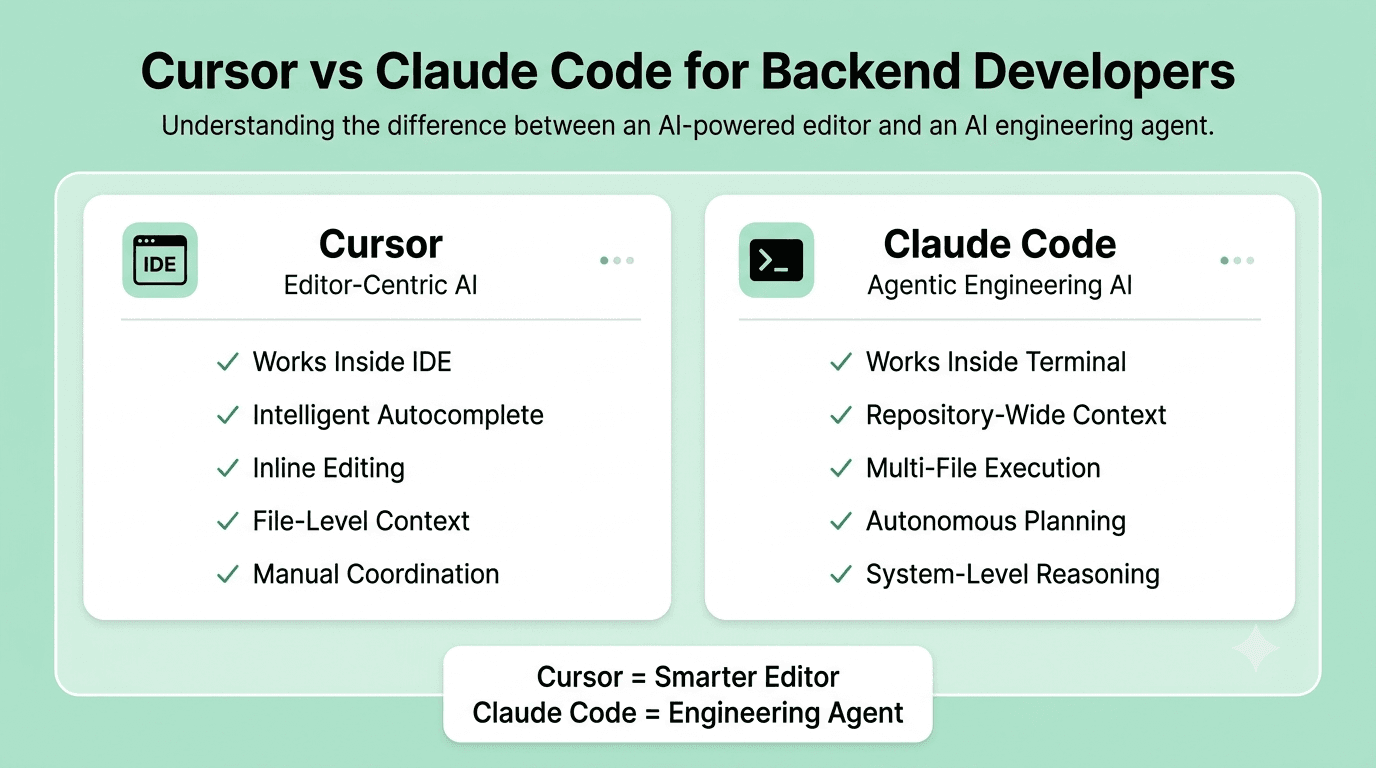
Cursor has become one of the most popular AI-powered editors because it feels like a smarter version of VS Code. Claude Code has gained momentum because it behaves less like an editor and more like an engineering agent that can understand and modify entire systems.
Both tools are excellent. Both can dramatically improve productivity but they solve different problems.
For backend developers working with APIs, databases, authentication systems, microservices, infrastructure configuration, and large codebases, understanding that difference matters.
This article is not another feature checklist. Instead, we'll look at how these tools behave during real backend work and where each one creates the most leverage.
FREE TO USE
25K+ INTERVIEWS4.8★ RATING68% IMPROVEMENT
Crack Your Dream Job
Real Interviews. Real Pressure. Practice until it feels easy.
- Seamless Interview Experience
- Resume & JD Questions
- Instant Personalized Feedback
The Honest Problem With How Developers Pick AI Tools
Most developers choose AI coding tools the same way they choose text editors.
They see someone influential on Twitter, LinkedIn, Reddit, or YouTube using a particular tool, try it for a few days, and decide whether it feels good.
That isn't necessarily wrong.
But it often leads developers toward tools optimized for the wrong problems.
Cursor exploded in popularity because it feels familiar.
You install it.
Your VS Code settings carry over.
Your extensions still work.
Within minutes, it starts predicting entire functions before you've finished writing the first few lines. That's genuinely impressive.
Claude Code takes a very different approach.
It doesn't begin with the editor. It begins with the codebase.
Instead of helping you write the next line, it tries to understand the project before making changes. That difference takes time to appreciate.
A frontend developer building React components may immediately prefer Cursor.
A backend developer maintaining authentication services, event-driven systems, database migrations, and distributed architecture often arrives at a different conclusion.
The deeper your work depends on understanding relationships across multiple files and services, the more important context becomes. And context is where the comparison starts getting interesting.
What Cursor Actually Does Well
Cursor is still the easiest AI coding tool to recommend to most developers. The reason is simple: It improves your existing workflow rather than replacing it. You stay inside an editor you already understand and continue coding exactly the way you always have. The AI simply becomes another layer of assistance. Cursor's autocomplete remains one of its biggest strengths. The tool doesn't just predict the next word. It frequently predicts entire functions, validation logic, route handlers, and repetitive implementation patterns. For backend developers, this becomes useful when writing: CRUD operations Service methods API endpoints Database queries Validation schemas Standard test cases Instead of repeatedly writing similar code, Cursor often generates most of the structure before you've finished typing. For routine development work, that creates real productivity gains. Cursor's inline editing experience is excellent. You highlight code and ask: Explain this function Convert this to async/await Optimize this query Write tests for this service The response appears directly in context. You don't have to switch tools or leave your editor. That speed matters because it preserves developer flow. One reason many developers remain loyal to Cursor is that it rarely interrupts how they already work. Multiple developer reviews consistently point to Cursor's IDE-first workflow and industry-leading autocomplete as its strongest advantages. Cursor performs particularly well when your work follows predictable patterns. Examples include: Express APIs NestJS applications Spring Boot services Django backends Laravel projects When a framework encourages consistency, Cursor becomes incredibly efficient at generating the repetitive pieces. The result is less typing and faster implementation.Exceptional Autocomplete
Fast Inline Editing
Great for Framework-Driven Development
Where Cursor Starts Showing Limits
The challenge appears when a task extends beyond the file currently open on your screen. Imagine a feature requiring changes to: API routes Database schema Service layer Middleware Test suite Infrastructure configuration Cursor can help with every individual piece. But you're still responsible for holding the entire system in your head. You're navigating between files, deciding what changes belong where. You're maintaining consistency, and managing context. For many backend developers, that becomes the actual bottleneck.
What Claude Code Actually Does Well
The easiest way to understand Claude Code is to stop thinking of it as a code editor. It's closer to an engineering agent. When developers first try Claude Code, they often compare it to Cursor, GitHub Copilot, or another coding assistant. That comparison only tells part of the story. Claude Code was built around a different philosophy. Instead of helping you write code faster, it helps you complete engineering tasks with less manual coordination. Consider a realistic backend scenario. You're asked to add rate limiting to authentication endpoints in a mature Node.js application. The implementation affects: Middleware Routes Authentication services Tests Configuration With a traditional AI editor, you'll likely generate each piece separately and connect everything yourself. With Claude Code, you can provide a high-level instruction:
Add rate limiting to authentication endpoints using the same pattern used in our payment service.
The tool can inspect the codebase, locate existing implementations, understand project conventions, update related files, and generate matching tests. The difference isn't code generation it is context gathering.
Claude Code Reads Before It Writes
One reason backend developers increasingly favor Claude Code for larger projects is that it spends more effort understanding the system before generating changes. Instead of focusing on the file currently visible, Claude Code analyzes relationships across the repository. That makes a significant difference when working on: Legacy systems Monoliths Microservice architectures Large backend platforms Long-running enterprise codebases Recent comparisons consistently describe Claude Code as stronger for repository-wide reasoning, architecture changes, and multi-file refactoring. Backend engineering becomes difficult when changes have downstream effects. A modification in one service may quietly break assumptions in another. A database migration can affect multiple layers. An authentication update can impact middleware, APIs, and background jobs simultaneously. These are not typing problems, they are reasoning problems.Claude Code's agentic workflow is designed specifically for this category of work. Multiple independent reviews and developer reports highlight architectural migrations, large refactors, and system-wide changes as areas where Claude Code often outperforms traditional editor-based AI workflows. Another area where Claude Code stands out is debugging. Backend bugs rarely exist in isolation. A production issue might involve: API layer Business logic Queue processing Database queries External services Finding the root cause requires tracing relationships across multiple files. Claude Code is particularly effective at following those chains and reasoning about how different parts of a system interact. For backend developers who spend as much time debugging as building new features, that capability can be more valuable than faster autocompleted.Stronger for Architectural Work
Debugging Across Systems
Cursor vs Claude Code: A Direct Comparison for Backend Developers
At first glance, these tools appear similar. Both write code, answer questions, and help developers move faster. But underneath, they solve fundamentally different problems.
Cursor is an AI-powered development environment while Claude Code is an AI-powered engineering agent.
That difference becomes obvious once you start working on larger backend systems.
In the next section, we'll compare how each tool handles context, multi-file changes, backend workflows, testing, debugging, and real-world engineering tasks.
How They Handle Context
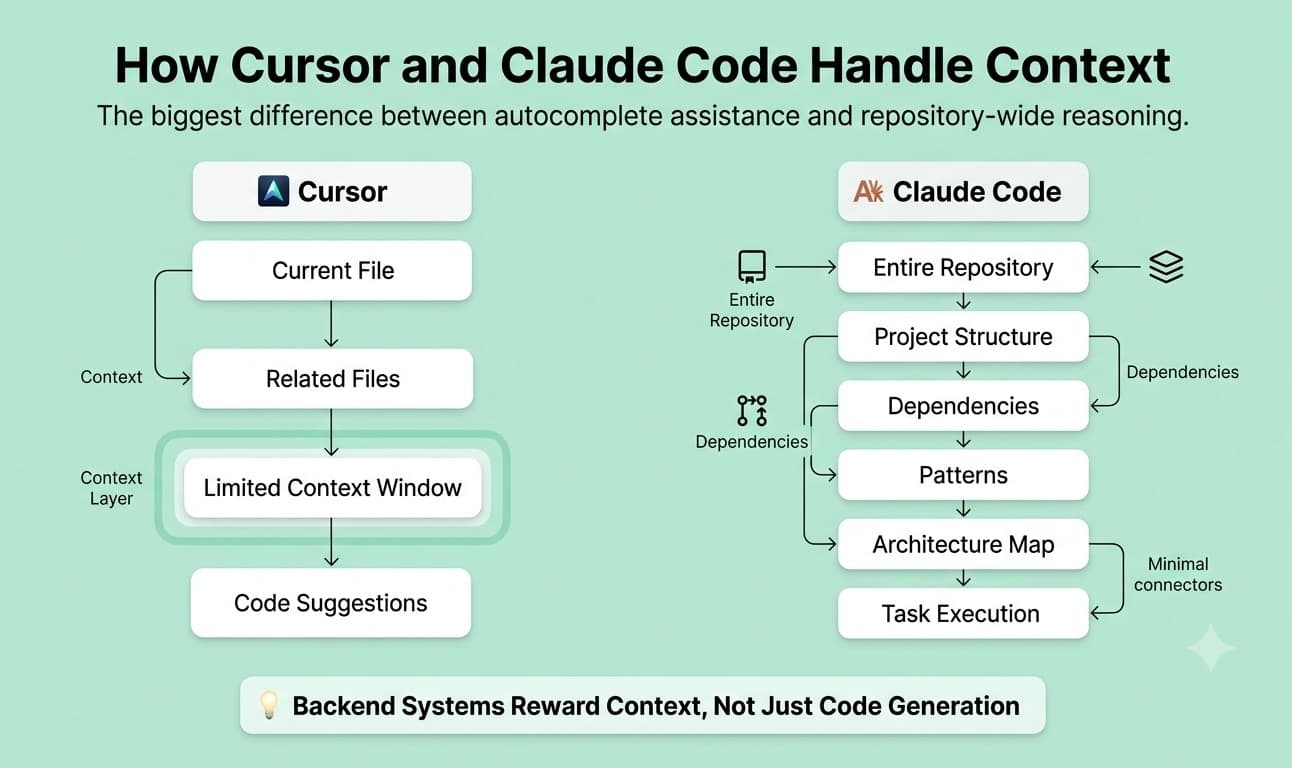
Context is where the biggest practical difference between Cursor and Claude Code appears.
Most backend projects are not isolated files. They're collections of services, APIs, databases, queues, background jobs, infrastructure configurations, and business rules that have evolved over years.
The challenge isn't usually writing code. It is understanding how a change in one area affects everything else.
Cursor works best within the context of your current workspace. It understands the file you're editing, nearby files, and relevant code it can access through indexing.
For many development tasks, that's enough. But as complexity increases, developers often find themselves manually feeding context into the conversation.
You explain relationships.
You point the tool toward specific files.
You provide additional background.
Claude Code approaches the problem differently, Instead of waiting for context, it actively gathers context. Before making changes, it inspects the codebase, identifies relevant files, discovers existing patterns, and builds a broader understanding of the project structure.
For backend developers working on large repositories, that difference becomes increasingly valuable.
The larger the system, the more expensive context gathering becomes.
How They Handle Multi-File Tasks
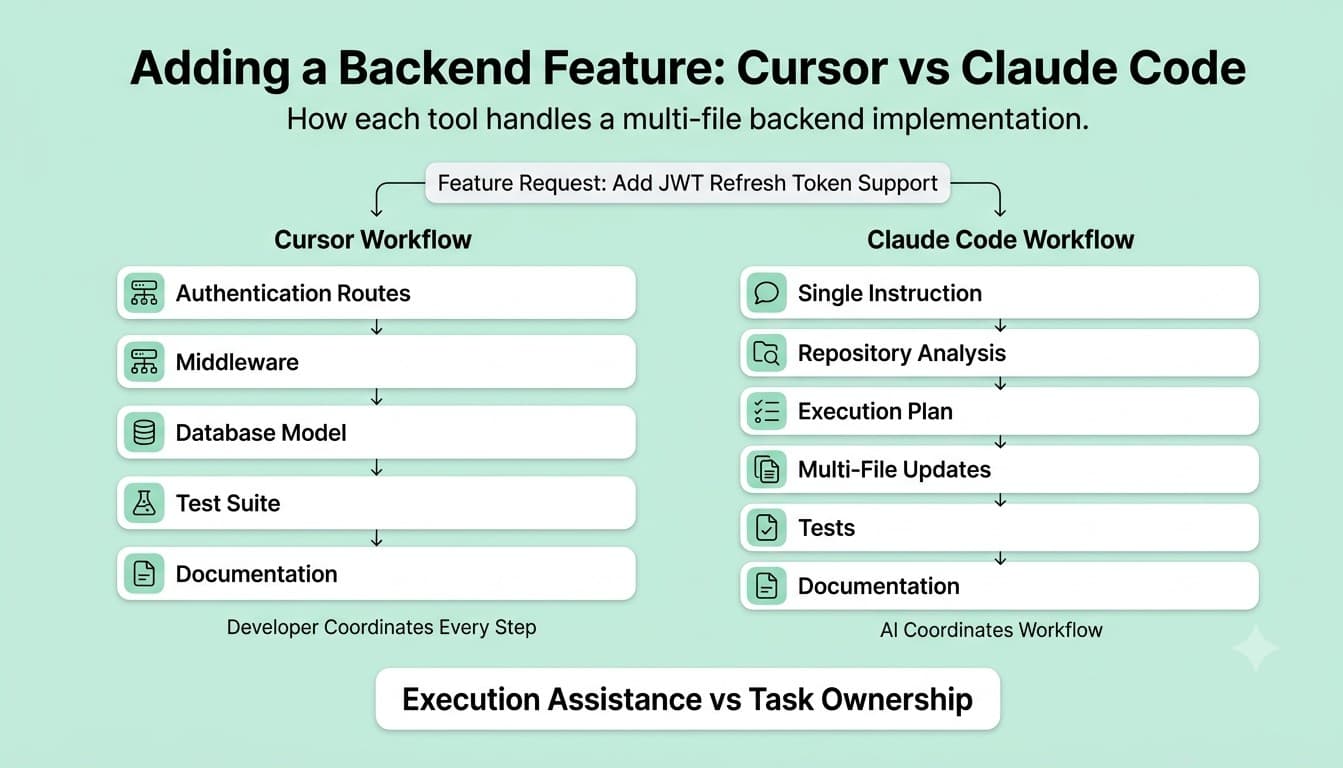
A Cursor-assisted developer completing a multi-file task is still in control of every step. They use Cursor to help write each piece but they are the ones navigating between files, deciding what changes go where, and keeping track of consistency. A Claude Code-assisted developer completing the same task gives the instruction once. Claude Code handles the navigation, the consistency checks, and the execution. The developer reviews and approves. This is not just a speed difference. It is a qualitatively different relationship with the tool.
How They Handle Testing
Both tools can write tests. The difference is that Claude Code writes tests in the style and structure of the tests that already exist in your project, because it has read them. Cursor writes tests that are correct and standard but may need adjustment to match your project's conventions. For backend projects with large, established test suites, this difference matters. Tests that do not follow the project's patterns require cleanup. Over many interactions, that cleanup adds up.
How They Handle Errors and Iteration
One of the most overlooked differences between these tools appears after code generation. When code fails. Backend developers spend a significant amount of time dealing with: Failing tests Runtime errors Dependency conflicts Database issues Integration problems Cursor helps analyze errors once you provide them. You run the code, inspect the failure, and paste the output. The AI assists with troubleshooting. Claude Code introduces a more autonomous loop. Because it can run commands, inspect outputs, and revise its approach, it can often iterate through failures with less manual intervention. For complex debugging sessions, this can significantly reduce context switching. The benefit becomes especially noticeable when the root cause spans multiple files or services.
FREE TO USE
8k+ SESSIONS92% FLUENCY4.9★ RATING
Speak With Confidence
Real Conversations. Real Scenarios. Speak until it feels natural.
- Real-Time Speaking Practice
- Guided Conversation Flows
- Instant AI Feedback
Real Backend Scenario: Adding JWT Refresh Token Support
Feature comparisons can only tell you so much. Let's look at a realistic backend task. Imagine you're asked to add JWT refresh token support to an existing Node.js authentication system. The change touches: Authentication routes Token services Middleware Database storage Session management Test suites API documentation A typical workflow might look like this: Generate refresh token logic. Create middleware. Update authentication routes. Modify database models. Write tests. Verify interactions manually. Cursor helps throughout the process. But the developer remains responsible for coordinating everything. The workflow often begins with a single instruction Implement refresh token support using existing authentication patterns. Update tests and documentation. Claude Code can inspect existing authentication flows, identify project conventions, discover testing patterns, and generate coordinated updates across multiple files. The distinction isn't about code quality. It's about how much of the system the tool understands before implementation begins. For backend engineers, that's often the more important advantage.Using Cursor
Using Claude Code
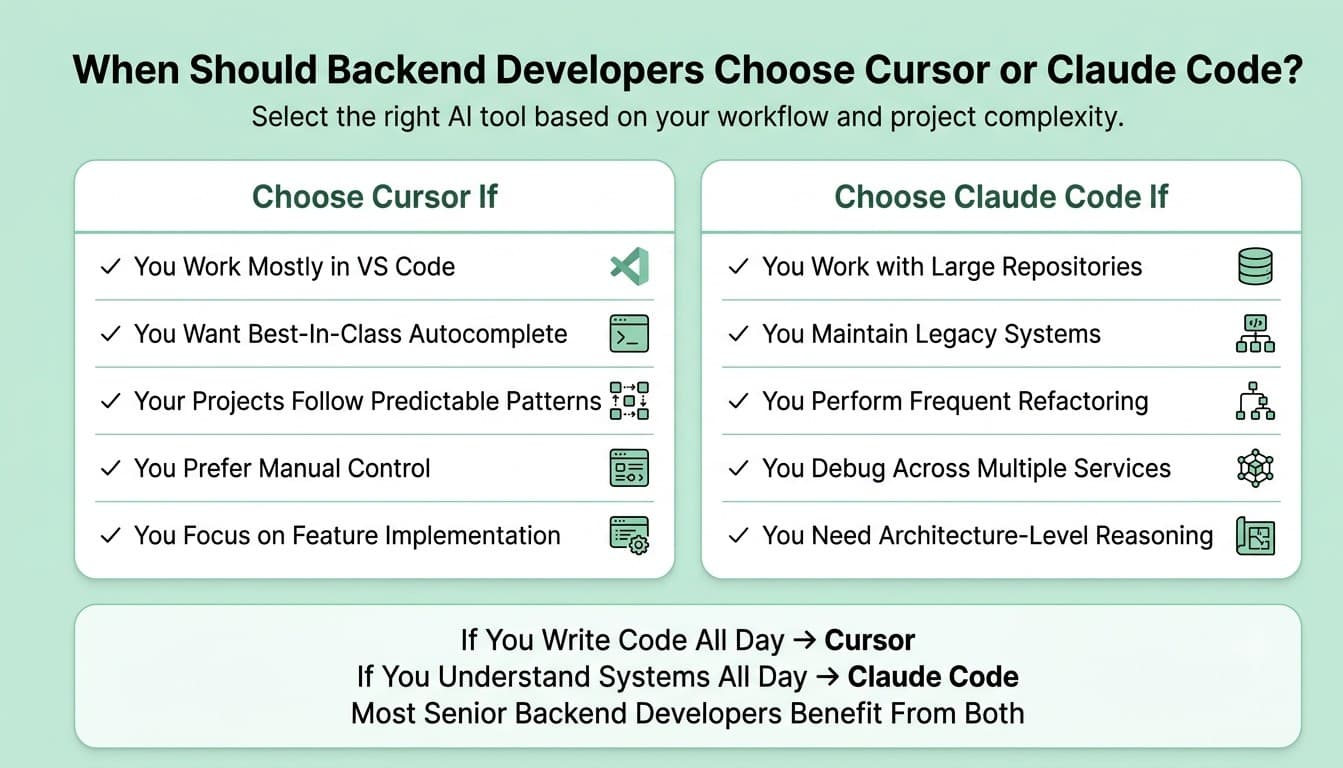
When Cursor Is the Right Tool
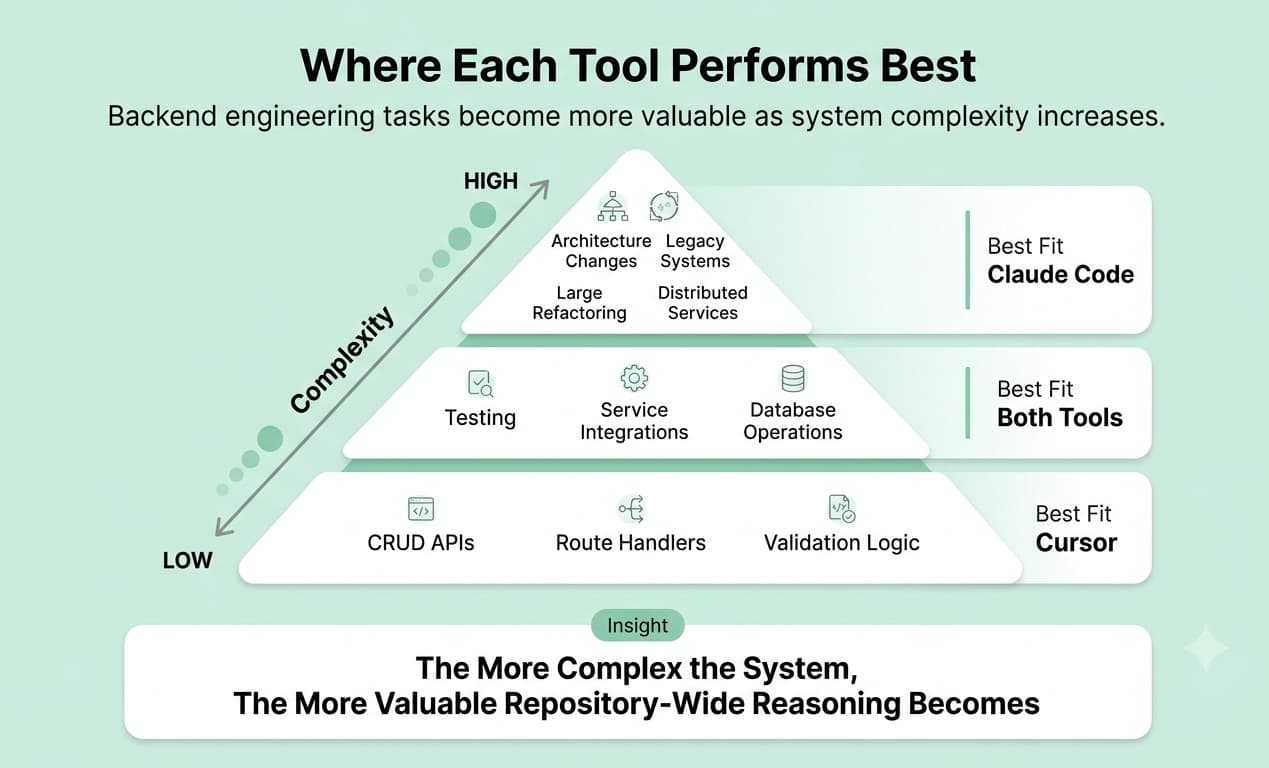
Cursor is often the better choice when development work is implementation-focused. Choose Cursor if: You spend most of your day inside VS Code. You want best-in-class autocomplete. Your projects follow predictable patterns. You prefer reviewing every change manually. You value staying in complete control of implementation. Many backend developers simply want an AI assistant that makes them faster without changing how they work. Cursor excels in that role. It feels like a natural extension of the development environment.
When Claude Code Is the Right Tool
Claude Code shines when complexity becomes the primary challenge. Choose Claude Code if: You work with large repositories. You perform frequent refactoring. You maintain legacy systems. You debug across multiple services. You spend more time understanding systems than writing code. In these situations, reasoning often matters more than generation speed. Claude Code's ability to gather context, identify patterns, and coordinate changes across systems becomes increasingly valuable.
What Experienced Developers Actually End Up Doing
One of the biggest misconceptions in AI coding discussions is that developers eventually choose one tool and abandon the other. That isn't what many experienced backend engineers are doing. Instead, they're using both. A common workflow looks like this: Daily coding Endpoint development CRUD operations Quick bug fixes Refactoring small modules Maintaining development flow Repository-wide refactoring Architecture changes Legacy code exploration Dependency upgrades Complex debugging Large-scale migrations Think of Cursor as the tool you keep open all day and Claude Code as the tool you call when the problem becomes larger than the file currently on your screen. That distinction reflects how many advanced developers are actually integrating AI into their workflows.Cursor For
Claude Code For
The Insight That Changes the Whole Comparison
Most backend developers think their biggest productivity problem is writing code. It usually isn't. The real bottleneck is understanding systems. Nobody spends two days implementing a controller.
They spend two days figuring out how a billing service, authentication layer, event queue, cache, and database interact before making a safe change.
That's why Cursor and Claude Code feel fundamentally different. Cursor reduces friction while you're coding while Claude Code reduces friction before you start coding.
As backend systems become larger and more interconnected, the second problem often becomes more expensive than the first.
That is why the conversation in 2026 is gradually shifting away from:
Cursor vs Claude Code
toward:
When should I use Cursor, and when should I use Claude Code?
For many backend engineers, the answer is increasingly both.
Conclusion
Cursor and Claude Code are both genuinely good tools. Neither is universally better. But for backend developers whose work involves complex systems, interconnected services, large codebases, and tasks where reasoning matters as much as writing, Claude Code's agentic, full-context approach is more aligned with the actual shape of the work. Cursor is the right choice when you want a smarter editor. Claude Code is the right choice when you want a thinking partner for your backend work. One action step you can take today: pick one task you have been putting off because it feels too large or too entangled to tackle efficiently. Run it through Claude Code with a clear instruction and review what it produces. That single experiment will tell you more about whether the tool fits your workflow than any comparison blog, including this one.
Want to Become a Better Backend Developer in the AI Era?
AI tools can accelerate coding, but they don't replace engineering judgment.
The developers who thrive in 2026 will be the ones who can explain architecture decisions, debug complex systems, communicate trade-offs, and think clearly under pressure.
That's exactly why backend interview preparation is evolving beyond coding questions.
Mocklingo helps backend developers practice system design discussions, architecture reviews, debugging conversations, and technical interviews that mirror real-world engineering work.
Because in the long run, your ability to think like an engineer compounds faster than any AI tool preference.
More Blogs



Sep 30, 2026
React Developer Interview Preparation Guide: A Complete Roadmap for 2026
31 min read
