Loading...
Contents
How Python Developers Use Cursor AI to Code Faster in 2026
Jun 25, 202631 min readUpdated Oct 2, 2026
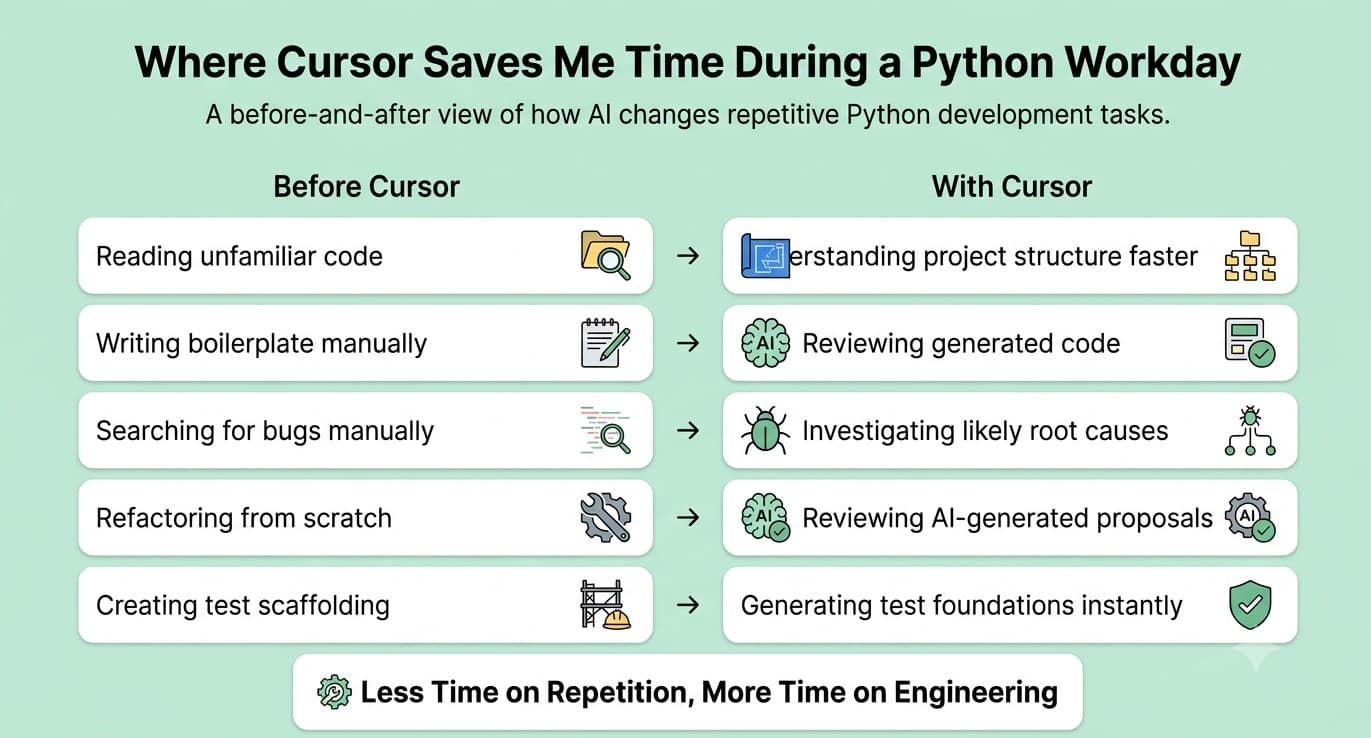
Six months ago I was spending roughly four hours a day on Python tasks that felt more like maintenance than real engineering. Reading through unfamiliar code. Writing the same types of functions I had written a dozen times before. Hunting down the same categories of bugs. Reformatting old utility functions that worked but looked like they were written in a rush, because they were. Then I changed how I work. I started using Cursor as my primary editor and built a specific workflow around it for Python development. The result was not minor. Certain categories of work that used to take me two to three hours now take forty-five minutes. And the output quality is better, not worse. This blog walks through my exact Cursor AI workflow for Python developers, step by step. What I do, where it genuinely helps, and where I still do not trust it.
FREE TO USE
25K+ INTERVIEWS4.8★ RATING68% IMPROVEMENT
Crack Your Dream Job
Real Interviews. Real Pressure. Practice until it feels easy.
- Seamless Interview Experience
- Resume & JD Questions
- Instant Personalized Feedback
The Biggest Mistake Developers Make With AI Coding Tools
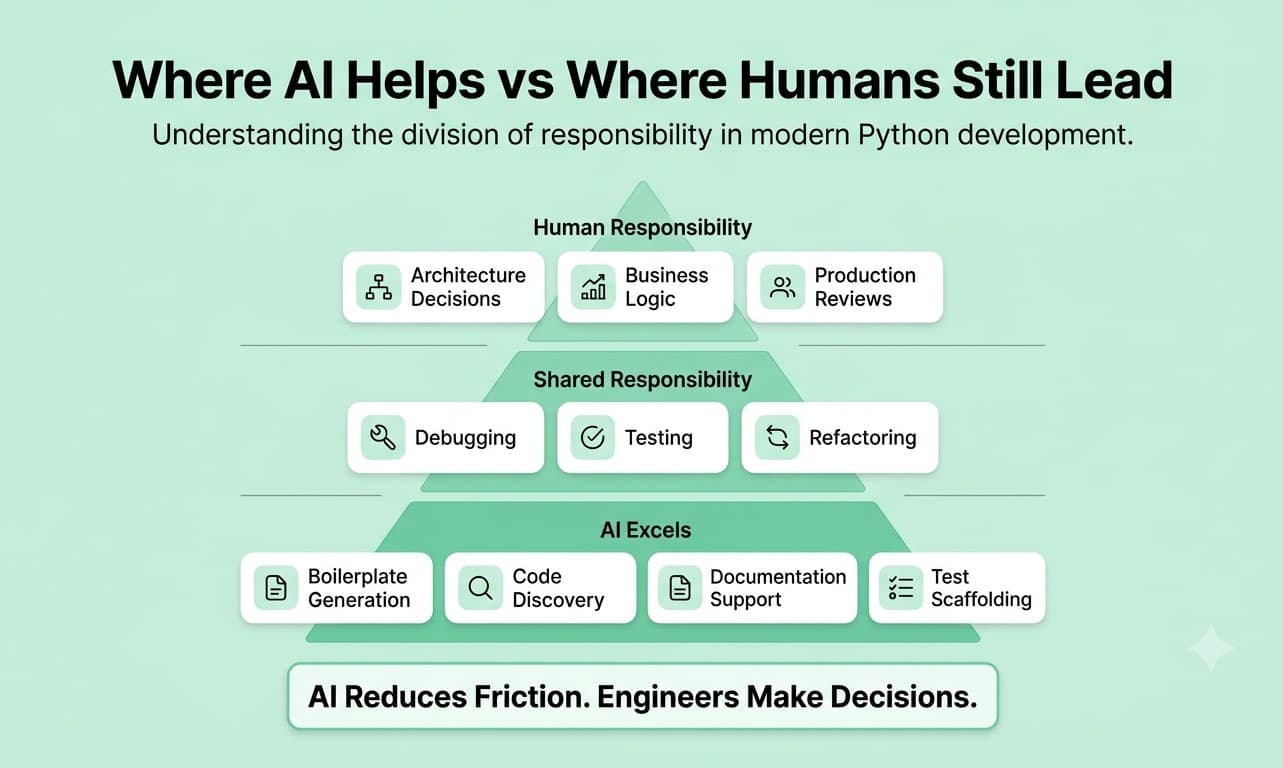
Before I get into the specifics of my workflow, it is worth understanding how the broader developer community is actually using AI tools for Python developers right now. Stack Overflow's 2024 Developer Survey found that 62 percent of developers were already using AI tools in their daily workflow. For Python developers specifically, the use cases cluster around a few consistent patterns: Writing boilerplate code for APIs, data models, and database layers Explaining unfamiliar code or library usage Debugging and interpreting error messages Writing and scaffolding unit tests Refactoring legacy code into cleaner patterns What is interesting is how the usage splits by experience level. Junior developers use AI heavily for the first category, generating starter code. Senior developers tend to use it more for the second and fourth categories, understanding complex systems and improving existing code faster. The common thread across both groups is time savings on tasks that do not require original thinking but do require attention and effort. AI does not replace judgment. It removes friction.
Why Are Developers Switching to Cursor AI?
Cursor is a standalone code editor built on top of VS Code. It is not a plugin or an extension. It is a full editor rebuilt from the ground up with AI integrated at every level. If you already use VS Code, switching to Cursor takes about ten minutes. Your settings, extensions, themes, and keybindings import automatically. It feels familiar from the first day. What makes Cursor AI for Python developers genuinely different from tools like GitHub Copilot is how it understands your codebase. Copilot primarily looks at the file you have open. Cursor indexes your entire project. When you ask it a question or request a change, it understands the full context, your folder structure, your existing modules, your naming conventions, and how your files relate to each other. Here is a quick comparison: For Python development specifically, the codebase-level awareness is the feature that changes daily work the most. Being able to ask "where in this project do we handle database connection errors?" and get an accurate answer saves real time when you are working on a large codebase you did not write yourself.
What Does My Cursor Workflow Look Like for Python Development?
Here is exactly how I structure my Python work with Cursor. I have broken it into the four areas where it has made the biggest difference.
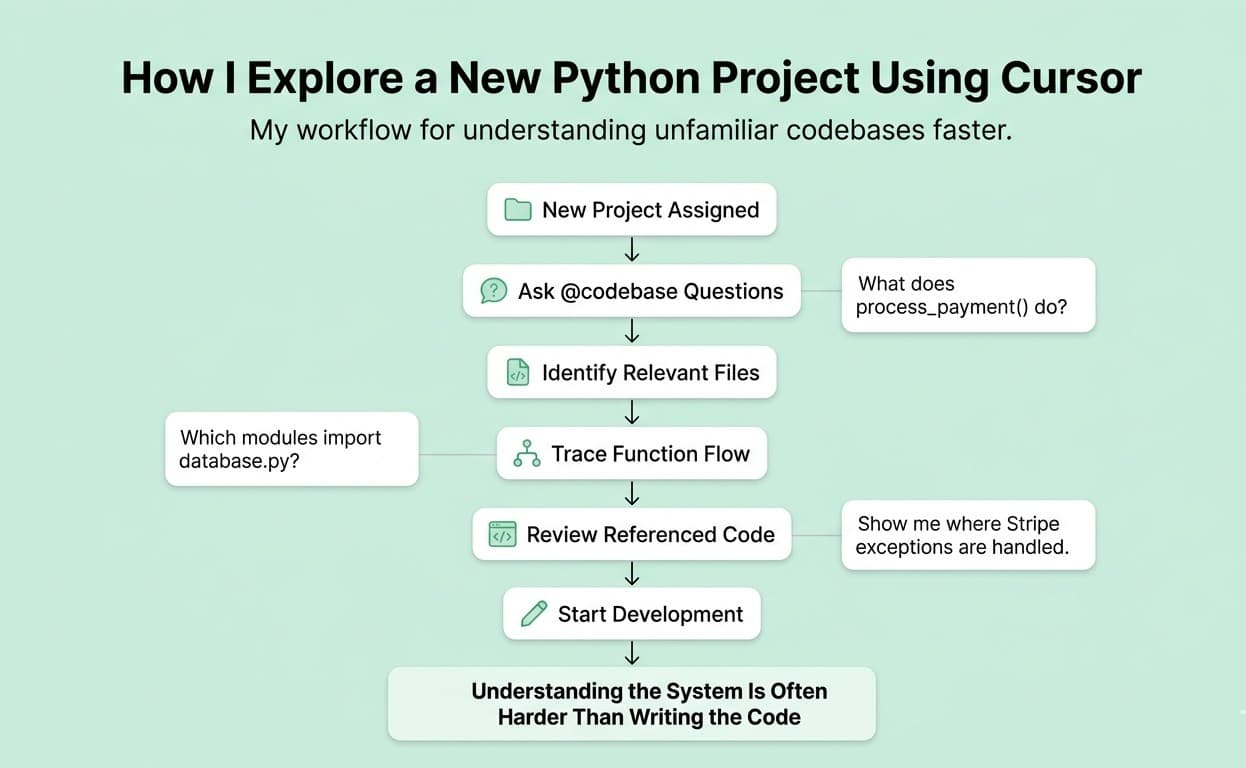
Step 1: Using AI to Understand Large Python Codebases
This is the use case I was not expecting to benefit from most, but it has turned out to be one of the most valuable. When I join a new project or get handed a module someone else wrote, I used to spend the first hour just reading through it carefully, tracing function calls, and trying to understand what everything did and why. On a complex Python backend with dozens of files, that process could take most of a day. Now I use Cursor's chat with the @codebase reference. I ask questions like: "What does the process_payment function do and where does it get called?" "Which modules import from utils/database.py?" "Is there any existing error handling for API timeouts in this project?" The answers come back with file references and line numbers. I can verify them directly. This does not replace reading the code entirely but it collapses the orientation phase from hours to minutes. What I found that works best: Start broad and get more specific. "What does this module do?" before "How does this specific function work?" Always verify the answer by reading the referenced code. Cursor is accurate most of the time but not always. Use it to find similar patterns before writing new ones. "How do we currently handle pagination in this project?" is more useful than asking it to generate pagination code from scratch.
Step 2: Generating Boilerplate Backend Code
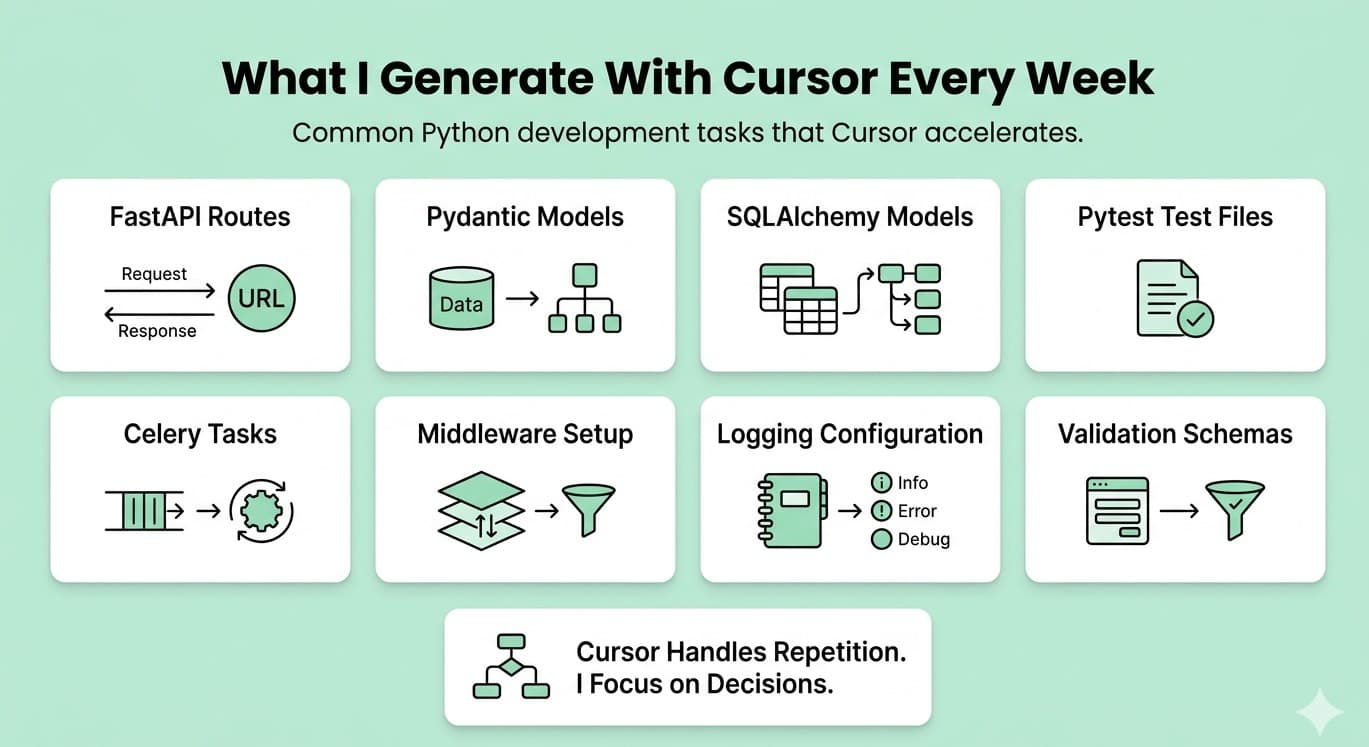
This is the use case everyone talks about and it is genuinely good. But there is a right way and a wrong way to use it. The right way is to give Cursor enough context before asking it to generate code. When I need a new API endpoint in a FastAPI project, I do not just type "create a user registration endpoint." I tell it: What framework and version we are using What our existing endpoint structure looks like (using @codebase) What the database model looks like What validation we expect What response format we use With that context, the generated code is almost always usable with small edits. Without that context, it generates generic code that does not match the project's patterns and takes longer to fix than it would have taken to write from scratch. Here is the kind of boilerplate I now generate in minutes rather than writing manually: Pydantic models for request and response validation SQLAlchemy model definitions from a schema description FastAPI router files with CRUD endpoints Basic pytest test files scaffolded from an existing module Celery task wrappers for background jobs Logging setup and middleware configuration None of these require original thinking. They require pattern knowledge and correct syntax. Cursor handles both.
Step 3: Debugging Python Errors Faster
This is where how developers use AI for coding has changed most visibly for me. Before Cursor, debugging a Python error meant reading the traceback, searching the relevant part on Stack Overflow or the docs, forming a hypothesis, testing it, and iterating. For common errors that process is fast. For unusual ones involving third-party libraries, environment issues, or subtle type mismatches, it could take an hour. Now I copy the full traceback into Cursor's chat along with the relevant code and ask it to explain what is happening. In most cases it gives me: A clear explanation of the error in plain language The most likely root cause A suggested fix An explanation of why the fix works For Python-specific issues, it handles these especially well: TypeError and AttributeError from unexpected None values Import errors from module structure issues asyncio event loop errors in async Python code Pydantic validation errors with complex nested models SQLAlchemy session and transaction errors My workflow for debugging with Cursor: Run the code and get the full traceback Open Cursor chat and paste the error with surrounding code using @file Ask "What is causing this error and what is the fix?" Read the explanation before accepting the fix Apply the fix and understand why it works before moving on That last step is the most important one. The risk with AI-assisted debugging is accepting fixes you do not understand. That creates technical debt invisibly. Always read the explanation.
Step 4: Refactoring Old Python Functions
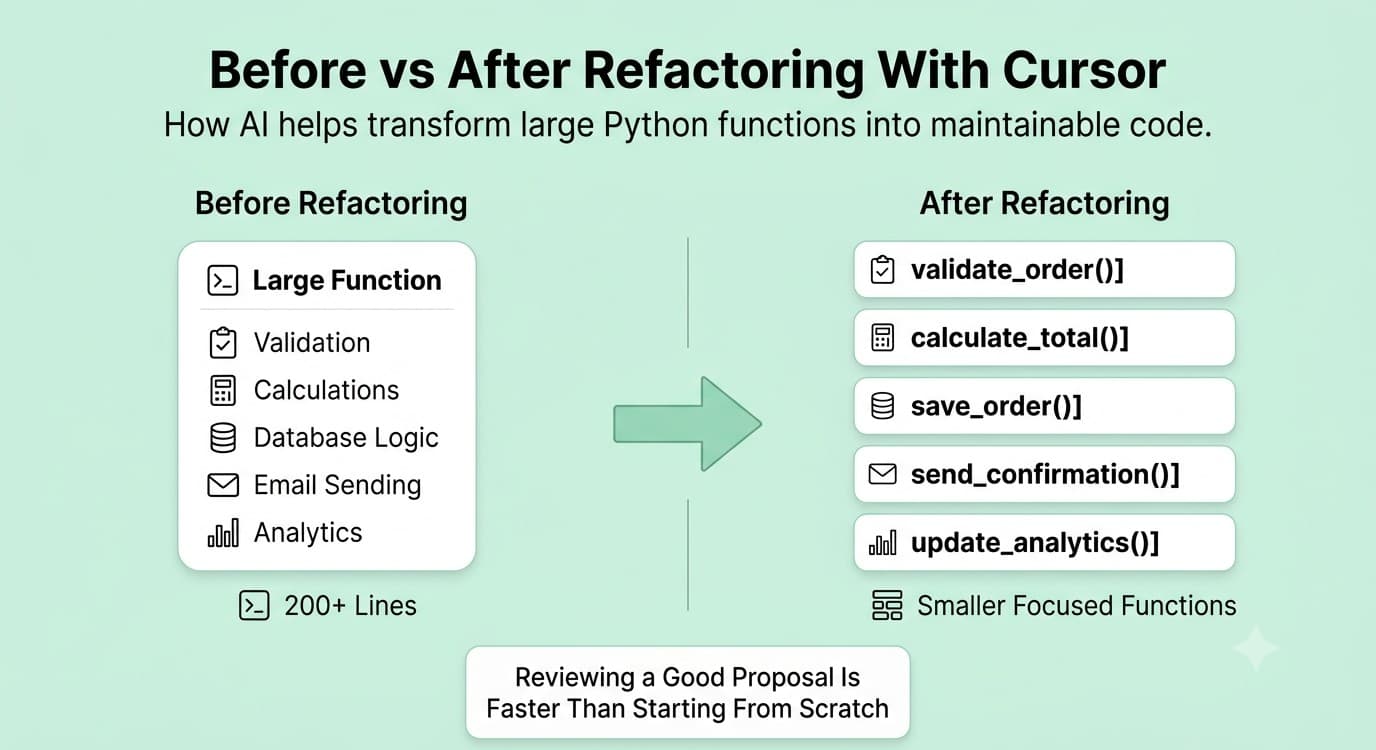
Refactoring is where I see the largest time savings on a percentage basis. I work with a codebase that has code written over several years. Some of it is clean. Some of it has functions that are two hundred lines long, mix business logic with database calls, have no type hints, and use variable names that were clearly written at 11pm under deadline pressure. Refactoring that code manually is slow and carries risk. You have to understand it first, then break it up carefully, then test that the behaviour is unchanged. With Cursor, my refactoring workflow looks like this: Open the function that needs work Tell Cursor what I want: "Refactor this function to separate the database query from the business logic, add type hints, and break it into smaller functions with clear names" Review what Cursor proposes using Composer mode, which shows diffs across all affected files Accept the changes I agree with and modify what I do not Run the tests to confirm behaviour is unchanged The key is that the Cursor makes a proposal and I review it. I do not accept blindly. But reviewing a proposal is significantly faster than writing the refactored version from scratch, and the proposal is usually around 80 percent of the way to what I want. Common refactoring tasks where Cursor saves the most time: Adding type hints to untyped Python functions Extracting long functions into smaller, named ones Converting synchronous functions to async equivalents Replacing manual dictionary parsing with Pydantic models Improving exception handling from bare except blocks to specific exceptions
My Cursor Rules: How I Avoid Becoming Dependent on AI
One thing I've noticed about AI coding discussions is that people often focus on what the tool can do.
Very few talk about the rules they follow when using it. These rules are what make the workflow sustainable.
Rule #1: Never Accept Generated Code Without Reading It
Although this sounds obvious, it becomes surprisingly easy to skip reviews when AI consistently produces useful results. The more helpful Cursor becomes, the more tempting it is to accept suggestions automatically.
I make it a strict rule to review every generated block of code because, regardless of who wrote it, I am ultimately responsible for what reaches production.
Rule #2: Never Trust Security-Sensitive Code Blindly
Whenever I work on authentication, authorization, permission systems, input validation, payment processing, or any other security-sensitive functionality, I apply an additional layer of scrutiny. AI-generated code can appear correct while still containing subtle vulnerabilities or flawed assumptions.
In these situations, I treat Cursor as a helpful collaborator rather than an authority and verify every important decision myself.
Rule #3: Run Tests Before Trusting Anything
Even when a generated solution looks perfect and the explanation seems convincing, testing comes first. I have encountered situations where AI-generated code solved the immediate problem but introduced a different issue elsewhere in the application.
Automated tests remain one of the most reliable ways to catch those unintended consequences before they become production problems.
Rule #4: Ask "Why?" Before Accepting a Fix
Whenever Cursor proposes a solution, I usually ask a follow-up question: "Why does this work?" If the explanation makes sense and aligns with my understanding of the system, I move forward.
If I cannot clearly understand the reasoning, I investigate further. My goal is not simply to fix bugs faster but to learn from the process and strengthen my understanding of the codebase.
Rule #5: AI Should Reduce Thinking Friction, Not Replace Thinking
This is the most important rule I follow. The moment I find myself accepting code that I do not fully understand, I stop and review it more carefully.
AI should eliminate repetitive work and reduce friction, but it should never replace engineering judgment. The value comes from accelerating execution, not outsourcing critical thinking.
FREE TO USE
8k+ SESSIONS92% FLUENCY4.9★ RATING
Speak With Confidence
Real Conversations. Real Scenarios. Speak until it feels natural.
- Real-Time Speaking Practice
- Guided Conversation Flows
- Instant AI Feedback
Where Cursor Saves Me the Most Time
Many articles about AI coding tools make dramatic claims about reducing development time by 70% or 80%. That has not been my experience. The reality is more nuanced. Cursor does not make every task faster, but it significantly improves certain parts of the development workflow.
Understanding Unfamiliar Code
The biggest productivity gain comes from understanding unfamiliar codebases. When working on a new project or an unfamiliar module, I can quickly identify relevant files, dependencies, and execution paths without spending hours manually tracing imports and function calls. What previously required extensive searching can often be accomplished in minutes.
Writing Tests
Generating test scaffolding is another area where Cursor performs exceptionally well. I still write important assertions and edge-case validations myself, but having a solid starting structure eliminates much of the repetitive setup work involved in creating test suites.
Refactoring Legacy Code
Legacy code often requires significant effort to modernize. Cursor helps by suggesting cleaner structures, adding type hints, identifying duplicated logic, and proposing ways to separate responsibilities. Reviewing and refining those suggestions is usually much faster than performing the entire refactor manually.
Debugging
The greatest debugging benefit is not necessarily fixing bugs automatically but reducing investigation time. Cursor helps identify likely causes, trace execution paths, and explain unfamiliar errors, allowing me to spend less time searching and more time validating solutions.
Where Cursor Saves Me the Least Time
Just as important as understanding where Cursor helps is recognizing where it provides limited value. Certain categories of work still require nearly the same amount of effort regardless of how advanced AI becomes.
Business Logic
Business logic is deeply tied to company-specific requirements, policies, and workflows. AI has no inherent understanding of those constraints, which means developers still need strong domain knowledge to implement solutions correctly.
Architecture Decisions
Decisions involving service boundaries, communication patterns, scalability strategies, and migration planning remain fundamentally human responsibilities. Cursor can suggest options and explain trade-offs, but it cannot determine which architectural decision is best for a specific organization or product.
Performance Optimization
When performance matters, measurement matters more than suggestions. I still rely on profiling tools, benchmarks, monitoring systems, and production metrics to identify bottlenecks. AI-generated optimization advice can provide useful ideas, but it should never replace empirical evidence.
What Tasks Should Python Developers NOT Rely on AI For?
This is one of the most important discussions surrounding AI-assisted development. While AI tools are incredibly useful, there are certain areas where I apply a much higher level of scrutiny because mistakes can have serious consequences.
Security-Sensitive Code
Authentication systems, authorization logic, cryptographic implementations, permission checks, and input validation should always receive careful manual review.
Whether code comes from an AI assistant or another engineer, security-critical functionality deserves additional attention because even small mistakes can create significant vulnerabilities.
Performance-Critical Systems
Applications that process large datasets, handle high request volumes, or operate under strict latency requirements require careful optimization. AI-generated code may be functionally correct, but correctness does not guarantee efficiency. Benchmarking, profiling, and measurement remain essential.
Complex Business Rules
AI tools do not understand organizational policies, legal requirements, operational constraints, or internal business processes.
They can generate plausible implementations, but they cannot verify whether those implementations align with real-world business expectations. Human expertise remains essential in these situations.
Final Production Review
No AI tool should replace code review. Generated code can appear polished while still containing logical flaws, hidden assumptions, maintainability concerns, or edge-case failures. A final human review remains one of the most important safeguards in any development workflow.
Is Cursor Better Than Other AI Coding Tools for Python?
Depends on what you are comparing and what you are using it for. For pure inline autocomplete, Copilot and Cursor are roughly equivalent. Both fill in functions, suggest completions, and handle boilerplate well. For codebase-aware questions and multi-file editing, Cursor is meaningfully better in 2026. The ability to ask questions about your whole project and get accurate, referenced answers is the feature that changes daily Python work more than any other. For developers on JetBrains (PyCharm), Cursor is not an option because it only works as a standalone VS Code-based editor. Copilot is the better choice in that environment. For cost-conscious developers who mostly write new code and rarely work with large existing codebases, Copilot at $10 per month delivers most of the value at half the cost. My honest assessment for Python backend developers specifically: if you spend meaningful time navigating, debugging, or refactoring existing code rather than only writing new code from scratch, Cursor's codebase awareness pays for the price difference quickly.
Conclusion
The workflow I have described here did not make me a better Python developer on its own. It made me a faster one on tasks where speed was the bottleneck rather than knowledge. The quality improvement came from using the time I saved to be more careful about the things that matter: architecture decisions, code review, testing, and understanding the business logic deeply. AI tools for Python developers are not a replacement for understanding your tools, your codebase, and your problem domain. They are a way to spend less time on the work that is least important, so you can spend more time on the work that actually needs attention.
FAQs
More Blogs

Sep 30, 2026
React Developer Interview Preparation Guide: A Complete Roadmap for 2026
31 min read
