Loading...
Contents
Top 50 React Developer Interview Questions in 2026
Sep 30, 2026153 min readUpdated Oct 3, 2026
A Comprehensive Preparation Guide
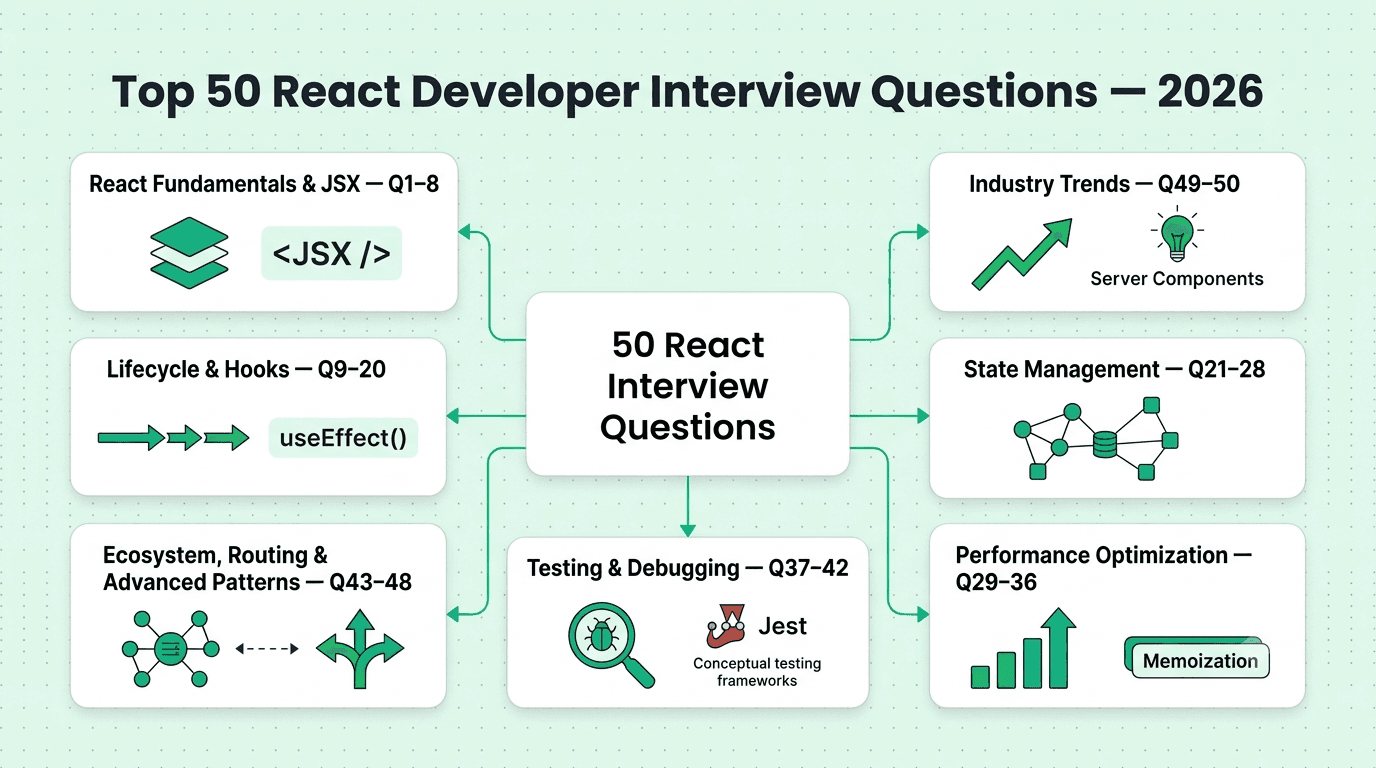
This guide covers the 50 most important React developer interview questions, organized by topic and roughly ordered by frequency/importance within each category, moving from fundamentals through hooks, state management, performance, testing, the broader ecosystem, and current industry trends.
Categories:
React Fundamentals & JSX (Q1-8)
Component Lifecycle & Hooks (Q9-20)
State Management (Q21-28)
Performance Optimization (Q29-36)
Testing & Debugging (Q37-42)
Ecosystem, Routing & Advanced Patterns (Q43-48)
Industry Trends (Q49-50)
FREE TO USE
25K+ INTERVIEWS4.8★ RATING68% IMPROVEMENT
Crack Your Dream Job
Real Interviews. Real Pressure. Practice until it feels easy.
- Seamless Interview Experience
- Resume & JD Questions
- Instant Personalized Feedback
Part 1: React Fundamentals & JSX
Question 1
Question: What is the Virtual DOM, and how does it improve performance compared to direct DOM manipulation?
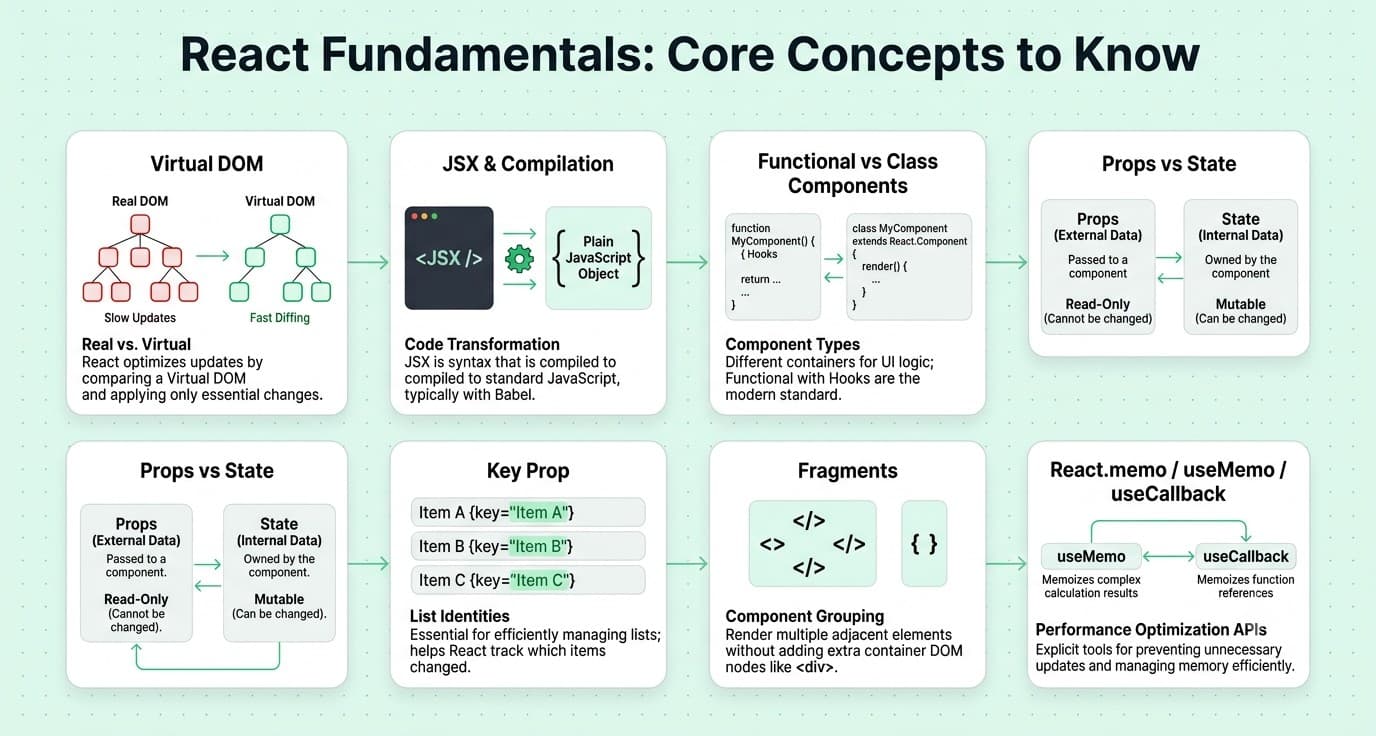
Answer: The Virtual DOM is a lightweight, in-memory JavaScript representation of the actual DOM — when state changes, React builds a new Virtual DOM tree, efficiently "diffs" it against the previous version, and calculates the minimal set of actual DOM mutations needed, then applies only those specific changes in a batch, which is generally faster than naive, unbatched direct DOM manipulation.
Explanation: A foundational concept for anyone working with React, frequently tested to gauge understanding beyond just "how to use React" toward understanding why it's architected the way it is.
Real-World Example: Updating a single item's text within a long rendered list only triggers a real DOM update for that specific changed node after diffing, rather than React needing to re-render and replace the entire list in the actual DOM.
Common Mistakes: Assuming the Virtual DOM makes React inherently faster than all direct DOM manipulation in every case — for very simple, targeted updates, direct manipulation can actually be faster; the Virtual DOM's real value is efficiently managing complexity as an application scales.
Follow-up Questions: How does React's reconciliation algorithm decide whether to update, add, or remove real DOM nodes? Why does React require a unique key prop when rendering lists? What are some newer frontend approaches that avoid a Virtual DOM entirely?
Question 2
Question: What is JSX, and how does it get converted into actual JavaScript?
Answer: JSX is a syntax extension allowing HTML-like markup to be written directly within JavaScript code — it's not understood natively by browsers, so a compiler (typically Babel) transforms JSX into regular React.createElement() calls (or, in modern React with the new JSX transform, an automatically-imported jsx() function call) before the code actually runs.
Explanation: A very foundational, commonly tested question, essential for understanding that JSX is syntactic sugar rather than a browser-native feature.
Real-World Example: <div className="box">Hello</div> compiles down to something equivalent to React.createElement('div', {className: 'box'}, 'Hello'), which is the actual JavaScript function call that produces a React element object.
Common Mistakes: Believing JSX is executed directly by the browser, without understanding the compilation step that converts it to plain JavaScript first.
Follow-up Questions: Why does JSX use className instead of class? What's the difference between the old and new JSX transforms regarding whether React needs to be imported in every file? How would you embed a JavaScript expression within JSX?
Question 3
Question: What is the difference between a controlled and uncontrolled component in React forms?
Answer: A controlled component has its form input value driven entirely by React state — the input's value is set from state, with an onChange handler updating that state on every keystroke, making React the single source of truth. An uncontrolled component lets the DOM itself manage the input's internal state, with React accessing the current value only when needed via a ref.
Explanation: A very commonly tested React forms concept, testing understanding of two fundamentally different approaches to handling form input.
Real-World Example: A form requiring real-time validation feedback as the user types requires a controlled component to have immediate access to the current value on every keystroke, while a simple, large form only needing final values on submission might reasonably use uncontrolled inputs with refs.
Common Mistakes: Mixing controlled and uncontrolled patterns unintentionally (providing a value prop without a corresponding onChange handler), causing React to warn and the input to appear "frozen."
Follow-up Questions: What are the performance tradeoffs between controlled and uncontrolled components for a form with many fields? How would you set a default initial value for an uncontrolled input? When would you choose a form library like React Hook Form, and how does it relate to this distinction?
Question 4
Question: What is the difference between props and state in React?
Answer: Props are read-only data passed down from a parent component to a child, used to configure and customize how the child renders and behaves — a child cannot modify its own props. State is data owned and managed internally by a component itself, which can be updated over time, triggering a re-render of that component whenever it changes.
Explanation: One of the most fundamental React concepts, essential vocabulary for any React-based technical discussion.
Real-World Example: A reusable Button component receives a label and onClick handler as props from its parent, while a Counter component manages its own internal count value as state, incrementing it in response to its own button clicks.
Common Mistakes: Attempting to directly mutate a prop within a child component rather than lifting relevant state up to a shared parent and passing down both the value and an appropriate update handler.
Follow-up Questions: What does "lifting state up" mean, and when would you need to do it? How would you decide whether a piece of data should be state versus derived from existing props or state during render? How does prop drilling become a problem in larger component trees?
Question 5
Question: What is React's key prop, and why is it important when rendering lists?
Answer: The key prop gives React a stable, unique identity for each element in a list, allowing its reconciliation algorithm to correctly determine which items have been added, removed, reordered, or changed between renders — without a stable key, React may inefficiently or incorrectly re-render elements, and can cause subtle bugs with component state getting incorrectly associated with the wrong list item after a reorder.
Explanation: A very commonly tested, deceptively simple React concept, since using an unstable key (especially array index) is an extremely common real-world source of subtle bugs.
Real-World Example: A to-do list where items can be reordered or deleted, if keyed by array index, can cause React to incorrectly preserve a checkbox's checked state on the wrong item after a reorder, since the index-based key doesn't track the item's true identity.
Common Mistakes: Using array index as the key for a list that can be reordered, filtered, or have items inserted/removed from the middle.
Follow-up Questions: Why is using array index as a key generally safe for a static list that's never reordered, but unsafe otherwise? What specific bugs can occur from an unstable key? How would you choose an appropriate key for a list of items fetched from an API?
Question 6
Question: What is the difference between a functional component and a class component in React?
Answer: A functional component is a plain JavaScript function that returns JSX, using Hooks (like useState and useEffect) to manage state and side effects. A class component extends React.Component, managing state via this.state and lifecycle methods like componentDidMount. Functional components with Hooks are now the standard, modern approach, with class components considered largely legacy.
Explanation: A very commonly tested question testing awareness of React's evolution and current best practices.
Real-World Example: A component managing local state and a data fetch on mount would traditionally use componentDidMount in a class component, while the modern functional equivalent uses useEffect with an empty dependency array to achieve the same behavior more concisely.
Common Mistakes: Not being able to explain the functional equivalent of a common class lifecycle method, suggesting only partial familiarity with modern React practice.
Follow-up Questions: How would you convert a simple class component to a functional component with Hooks? Are there things class components can do that functional components with Hooks cannot, or vice versa? Why did React introduce Hooks despite class components already supporting state?
Question 7
Question: What is the difference between React.Fragment and a regular <div> wrapper, and why would you use a Fragment?
Answer: A Fragment lets you group multiple child elements without adding an extra node to the actual rendered DOM, whereas wrapping children in a <div> adds a real, visible DOM element — Fragments are useful when an extra wrapper <div> would break CSS layout (like flex or grid) or add unnecessary nesting without any semantic or styling purpose.
Explanation: A commonly tested, practical React syntax question, testing awareness of a small but genuinely useful feature for avoiding unnecessary DOM bloat.
Real-World Example: A component returning multiple <td> elements as table cells must use a Fragment rather than a <div>, since wrapping table cells in a <div> would break the table's valid HTML structure entirely.
Common Mistakes: Habitually wrapping every component's return value in an unnecessary <div>, adding extra, meaningless nesting to the DOM that Fragments would avoid.
Follow-up Questions: What's the shorthand syntax for a Fragment, and what limitation does it have compared to the full <React.Fragment> syntax? When would you actually need the full syntax rather than the shorthand? Does using a Fragment have any effect on component behavior beyond the rendered DOM structure?
Question 8
Question: What is the difference between React.memo, useMemo, and useCallback?
Answer: React.memo wraps a component to skip re-rendering it if its props haven't changed (shallow comparison). useMemo caches the result of an expensive calculation between renders, recomputing only when its dependencies change. useCallback caches a function reference itself between renders, useful to prevent unnecessary re-renders of memoized child components that receive that function as a prop.
Explanation: A commonly tested React performance optimization topic, testing precise understanding of when and why each specific tool is appropriate.
Real-World Example: A component rendering a large, complex data visualization based on expensive calculations might use useMemo to avoid recalculating that result on every render, only recomputing when the actual underlying data dependency changes.
Common Mistakes: Overusing these tools throughout an application "just in case" without profiling to confirm there's an actual measurable performance problem, adding code complexity without a genuine benefit.
Follow-up Questions: When would React.memo on a component actually fail to prevent an unnecessary re-render? How would you profile a React application to identify genuine, worthwhile memoization opportunities? What's the tradeoff/cost of memoization even when it's technically "working"?
Part 2: Component Lifecycle & Hooks
Question 9
Question: Explain the React useEffect hook, including its dependency array and cleanup function.
Answer: useEffect runs a side effect after a component renders, with its dependency array controlling when the effect re-runs: an empty array [] means it runs once after the initial render only, omitting the array means it runs after every render, and including specific dependencies means it re-runs only when any of those values change between renders. An optional returned cleanup function runs before the component unmounts or before the effect re-runs again, useful for preventing memory leaks.
Explanation: One of the most commonly used and frequently misused React hooks, making precise understanding essential and very commonly tested.
Real-World Example: A component subscribing to a WebSocket connection on mount would set up the subscription inside useEffect and return a cleanup function that closes the connection, preventing a memory leak or duplicate subscriptions when the component unmounts.
Common Mistakes: Omitting a dependency the effect actually uses (a very common mistake, generally caught by the exhaustive-deps ESLint rule), causing the effect to use a stale, outdated value from a previous render.
Follow-up Questions: What happens if you omit the dependency array entirely versus providing an empty array? Why is the exhaustive-deps ESLint rule important, and when might you deliberately deviate from it? How would you handle a data-fetching effect that needs to avoid a race condition when its dependencies change quickly?
Question 10
Question: What is the difference between useState and useReducer, and when would you choose one over the other?
Answer: useState manages a single piece of state with a simple setter function, well suited for simple, independent state values. useReducer manages more complex state logic through a reducer function (similar to Redux) that takes the current state and an action, returning new state — better suited when state updates involve complex logic, multiple sub-values that change together, or when the next state depends heavily on the previous state in a non-trivial way.
Explanation: A very commonly tested state management question, testing whether a candidate can match the right tool to the actual complexity of the state being managed.
Real-World Example: A simple toggle or text input value is well suited to useState, while a shopping cart with add/remove/update-quantity actions affecting several related pieces of state together is often more cleanly managed with useReducer.
Common Mistakes: Using several separate useState calls to manage deeply interrelated state that would be more clearly and reliably managed together with a single useReducer, risking inconsistent updates across the related pieces of state.
Follow-up Questions: How would you write a reducer function for a shopping cart supporting add, remove, and update-quantity actions? How does useReducer relate conceptually to Redux? Would you combine useReducer with Context for broader state sharing — what would that look like?
Question 11
Question: What is the Rules of Hooks, and why must Hooks be called in the same order on every render?
Answer: The Rules of Hooks state that Hooks must only be called at the top level of a function component (never inside loops, conditions, or nested functions) and only from React function components or custom Hooks — this is because React tracks each Hook's state based purely on the order it's called in, so calling Hooks conditionally would cause that order to shift between renders, corrupting the association between each Hook call and its actual stored state.
Explanation: A very commonly tested, foundational Hooks concept, essential for understanding why seemingly reasonable code (like a conditional useState call) actually breaks React's internal Hook bookkeeping.
Real-World Example: Writing if (condition) { const [value, setValue] = useState(0); } would work on the very first render but break on a subsequent render where condition evaluates differently, since React would then associate the wrong stored state with a different Hook call at that position.
Common Mistakes: Attempting to call a Hook conditionally or within a loop to seemingly simplify code, not realizing this violates React's fundamental assumption about consistent Hook call order.
Follow-up Questions: How would you conditionally apply a Hook's effect without conditionally calling the Hook itself? What does the eslint-plugin-react-hooks linter specifically check for? Why can custom Hooks call other Hooks, but regular functions cannot?
Question 12
Question: How would you write a custom Hook, and what problem do custom Hooks solve?
Answer: A custom Hook is a JavaScript function whose name starts with "use" and that can call other Hooks internally, allowing reusable stateful logic to be extracted and shared across multiple components without duplicating the underlying implementation — solving the problem of sharing stateful behavior (unlike a regular utility function, which can't use Hooks) between components that don't share a common parent-child relationship suited to simple prop passing.
Explanation: A very commonly tested, practical Hooks concept, essential for writing maintainable, DRY React code.
Real-World Example: A useWindowSize custom Hook encapsulating the logic for tracking browser window dimensions (using useState and useEffect internally to listen for resize events) can be reused across any component needing that information, without duplicating the subscription and cleanup logic in each one.
Common Mistakes: Duplicating the same stateful logic (like a data-fetching pattern) across many components instead of extracting it into a single, reusable custom Hook.
Follow-up Questions: How would you test a custom Hook in isolation? Can a custom Hook return JSX, or is it limited to returning data/functions? How would you design a custom Hook to be genuinely reusable across different use cases rather than overly specific to one component?
Question 13
Question: What is the useContext hook, and what problem does React Context solve?
Answer: Context provides a way to pass data through the component tree without manually passing props down through every intermediate level ("prop drilling") — useContext lets a component directly consume a value from the nearest matching Context Provider above it in the tree, regardless of how many intermediate components exist between them.
Explanation: A very commonly tested React data-sharing mechanism, essential for understanding an alternative to prop drilling for widely-needed data like theme or authenticated user information.
Real-World Example: A deeply nested component needing access to the current authenticated user's information can consume that value directly via useContext(AuthContext) rather than requiring every intermediate component in the tree to accept and forward an unused user prop.
Common Mistakes: Overusing Context for frequently-changing, narrowly-scoped state, which can cause unnecessary re-renders of every consuming component whenever the context value changes at all.
Follow-up Questions: What specific performance problem can arise from overusing Context for frequently-changing state, and how would you mitigate it? How would you combine Context with useReducer for more structured state management? When would you choose Context over a dedicated state management library like Redux?
Question 14
Question: What is the useRef hook, and what are its two main use cases?
Answer: useRef creates a mutable object that persists across re-renders without itself triggering a re-render when changed — its two main use cases are accessing a DOM element directly (like focusing an input) and storing a mutable value that needs to persist across renders but shouldn't cause a re-render when it changes (like a timer ID or a previous value for comparison).
Explanation: A very commonly tested Hooks concept, testing whether a candidate understands both of useRef's distinct, important use cases rather than only the more commonly known DOM-access one.
Real-World Example: A component implementing a custom video player might use a ref to directly call .play() or .pause() on the underlying <video> DOM element, an imperative action that doesn't fit React's typical declarative state-driven rendering model.
Common Mistakes: Using useRef to store a value that should actually trigger a re-render when it changes (which requires useState instead), or unnecessarily reaching for a ref and imperative DOM manipulation when a declarative state-based approach would be more idiomatic.
Follow-up Questions: Why doesn't updating a ref's .current value trigger a re-render, and when is that specifically useful? How would you use a ref to store the previous value of a prop or state variable for comparison? How does useRef differ from createRef, and why does that distinction matter specifically in functional components?
Question 15
Question: What is the order of operations for React's component lifecycle in a functional component using Hooks (mount, update, unmount)?
Answer: On mount: the component function runs, JSX is rendered to the DOM, and then useEffect callbacks with satisfied dependencies run (in the order they're declared) after the DOM has been updated. On update: the component function re-runs, the DOM is updated, and useEffect callbacks whose dependencies changed run again (first running any cleanup function from the previous effect execution). On unmount: cleanup functions from any active effects run.
Explanation: A commonly tested, foundational lifecycle question, testing whether a candidate understands the actual sequencing of render, DOM update, and effect execution, not just that "useEffect runs after render."
Real-World Example: A component with a useEffect that sets up an event listener and returns a cleanup function removing it will have that cleanup run first if the effect's dependencies change (before the new effect instance runs), and again on final unmount — ensuring no duplicate listeners accumulate.
Common Mistakes: Assuming an effect's cleanup function only ever runs once, on unmount, without recognizing it also runs before every re-execution of the effect when its dependencies change.
Follow-up Questions: How would you use this lifecycle understanding to debug a memory leak caused by an uncleaned-up subscription? What's the difference in timing between useEffect and useLayoutEffect? How would you verify effect execution order using React DevTools or console logging?
Question 16
Question: What is the difference between useEffect and useLayoutEffect?
Answer: useEffect runs asynchronously after the browser has painted the updated DOM to the screen, not blocking visual updates. useLayoutEffect runs synchronously immediately after DOM mutations but before the browser paints, blocking the visual update until it completes — useful when an effect needs to measure or synchronously adjust the DOM before the user sees any visual flicker from an intermediate state.
Explanation: A commonly tested, more nuanced Hooks question, testing precise understanding of the timing difference and when the less commonly used useLayoutEffect is actually appropriate.
Real-World Example: A tooltip component that needs to measure its own rendered size and reposition itself to avoid overflowing the viewport would use useLayoutEffect to make that adjustment before the browser paints, avoiding a visible flicker where the tooltip briefly appears in the wrong position.
Common Mistakes: Using useLayoutEffect by default for effects that don't actually need synchronous DOM measurement, unnecessarily blocking the browser's paint and potentially harming perceived performance.
Follow-up Questions: What visual symptom would indicate you should switch from useEffect to useLayoutEffect? Why does React recommend defaulting to useEffect unless you have a specific reason to need useLayoutEffect? How does this timing difference affect server-side rendering, where there's no browser paint step at all?
Question 17
Question: How would you handle a race condition in a useEffect that fetches data based on a changing prop or state value?
Answer: Use a cleanup mechanism (like a boolean flag or an AbortController) to track whether the effect instance is still the "current" one, and ignore or cancel the result of a stale, superseded fetch if the effect's dependencies have changed again before the earlier fetch completed — preventing a slower, earlier request from overwriting the result of a faster, more recent one.
Explanation: A very commonly tested, practical troubleshooting question, since this exact race condition is an extremely common real-world bug in data-fetching components.
Real-World Example: A search-as-you-type component rapidly firing off a new fetch request on each keystroke could, without this safeguard, have an earlier, slower request's result arrive after a later, faster request's result, incorrectly overwriting the display with stale, outdated search results.
Common Mistakes: Not accounting for the possibility that fetch requests can resolve out of order, leading to stale data occasionally and unpredictably overwriting more current data in the UI.
Follow-up Questions: How would you use an AbortController specifically to cancel a stale, in-flight fetch request rather than just ignoring its eventual result? How does a data-fetching library like React Query or SWR handle this race condition automatically? How would you test that your race condition fix actually works reliably?
Question 18
Question: What is the difference between useMemo and simply computing a value directly in the component body on every render?
Answer: Computing a value directly recalculates it on every single render, which is fine for cheap computations but wasteful for genuinely expensive ones. useMemo caches the result and only recomputes when its specified dependencies actually change, avoiding redundant expensive work on renders where the relevant inputs haven't changed — but useMemo itself has some overhead, so it should be reserved for computations that are actually expensive enough to justify that overhead.
Explanation: A commonly tested performance nuance, testing whether a candidate understands useMemo isn't a free performance win to apply everywhere, but a targeted tool for genuinely expensive computations.
Real-World Example: Filtering and sorting a large list of thousands of items on every render (even when unrelated state elsewhere in the component changes) is a good candidate for useMemo, while a simple string concatenation is cheap enough that memoizing it would add unnecessary complexity for no real benefit.
Common Mistakes: Wrapping every single computed value in useMemo "just in case," adding code complexity and a small overhead cost without any genuine, measurable performance benefit for cheap computations.
Follow-up Questions: How would you measure whether a specific computation is actually expensive enough to warrant useMemo? What's the overhead cost of useMemo itself, and when could it actually make things slightly slower? How would you profile a React component to identify a genuine memoization opportunity?
Question 19
Question: How would you fetch data in a React component using Hooks, and what are the common pitfalls?
Answer: Use useEffect to trigger the fetch (typically with the relevant dependency, like an ID, in the dependency array), manage loading, data, and error states (often with useState or useReducer), and include a cleanup mechanism to handle the component unmounting or dependencies changing before the fetch completes — common pitfalls include forgetting error handling, not handling the race condition described earlier, and forgetting to guard against setting state on an unmounted component.
Explanation: A very commonly asked, practical hands-on coding question, testing genuine implementation fluency with a task that comes up constantly in real React development.
Real-World Example: A component displaying a user's profile based on a userId prop would fetch new data whenever that prop changes, correctly show a loading state during the fetch, and gracefully handle and display an error if the request fails, rather than silently failing or crashing.
Common Mistakes: Omitting error handling entirely, assuming every fetch will always succeed, and forgetting to display a loading state, leaving the UI in a confusing, seemingly frozen state during the fetch.
Follow-up Questions: How would you avoid duplicating this fetch-loading-error pattern across many different components? How would a library like React Query or SWR simplify this implementation? How would you handle a fetch that needs to be re-triggered manually, not just automatically on a dependency change?
Question 20
Question: What is the difference between useState's functional update form (setCount(prev => prev + 1)) and the direct form (setCount(count + 1)), and when does this distinction actually matter?
Answer: The direct form uses the value of count as it was captured in that specific render's closure, which can be stale if multiple updates are batched or queued in quick succession before a re-render occurs. The functional update form receives the guaranteed-latest previous state value directly from React at the time the update is actually applied, avoiding this staleness — this distinction matters specifically when multiple state updates to the same value happen in rapid succession, like within the same event handler or a loop.
Explanation: A commonly tested, subtle but genuinely important Hooks nuance, testing whether a candidate understands a real, common source of unexpected bugs.
Real-World Example: Calling setCount(count + 1) three times in a row within a single event handler would, due to closure staleness, only actually increment the count by 1 overall (since all three calls capture the same original count value), while using the functional form setCount(prev => prev + 1) three times would correctly increment it by 3.
Common Mistakes: Using the direct form when multiple updates to the same state value happen within the same function or event handler, producing an unexpected, seemingly "missing" update.
Follow-up Questions: Why does this staleness issue occur specifically due to how JavaScript closures work? Would this same issue occur if the three setCount calls were instead in three genuinely separate, sequential event handlers triggered one after another? How would you test for this kind of stale-closure bug in your own code?
Part 3: State Management
Question 21
Question: How would you decide between using React's built-in state management (useState/useContext) versus a dedicated state management library (like Redux or Zustand)?
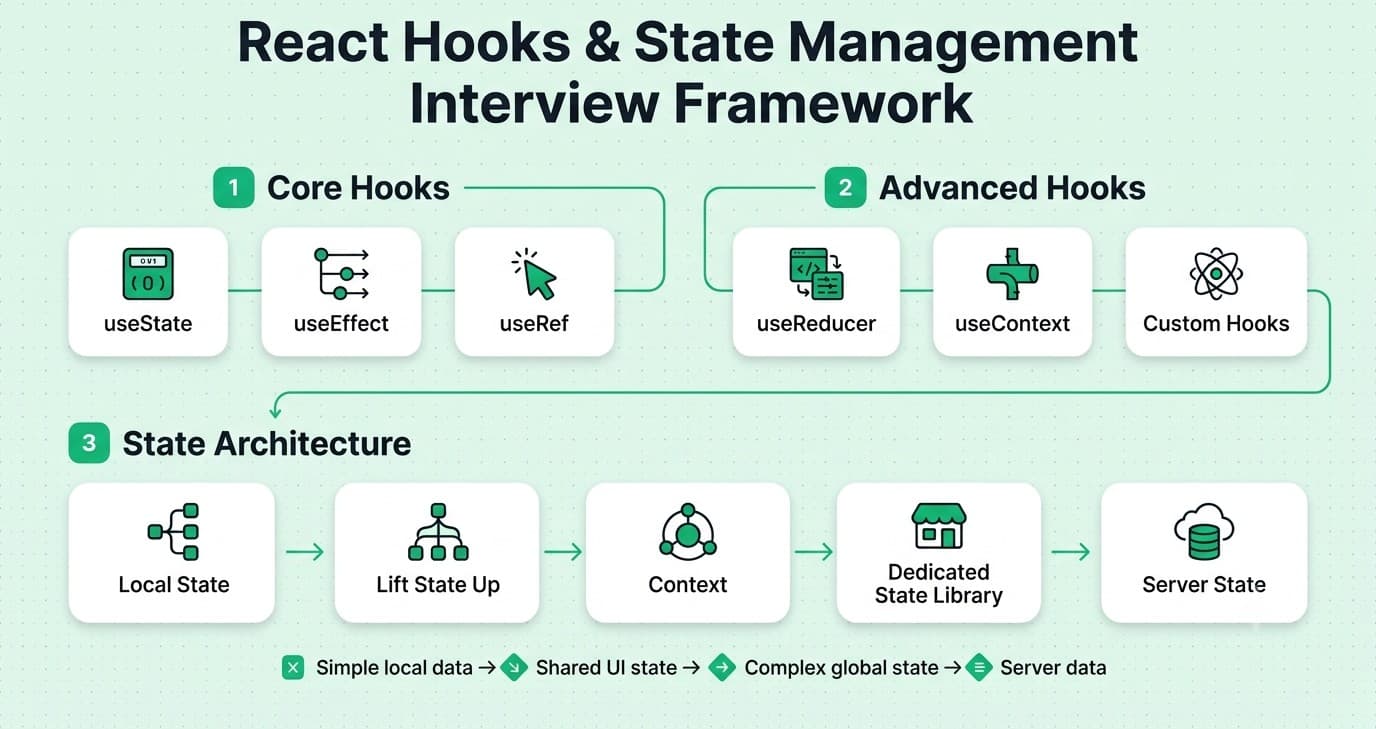
Answer: Built-in useState and useContext are generally sufficient for simpler applications or state naturally scoped to a specific component tree, but can become unwieldy for complex, frequently-updated global state shared across many disparate parts of a large application, since Context re-renders all consuming components on any change without additional optimization and lacks built-in tooling for debugging complex state transitions. Dedicated libraries provide more structured patterns, better performance optimization for complex state, and powerful developer tooling (like Redux DevTools for time-travel debugging).
Explanation: A very commonly tested architectural judgment question, testing whether a candidate can match tooling choice to actual project needs and complexity.
Real-World Example: A small marketing website has no real need for Redux, while a complex application like a project management tool with deeply interconnected, frequently-updated state across many components often benefits significantly from a dedicated state management solution.
Common Mistakes: Introducing a heavyweight state management library for a genuinely simple application where React's built-in state management would suffice, adding unnecessary complexity and boilerplate.
Follow-up Questions: What specific performance problem can arise from overusing React Context for frequently-changing global state? How does a library like Zustand differ philosophically from Redux? At what point in a growing project would you know it's time to introduce a dedicated state management solution?
Question 22
Question: What is Redux, and what are its three core principles?
Answer: Redux is a predictable state management library based on three core principles: a single source of truth (all application state lives in one central store), state is read-only (the only way to change state is by dispatching an action describing the intended change), and changes are made through pure reducer functions (taking the current state and an action, returning a new state without mutating the original).
Explanation: A foundational state management library question, still commonly tested given Redux's widespread historical and continuing adoption in many production codebases.
Real-World Example: A large e-commerce application might use Redux to manage cart state consistently across many disconnected parts of the UI (header cart icon, checkout page, product page "add to cart" button), all reading from and dispatching actions to the same single source of truth.
Common Mistakes: Mutating state directly within a reducer instead of returning a new state object, violating Redux's core immutability principle and causing subtle, hard-to-debug bugs.
Follow-up Questions: Why is reducer immutability so important in Redux, and what problems does violating it cause? What is Redux middleware, and what's a common use case for it (like handling async actions)? How does Redux Toolkit simplify traditional Redux boilerplate?
Question 23
Question: How would you manage server state (data fetched from an API) differently from client/UI state in a React application?
Answer: Server state (like a list of products fetched from an API) has different characteristics than client state — it can become stale, needs caching, and often needs deduplication and background refetching — making it better suited to a dedicated data-fetching library (like React Query or SWR) rather than treating it identically to purely client-side UI state (like a modal's open/closed status) managed in Redux or plain useState.
Explanation: A commonly tested, more advanced architectural distinction, testing whether a candidate recognizes server state as a genuinely distinct category with its own specialized tooling needs.
Real-World Example: A team previously storing fetched API data in Redux alongside UI state might migrate to React Query specifically for server data, gaining automatic caching, background refetching, and loading/error state management out of the box, while keeping Redux (or simpler local state) for genuinely client-only concerns.
Common Mistakes: Treating all application state uniformly and managing server data manually through the same general-purpose state management approach used for UI state, missing out on caching and synchronization benefits a dedicated data-fetching library would provide.
Follow-up Questions: What specific problems does a library like React Query solve that manually managing fetched data in Redux wouldn't? How would you handle optimistic updates when using a server-state management library? How would you decide what still belongs in client-side state versus what should be treated as server state?
Question 24
Question: What is prop drilling, and what are the different ways to avoid it?
Answer: Prop drilling occurs when data needs to be passed down through several layers of intermediate components that don't actually use the data themselves, purely to reach a deeply nested component that does. Ways to avoid it include React Context (for widely-needed, relatively stable data), component composition (passing components as children/props rather than data, restructuring the tree to avoid the need for deep passing), or a dedicated state management library for genuinely global state.
Explanation: A very commonly tested practical problem and its solutions, essential vocabulary for discussing React application architecture.
Real-World Example: Passing a theme value through five layers of unrelated intermediate components purely so a deeply nested button can access it is a classic prop drilling scenario, cleanly solved by instead providing the theme via Context and consuming it directly where needed.
Common Mistakes: Reaching immediately for a heavyweight state management library to solve prop drilling when a simpler solution (Context, or restructuring components via composition) would be more appropriate for the specific case.
Follow-up Questions: How would component composition (passing children) help avoid prop drilling without needing Context at all? When would Context itself become an inappropriate solution due to performance concerns? How would you refactor an existing deeply-prop-drilled component tree?
Question 25
Question: What is the difference between local component state and global application state, and how would you decide where a specific piece of state should live?
Answer: Local state is relevant only to a single component (or a small, closely related subtree), like whether a dropdown is currently open. Global state is needed across many unrelated parts of the application, like the currently authenticated user. The general principle is to keep state as local as possible by default, only lifting it to a more global scope when genuinely multiple, disparate parts of the application actually need to read or modify it.
Explanation: A very commonly tested state architecture principle, testing whether a candidate avoids the common anti-pattern of putting everything in global state "just in case."
Real-World Example: A single form's individual input values are typically best kept as local component state, while the user's authentication status genuinely needs to be globally accessible across the entire application, justifying a more global state solution.
Common Mistakes: Defaulting to storing all or most state globally (in Redux or a similar tool) even when it's genuinely only relevant to one component, adding unnecessary complexity and coupling.
Follow-up Questions: How would you recognize that a piece of local state actually needs to be lifted to a more global scope? What's the performance cost of putting frequently-changing state in a global store unnecessarily? Can you describe a time you refactored global state back down to local state, or vice versa?
Question 26
Question: What is optimistic UI updating, and how would you implement it in a React application?
Answer: Optimistic updating immediately updates the UI to reflect an anticipated successful result of an action (like a "like" button toggling instantly) before the actual server confirmation arrives, then reverting the UI if the server request ultimately fails — improving perceived responsiveness by not making the user wait for a round trip before seeing feedback.
Explanation: A commonly tested, practical UX-oriented technique, testing whether a candidate can implement responsive-feeling interfaces despite genuine network latency.
Real-World Example: A social media "like" button typically updates its appearance and count immediately when clicked, well before the actual server request confirming the like has completed, with a subtle rollback and error message only in the rare case the request actually fails.
Common Mistakes: Implementing optimistic updates without a proper rollback mechanism for the failure case, leaving the UI in an incorrect, inconsistent state if the underlying server request doesn't actually succeed.
Follow-up Questions: How would you handle a rollback if an optimistic update's corresponding server request fails? How does a library like React Query support optimistic updates out of the box? What kinds of actions are poorly suited to optimistic updating?
Question 27
Question: How would you share state between two sibling components that don't have a direct parent-child relationship?
Answer: Lift the shared state up to their closest common ancestor component, passing it down to both siblings as props (along with any necessary update handlers) — for state that needs to be shared across many more distantly related components, Context or a dedicated state management library would be more appropriate than continuing to lift state up through many layers.
Explanation: A very commonly tested, foundational React data-flow question, testing understanding of React's unidirectional data flow model and how to work within it.
Real-World Example: Two sibling components — a search input and a results list — that need to share the current search query would have that query lifted to their common parent, which passes the query value down to the results list and an update handler down to the search input.
Common Mistakes: Attempting to have sibling components communicate directly with each other (which React's architecture doesn't naturally support), rather than correctly lifting the shared state to a common ancestor.
Follow-up Questions: At what point would lifting state up through many layers become impractical, calling for Context or a state management library instead? How would you structure this "lifted" state and its update logic to keep the common parent component clean and manageable? Can you describe a real example where you lifted state to solve a sibling-communication need?
Question 28
Question: What is Zustand, and how does its approach to state management differ from Redux?
Answer: Zustand is a lightweight state management library using a simple hook-based API to create and access a store, without requiring the boilerplate of actions, reducers, and dispatch that traditional Redux requires — state updates happen through direct setter functions defined within the store itself, offering a much simpler, less ceremonial developer experience for many common use cases while still supporting middleware and more advanced patterns when genuinely needed.
Explanation: A commonly tested, increasingly relevant modern state management alternative, testing whether a candidate is aware of the broader ecosystem beyond just Redux and Context.
Real-World Example: A team wanting simple, straightforward global state management without Redux's characteristic boilerplate (action types, action creators, reducers, and the Provider wrapping setup) might choose Zustand for its much more minimal, hook-based API achieving a similar practical outcome.
Common Mistakes: Assuming Zustand and similar lightweight libraries can't handle complex state logic, when they generally support middleware, persistence, and more advanced patterns comparable to Redux when actually needed.
Follow-up Questions: What are the tradeoffs of Zustand's simpler API compared to Redux's more structured, opinionated approach? How would you handle derived/computed state in Zustand? When might Redux's more rigid structure and mature ecosystem still be preferable despite the added boilerplate?
Part 4: Performance Optimization
Question 29
Question: How would you optimize the performance of a large list with thousands of items rendered in a React application?
Answer: Implement list virtualization (windowing) — rendering only the small subset of items currently visible within the viewport (plus a small buffer), dynamically swapping which items are rendered as the user scrolls, rather than rendering the DOM for every single item in a potentially huge list at once.
Explanation: A very commonly tested practical frontend performance question, since rendering large lists naively is a frequent, significant real-world performance bottleneck.
Real-World Example: A social media feed or large data table displaying thousands of rows commonly uses a virtualization library (like react-window or react-virtualized) to maintain smooth scrolling performance by keeping the actual number of rendered DOM nodes small and roughly constant regardless of total dataset size.
Common Mistakes: Rendering an entire large list's DOM elements at once without any virtualization, causing significant initial render time, memory usage, and janky scrolling performance.
Follow-up Questions: How does list virtualization handle items of variable, dynamically-measured height? What other performance optimizations, beyond virtualization, would you consider for a data-heavy page? How would you implement infinite scroll/pagination in combination with virtualization?
Question 30
Question: What causes unnecessary re-renders in a React application, and how would you identify and fix them?
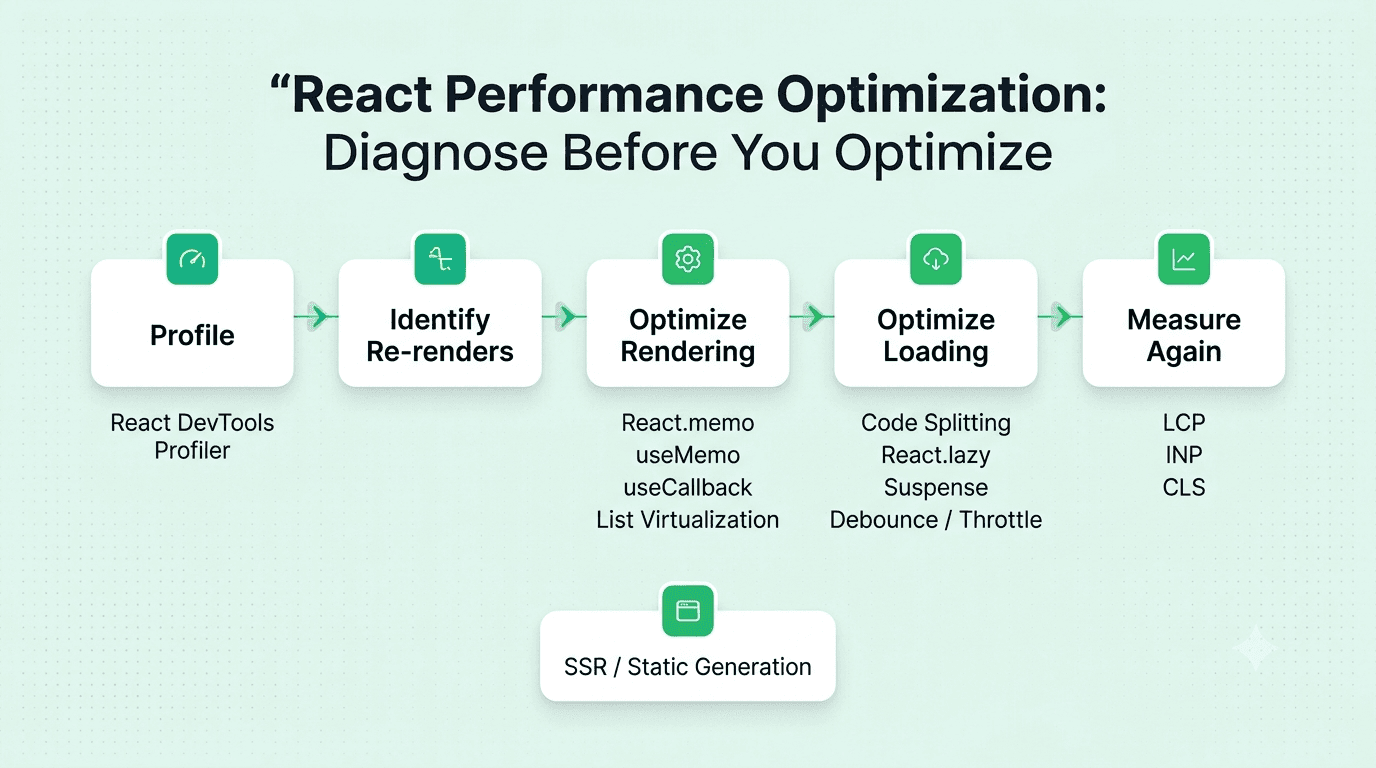
Answer: Unnecessary re-renders commonly occur when a parent re-renders and all its children re-render by default even if their own props haven't genuinely changed, when an inline object or function is passed as a prop (creating a new reference on every render that defeats shallow-comparison memoization), or when Context updates cause every consuming component to re-render regardless of whether they use the specific piece of the value that changed. Identification typically uses React DevTools' Profiler to visualize which components re-rendered and why, and fixes involve React.memo, useMemo/useCallback for stable references, or restructuring Context to split frequently and infrequently changing values.
Explanation: A very commonly tested, practical performance debugging question, testing genuine hands-on ability to diagnose and fix real React performance issues.
Real-World Example: A parent component passing an inline arrow function (onClick={() => doSomething()}) as a prop to a React.memo-wrapped child creates a new function reference on every parent render, defeating the memoization and causing the child to re-render unnecessarily every time regardless.
Common Mistakes: Applying React.memo to a child component without also stabilizing the function/object props passed to it via useCallback/useMemo, not realizing the memoization is silently ineffective due to unstable prop references.
Follow-up Questions: How would you use React DevTools' Profiler to identify which specific component is re-rendering unnecessarily and why? How would you split a Context value to avoid unnecessary re-renders when only part of it changes? At what point would you decide a re-render is actually cheap enough not to be worth optimizing at all?
Question 31
Question: What is code splitting in React, and how would you implement it?
Answer: Code splitting breaks a large JavaScript bundle into smaller chunks that are loaded on demand rather than all at once upfront, reducing the initial bundle size and improving initial page load time — implemented in React using React.lazy() combined with Suspense to lazily load a component only when it's actually needed, commonly applied at the route level so each page's code loads only when a user actually navigates to it.
Explanation: A very commonly tested, practical performance optimization technique, essential for keeping initial load times reasonable as an application grows.
Real-World Example: A large application with many distinct pages (dashboard, settings, admin panel) would typically code-split at the route level, so a user visiting only the dashboard doesn't need to download the JavaScript for the admin panel they may never actually visit.
Common Mistakes: Shipping one single, large JavaScript bundle containing the code for every possible page and feature, unnecessarily bloating initial load time even for users who only ever visit a small portion of the application.
Follow-up Questions: What fallback UI would you show while a lazily-loaded component is still being fetched, using Suspense? How would you decide the right granularity for code splitting — per route, per feature, or more finely-grained? How would you measure the actual impact of code splitting on your application's load performance?
Question 32
Question: How would you measure and improve a React application's initial page load performance?
Answer: Measure using Core Web Vitals (Largest Contentful Paint, Interaction to Next Paint, Cumulative Layout Shift) alongside bundle size analysis tools, then improve through code splitting, lazy loading non-critical components and images, minimizing and appropriately compressing the JavaScript bundle, and considering server-side rendering or static generation for content that doesn't need to be fully client-rendered.
Explanation: A commonly tested, holistic frontend performance question, testing whether a candidate thinks about measurable, user-centric performance metrics rather than only subjective impressions of speed.
Real-World Example: A team noticing a poor Largest Contentful Paint score might discover through bundle analysis that a large, rarely-used charting library is being loaded upfront even on pages that don't display any charts, fixable through targeted code splitting.
Common Mistakes: Optimizing based on subjective, anecdotal impressions of speed rather than measuring against concrete, standardized performance metrics like Core Web Vitals.
Follow-up Questions: What tools would you use to analyze your application's bundle size and identify large, unnecessary dependencies? How would server-side rendering specifically improve Largest Contentful Paint compared to pure client-side rendering? How would you set up ongoing performance monitoring to catch a regression before it significantly affects real users?
Question 33
Question: What is the significance of the key prop specifically for React's reconciliation performance, beyond just correctness?
Answer: Beyond preventing correctness bugs, a stable, well-chosen key also improves reconciliation performance, since React can efficiently match and reuse existing DOM elements for unchanged items (preserving their internal state and avoiding unnecessary re-creation) rather than needing to tear down and recreate elements whose identity it can't reliably track across renders.
Explanation: A commonly tested, deeper follow-up to the basic key question, testing whether a candidate understands the performance dimension in addition to the more commonly known correctness dimension.
Real-World Example: A list of expandable accordion items, if keyed properly by a stable unique ID, allows React to efficiently preserve each item's individual expanded/collapsed internal state and avoid unnecessary DOM recreation even as the list is filtered or reordered.
Common Mistakes: Only understanding key's role in preventing correctness bugs (like state association) without recognizing its additional performance implications for reconciliation efficiency.
Follow-up Questions: How would using a non-stable key (like a randomly generated value on every render) actively harm performance, beyond just correctness? How would you verify in React DevTools that your keys are enabling efficient reconciliation? Can you think of a case where using array index as a key would actually be performance-neutral and safe?
Question 34
Question: How would you debounce or throttle an expensive operation triggered by frequent user input (like a search-as-you-type feature) in React?
Answer: Debouncing delays executing the expensive operation (like an API call) until a specified pause in the triggering events has occurred (like the user pausing typing for 300ms), while throttling ensures the operation executes at most once within a given time interval regardless of how frequently the triggering event fires — implemented either with a custom Hook wrapping a debounce/throttle utility, or a library like lodash.debounce combined with useMemo or useRef to maintain a stable debounced function reference across renders.
Explanation: A very commonly tested, practical performance technique, essential for preventing excessive API calls or expensive computations from a rapidly-firing event like keystrokes.
Real-World Example: A search-as-you-type feature would debounce the actual API call so it only fires once the user has paused typing briefly, rather than firing a new request on every single keystroke, which would otherwise overwhelm the backend and waste bandwidth on requests for incomplete queries.
Common Mistakes: Creating a new debounced function on every single render (rather than maintaining a stable reference via useMemo or useRef), which defeats the actual debouncing behavior since each render effectively starts a fresh, independent debounce timer.
Follow-up Questions: How would you maintain a stable debounced function reference across re-renders in a functional component? What's the practical difference between debouncing and throttling, and when would you choose one over the other? How would you write a custom useDebounce Hook from scratch?
Question 35
Question: What is server-side rendering (SSR) in the context of a React application, and what performance benefits does it provide?
Answer: SSR renders the full HTML content on the server for each request rather than sending a minimal HTML shell that JavaScript then fills in client-side — this improves initial load perception (users see meaningful content sooner, before JavaScript has even downloaded and executed) and generally improves SEO, since search engine crawlers receive fully-rendered content immediately rather than needing to execute JavaScript first.
Explanation: A very commonly tested modern React architecture concept, especially relevant given the popularity of frameworks like Next.js that support SSR alongside client-side rendering.
Real-World Example: A content-heavy marketing site benefits significantly from SSR (or static generation) both for faster perceived load time and stronger SEO, since search engines and users alike receive fully-rendered content immediately, rather than an initially blank page while JavaScript loads and executes.
Common Mistakes: Defaulting to pure client-side rendering for every kind of page without considering the real SEO and initial-load-performance costs, especially for public-facing, content-heavy pages where those factors matter significantly.
Follow-up Questions: What is hydration in the context of SSR, and what problems can occur during that process (like a hydration mismatch)? How does SSR compare to static site generation in terms of when the HTML is actually generated? At what point would a heavily interactive, authenticated dashboard be better suited to pure client-side rendering instead of SSR?
Question 36
Question: How would you profile a React application to identify a specific performance bottleneck?
Answer: Use React DevTools' Profiler to record a session of user interaction, examining the resulting flame graph to identify which components rendered, how long each took, and why they re-rendered (props, state, or a parent re-render) — combined with the browser's own Performance tab for a broader view of overall page performance beyond just React-specific rendering, to identify the actual specific bottleneck rather than guessing.
Explanation: A very commonly tested, practical performance debugging skill, testing whether a candidate has genuine hands-on experience with the actual tools used to diagnose real React performance issues.
Real-World Example: A team investigating a sluggish interaction might use the Profiler to discover that a single, deeply nested component is re-rendering far more frequently than expected due to an unstable prop reference passed from several levels up, pinpointing the actual root cause rather than optimizing the wrong component based on assumption.
Common Mistakes: Attempting to optimize a React application based on intuition about what "feels slow" without first using profiling tools to confirm the actual, specific bottleneck.
Follow-up Questions: How would you interpret a flame graph in React DevTools' Profiler to identify the actual slowest component? What's the difference between profiling in development mode versus a production build, and why does that distinction matter for accurate results? How would you set up ongoing performance monitoring in production, beyond just local profiling during development?
FREE TO USE
8k+ SESSIONS92% FLUENCY4.9★ RATING
Speak With Confidence
Real Conversations. Real Scenarios. Speak until it feels natural.
- Real-Time Speaking Practice
- Guided Conversation Flows
- Instant AI Feedback
Part 5: Testing & Debugging
Question 37
Question: How would you approach testing a React component using React Testing Library?
Answer: React Testing Library encourages testing components from the user's perspective — simulating real user actions (clicking, typing) and asserting on the resulting visible, rendered output — rather than testing internal implementation details like specific state variable values, making tests more robust to internal refactoring that doesn't change actual user-facing behavior.
Explanation: A very commonly tested, practical testing philosophy question, testing whether a candidate follows current best practices for writing maintainable, genuinely useful component tests.
Real-World Example: Testing a form component typically involves simulating a user typing into fields and clicking a submit button, then asserting on the resulting visible output (like a success message appearing), rather than directly inspecting the component's internal state variables.
Common Mistakes: Writing brittle tests that directly assert on internal implementation details (like specific internal state values or exact internal function calls) rather than actual rendered, user-observable output, causing tests to break unnecessarily on internal refactors that don't change real behavior.
Follow-up Questions: Why does React Testing Library specifically discourage testing internal component state or implementation details directly? How would you test a component that makes an asynchronous API call? What's the difference between getBy, queryBy, and findBy query variants in React Testing Library, and when would you use each?
Question 38
Question: How would you test a custom Hook in isolation, without needing to render a full component?
Answer: Use a testing utility like @testing-library/react-hooks (or the renderHook function now included in modern React Testing Library) to render the Hook within a minimal test harness, allowing you to call the Hook's returned functions and assert on its returned state, simulating the Hook's behavior across multiple renders without needing an actual full UI component to test it through.
Explanation: A commonly tested, practical testing technique specific to custom Hooks, testing whether a candidate can test reusable stateful logic independently of any particular component using it.
Real-World Example: Testing a custom useCounter Hook would use renderHook to call the Hook directly, then call its returned increment function and assert the returned count value updates correctly, without needing to build and render an actual counter UI component just to test the underlying logic.
Common Mistakes: Only testing a custom Hook indirectly through a full component that happens to use it, making it harder to isolate and clearly test the Hook's own specific behavior independent of that component's other logic.
Follow-up Questions: How would you test a custom Hook that has an asynchronous side effect, like a data fetch? How would renderHook's act() wrapper matter for testing state updates correctly? How would you test a custom Hook that depends on Context?
Question 39
Question: How would you debug a React application where a component isn't re-rendering when you expect it to?
Answer: Check whether the state update is actually creating a new reference (React's default comparison for objects/arrays is by reference, so mutating an object or array in place rather than creating a new one won't be detected as a change), verify the component is actually subscribed to the relevant piece of state (like correctly reading from the right Context or store selector), and use React DevTools to inspect the component's current props and state directly to confirm what React actually believes the current values are.
Explanation: A very commonly tested, practical troubleshooting question, since this exact "component won't update" issue and its root cause (accidental mutation) is an extremely common real-world React bug.
Real-World Example: Calling array.push(newItem) directly on a state array and then calling the setter with that same, mutated array reference won't trigger a re-render, since React's shallow comparison sees the identical reference and assumes nothing changed — the fix is creating a new array via spread ([...array, newItem]) instead.
Common Mistakes: Mutating state directly (pushing to an array or setting a property on an object) rather than creating a new reference, not realizing React's default state comparison relies on reference equality, not deep value comparison.
Follow-up Questions: Why does React use reference equality rather than deep equality to determine if state has changed? How would you use React DevTools to directly inspect a component's current state and props to help diagnose this issue? How would Object.freeze help you catch an accidental state mutation bug during development?
Question 40
Question: How would you mock an API call in a component test?
Answer: Use a mocking library (like Jest's built-in mocking utilities, or Mock Service Worker/MSW for intercepting actual network requests at a lower level) to replace the real API call with a controlled, predictable mock response, allowing the test to reliably and deterministically verify the component's behavior for both success and various failure scenarios without depending on an actual real network call or backend.
Explanation: A very commonly tested, practical testing technique, essential for writing fast, reliable component tests that don't depend on genuine external network calls.
Real-World Example: Testing a component that fetches and displays user data would mock the fetch call to return a controlled sample response in one test case, and a simulated network error in a separate test case, thoroughly verifying the component handles both scenarios correctly.
Common Mistakes: Writing a test that makes a genuine real network call to an actual backend or external API, resulting in a test that's slow, unreliable, and potentially problematic to run repeatedly in CI.
Follow-up Questions: What's the difference between mocking at the fetch/network level (like with MSW) versus mocking a specific module or function directly? How would you test a component's loading state, which typically only exists briefly during an actual asynchronous fetch? How would you verify a component correctly displays an error message when the mocked API call fails?
Question 41
Question: What is a common cause of a "Can't perform a React state update on an unmounted component" warning, and how would you fix it?
Answer: This warning occurs when an asynchronous operation (like a fetch or a timer) started while a component was mounted attempts to call a state setter after that component has already unmounted, since there's no longer any component instance to actually update — fixed by tracking the component's mounted status (via a ref or an AbortController for fetches) and checking it before calling a state setter, or, more cleanly, properly canceling the pending operation in the effect's cleanup function when the component unmounts.
Explanation: A very commonly encountered, practical debugging scenario, testing whether a candidate understands both the root cause and the modern, cleaner fix (cancellation) versus an older, less clean workaround (a mounted-tracking flag).
Real-World Example: A component that starts a data fetch on mount and navigates away (unmounting) before that fetch completes would trigger this warning if the fetch's .then() callback still attempts to call setState after the component is already gone, fixable by using an AbortController to actually cancel the fetch in the effect's cleanup function.
Common Mistakes: Ignoring this warning as harmless noise, when it can actually indicate a genuine memory leak or an unnecessary, wasted asynchronous operation continuing to run after it's no longer needed.
Follow-up Questions: How would you use an AbortController specifically to cancel an in-flight fetch request when a component unmounts? Why is properly canceling the underlying operation generally considered a cleaner fix than just tracking a mounted flag and conditionally skipping the state update? How would this same underlying issue manifest differently for a setTimeout or setInterval compared to a fetch?
Question 42
Question: How would you use React's Error Boundaries to handle runtime errors gracefully in production?
Answer: An Error Boundary is a class component (Error Boundaries currently cannot be implemented as function components without a wrapping library) implementing componentDidCatch and/or getDerivedStateFromError, catching JavaScript errors thrown anywhere in its child component tree during rendering, and displaying a fallback UI instead of letting the entire application crash with a blank screen — strategically placed around distinct sections of an application so an error in one isolated part doesn't take down the entire page.
Explanation: A commonly tested, practical production-resilience question, testing whether a candidate builds applications that degrade gracefully rather than catastrophically on an unexpected runtime error.
Real-World Example: Wrapping a complex, less-tested widget (like a third-party embedded chart) in its own Error Boundary ensures that if that specific widget throws a rendering error, only that widget shows a fallback message, while the rest of the surrounding page continues functioning normally.
Common Mistakes: Wrapping the entire application in a single Error Boundary at the very top level only, meaning any error anywhere causes the entire application to show one generic fallback, rather than isolating failures to more specific, granular sections.
Follow-up Questions: What kinds of errors does an Error Boundary NOT catch (like errors in event handlers or asynchronous code)? How would you log errors caught by an Error Boundary to an external error-tracking service? How would you design fallback UI to still allow a user to recover or retry, rather than just showing a dead-end error message?
Part 6: Ecosystem, Routing & Advanced Patterns
Question 43
Question: How would you implement client-side routing in a React application using React Router?
Answer: Wrap the application in a router provider (like BrowserRouter), define Route components mapping specific URL paths to the components that should render for them, and use Link (or NavLink) components instead of plain anchor tags for navigation, which update the URL and render the matching route without triggering a full page reload, preserving the single-page application experience.
Explanation: A very commonly tested, foundational ecosystem question, essential given how central client-side routing is to almost any real-world multi-page React application.
Real-World Example: A typical application would define routes like /, /products/:id, and /checkout, with the :id segment captured as a URL parameter accessible within the corresponding component via a hook like useParams.
Common Mistakes: Using a plain <a> tag instead of Link for internal navigation, which triggers a full page reload and loses the single-page application's client-side routing benefits entirely.
Follow-up Questions: How would you access a URL parameter (like a dynamic ID) within the component rendered for that route? How would you implement a protected route that redirects unauthenticated users to a login page? How would you handle nested routes and layouts with React Router?
Question 44
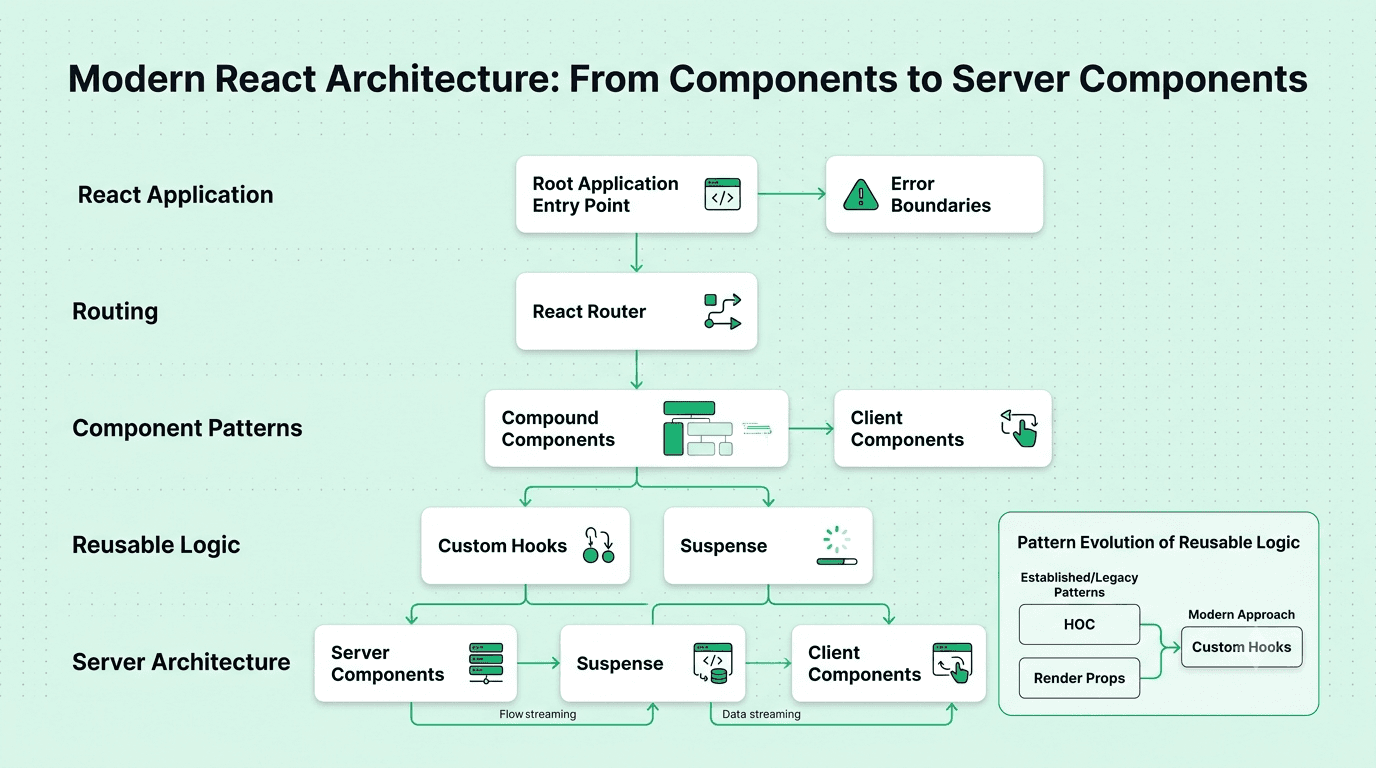
Question: What is the compound component pattern in React, and when would you use it?
Answer: The compound component pattern lets several related components work together implicitly, sharing state via Context internally, while presenting a clean, flexible, declarative API to the consumer (like <Select><Select.Option>...</Select.Option></Select>), allowing the consumer to compose and arrange the sub-components flexibly rather than passing everything through a single, rigid set of props.
Explanation: A more advanced, commonly tested React design pattern, testing awareness of techniques for building genuinely flexible, reusable component libraries.
Real-World Example: A custom Tabs component built using the compound component pattern might expose Tabs, Tabs.List, Tabs.Tab, and Tabs.Panel sub-components that implicitly share the currently active tab state via Context, letting consumers freely arrange and style the individual pieces while the components handle the underlying coordination logic themselves.
Common Mistakes: Building an overly rigid component with a large number of configuration props attempting to handle every possible layout variation, when a compound component pattern would offer much more natural, flexible composability instead.
Follow-up Questions: How would you implement the implicit state sharing between compound components (typically via Context)? What are the tradeoffs of the compound component pattern compared to a simpler, more traditional prop-based API? Can you give an example of a well-known component library that uses this pattern?
Question 45
Question: What is the render props pattern, and how has it largely been superseded by custom Hooks?
Answer: The render props pattern shares reusable logic between components by passing a function as a prop, which the component calls (typically as its child) to render UI based on some internal state or behavior the wrapping component manages — largely superseded by custom Hooks since Hooks achieve similar logic reuse with less nesting complexity ("wrapper hell") and more straightforward, readable code, without needing to structure the JSX around a function-as-child pattern.
Explanation: A commonly tested, more historical React pattern question, testing whether a candidate understands both an older pattern and why the ecosystem has broadly moved past it with Hooks.
Real-World Example: A <MouseTracker render={mouseState => <div>{mouseState.x}, {mouseState.y}</div>} /> component using the render props pattern for sharing mouse-position logic would today typically be implemented as a much simpler useMousePosition() custom Hook instead, avoiding the extra nesting and indirection.
Common Mistakes: Being unfamiliar with this older pattern entirely, or, conversely, still reaching for it in new code where a custom Hook would now be simpler and more idiomatic.
Follow-up Questions: How would you refactor a render props component into an equivalent custom Hook? What specific problem ("wrapper hell") did Hooks solve relative to both render props and higher-order components? Are there any remaining legitimate use cases where render props are still genuinely preferable to a Hook?
Question 46
Question: What is a Higher-Order Component (HOC), and what's an example of its use?
Answer: A Higher-Order Component is a function that takes a component and returns a new, enhanced component with additional props or behavior injected — a pattern for reusing component logic, historically common before Hooks provided a generally simpler alternative for many of the same use cases.
Explanation: A commonly tested, more historical React pattern, testing awareness of an older technique still found in many existing codebases and some libraries.
Real-World Example: A withAuth(Component) HOC might check authentication status and either render the wrapped component or redirect to a login page, injecting the current user as an additional prop to any component it wraps.
Common Mistakes: Confusing an HOC (a function that returns a component) with a regular component that simply accepts other components as children or props.
Follow-up Questions: What is "wrapper hell," and how can composing many HOCs together lead to it? How would you refactor a common HOC pattern (like withAuth) into an equivalent custom Hook today? Are HOCs still used in any modern, actively-maintained libraries you're aware of?
Question 47
Question: What is the difference between React Suspense for data fetching and Suspense for code splitting?
Answer: Suspense for code splitting (used with React.lazy) lets a component "suspend" rendering while its code is still being fetched, showing a fallback until the module loads — Suspense for data fetching extends this same underlying mechanism to data-fetching libraries specifically designed to integrate with Suspense, letting a component "suspend" while data is loading and showing a fallback, unifying the loading-state handling for both code and data under one consistent pattern.
Explanation: A more advanced, increasingly relevant modern React concept, testing awareness of how Suspense's role has been expanding beyond its original code-splitting use case.
Real-World Example: A framework like Next.js (or a data library specifically built to support Suspense) lets a component simply "read" data as if it were already available, with Suspense automatically showing a fallback UI during the actual loading period, rather than the component needing to manually manage its own loading state with useState.
Common Mistakes: Assuming any arbitrary data-fetching approach (like a plain fetch call in useEffect) automatically works with Suspense, when Suspense for data fetching specifically requires a library or pattern built to properly integrate with it.
Follow-up Questions: What does it mean for a component to "suspend," technically speaking? How does Suspense interact with Error Boundaries for handling a data-fetching failure? How is Suspense for data fetching different in React Server Components compared to a typical client-side application?
Question 48
Question: What are React Server Components, and how do they differ from traditional server-side rendering?
Answer: React Server Components render entirely on the server and send a serialized representation of the resulting UI to the client, without shipping any of that component's own JavaScript to the browser at all (unlike traditional SSR, which still sends the full component's JavaScript to the client for hydration) — reducing the client-side JavaScript bundle size for components that don't need client-side interactivity, while still allowing genuinely interactive "Client Components" to be used alongside them where needed.
Explanation: A more advanced, very current React ecosystem concept, testing whether a candidate has genuine, up-to-date awareness of one of React's most significant recent architectural developments.
Real-World Example: A blog post's static content (rendered as a Server Component) doesn't need to ship any of its own JavaScript to the browser at all, while an interactive comment section on that same page (a Client Component) does ship its JavaScript, since it genuinely needs client-side interactivity like handling clicks and local state.
Common Mistakes: Confusing Server Components with traditional server-side rendering, missing the key distinction that Server Components ship no client-side JavaScript for that specific component at all, rather than simply rendering the initial HTML on the server before still hydrating with JavaScript.
Follow-up Questions: Why can't a Server Component use Hooks like useState or useEffect? How do Server Components and Client Components communicate or pass data to each other? What framework currently provides the most mature support for React Server Components?
Part 7: Industry Trends (2026)
Question 49
Question: What are the most important features introduced in React 19, and how do they change the way you build forms and handle async work?
Answer: React 19 made Actions a first-class concept: functions (including async ones) passed to a form's action prop or used in transitions, with React managing the pending state, errors, and optimistic updates for you. Supporting APIs include useActionState (tracks an action's result and pending status), useFormStatus (lets a child component read its parent form's pending state), useOptimistic (shows an optimistic value while an action is in flight and reverts if it fails), and the use API (reads a Promise or Context during render, integrating with Suspense). Together they replace much of the hand-written isLoading/error state and useEffect fetch boilerplate that earlier React versions required.
Explanation: A very current, frequently tested question, since interviewers now expect candidates to know the modern React data-mutation model rather than only the pre-19 patterns built around useEffect and manual loading flags.
Real-World Example: A "post comment" form can pass an async server function as its action, use useFormStatus to disable its submit button while pending, and use useOptimistic to show the new comment in the list immediately, rolling it back automatically if the request fails, with no manual loading or rollback state written by the developer.
Common Mistakes: Continuing to build every form with controlled inputs, onSubmit, and hand-rolled loading/error state out of habit, or describing use as "just another data-fetching hook" without understanding that it reads a Promise during render and relies on Suspense and Error Boundaries to handle the loading and failure states.
Follow-up Questions: How does useOptimistic handle rollback when the underlying action fails? What is the difference between use and await in a Server Component? How would you migrate an existing useEffect-based data-fetching component to a Suspense-based approach incrementally?
Question 50
Question: What is the React Compiler, and how does it change the way you think about useMemo, useCallback, and React.memo?
Answer: The React Compiler is a build-time tool that analyzes your components and automatically inserts memoization where it's safe and beneficial, so you no longer need to manually wrap values in useMemo, functions in useCallback, or components in React.memo to avoid unnecessary re-renders in most cases. It relies on your code following the Rules of React (pure render functions, no mutation of props or state during render), and it will skip optimizing components it can't prove are safe. In a compiler-enabled codebase, manual memoization becomes the exception, reserved for edge cases like stabilizing a value used as an effect dependency or fine-tuning a specific hot path.
Explanation: A highly current trend question that tests whether a candidate understands that the memoization advice repeated in older tutorials (and earlier questions in this guide) is being progressively automated, while still understanding the underlying re-render mechanics the compiler builds on.
Real-World Example: A team enabling the compiler on an existing app can often delete large numbers of defensive useCallback and useMemo wrappers and see equal or better render performance, but the components that violate the Rules of React, such as mutating props or reading mutable values during render, are silently skipped and keep their original performance problems until fixed.
Common Mistakes: Believing the compiler makes understanding re-renders unnecessary (you still need that knowledge to diagnose what it skipped and why), removing all manual memoization at once before verifying with the Profiler, or assuming code that mutates state during render will be optimized rather than skipped.
Follow-up Questions: What kinds of code patterns cause the React Compiler to bail out of optimizing a component? How would you roll out the compiler incrementally in a large existing codebase? When would you still write useMemo or useCallback by hand in a compiler-enabled project?
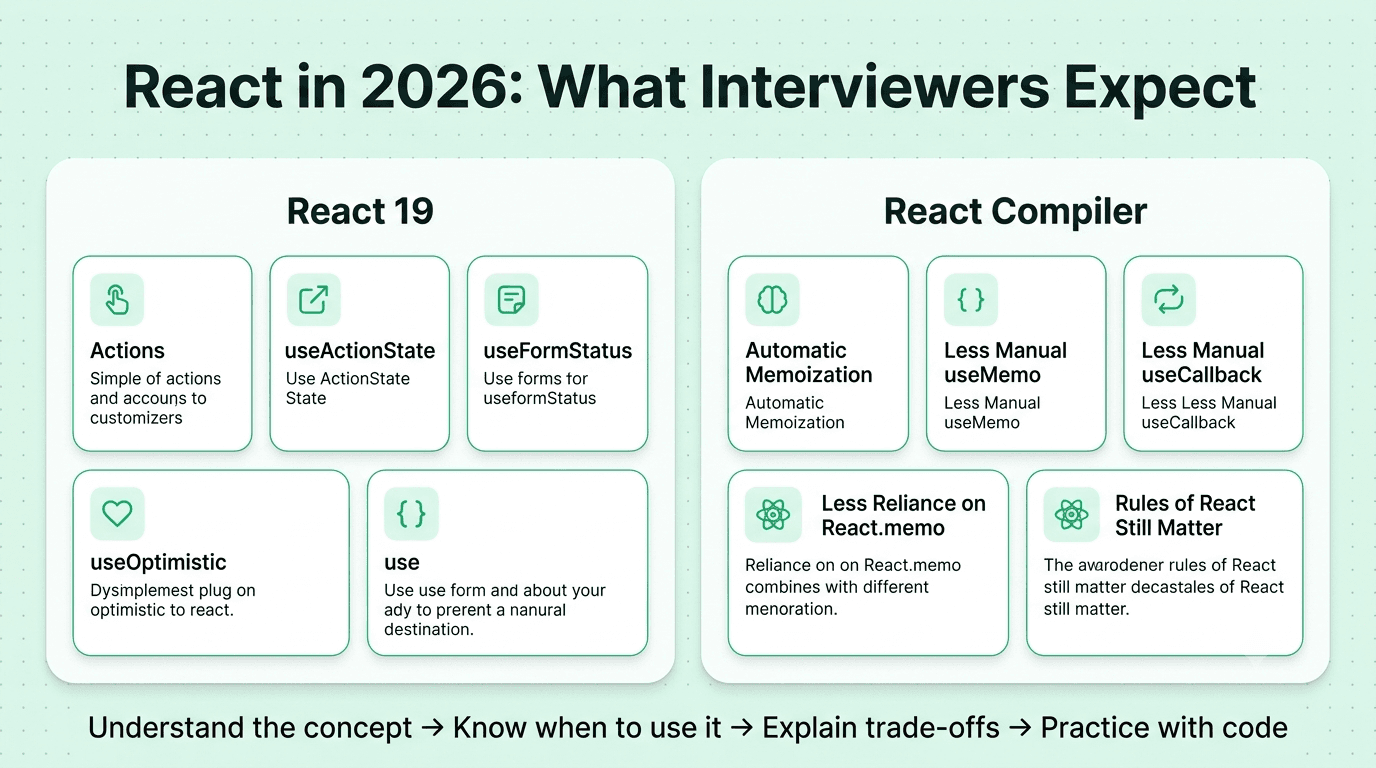
How to Use This Guide
Don't memorize word-for-word. Use the "Explanation" sections to build real understanding, then practice explaining each answer aloud in your own words.
Code the hands-on questions. For Parts 2, 3, and 4 in particular, build the small examples yourself (a debounced search box, a fetch-with-cleanup component, an optimistic like button) rather than only reading the answers.
Know the modern defaults. In 2026, interviewers expect you to be comfortable with functional components and Hooks, server state libraries or Suspense-based data loading, Server Components, and React 19's Actions, and to explain when older patterns (class components, HOCs, render props, manual memoization) still appear in existing codebases.
Practice profiling, not just theory. Be ready to describe how you would use the React DevTools Profiler and Core Web Vitals to find a real bottleneck before optimizing anything.
Use the follow-up questions as a self-check. Interviews usually go deeper right where a candidate's first answer ends, so try answering each follow-up before moving on.
Good luck with your interview preparation.
More Blogs


Sep 30, 2026
React Developer Interview Preparation Guide: A Complete Roadmap for 2026
31 min read