Loading...
Contents
Top 100 Frontend Developer Interview Questions
Aug 22, 2026274 min readUpdated Oct 5, 2026
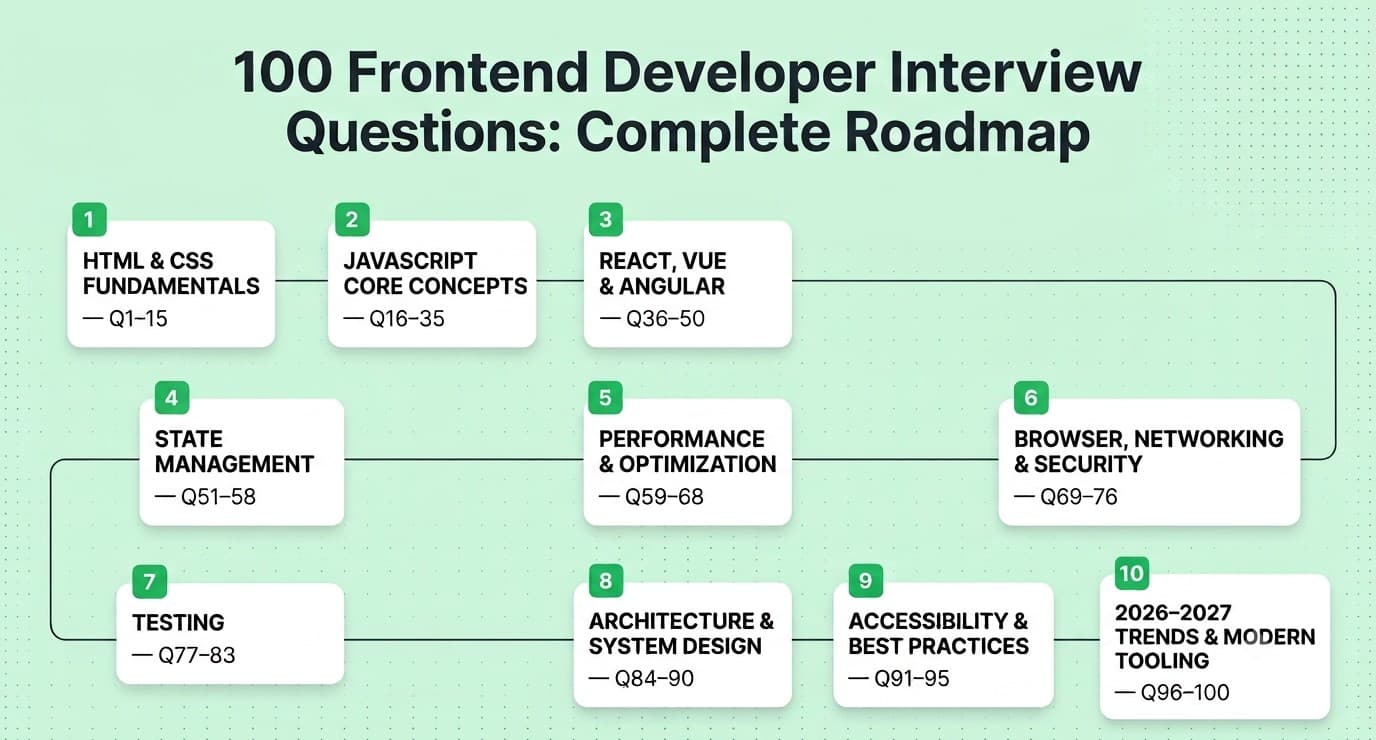
If you're prepping for a frontend developer interview in 2026 or 2027, you already know the field has moved fast. Companies aren't just testing whether you can center a div anymore, they want to see how you think about performance, accessibility, component architecture, AI-assisted tooling, and real production trade-offs. This guide walks through the 100 most commonly asked frontend interview questions, grouped by topic and ranked roughly by how often they show up (fundamentals first, since almost every interview touches them, working up to trends that are becoming common in 2026–2027 interviews). For every question you get: Answer — the short, interview-ready response Explanation — why it matters and what's really going on under the hood Real-World Example — how it shows up in actual production code Common Mistakes — what trips candidates up Follow-up Questions — what a sharp interviewer asks next Grab a coffee, work through this section by section, and you'll walk into your next interview genuinely ready, not just memorized. Also Read: How to prepare for Frontend Developer Interview in 2026
FREE TO USE
25K+ INTERVIEWS4.8★ RATING68% IMPROVEMENT
Crack Your Dream Job
Real Interviews. Real Pressure. Practice until it feels easy.
- Seamless Interview Experience
- Resume & JD Questions
- Instant Personalized Feedback
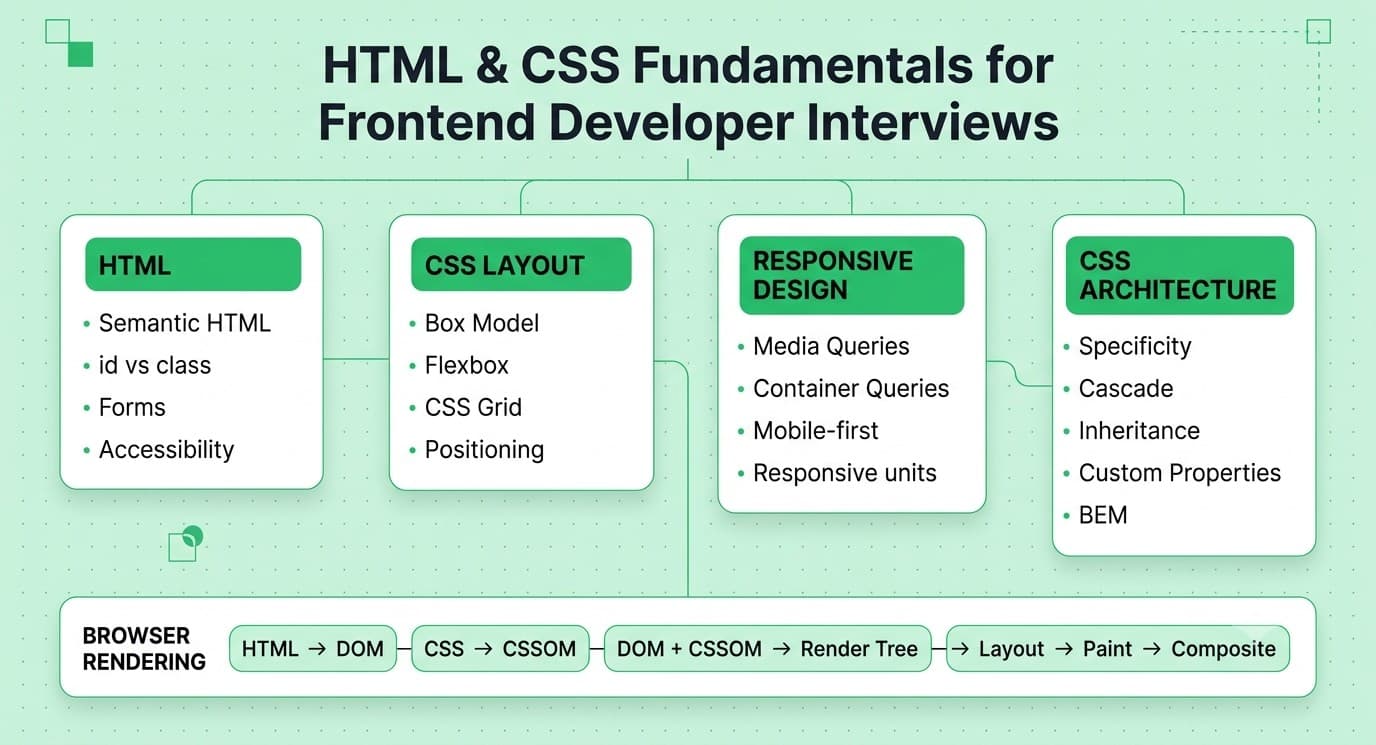
1. HTML & CSS Fundamentals
Question: What's the difference between id and class in HTML/CSS, and when should you use each? Answer: An id must be unique per page and is meant for one specific element (used for anchors, JS hooks, or a single unique style). A class can be reused across many elements and is the right tool for shared styling or behavior. Explanation: IDs have higher CSS specificity than classes, which can cause specificity wars if overused for styling. Classes keep your CSS reusable and your specificity flat and predictable. Real-World Example: A design system might use .btn and .btn--primary classes for every button, but reserve id="main-nav" for the one navigation landmark that JavaScript needs to grab directly. Common Mistakes: Styling with IDs (causes specificity headaches later), or using duplicate IDs on a page (invalid HTML and breaks getElementById). Follow-up Questions: "How does CSS specificity get calculated?" "What's the specificity order between inline styles, IDs, classes, and elements?" Question: Explain the CSS Box Model. Answer: Every element is a rectangular box made of content, padding, border, and margin, in that order from inside out. Total visible size = content + padding + border (margin sits outside and affects spacing between elements, not the box's own size). Explanation: box-sizing: content-box (the default) makes width/height apply only to content, so padding and border add on top. box-sizing: border-box makes width/height include padding and border, which is far more predictable for layout work. Real-World Example: Most modern CSS resets set * { box-sizing: border-box; } globally so a width: 200px box actually stays 200px wide even after you add padding. Common Mistakes: Forgetting that margins collapse between adjacent block elements, and being surprised when a "200px" box is actually wider because of content-box sizing. Follow-up Questions: "What is margin collapsing and how do you prevent it?" "How does box-sizing affect flex/grid children?" Question: What's the difference between Flexbox and CSS Grid, and when do you pick one over the other? Answer: Flexbox is one-dimensional (row OR column) and great for distributing space among items in a line. Grid is two-dimensional (rows AND columns) and great for full page or component layouts. Explanation: Flexbox content dictates layout (items grow/shrink based on content and available space). Grid layout dictates where content goes (you define the tracks first, then place items into them). Real-World Example: A navbar with logo, links, and a search box lining up in a row is a textbook Flexbox case. A dashboard with a sidebar, header, and main content area in a fixed layout is a textbook Grid case. Common Mistakes: Trying to force complex 2D layouts with nested Flexbox instead of just using Grid, or reaching for Grid on a simple single-row toolbar where Flexbox is simpler. Follow-up Questions: "How would you build a responsive card grid with equal-height cards?" "What's the difference between fr units and % in Grid?" Question: How does CSS specificity work, and how do you debug specificity conflicts? Answer: Specificity is calculated as (inline styles, IDs, classes/attributes/pseudo-classes, elements/pseudo-elements). Higher wins; ties are broken by source order (later wins); !important overrides normal specificity entirely. Explanation: Browsers compute a specificity "score" for every selector matching an element and apply the highest one. This is why the same property can be declared in multiple places but only one wins. Real-World Example: .card .title { color: blue; } beats .title { color: red; } because it has two class selectors versus one, regardless of which rule appears later in the file. Common Mistakes: Reaching for !important to "fix" a styling bug instead of understanding why the conflicting rule is winning; over-nesting selectors which makes specificity hard to manage later. Follow-up Questions: "How would you refactor a codebase that's full of !important?" "What's the specificity of :not()?" Question: What is semantic HTML and why does it matter? Answer: Semantic HTML means using tags that describe their meaning/content (<nav>, <article>, <button>), not just their appearance (<div>, <span>). Explanation: Semantic tags help screen readers, search engines, and other developers understand the structure of a page without extra ARIA work. They also come with free built-in behavior (like <button> being keyboard-focusable by default). Real-World Example: Using <button onClick={...}> instead of <div onClick={...}> gives you keyboard support (Enter/Space to activate), focus styles, and screen reader announcement for free. Common Mistakes: "div soup" — wrapping everything in generic <div>s and reimplementing accessibility behavior manually instead of using the semantic element that already does it. Follow-up Questions: "How would you make a <div> accessible if you truly had to use one as a button?" "What's the difference between <article> and <section>?" Question: Explain responsive design and the main techniques used to implement it. Answer: Responsive design means a layout adapts to different screen sizes using fluid grids, flexible images, and media queries (or newer container queries) instead of fixed pixel layouts. Explanation: Mobile-first design starts with a base layout for small screens, then uses min-width media queries to add complexity for larger screens — this tends to produce simpler, more performant CSS than desktop-first approaches. Real-World Example: grid-template-columns: repeat(auto-fit, minmax(240px, 1fr)); builds a product grid that reflows its column count automatically as the viewport shrinks, without a single media query. Common Mistakes: Writing desktop-first CSS and overriding it heavily for mobile (bloated, harder to maintain); using px everywhere instead of relative units like rem/%. Follow-up Questions: "What's the difference between a media query and a container query?" "How do you handle responsive typography?" Question: What is the difference between relative, absolute, fixed, sticky, and static positioning? Answer: static is default flow. relative shifts an element from its normal position without affecting others. absolute removes it from flow and positions it relative to the nearest positioned ancestor. fixed positions relative to the viewport. sticky toggles between relative and fixed depending on scroll position. Explanation: "Positioned ancestor" means any ancestor with position other than static. This is the #1 source of "why isn't my absolute element where I expect it" bugs. Real-World Example: A sticky table header (position: sticky; top: 0;) stays visible while scrolling through a long data table — used constantly in admin dashboards. Common Mistakes: Forgetting to set position: relative on a parent before using position: absolute on a child, causing the child to jump to the nearest positioned ancestor (often <body>). Follow-up Questions: "Why might position: sticky silently fail to work?" "How does position: fixed interact with transform on an ancestor?" Question: What are CSS custom properties (variables) and why use them over preprocessor variables like Sass? Answer: CSS custom properties (--main-color: #333;, accessed via var(--main-color)) are native, runtime, cascade-aware variables, unlike Sass variables which are compiled away at build time. Explanation: Because custom properties live in the actual cascade, they can be changed dynamically with JavaScript or media queries (e.g., for theming/dark mode) without a rebuild — Sass variables can't do that. Real-World Example: A dark mode toggle that swaps --bg-color and --text-color on the <html> element instantly updates every component using those variables, no recompilation needed. Common Mistakes: Assuming custom properties inherit like Sass variables do (they follow the CSS cascade, which is similar but has nuances with scope and fallback values). Follow-up Questions: "How do fallback values work in var()?" "Can you use custom properties inside media queries?" Question: How does the CSS cascade and inheritance work together? Answer: The cascade decides which conflicting declaration wins (based on origin, specificity, and source order). Inheritance is separate — some properties (like color, font-family) pass down to children automatically unless overridden; others (like margin, border) don't. Explanation: Understanding which properties inherit by default helps you avoid unnecessary repetition and predict computed styles. Real-World Example: Setting font-family once on <body> cascades down to every text element, but you'd need to explicitly restate border-radius on each button since it doesn't inherit. Common Mistakes: Assuming all properties inherit, or fighting the cascade with excessive overrides instead of setting good base values high in the tree. Follow-up Questions: "What does inherit, initial, and unset do explicitly?" "How does all: unset work?" Question: What's the difference between em, rem, %, vw/vh, and px units? Answer: px is a fixed unit. em is relative to the parent's font size (compounds with nesting). rem is relative to the root font size (doesn't compound). % is relative to the parent's dimension. vw/vh are relative to the viewport width/height. Explanation: rem is usually preferred for font sizing because it avoids the "compounding" problem where nested em values multiply unexpectedly. Real-World Example: A design system typically sets html { font-size: 100%; } (respects user browser settings) and then uses rem throughout for spacing and type scale, so everything scales together if a user increases their browser's default font size. Common Mistakes: Using em for padding/margin inside deeply nested components, causing spacing to balloon unpredictably as nesting increases. Follow-up Questions: "How does accessibility zoom interact with rem vs px?" "What's a clamp() and how does it help with fluid typography?" Question: What are pseudo-classes and pseudo-elements, and what's the difference? Answer: Pseudo-classes (:hover, :focus, :nth-child()) target an element in a particular state or position. Pseudo-elements (::before, ::after, ::first-line) target a sub-part of an element that doesn't exist as its own DOM node. Explanation: Pseudo-elements are written with double colons (::) in modern CSS to distinguish them from pseudo-classes, though single colon still works for backward compatibility on the original four. Real-World Example: ::before with content: ""; is commonly used to inject decorative icons or shapes without adding extra markup, like a small arrow icon before a link. Common Mistakes: Forgetting content: "" is required for ::before/::after to render at all, or using them for actual content that should be in the DOM (bad for accessibility since generated content isn't always exposed to screen readers). Follow-up Questions: "How would you use :nth-child() to style every other row in a table?" "What's the difference between :focus and :focus-visible?"Question 1
Question 2
Question 3
Question 4
Question 5
Question 6
Question 7
Question 8
Question 9
Question 10
Question 11
Question: How would you center a div both horizontally and vertically? Name multiple approaches. Answer: Modern answer: display: flex; align-items: center; justify-content: center; on the parent, or CSS Grid with place-items: center;. Older approaches include absolute positioning with transform: translate(-50%, -50%). Explanation: Interviewers ask this constantly because it tests whether you know multiple layout systems and their trade-offs, not just one memorized trick. Real-World Example: Centering a modal dialog on screen is commonly done with position: fixed; inset: 0; display: grid; place-items: center; combined with a semi-transparent overlay. Common Mistakes: Only knowing one method (usually the old margin: 0 auto trick, which only centers horizontally, not vertically) and freezing when asked for alternatives. Follow-up Questions: "How would you center it without knowing the element's height in advance?" "What are the trade-offs between Flexbox centering and Grid centering?" Question: What is BEM and why do teams use CSS naming conventions? Answer: BEM (Block, Element, Modifier) is a naming convention like .card__title--highlighted that makes CSS class relationships explicit and reduces specificity conflicts by keeping selectors flat (mostly single classes). Explanation: Without a convention, large CSS codebases become a specificity minefield where nobody's sure what's safe to change. BEM (and similar approaches, or CSS-in-JS/utility frameworks) solve this by making styles predictable and scoped by naming rather than nesting. Real-World Example: .button, .button__icon, .button--disabled clearly communicate "this is a button, this is a sub-part of a button, this is a state variant of a button" just from the class name. Common Mistakes: Mixing BEM with deep selector nesting anyway, which defeats the purpose; being inconsistent about what counts as a "block" vs an "element." Follow-up Questions: "How does BEM compare to utility-first CSS like Tailwind?" "How would you scope styles in a component-based framework without BEM?" Question: What are media queries and container queries, and how do they differ? Answer: Media queries respond to the viewport size (@media (min-width: 768px)). Container queries (@container (min-width: 400px)) respond to the size of a containing element, regardless of viewport size. Explanation: Container queries, now well-supported across modern browsers, solve the long-standing problem of building truly reusable components — a card component can adapt its own layout based on the space it's actually given (sidebar vs. main content), not just the overall screen size. Real-World Example: A <ProductCard> component that shows a stacked layout when placed in a narrow sidebar and a horizontal layout when placed in a wide main content area, using the same component code, driven purely by container queries. Common Mistakes: Still reaching for JavaScript-based resize observers to solve component-level responsiveness when container queries can now handle it natively in CSS. Follow-up Questions: "What do you need to set on a parent for container queries to work?" "How do container queries interact with container units like cqw?" Question: How does the browser render a webpage from HTML/CSS (critical rendering path)? Answer: Broadly: parse HTML into the DOM → parse CSS into the CSSOM → combine into the Render Tree → Layout (calculate geometry) → Paint (fill pixels) → Composite (layer onto the screen). Explanation: Understanding this pipeline explains why certain CSS changes are expensive (triggering layout) versus cheap (only triggering composite, like transform and opacity). Real-World Example: Animating left/top on an element triggers layout on every frame (janky), while animating transform: translateX() only triggers compositing (smooth, GPU-accelerated) — this is why performance-conscious teams standardize on transform-based animations. Common Mistakes: Not knowing why some CSS animations are janky and others are smooth; assuming all CSS properties are equally cheap to animate. Follow-up Questions: "What triggers a layout reflow versus just a repaint?" "How does will-change help, and what's the risk of overusing it?"Question 12
Question 13
Question 14
Question 15
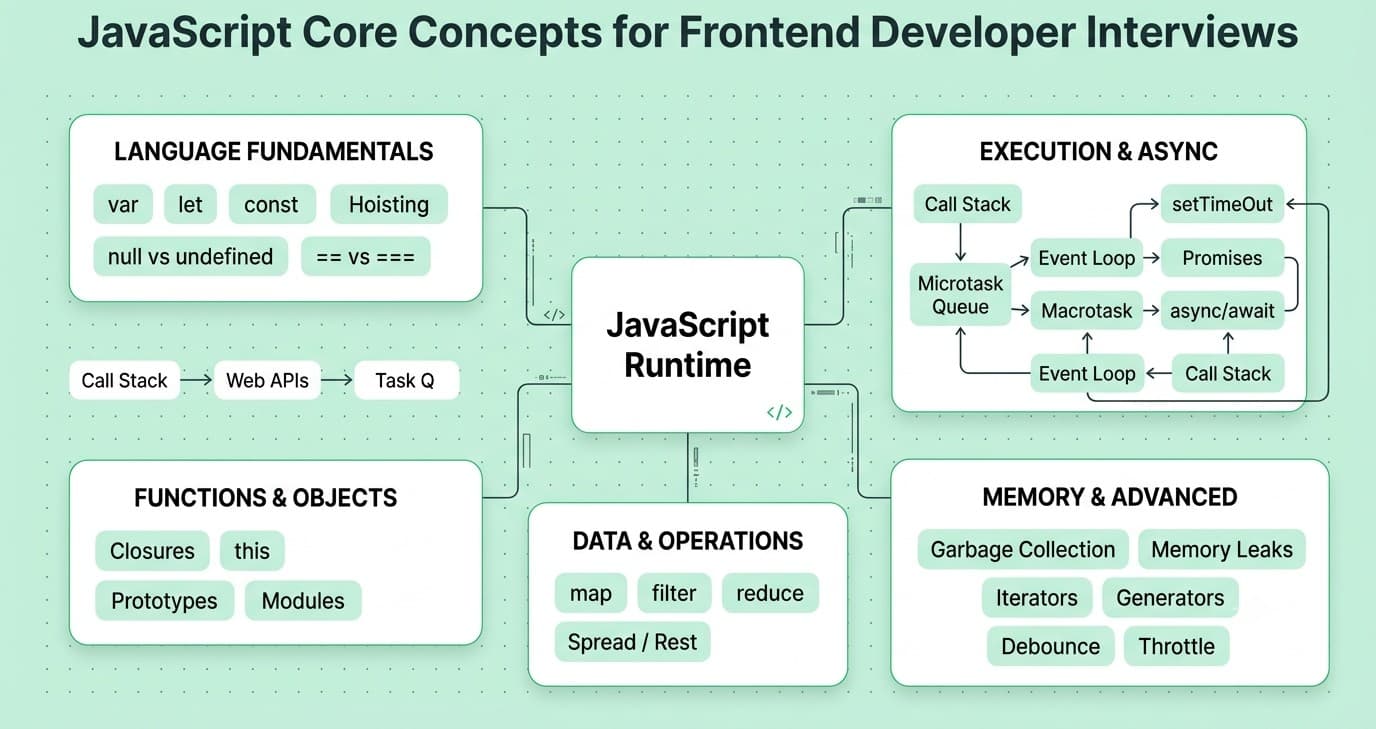
2. JavaScript Core Concepts
Question: Explain the difference between var, let, and const. Answer: var is function-scoped and hoisted with an initial value of undefined. let and const are block-scoped and live in the "temporal dead zone" until their declaration line. const additionally can't be reassigned (though object/array contents it points to can still be mutated). Explanation: Block scoping via let/const prevents a huge class of classic bugs, like loop variable leakage in closures, that var's function scoping used to cause constantly. Real-World Example: A for loop creating click handlers: with var i, every handler closes over the same final value of i; with let i, each iteration gets its own binding, so each handler correctly captures its own index. Common Mistakes: Thinking const makes objects immutable (it doesn't — it only prevents reassigning the variable itself); not understanding the temporal dead zone. Follow-up Questions: "What's the temporal dead zone exactly?" "How would you truly freeze an object so it can't be mutated?" Question: What is a closure, and can you give a practical use case? Answer: A closure is a function that "remembers" the variables from its outer scope even after that outer function has finished executing. Explanation: JavaScript functions carry a reference to their lexical environment. This is the mechanism behind private variables, memoization, and callback patterns. Real-World Example: A createCounter() function that returns an increment() function — the returned function keeps access to a private count variable that outside code can't touch directly, giving you basic encapsulation. Common Mistakes: Creating closures inside loops carelessly and being surprised all of them reference the same variable (classic with var); memory leaks from closures holding onto large objects longer than needed. Follow-up Questions: "How do closures relate to the module pattern?" "Can closures cause memory leaks — how?" Question: Explain the JavaScript event loop and how asynchronous code actually executes. Answer: JS is single-threaded with a call stack. Async work (timers, network calls, promises) is handed off to the browser/Node APIs, and their callbacks are queued — microtasks (Promises) run before macrotasks (setTimeout) once the call stack is empty. Explanation: This explains ordering puzzles like why a Promise.resolve().then() fires before a setTimeout(fn, 0) even though both are "async." Real-World Example: In a UI, this is why a .then() chain updating state runs before a scheduled setTimeout re-render, which can matter for avoiding visual flicker or race conditions. Common Mistakes: Assuming setTimeout(fn, 0) runs immediately; not understanding microtask vs macrotask ordering when debugging async race conditions. Follow-up Questions: "What's the difference between the microtask queue and the macrotask (callback) queue?" "How does async/await fit into this model under the hood?" Question: What's the difference between == and ===? Answer: == compares values after type coercion; === compares both value and type without coercion. Explanation: Type coercion rules in JS are notoriously quirky ('' == 0 is true, null == undefined is true but null === undefined is false), so === is almost always the safer default. Real-World Example: A form validation bug where if (userInput == 0) accidentally matches an empty string input, letting invalid data slip through — using === would have caught it. Common Mistakes: Defaulting to == out of habit; not knowing specific coercion gotchas like NaN === NaN being false. Follow-up Questions: "How would you check if a value is NaN?" "What does Object.is() do differently from ===?" Question: Explain prototypal inheritance in JavaScript. Answer: Every JS object has an internal link ([[Prototype]]) to another object it can inherit properties/methods from, forming a prototype chain. class syntax is mostly syntactic sugar over this. Explanation: When you access a property, JS looks on the object itself first, then walks up the prototype chain until it finds it or reaches null. Real-World Example: Every array you create has access to .map(), .filter(), etc., because they live on Array.prototype, not because each array instance carries its own copy of those methods. Common Mistakes: Thinking class in JS works like classical (Java/C++) inheritance rather than prototype-based inheritance; modifying built-in prototypes directly (considered bad practice). Follow-up Questions: "How does Object.create() relate to prototypal inheritance?" "What's the difference between __proto__ and prototype?" Question: What is this in JavaScript, and how is it determined? Answer: this is determined by how a function is called, not where it's defined (except for arrow functions, which inherit this lexically from their enclosing scope). Explanation: The four main binding rules are: default (global/undefined in strict mode), implicit (object.method()), explicit (call/apply/bind), and new binding (constructor calls). Real-World Example: A common bug: passing this.handleClick as a callback loses its binding to the class instance, causing this to be undefined inside the method — fixed with .bind(this) or by using an arrow function class property. Common Mistakes: Using a regular function for a callback that needs the surrounding this, then being confused why this is undefined; forgetting arrow functions don't have their own this. Follow-up Questions: "How do call, apply, and bind differ?" "Why don't arrow functions work well as object methods?" Question: Explain Promises and how they differ from callbacks. Answer: A Promise represents a value that will be available now, later, or never, with .then()/.catch()/.finally() for handling outcomes — it avoids "callback hell" and gives you proper error propagation. Explanation: Promises are chainable and composable (Promise.all, Promise.race, Promise.allSettled), which callbacks alone don't support cleanly. Real-World Example: Fetching a user's profile and then their posts sequentially reads far more cleanly as fetchUser().then(fetchPosts) than as deeply nested callback functions. Common Mistakes: Forgetting to return a promise inside a .then() chain (breaks chaining); not handling rejected promises, causing silent failures or unhandled rejection warnings. Follow-up Questions: "What's the difference between Promise.all and Promise.allSettled?" "How would you implement a simple Promise.all from scratch?" Question: How does async/await work under the hood? Answer: async/await is syntactic sugar over Promises — await pauses execution of the async function (without blocking the main thread) until the awaited promise settles. Explanation: An async function always returns a Promise, and await internally works like chaining .then(), but written in a way that reads like synchronous code. Real-World Example: Fetching data in a React useEffect often uses an inner async function since useEffect's callback itself can't be async: useEffect(() => { async function load() { const data = await fetch(...); } load(); }, []). Common Mistakes: Forgetting try/catch around await calls, so rejected promises crash silently or produce unhandled errors; awaiting things sequentially that could run in parallel with Promise.all. Follow-up Questions: "How would you run three async calls in parallel instead of sequentially?" "What happens if you forget to await an async call?" Question: What is event delegation and why is it useful? Answer: Event delegation means attaching a single event listener to a parent element instead of individual listeners on each child, relying on event bubbling and event.target to identify which child was interacted with. Explanation: This reduces memory usage (fewer listeners) and automatically works for dynamically added children without re-binding listeners. Real-World Example: A todo list with hundreds of items only needs one click listener on the <ul> checking event.target.matches('.delete-btn'), instead of one listener per delete button. Common Mistakes: Not checking event.target correctly (matching the wrong nested element), or using delegation where it's unnecessary and makes code harder to follow. Follow-up Questions: "What's the difference between event bubbling and event capturing?" "How would you stop an event from bubbling further?" Question: What are the differences between map(), forEach(), filter(), and reduce()? Answer: forEach() iterates with no return value. map() transforms each item and returns a new array of the same length. filter() returns a new array with only items passing a test. reduce() folds the array down into a single accumulated value. Explanation: These are core to functional-style JS and avoid mutating the original array, which is generally safer and more predictable, especially in frameworks like React that rely on immutability for change detection. Real-World Example: Transforming an API response of user objects into display names is a .map(); filtering out inactive users is a .filter(); totaling a shopping cart's price is a .reduce(). Common Mistakes: Using .map() when you actually just want side effects (should be .forEach()); mutating the array inside these methods instead of treating them as pure transformations. Follow-up Questions: "How would you implement .map() using .reduce()?" "What's the time complexity consideration when chaining multiple array methods?" Question: What is destructuring and the spread/rest operator, and how are they used? Answer: Destructuring unpacks values from arrays/objects into variables (const { name, age } = user;). Spread (...) expands an iterable/object into individual elements; rest (...) collects remaining items into an array/object. Explanation: These features make immutable updates and function signatures much cleaner, which is especially important in frameworks that rely on new object references to detect change. Real-World Example: Updating state immutably in React: setUser(prev => ({ ...prev, name: 'New Name' })); spreads the previous object and overrides just one field, producing a new object reference. Common Mistakes: Assuming spread creates a deep copy (it's shallow — nested objects are still shared by reference); confusing spread and rest since they use the same ... syntax in different contexts. Follow-up Questions: "How would you deep clone an object safely?" "What's the difference between spreading an array and using .concat()?" Question: Explain hoisting in JavaScript. Answer: Hoisting means variable and function declarations are conceptually moved to the top of their scope during compilation. var declarations are hoisted and initialized as undefined; let/const are hoisted but stay uninitialized (temporal dead zone) until their line runs; function declarations are hoisted fully (usable before their line). Explanation: Understanding hoisting explains why calling a function declaration before its definition works, but calling a function expression assigned to a let/const variable before its line throws an error. Real-World Example: A common gotcha: console.log(x); var x = 5; logs undefined rather than throwing, whereas the same with let throws a ReferenceError. Common Mistakes: Believing hoisting means the whole declaration-with-value moves up (only the declaration does, not the assignment); relying on hoisting instead of writing declarations in a clear top-down order. Follow-up Questions: "What's the temporal dead zone, precisely?" "Are class declarations hoisted the same way as function declarations?" Question: What are JavaScript modules (import/export), and how do ES Modules differ from CommonJS? Answer: ES Modules (import/export) are the standardized, statically-analyzable module system used natively in browsers and modern Node. CommonJS (require/module.exports) is Node's older, dynamic, synchronous module system. Explanation: ES Modules being statically analyzable is what allows bundlers to do tree-shaking (removing unused exports) — CommonJS's dynamic nature makes that much harder. Real-World Example: A utility library exporting many named functions lets a consumer import { debounce } from 'utils' and have the bundler strip out every other unused function from the final bundle. Common Mistakes: Mixing require and import inconsistently in the same project without understanding interop quirks; not realizing default exports can hurt tree-shaking compared to named exports. Follow-up Questions: "What is tree-shaking and how does it actually work?" "How do circular imports behave differently in ESM vs CommonJS?" Question: What is debouncing and throttling, and when would you use each? Answer: Debouncing delays execution until a pause in events (fires once after activity stops). Throttling limits execution to at most once per fixed interval, regardless of how many events fire. Explanation: Both control how often an expensive function runs in response to frequent events, but solve slightly different problems — debounce is for "wait until they're done," throttle is for "run regularly at most this often." Real-World Example: A search-as-you-type box uses debounce (only fire the API call after the user pauses typing for 300ms). A scroll-position tracker uses throttle (update at most every 100ms while scrolling continuously). Common Mistakes: Using debounce where throttle is actually needed (or vice versa), causing either too many API calls or a UI that feels laggy; not cleaning up timers on component unmount, causing memory leaks. Follow-up Questions: "How would you implement debounce from scratch?" "How do you handle debounce/throttle cleanup in a React useEffect?" Question: What is the difference between synchronous and asynchronous JavaScript, and how does the call stack relate? Answer: Synchronous code executes line by line, blocking further execution until each line finishes. Asynchronous code lets long-running operations (network, timers) happen in the background while the call stack continues processing other code. Explanation: Because JS has a single call stack, blocking synchronous operations (like a huge loop) freeze the UI entirely — this is why long computations are often broken up or offloaded to Web Workers. Real-World Example: A large client-side CSV parse that blocks the main thread for 3 seconds makes the whole page unresponsive; moving that parsing into a Web Worker keeps the UI interactive. Common Mistakes: Assuming async automatically means "runs on another thread" (it doesn't — JS is still single-threaded; async just means non-blocking scheduling of the callback, not true parallelism). Follow-up Questions: "When would you reach for a Web Worker?" "How does Node.js handle async I/O differently from the browser?" Question: What are null and undefined, and how do they differ? Answer: undefined means a variable has been declared but not assigned a value (or a property/argument doesn't exist). null is an intentional assignment representing "no value." Explanation: JS gives you both as a historical quirk, but the convention most teams follow is: let the language set undefined automatically, and use null explicitly when you want to signal "this is intentionally empty." Real-World Example: A user.middleName field from an API might be null (explicitly no middle name) versus a typo'd property access like user.mdidleName returning undefined (property doesn't exist at all). Common Mistakes: Using == to check for both at once without understanding it also matches the other value; being inconsistent within a codebase about which one to use for "empty." Follow-up Questions: "What does typeof null return, and why is that considered a JS bug?" "How does optional chaining (?.) interact with null/undefined?" Question: Explain how JavaScript's garbage collection works, at a high level. Answer: Modern JS engines use "mark-and-sweep" garbage collection — objects reachable from root references (global scope, active call stack) are kept; unreachable objects are eventually collected and their memory freed. Explanation: This is why "memory leaks" in JS are usually about accidentally keeping a reference alive (e.g., in a closure, a global variable, or a forgotten event listener) rather than truly manual memory mismanagement like in C. Real-World Example: Forgetting to remove an event listener on component unmount keeps that listener (and everything it closes over) alive in memory even after the component is gone, causing a slow memory leak in long-running single-page apps. Common Mistakes: Not cleaning up subscriptions, intervals, and listeners in cleanup functions; holding references to DOM nodes in long-lived caches after they're removed from the page. Follow-up Questions: "How would you detect a memory leak in a web app using dev tools?" "What are WeakMap and WeakSet used for?" Question: What's the difference between shallow copy and deep copy in JavaScript, and how do you do each? Answer: A shallow copy duplicates only the top-level structure ({...obj}, Object.assign, Array.from) — nested objects are still shared by reference. A deep copy duplicates every nested level so nothing is shared (structuredClone(obj), or a recursive/library-based clone). Explanation: Choosing the wrong one is a very common bug source: mutating a "copied" nested object accidentally mutates the original too, because the shallow copy only copied the outer reference. Real-World Example: const copy = { ...state }; copy.user.name = 'New'; still mutates state.user.name because user is a shared reference — using structuredClone(state) avoids this. Common Mistakes: Assuming spread/Object.assign deep-copies; using JSON.parse(JSON.stringify(obj)) as a deep clone hack without realizing it breaks on functions, Date, undefined, and circular references. Follow-up Questions: "What are the limitations of structuredClone?" "How would you deep clone an object containing functions?" Question: What are generators and iterators in JavaScript? Answer: An iterator is any object implementing a next() method returning { value, done }. A generator (function*) is a special function that can pause (yield) and resume execution, automatically implementing the iterator protocol. Explanation: Generators are useful for lazily producing sequences of values (especially large or infinite ones) without computing them all upfront. Real-World Example: A generator function that lazily yields paginated API results one page at a time, only fetching the next page when the consumer actually asks for more data. Common Mistakes: Confusing generators with regular async functions; forgetting that a generator's returned iterator is consumed once and must be recreated to iterate again. Follow-up Questions: "How do async generators differ from regular generators?" "How does a for...of loop use the iterator protocol under the hood?" Question: How would you detect and avoid memory leaks in a single-page application? Answer: Watch for growing heap size over time in dev tools memory profiler, take heap snapshots before/after an action repeated many times, and look for detached DOM nodes or growing listener counts. Explanation: Common SPA leak sources: uncleared setInterval/setTimeout, event listeners never removed, subscriptions (WebSocket, RxJS) never unsubscribed, and closures holding references to large data or DOM nodes longer than needed. Real-World Example: A chat app that subscribes to a WebSocket message stream in each conversation component but never unsubscribes on unmount will accumulate duplicate handlers every time a user switches conversations, eventually slowing the whole app down. Common Mistakes: Not returning a cleanup function from useEffect (or equivalent lifecycle hook) for every subscription/listener/timer that's set up. Follow-up Questions: "Walk me through how you'd use Chrome DevTools to find a leak." "What's a detached DOM node and why does it still count against memory?"Question 16
Question 17
Question 18
Question 19
Question 20
Question 21
Question 22
Question 23
Question 24
Question 25
Question 26
Question 27
Question 28
Question 29
Question 30
Question 31
Question 32
Question 33
Question 34
Question 35
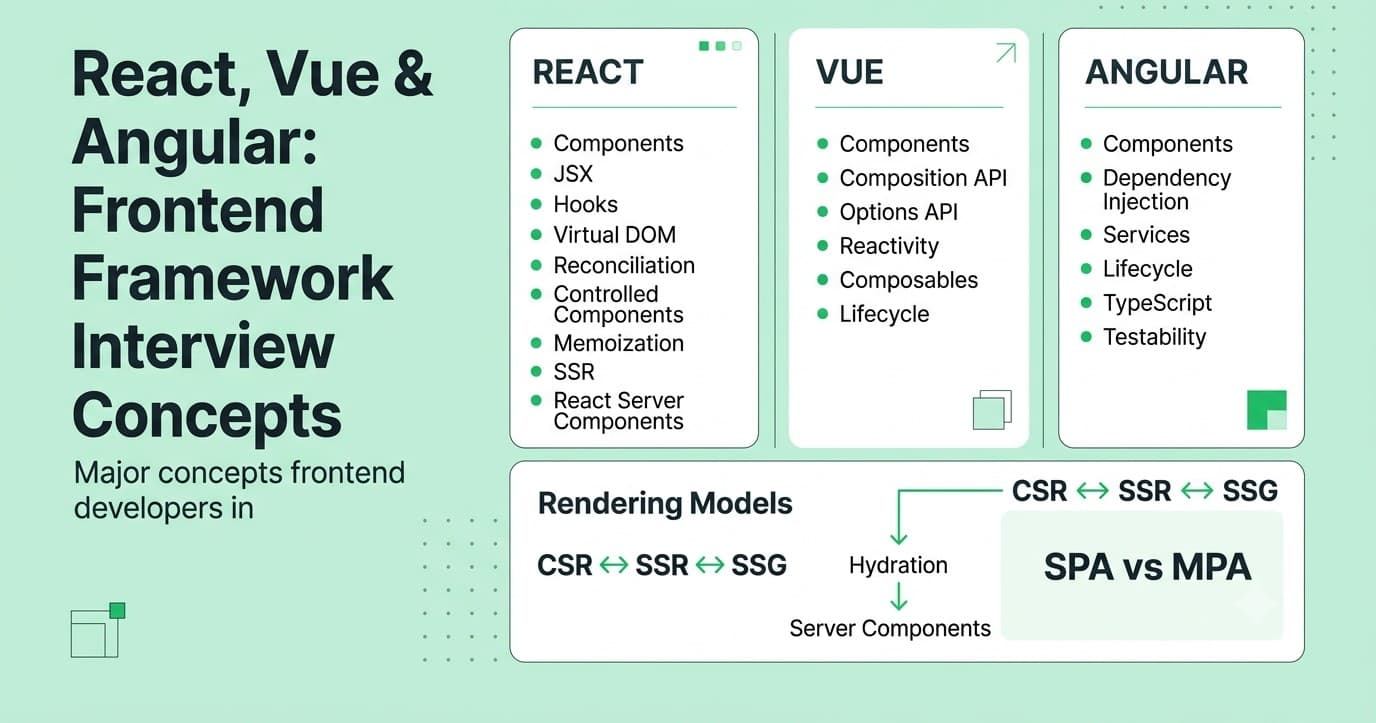
3. Frontend Frameworks — React, Vue, Angular
Question: What is the Virtual DOM and how does it improve performance? Answer: The Virtual DOM is a lightweight in-memory representation of the real DOM. Frameworks like React diff the new virtual tree against the previous one and apply only the minimal set of real DOM updates needed, instead of re-rendering everything. Explanation: Real DOM operations are expensive (triggering layout/paint); batching and minimizing them via diffing is what makes UI updates fast even in large apps. Real-World Example: Updating one item's text in a 1,000-row list only patches that single text node in the real DOM, rather than re-rendering all 1,000 rows from scratch. Common Mistakes: Thinking the Virtual DOM makes React "faster than vanilla JS" in all cases (it's not inherently faster — its value is developer ergonomics plus smart, automatic minimal updates); missing key props causing incorrect diffing. Follow-up Questions: "Why does React ask for a stable key in lists?" "What's the difference between reconciliation and rendering?" Question: Explain React's component lifecycle (or the equivalent hooks-based model). Answer: Class components have mount (componentDidMount), update (componentDidUpdate), and unmount (componentWillUnmount) phases. In modern function components, useEffect covers all three depending on its dependency array. Explanation: useEffect with [] runs once on mount; with dependencies runs on mount plus whenever a dependency changes; the returned cleanup function runs before the next effect and on unmount. Real-World Example: Fetching data on mount, re-fetching when a filter changes, and cancelling an in-flight request on unmount are all handled by a single well-written useEffect. Common Mistakes: Missing dependencies in the dependency array (stale closures); forgetting cleanup functions, causing leaks or "setting state on an unmounted component" warnings. Follow-up Questions: "What's a stale closure and how does it happen with useEffect?" "How would you replicate componentDidUpdate-only behavior with hooks?" Question: What are React hooks, and why were they introduced? Answer: Hooks (useState, useEffect, useContext, etc.) let function components use state and other React features that were previously only available in class components. They were introduced to make logic reuse easier (via custom hooks) and reduce the boilerplate/confusion of class components. Explanation: Before hooks, sharing stateful logic required patterns like higher-order components or render props, which often caused "wrapper hell." Custom hooks let you extract and reuse logic as a plain function. Real-World Example: A useLocalStorage(key, defaultValue) custom hook wraps useState plus useEffect to sync a value with localStorage, and can be reused across any component without duplicating that logic. Common Mistakes: Breaking the "rules of hooks" — calling hooks conditionally or inside loops, which breaks React's ability to track hook order between renders. Follow-up Questions: "Why can't hooks be called conditionally?" "How would you build a custom hook for a debounced input value?" Question: What is the difference between controlled and uncontrolled components in React? Answer: A controlled component's value is driven entirely by React state (value + onChange). An uncontrolled component manages its own state internally in the DOM, accessed via a ref when needed. Explanation: Controlled components give you full control for validation, formatting, and conditional logic at the cost of a re-render per keystroke; uncontrolled components are simpler and slightly more performant for basic forms. Real-World Example: A live character counter under a text input requires a controlled component (React needs to know the value on every keystroke); a simple "submit this form once" contact form can often get away with uncontrolled inputs and a ref. Common Mistakes: Mixing controlled and uncontrolled patterns on the same input (React will warn about switching between them); not providing a fallback value, causing an input to flip from uncontrolled to controlled unexpectedly. Follow-up Questions: "How would you build a custom controlled input component that also debounces its onChange?" "When would you deliberately choose uncontrolled for performance?" Question: What is prop drilling, and how do you avoid it? Answer: Prop drilling is passing data through many layers of components that don't need it themselves, just to get it to a deeply nested child. It's avoided with Context, state management libraries, or component composition. Explanation: Prop drilling isn't "wrong," but it becomes a maintenance burden as trees get deep — every intermediate component becomes coupled to data it doesn't actually use. Real-World Example: Passing a currentUser object through five layers of unrelated layout components just so a deeply nested <Avatar> can render it is a classic case where React Context (useContext) cleans things up significantly. Common Mistakes: Reaching for global state management for every piece of shared data instead of considering composition (passing components as children/props) first, which often solves the same problem more simply. Follow-up Questions: "When would you use Context versus a state management library like Redux or Zustand?" "What are the performance implications of Context re-renders?" Question: Explain React's key prop and why it matters in lists. Answer: key gives React a stable identity for each item in a list across re-renders, so it can correctly match old and new elements during reconciliation instead of guessing based on position. Explanation: Without stable keys (or using array index as key when the list can reorder/filter), React can misattribute state to the wrong item, causing subtle bugs like form inputs showing the wrong value after a reorder. Real-World Example: A to-do list where items can be deleted from the middle — using array index as key can cause the wrong checkbox to appear checked after a deletion, because React thinks it's just updating item content in place at that position. Common Mistakes: Using array index as key for lists that can reorder, insert, or delete items; using non-unique or unstable keys (like Math.random() on every render, which defeats the purpose entirely). Follow-up Questions: "When is using index as key actually fine?" "How does key interact with component state resetting on purpose?" Question: What is memoization in React (React.memo, useMemo, useCallback), and when should you use it? Answer: React.memo skips re-rendering a component if its props haven't changed. useMemo caches a computed value between renders. useCallback caches a function reference between renders. All exist to avoid unnecessary re-renders or recomputation. Explanation: These are optimization tools, not defaults — overusing them adds complexity and can even hurt performance since memoization itself has a cost (comparing dependencies every render). Real-World Example: Memoizing an expensive derived value (like filtering/sorting a large list) with useMemo avoids recalculating it on every keystroke of an unrelated input elsewhere on the page. Common Mistakes: Wrapping everything in useMemo/useCallback "just in case" without profiling first; forgetting that passing a new inline object/array as a prop defeats React.memo even if the "real" data hasn't changed. Follow-up Questions: "How would you profile a React app to find unnecessary re-renders?" "What's the difference between memoizing a value and memoizing a component?" Question: What is server-side rendering (SSR) versus client-side rendering (CSR) versus static site generation (SSG)? Answer: CSR ships a mostly-empty HTML shell and builds the page in the browser via JS. SSR renders full HTML on the server per request. SSG pre-renders HTML at build time, served as static files. Explanation: Each trades off differently on time-to-first-byte, SEO, server cost, and content freshness. Modern frameworks (Next.js, Nuxt, SvelteKit) let you mix all three per-route, plus newer patterns like React Server Components. Real-World Example: A marketing landing page is a great SSG candidate (content rarely changes, needs fast load + SEO). A personalized dashboard behind login is usually CSR or SSR-per-request since content is unique per user and doesn't benefit from pre-rendering. Common Mistakes: Defaulting to CSR for everything, including SEO-critical public pages, and then being surprised by poor search rankings or slow perceived load; not understanding hydration cost with SSR. Follow-up Questions: "What is hydration, and why can it be slow?" "What problem do React Server Components solve that traditional SSR doesn't?" Question: What is hydration in the context of SSR frameworks, and what can go wrong with it? Answer: Hydration is the process of attaching JavaScript event handlers and interactivity to server-rendered HTML that's already visible on screen, "waking up" static markup into a fully interactive app. Explanation: Hydration requires the client-rendered output to match the server-rendered output exactly — mismatches cause "hydration errors" and can cause visible content flashes or broken interactivity. Real-World Example: Rendering new Date().toLocaleString() differently on server vs. client (different timezones/locales) is a classic hydration mismatch bug that shows console warnings and can cause flickering content. Common Mistakes: Using browser-only APIs (like window or localStorage) directly during server render, causing crashes; not accounting for hydration mismatch when rendering time-sensitive or randomized content. Follow-up Questions: "What is partial/progressive hydration and why does it matter for performance?" "How do islands architectures (like Astro) change the hydration story?" Question: In Vue, explain the difference between the Options API and Composition API. Answer: The Options API organizes a component by option type (data, methods, computed). The Composition API (setup() / <script setup>) organizes code by logical concern, letting you group related state and logic together and extract reusable "composables." Explanation: The Composition API was introduced largely to solve the same logic-reuse problem React hooks solve, and to improve TypeScript inference, which the Options API struggled with. Real-World Example: A useMousePosition() composable can encapsulate mouse-tracking state and event listener setup/teardown, reusable across any component with <script setup>, similar to a React custom hook. Common Mistakes: Mixing both APIs inconsistently across a codebase without a clear team convention; not understanding ref vs reactive unwrapping behavior in templates vs script code. Follow-up Questions: "What's the difference between ref and reactive in Vue 3?" "How does Vue's reactivity system work under the hood (Proxies)?" Question: In Angular, explain the purpose of dependency injection. Answer: Angular's DI system provides services (shared logic/data) to components and other services automatically, based on what they declare they need in their constructor, rather than each class manually instantiating its own dependencies. Explanation: DI makes code more testable (you can inject mock services in tests) and promotes loose coupling between components and the services they rely on. Real-World Example: An AuthService injected into any component that needs to check login state means there's a single source of truth for auth logic, easily swapped out for a mock in unit tests. Common Mistakes: Creating tightly-coupled services that are hard to mock/test; misunderstanding Angular's hierarchical injector scopes (root vs. component-level providers), leading to unexpected multiple instances of a "singleton" service. Follow-up Questions: "What's the difference between providing a service at the root level versus a component level?" "How would you test a component that depends on an injected service?" Question: What are React Server Components, and how do they differ from traditional SSR? Answer: React Server Components (RSC) render entirely on the server and never ship their JS to the client at all — no hydration needed for them — while Client Components still hydrate and run interactively in the browser. Traditional SSR renders everything on the server but still ships and hydrates all the component JS on the client. Explanation: RSC reduces bundle size significantly for non-interactive parts of the UI (like static content, data-fetching wrappers) since their code literally never reaches the browser, while interactive pieces stay as Client Components. Real-World Example: In a Next.js App Router page, a component that just fetches and displays a blog post's content can be a Server Component (zero client JS), while the "like" button inside it is a small Client Component that hydrates. Common Mistakes: Trying to use browser-only hooks (useState, useEffect) inside a Server Component (not allowed); not understanding the boundary rules between Server and Client Components in composition. Follow-up Questions: "Can a Server Component import a Client Component, and vice versa?" "How does data fetching change with Server Components compared to useEffect-based fetching?" Question: What is the difference between a Higher-Order Component (HOC) and a custom hook in React? Answer: An HOC is a function that takes a component and returns a new enhanced component (withAuth(MyComponent)). A custom hook is a function that extracts and reuses stateful logic without wrapping the component itself. Explanation: Hooks generally replaced HOCs and render props for most logic-reuse cases because they avoid extra wrapper components in the tree ("wrapper hell") and are easier to compose and type. Real-World Example: Instead of withWindowSize(MyComponent) wrapping a component to inject a windowSize prop, a useWindowSize() hook lets the component call it directly and get the value without any wrapping. Common Mistakes: Still reaching for HOCs by default in new hooks-based codebases out of habit; naming collisions when composing multiple HOCs that inject similarly-named props. Follow-up Questions: "Are there cases where an HOC is still the better tool than a hook?" "How would you type a generic HOC in TypeScript?" Question: How does React's reconciliation algorithm decide what to re-render? Answer: React compares the new element tree to the previous one level by level; if element types match, it updates props in place and recurses into children; if types differ, it tears down the old subtree and builds a new one from scratch. Explanation: This heuristic (rather than a full tree diff, which would be too slow) is why changing a component's type at the same position (e.g., conditionally rendering <div> vs <span>) resets all state in that subtree, while keeping the same type preserves it. Real-World Example: Conditionally rendering {isEditing ? <EditForm /> : <ViewCard />} at the same JSX position causes React to fully unmount one and mount the other, resetting any internal state — a common source of "why did my state reset?" bugs. Common Mistakes: Not understanding why state resets unexpectedly when swapping component types in the same tree position; assuming reconciliation always does a full deep comparison (it uses heuristics, not an optimal diff). Follow-up Questions: "How does the key prop affect this reconciliation heuristic?" "How would you preserve state across a conditional render if you needed to?" Question: What is a single-page application (SPA), and what are its main trade-offs versus multi-page apps (MPAs)? Answer: An SPA loads a single HTML shell and handles navigation/rendering client-side via JavaScript, without full page reloads. An MPA (including SSR frameworks doing per-route rendering) serves a fresh HTML document per navigation. Explanation: SPAs offer smooth, app-like transitions but historically struggled with initial load time, SEO, and JS bundle size — modern meta-frameworks blend SPA-like navigation with server rendering to get the best of both. Real-World Example: A complex dashboard app (like an email client) benefits from SPA-style navigation for snappy interactions; a content-heavy blog benefits more from an MPA/SSG approach for fast first paint and SEO. Common Mistakes: Building an SPA for a mostly-static content site and paying an unnecessary JS bundle-size and SEO cost; not implementing proper route-based code splitting in a large SPA. Follow-up Questions: "How would you implement code splitting by route?" "What client-side routing challenges come up with SPAs (like back-button behavior)?"Question 36
Question 37
Question 38
Question 39
Question 40
Question 41
Question 42
Question 43
Question 44
Question 45
Question 46
Question 47
Question 48
Question 49
Question 50
4. State Management
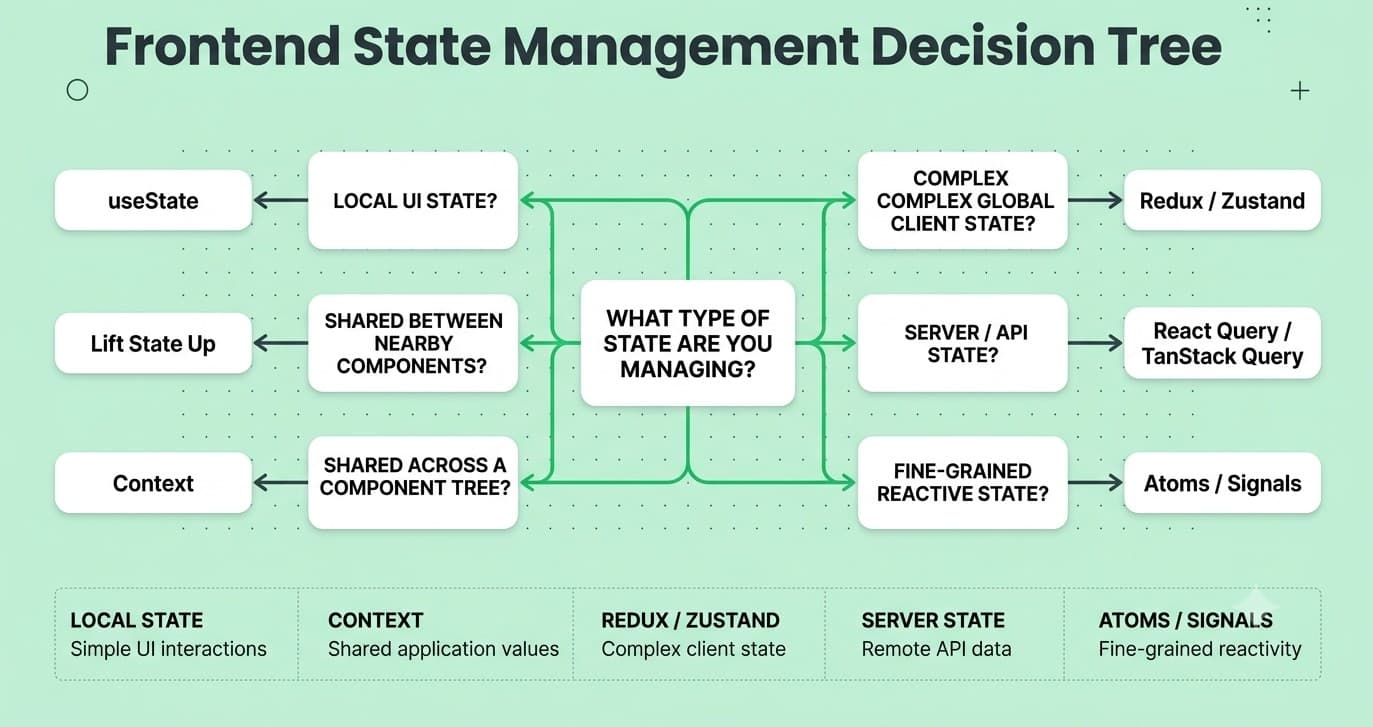
Question: What is the difference between local component state and global application state? Answer: Local state lives inside and is only relevant to one component (like a dropdown's open/closed status). Global state is shared across many unrelated parts of the app (like the logged-in user or shopping cart). Explanation: A common architecture mistake is putting everything in global state "just in case" — this increases coupling and unnecessary re-renders. The right default is local first, and lift/globalize only when genuinely shared. Real-World Example: A modal's open/closed boolean should be local useState in the component that owns the modal, while the current authenticated user typically belongs in global state (Context, Redux, Zustand) since many unrelated components need it. Common Mistakes: Over-globalizing state that's only used by one component; under-globalizing state that ends up needing prop drilling through many layers. Follow-up Questions: "How do you decide when state should be lifted up versus kept local?" "What's 'server state' and why do libraries like React Query treat it differently from client state?" Question: What problem does Redux (or similar state libraries) solve, and what are its core principles? Answer: Redux centralizes application state into a single store with predictable, one-way data flow: state is read-only, changes happen through dispatched actions, and a pure reducer function computes the new state. Explanation: The single-source-of-truth and pure-reducer model makes state changes traceable and debuggable (time-travel debugging, action logs) at the cost of more boilerplate than simpler local-state approaches. Real-World Example: A large e-commerce app with cart, auth, and product filters shared across many disconnected pages benefits from Redux's predictable structure and dev tools for tracing exactly which action caused a bug. Common Mistakes: Reaching for Redux (or similar) for a small app that doesn't need it, adding unnecessary boilerplate; mutating state directly inside a reducer instead of returning a new state object. Follow-up Questions: "How does Redux Toolkit reduce traditional Redux boilerplate?" "What's the difference between Redux and Context for state management?" Question: What is "server state" versus "client state," and why do tools like React Query / TanStack Query treat them differently? Answer: Server state is data that actually lives on a remote server and is just cached locally (like API responses) — it can go stale and needs re-fetching/syncing. Client state is data that only exists in the UI (like form input or a toggle). Explanation: Server state has unique needs — caching, background refetching, deduplication, stale-time management — that generic state managers like Redux weren't designed for, which is why dedicated data-fetching libraries emerged. Real-World Example: A product list fetched from an API is server state best handled by React Query (with automatic caching/refetching); whether the "filters" sidebar is expanded is pure client state, better handled with plain useState. Common Mistakes: Manually managing server state (loading/error/data flags, refetch logic) with plain useState/useEffect when a dedicated data-fetching library would handle caching and race conditions automatically and correctly. Follow-up Questions: "How does React Query handle race conditions between rapid refetches?" "What's stale-while-revalidate, and where have you seen that pattern before?" Question: What is the Context API in React, and what are its performance pitfalls? Answer: Context lets you share values across a component tree without prop drilling. Its pitfall: any component consuming a Context re-renders whenever that Context's value changes, even if the specific field it cares about didn't change. Explanation: Because Context doesn't do selective/partial subscriptions out of the box, putting frequently-changing values in a single large Context can cause widespread unnecessary re-renders across the app. Real-World Example: A single AppContext holding both rarely-changing theme settings and frequently-changing form data will cause theme-consuming components to re-render every time the form updates, unless you split them into separate contexts. Common Mistakes: Putting all app state into one giant Context instead of splitting by concern/update-frequency; using Context as a full replacement for a proper state management library in complex apps. Follow-up Questions: "How would you split Context to avoid unnecessary re-renders?" "How do libraries like Zustand avoid the re-render problem Context has?" Question: What is "lifting state up" in React, and when should you do it? Answer: Lifting state up means moving state from a child component to their closest common ancestor, so multiple children can share and stay in sync with the same data via props. Explanation: It's the simplest, most React-idiomatic way to share state between siblings before reaching for Context or an external library — and it's usually the right first step. Real-World Example: Two sibling components — a search input and a results list — both need the search term; lifting the searchTerm state to their shared parent lets both stay in sync without any global state tool. Common Mistakes: Reaching straight for Context or Redux for simple sibling-sharing cases that lifting state up would solve more simply. Follow-up Questions: "At what point does lifting state up become impractical, and what do you reach for next?" "How does this relate to the 'single source of truth' principle?" Question: What are atoms/selectors in state libraries like Recoil or Jotai, and how do they differ from a single global store? Answer: Atomic state management splits global state into small, independent units ("atoms") that components subscribe to individually, rather than one large centralized store — so a component only re-renders when the specific atom it reads changes. Explanation: This solves the "everything re-renders on any state change" problem that a single monolithic store (or unsplit Context) can have, without requiring manual memoization everywhere. Real-World Example: In Jotai, a themeAtom and a cartAtom are fully independent — updating the cart never triggers a re-render in a component only reading the theme atom. Common Mistakes: Not understanding derived state (selectors/computed atoms) and instead manually syncing multiple atoms together, which can cause inconsistency bugs. Follow-up Questions: "How do selectors handle async derived state?" "How does atomic state compare to signals-based reactivity (like in Solid or Angular Signals)?" Question: What are "signals" (as seen in Solid.js, Angular, Vue, and Preact Signals), and how do they differ from React's state model? Answer: Signals are reactive primitives that track exactly which parts of the UI depend on them, updating only those specific DOM nodes directly when their value changes — without re-running an entire component function like React does. Explanation: This is a fundamentally different rendering model: React re-renders whole components (then diffs), while fine-grained reactive systems (signals) skip the "re-render and diff" step entirely and surgically update just the affected DOM. Real-World Example: In Solid.js, updating a signal used only inside a single text node updates that one DOM text node directly, without re-executing the surrounding component function at all — unlike React re-rendering the whole component on state change. Common Mistakes: Assuming signals are "just like useState" — mentally porting React patterns 1:1 without understanding the different reactivity/update model can cause subtle bugs or missed performance benefits. Follow-up Questions: "Why has React started exploring compiler-based optimizations (like the React Compiler) instead of adopting signals directly?" "What trade-offs come with fine-grained reactivity versus component-level re-rendering?" Question: How would you decide between Context, Redux/Zustand, and a server-state library like React Query for a given piece of state? Answer: Ask what the state actually is: if it mirrors data from a server, use a server-state library (handles caching/refetching). If it's UI-only and shared across a few nearby components, lift state up or use Context. If it's complex, frequently-updated, cross-cutting client state, use a dedicated state library like Zustand or Redux Toolkit. Explanation: Picking the right tool per state "type" avoids both over-engineering (Redux for a dropdown) and under-engineering (manual fetch/cache logic that a data library would give you for free). Real-World Example: A typical modern app: React Query for API data, Zustand or Context for UI-only cross-cutting state (like a global toast notification system), and local useState for everything else. Common Mistakes: Treating all state the same and reaching for one tool everywhere; storing server-fetched data in Redux and manually reimplementing caching/refetch logic that React Query already solves. Follow-up Questions: "How would you migrate an app that stores API data in Redux over to React Query?" "What's the risk of storing derived state instead of computing it on the fly?"Question 51
Question 52
Question 53
Question 54
Question 55
Question 56
Question 57
Question 58
FREE TO USE
8k+ SESSIONS92% FLUENCY4.9★ RATING
Speak With Confidence
Real Conversations. Real Scenarios. Speak until it feels natural.
- Real-Time Speaking Practice
- Guided Conversation Flows
- Instant AI Feedback
5. Performance & Optimization
Question: What are Core Web Vitals, and why do they matter? Answer: Core Web Vitals are Google's standardized UX metrics: LCP (Largest Contentful Paint — loading speed), INP (Interaction to Next Paint — responsiveness, which replaced FID in 2024), and CLS (Cumulative Layout Shift — visual stability). Explanation: They matter both for real user experience and for SEO, since Google uses them as a ranking signal — making them a common interview topic for teams that care about production performance. Real-World Example: A page with a large hero image loading late will have poor LCP; a page where buttons shift around as ads load in will have poor CLS — both are measurable and fixable with specific techniques (image preloading, reserved space). Common Mistakes: Only testing performance on a fast dev machine/network instead of throttled conditions; not reserving space for images/ads/fonts, causing layout shift. Follow-up Questions: "How would you improve a poor LCP score?" "What commonly causes CLS, and how do you prevent it for web fonts specifically?" Question: What is code splitting, and how do you implement it? Answer: Code splitting breaks a large JS bundle into smaller chunks loaded on demand (e.g., per route or per feature), instead of shipping everything upfront. Explanation: This reduces initial load time significantly, since users only download the code needed for the page they're currently viewing. Real-World Example: In React, React.lazy(() => import('./Settings')) combined with <Suspense> ensures the Settings page's code only downloads when a user actually navigates there, not on initial app load. Common Mistakes: Not code-splitting at all in a large app, shipping one massive bundle; over-splitting into too many tiny chunks, causing excessive network requests that can hurt performance on slower connections. Follow-up Questions: "How does route-based code splitting differ from component-based code splitting?" "What's the role of <Suspense> while a lazy chunk is loading?" Question: What is lazy loading, and where is it commonly applied? Answer: Lazy loading defers loading a resource (images, components, routes) until it's actually needed, typically when it's about to enter the viewport or the user navigates to it. Explanation: It reduces initial page weight and speeds up first load, at the cost of a small delay when the deferred content is finally requested — a trade-off that's usually worth it for below-the-fold content. Real-World Example: <img loading="lazy" src="..."> defers offscreen images natively in the browser; an infinite-scroll product page lazy-loads additional product batches as the user scrolls near the bottom. Common Mistakes: Lazy-loading above-the-fold, immediately-visible content (which actually hurts LCP instead of helping); not providing a placeholder/skeleton, causing jarring pop-in. Follow-up Questions: "How would you lazy load a component only when it scrolls into view?" "What's the risk of lazy-loading too aggressively?" Question: How does image optimization affect performance, and what techniques do you use? Answer: Use modern formats (WebP/AVIF), responsive srcset/sizes for different viewport sizes, proper compression, lazy loading for offscreen images, and explicit width/height (or aspect-ratio) to reserve layout space. Explanation: Images are often the single largest contributor to page weight, so optimizing them has an outsized impact on load performance and Core Web Vitals like LCP and CLS. Real-World Example: Serving a hero image via <picture> with AVIF/WebP fallbacks and a correctly sized srcset can cut image payload dramatically compared to a single large unoptimized JPEG. Common Mistakes: Shipping one huge image and letting CSS resize it down visually (still downloads full size); not setting explicit dimensions, causing layout shift as images load in. Follow-up Questions: "How does a CDN with automatic image optimization change this workflow?" "What's the difference between srcset and <picture>, and when do you need each?" Question: What is tree-shaking, and what makes code tree-shakeable? Answer: Tree-shaking is a bundler optimization that removes unused exports from the final bundle, based on static analysis of ES Module import/export statements. Explanation: For tree-shaking to work reliably, code needs to avoid side effects at the module level (or be marked sideEffects: false in package.json) and use ES Modules rather than CommonJS, since CommonJS's dynamic nature can't be statically analyzed the same way. Real-World Example: Importing just import { debounce } from 'lodash-es' (ES Modules build) tree-shakes to include only that function, while import _ from 'lodash' (CommonJS) often pulls in the entire library. Common Mistakes: Importing whole libraries by default instead of specific functions/modules; writing utility modules with top-level side effects that prevent the bundler from safely removing unused parts. Follow-up Questions: "How would you verify whether tree-shaking is actually working using a bundle analyzer?" "What's the sideEffects field in package.json used for?" Question: What causes "jank" (janky animations/scrolling), and how do you fix it? Answer: Jank happens when the browser can't consistently hit 60fps (or the display's refresh rate) because expensive work (layout, style recalculation, heavy JS) blocks the main thread during a frame. Fixing it means minimizing layout-triggering changes, offloading heavy JS work, and preferring GPU-friendly properties like transform/opacity for animation. Explanation: Every frame budget at 60fps is about 16ms; if layout, paint, and JS execution together exceed that, frames get dropped and users perceive stutter. Real-World Example: Animating width on a sidebar causes layout recalculation every frame (janky); animating transform: translateX() instead achieves the same visual effect via compositing only, staying smooth even on lower-end devices. Common Mistakes: Animating layout-triggering properties (top, left, width, height) instead of transform; running heavy synchronous JS (like large array processing) on the main thread during an animation. Follow-up Questions: "How would you profile a janky animation using Chrome DevTools' Performance tab?" "What's the difference between the main thread and the compositor thread?" Question: What is a bundle analyzer, and how would you use one to reduce bundle size? Answer: A bundle analyzer (like webpack-bundle-analyzer or source-map-explorer) visualizes what's actually inside your production JS bundle, showing which dependencies take up the most space so you can target the biggest wins. Explanation: Without visibility into bundle contents, it's easy to accidentally ship huge dependencies (like a full date library) for a tiny bit of functionality that a lighter alternative could provide. Real-World Example: A bundle analysis revealing that a moment.js import (large, not tree-shakeable) accounts for 300kb of a bundle often leads teams to switch to a lighter, tree-shakeable alternative like date-fns, cutting bundle size significantly. Common Mistakes: Never actually measuring bundle size and just assuming it's fine; adding dependencies without checking their size/tree-shakeability first. Follow-up Questions: "What's the difference between gzip size and raw/parsed size when evaluating a bundle?" "How would you set up a bundle-size budget/CI check to prevent regressions?" Question: What is the difference between preloading, prefetching, and preconnecting resources? Answer: <link rel="preload"> fetches a resource needed for the current page with high priority (e.g., a critical font). <link rel="prefetch"> fetches a resource likely needed for a future navigation, at low priority, during idle time. <link rel="preconnect"> establishes an early connection (DNS/TCP/TLS) to a domain you'll need soon, without fetching anything yet. Explanation: Choosing the right one avoids both under-optimizing (leaving critical resources to be discovered late) and over-optimizing (wasting bandwidth prefetching things aggressively that the user may never need). Real-World Example: Preloading a critical webfont avoids the "flash of invisible text"; prefetching the next likely page in a checkout flow (like a "Payment" step) speeds up that navigation when it happens. Common Mistakes: Preloading too many resources (competes for bandwidth with genuinely critical resources); confusing prefetch with preload and misapplying priority hints. Follow-up Questions: "How would you decide what's worth preloading on a given page?" "What's the risk of over-prefetching on a metered mobile connection?" Question: How would you diagnose a slow-loading page using browser dev tools? Answer: Start with the Network tab (waterfall — what's blocking, what's slow, what's large) and Lighthouse/Performance tab (Core Web Vitals breakdown, main-thread activity), then drill into specific bottlenecks (large JS execution, render-blocking resources, slow API calls). Explanation: A systematic approach — measure first, then optimize the biggest bottleneck, then re-measure — avoids wasting time optimizing something that wasn't actually the problem. Real-World Example: A Lighthouse audit flagging "render-blocking resources" pointing at a synchronous third-party analytics script in the <head> might lead to moving it to async/defer, cutting seconds off time-to-interactive. Common Mistakes: Guessing at optimizations without profiling first ("premature optimization"); only testing on fast wifi/dev hardware instead of throttled 3G/mid-tier device simulation. Follow-up Questions: "What's the difference between Time to First Byte, First Contentful Paint, and Largest Contentful Paint?" "How would you set up a performance budget in CI?" Question: What role do Web Workers play in frontend performance? Answer: Web Workers run JavaScript on a separate background thread, letting you offload CPU-intensive work (parsing, heavy computation, image processing) without blocking the main thread that handles UI rendering and user interaction. Explanation: Because the main thread is where all rendering and event handling happens, any heavy synchronous work there directly causes jank — Workers solve this by moving the heavy lifting elsewhere and communicating results back via message passing. Real-World Example: A client-side spreadsheet app doing complex recalculations on a large dataset can run that logic in a Web Worker, keeping cell editing and scrolling smooth even during heavy computation. Common Mistakes: Not knowing Workers can't directly access the DOM (they communicate only via messages); using Workers for trivially small tasks where the messaging overhead outweighs the benefit. Follow-up Questions: "How does data get passed between the main thread and a Worker?" "What's the difference between a dedicated Worker, a Shared Worker, and a Service Worker?"Question 59
Question 60
Question 61
Question 62
Question 63
Question 64
Question 65
Question 66
Question 67
Question 68
6. Browser, Networking & Security
Question: What is CORS, and why does it exist? Answer: CORS (Cross-Origin Resource Sharing) is a browser security mechanism that blocks a webpage from making requests to a different origin (domain/protocol/port) unless the server at that origin explicitly allows it via response headers. Explanation: It exists to protect users from malicious sites silently making authenticated requests to other services using the user's existing cookies/session — the browser enforces it, not the server, though the server must opt in via headers. Real-World Example: A frontend on app.example.com calling an API on api.example.com needs the API to respond with Access-Control-Allow-Origin: https://app.example.com (or * for public APIs), or the browser blocks the response from being read. Common Mistakes: Thinking CORS is a server security feature that blocks requests server-side (it's enforced client-side by the browser, after the server has often already processed the request); "fixing" CORS errors by blindly setting Access-Control-Allow-Origin: * even on endpoints that require credentials. Follow-up Questions: "What's a preflight request, and when does the browser send one?" "How does CORS interact with cookies/credentials specifically?" Question: What's the difference between cookies, localStorage, and sessionStorage? Answer: Cookies are small (~4KB), sent automatically with every HTTP request to their domain, and can be set server-side; useful for auth tokens/sessions. localStorage persists indefinitely client-side (until cleared) and isn't sent with requests. sessionStorage is like localStorage but scoped to a single tab/session, cleared on tab close. Explanation: The right choice depends on whether the server needs the data automatically (cookies), whether it should persist across sessions (localStorage), or whether it should be tab-scoped and temporary (sessionStorage). Real-World Example: An auth session token is often stored in an HttpOnly cookie (inaccessible to JS, protecting against XSS token theft); a user's UI theme preference is a good fit for localStorage; a multi-step form's in-progress data might use sessionStorage. Common Mistakes: Storing sensitive auth tokens in localStorage (vulnerable to XSS since any injected script can read it) instead of an HttpOnly cookie; not accounting for storage size limits. Follow-up Questions: "Why is HttpOnly cookie storage generally safer for auth tokens than localStorage?" "How does SameSite cookie attribute relate to CSRF protection?" Question: What is XSS (Cross-Site Scripting), and how do frontend developers prevent it? Answer: XSS is an attack where malicious script gets injected into a page and executes in a user's browser (often via unsanitized user input rendered as HTML). Prevention includes escaping/sanitizing output, using frameworks that auto-escape by default (React, Vue), and setting a strict Content Security Policy. Explanation: Modern frameworks escape interpolated content by default, but XSS risk reappears whenever developers deliberately bypass that protection (like dangerouslySetInnerHTML in React or v-html in Vue) with untrusted content. Real-World Example: Rendering a user's comment directly via dangerouslySetInnerHTML={{ __html: comment }} without sanitizing lets an attacker submit <script> or event-handler-laden HTML that executes for every viewer of that comment. Common Mistakes: Using "raw HTML" rendering APIs on untrusted user input without a sanitization library (like DOMPurify); assuming a framework's default escaping protects you even when you've explicitly opted out of it. Follow-up Questions: "What's the difference between stored, reflected, and DOM-based XSS?" "How does a Content Security Policy help mitigate XSS even if some sanitization is missed?" Question: What is CSRF (Cross-Site Request Forgery), and how is it mitigated? Answer: CSRF tricks a logged-in user's browser into making an unwanted authenticated request to another site (since cookies are sent automatically). Mitigations include CSRF tokens, SameSite cookie attributes, and checking request origin/referrer headers server-side. Explanation: CSRF exploits the browser's automatic cookie-sending behavior — the attacker doesn't need to read the response, just trigger a state-changing request (like "transfer money") using the victim's existing session. Real-World Example: Without protection, a malicious site could auto-submit a hidden form to bank.com/transfer — if the user is logged into their bank in another tab, that request rides along with their session cookie unless CSRF protections are in place. Common Mistakes: Relying solely on cookies for auth state-changing requests without any CSRF token or SameSite=Strict/Lax protection; assuming HTTPS alone prevents CSRF (it doesn't — it's a different threat model). Follow-up Questions: "How does SameSite=Lax versus SameSite=Strict differ in what it blocks?" "Why doesn't CSRF typically apply to APIs using token-based auth in an Authorization header instead of cookies?" Question: What is a Content Security Policy (CSP), and what does it protect against? Answer: CSP is an HTTP response header that tells the browser which sources of scripts, styles, images, etc. are allowed to load/execute on a page, drastically reducing the impact of XSS by blocking unauthorized inline scripts or external resources. Explanation: Even if an attacker manages to inject a <script> tag via an XSS vulnerability, a strict CSP can prevent that script from actually executing (e.g., by disallowing inline scripts entirely). Real-World Example: A policy like Content-Security-Policy: script-src 'self' https://trusted-cdn.com; blocks any injected inline script or script from an unapproved domain from running, even if an XSS hole exists elsewhere. Common Mistakes: Setting an overly permissive CSP (like allowing 'unsafe-inline') that defeats most of its protection; not testing CSP thoroughly, causing legitimate third-party scripts (analytics, ads) to break silently. Follow-up Questions: "How would you roll out a CSP safely on an existing large app without breaking things?" "What's report-uri/report-to used for in CSP?" Question: How does HTTP/2 (or HTTP/3) change frontend performance considerations compared to HTTP/1.1? Answer: HTTP/2 introduced multiplexing (many requests over one connection), header compression, and server push, largely eliminating the old need for hacks like domain sharding and file concatenation to work around HTTP/1.1's connection limits. HTTP/3 (over QUIC) further improves this, especially on unreliable networks, by avoiding head-of-line blocking at the transport level. Explanation: Older performance folklore (like "combine all your CSS/JS into one file to reduce requests") is less relevant or even counterproductive under HTTP/2+, since many small, cacheable requests can now be efficient rather than costly. Real-World Example: With HTTP/2, splitting JS into many small, well-cached chunks (for better cache invalidation on deploys) is often preferable to one giant bundle, since the old "fewer requests is always better" logic no longer strictly applies. Common Mistakes: Still applying HTTP/1.1-era optimization folklore (aggressive file concatenation, domain sharding) on an HTTP/2+ stack where it's unnecessary or actively counterproductive. Follow-up Questions: "What's head-of-line blocking, and how does HTTP/3/QUIC address it?" "How does server push differ from simply preloading resources, and why did it fall out of favor?" Question: What is a Service Worker, and what can it be used for? Answer: A Service Worker is a background script the browser runs separately from the page, able to intercept network requests, cache responses, and enable offline functionality and push notifications for a web app. Explanation: It's the foundation of Progressive Web Apps (PWAs) — enabling offline-first experiences, custom caching strategies, and background sync that plain webpages can't do. Real-World Example: A news app's Service Worker can cache previously-read articles so they're still readable offline, and serve a custom "you're offline" fallback page for uncached routes instead of the browser's default error page. Common Mistakes: Caching too aggressively without a proper cache-invalidation/versioning strategy, causing users to get stuck on stale app versions; not understanding the Service Worker lifecycle (install, activate, fetch events) well enough to debug caching bugs. Follow-up Questions: "What are common caching strategies (cache-first, network-first, stale-while-revalidate) and when would you use each?" "How do you force an update when you've shipped a new Service Worker version?" Question: How would you secure a frontend application against common vulnerabilities beyond XSS/CSRF? Answer: Validate and sanitize all user input (even though the real enforcement must also happen server-side), avoid exposing secrets/API keys in client-side code, use HTTPS everywhere, set secure cookie flags, keep dependencies patched, and apply the principle of least privilege for any third-party scripts. Explanation: Frontend security is a defense-in-depth practice — no single technique is sufficient, and a meaningful amount of "frontend security" is really about not trusting the client and always re-validating on the server. Real-World Example: Storing a payment provider's secret API key in frontend JS (instead of only the safe-to-expose publishable key) would let anyone inspecting network requests or bundle source steal it — a surprisingly common real-world mistake. Common Mistakes: Assuming client-side validation is sufficient security (it's just UX — server-side validation is the actual security boundary); shipping secret keys in frontend bundles. Follow-up Questions: "How would you audit a codebase for accidentally exposed secrets?" "What's Subresource Integrity (SRI) and when should you use it for third-party scripts?"Question 69
Question 70
Question 71
Question 72
Question 73
Question 74
Question 75
Question 76
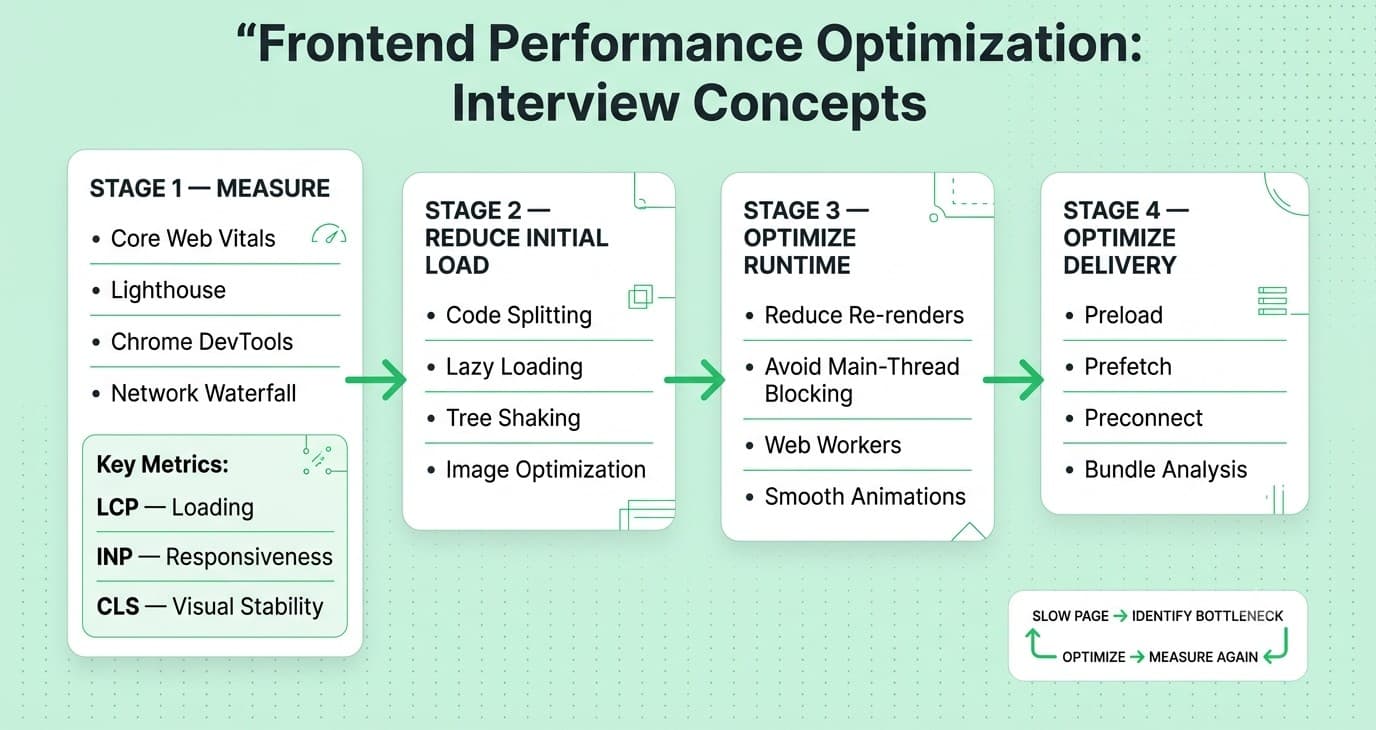
Testing
Question: What's the difference between unit tests, integration tests, and end-to-end (E2E) tests? Answer: Unit tests check a single function/component in isolation (fast, narrow). Integration tests check how multiple units work together (like a form and its validation logic). E2E tests simulate real user flows through the full running app (slow, broad, high confidence). Explanation: The "testing pyramid" (or trophy, for frontend) suggests having many fast unit tests, a healthy number of integration tests, and fewer, higher-value E2E tests, balancing speed of feedback against confidence. Real-World Example: Testing a formatCurrency() utility function is a unit test; testing that submitting a checkout form calls the right API with the right payload is an integration test; testing "user can add an item to cart and complete checkout" in a real browser is E2E. Common Mistakes: Over-relying on E2E tests for everything (slow test suite, flaky, hard to maintain) or under-testing integration between units (lots of passing unit tests but the app is still broken when pieces connect). Follow-up Questions: "What's the 'testing trophy' concept, and how does it differ from the traditional pyramid for frontend apps?" "How would you decide what NOT to test?" Question: What is snapshot testing, and what are its pros and cons? Answer: Snapshot testing captures a component's rendered output (or serialized value) and compares future test runs against that saved snapshot, flagging any difference for review. Explanation: Snapshots are great for catching unintended changes but can become a "just click update" rubber-stamp habit if developers aren't actually reviewing diffs carefully, reducing their real value. Real-World Example: A snapshot test on a <Card> component catches an accidental change to its rendered markup during a refactor that a developer didn't intend, prompting a closer look before merging. Common Mistakes: Blindly running "update snapshots" without reviewing what changed and why, which turns the safety net into a rubber stamp; snapshotting overly large components, producing noisy diffs that are hard to review meaningfully. Follow-up Questions: "When would you avoid snapshot testing in favor of explicit assertions?" "How do you keep snapshot tests useful over time as a codebase evolves?" Question: How do you test asynchronous code and API calls in frontend tests? Answer: Use testing utilities that support async assertions (waitFor, findBy queries in Testing Library), and mock network calls (via tools like MSW — Mock Service Worker) so tests are fast, deterministic, and don't depend on a real backend. Explanation: Mocking network requests at the network layer (rather than mocking your own fetch wrapper function) tests your actual data-fetching code path, giving higher confidence than mocking too high up the stack. Real-World Example: Using MSW to intercept a fetch('/api/users') call in a test and return a fixed mock response lets you verify the component correctly renders loading, success, and error states without hitting a real API. Common Mistakes: Using arbitrary setTimeout-based waits in tests instead of proper async utilities (causes flaky, slow tests); mocking at too high a level (mocking your own hook instead of the network call it wraps), which reduces what the test actually verifies. Follow-up Questions: "What's the difference between mocking fetch directly versus using MSW?" "How would you test a component that shows a loading spinner before data arrives?" Question: What is Test-Driven Development (TDD), and have you used it in frontend work? Answer: TDD is writing a failing test first, then writing the minimum code to make it pass, then refactoring — repeating this red-green-refactor cycle. It's used selectively in frontend, often more for logic-heavy code (utilities, reducers, hooks) than for pure UI markup, which tends to change quickly during design iteration. Explanation: Strict TDD for every pixel of UI can be counterproductive early in a project when the design itself is still in flux; it shines more for stable business logic where the "contract" is well understood upfront. Real-World Example: Writing tests first for a cart-total calculation function (with edge cases like discounts, taxes, empty cart) before implementing it is a strong TDD use case; TDD-ing the exact pixel layout of a still-evolving marketing page is usually not worth the overhead. Common Mistakes: Applying TDD dogmatically to every single piece of UI regardless of stability/value; writing tests so tightly coupled to implementation details that they break on every harmless refactor. Follow-up Questions: "How do you decide what's worth TDD-ing versus testing after the fact?" "What makes a test 'brittle,' and how do you avoid writing brittle tests?" Question: How would you test accessibility as part of your frontend testing strategy? Answer: Combine automated tools (like jest-axe or axe-core integrated into your test suite/CI) that catch common issues (missing labels, contrast, ARIA misuse) with manual testing (keyboard-only navigation, screen reader spot checks), since automated tools alone catch only a fraction of real accessibility problems. Explanation: Automated accessibility testing is a good baseline safety net that prevents obvious regressions, but genuinely usable accessibility requires manual verification that automated rules can't fully capture (like "does this flow make sense with a screen reader"). Real-World Example: Adding jest-axe assertions to component tests catches a missing alt attribute or insufficient color contrast automatically in CI, before it ever reaches a real user. Common Mistakes: Treating "passes automated a11y scan" as equivalent to "is actually accessible" (automated tools typically catch a minority of real-world issues); never testing with an actual keyboard or screen reader. Follow-up Questions: "What's something automated accessibility tools consistently miss?" "How would you keyboard-test a custom dropdown component?" Question: What's the difference between mocking and stubbing in tests? Answer: A stub returns predetermined data when called, without caring how it was called. A mock additionally verifies how it was called (arguments, call count) as part of the test assertion. Explanation: Both are types of "test doubles" that replace real dependencies, but mocks add behavioral verification on top of just supplying fake data. Real-World Example: A stubbed getUser() might always return a fixed fake user object regardless of input; a mocked version of an analytics.track() call would additionally assert it was called exactly once with the correct event name. Common Mistakes: Over-mocking internal implementation details, which makes tests brittle to refactors that don't actually change behavior; not understanding the distinction and using the terms interchangeably in ways that confuse test intent. Follow-up Questions: "What's a spy, and how does it differ from a mock?" "When is it better to use a real implementation instead of any test double?" Question: How would you approach testing a component with complex conditional rendering and multiple states (loading, error, empty, success)? Answer: Write separate, focused tests for each meaningful state, using mocked data/props to force the component into that specific state, and assert on what the user would actually see/do in each case — rather than one giant test trying to cover everything at once. Explanation: Testing each state independently (rather than one sprawling test) makes failures easier to diagnose and keeps tests resilient to unrelated changes in other states. Real-World Example: For a <UserProfile> component, you'd write distinct tests for "shows a spinner while loading," "shows an error message on fetch failure," "shows 'no data' for an empty profile," and "renders the profile correctly on success" — four small, clear tests instead of one tangled one. Common Mistakes: Writing one enormous test that tries to simulate every state transition in sequence, making failures hard to pinpoint; testing implementation details (internal state variable names) instead of user-visible behavior. Follow-up Questions: "How would you test a component that depends on React Query's loading/error states specifically?" "What's the difference between testing implementation details and testing behavior?"Question 77
Question 78
Question 79
Question 80
Question 81
Question 82
Question 83
8. Architecture & System Design
Question: How would you design the frontend architecture for a large-scale application used by multiple teams? Answer: Key decisions include: a component library/design system for consistency, a clear folder/module structure (often feature-based rather than type-based), a chosen state management strategy per state "type," a build/monorepo strategy (if multiple apps share code), and clear ownership/contribution guidelines. Explanation: At scale, the biggest risks aren't "which framework" but coordination problems — inconsistent UI, duplicated logic, and unclear ownership — which good architecture and conventions solve more than any single technical choice. Real-World Example: A large company with many product teams often adopts a monorepo with a shared design-system package (@company/ui) that every team's app depends on, ensuring visual and behavioral consistency without every team reinventing buttons and modals. Common Mistakes: Organizing folders purely "by type" (all components together, all hooks together) in a large app, which makes related code hard to find; not investing in a shared component library early enough, leading to costly UI inconsistency later. Follow-up Questions: "How would you handle versioning and breaking changes in a shared component library used by many teams?" "What's your approach to a monorepo versus multiple repos for a multi-team frontend?" Question: How would you design a scalable, reusable design system / component library? Answer: Start with design tokens (colors, spacing, typography as variables), build low-level primitive components first (Button, Input, Text), compose them into higher-level patterns, document usage clearly (often with Storybook), and version it as a proper published package with semantic versioning. Explanation: A design system's value comes from consistency and reduced duplication — but it needs governance (a clear process for proposing changes) or it either stagnates or fragments as teams fork it locally instead of contributing back. Real-World Example: A <Button variant="primary" size="sm"> API driven by shared design tokens ensures every team's buttons look and behave consistently, and a single token change (like updating the brand's primary color) propagates everywhere automatically. Common Mistakes: Building overly rigid components that don't cover real use cases, causing teams to "escape hatch" around the system entirely; skipping documentation, making adoption harder than it should be. Follow-up Questions: "How would you handle a breaking change to a widely-used component?" "How do design tokens flow from design tools (like Figma) into code?" Question: What is micro-frontend architecture, and when does it make sense? Answer: Micro-frontends split a large frontend application into independently deployable pieces (often owned by different teams), composed together at runtime or build time — similar in spirit to microservices, but for the frontend. Explanation: It makes sense mainly at real organizational scale (many autonomous teams needing independent release cycles), and comes with real costs — cross-app consistency, shared dependency management, and runtime integration complexity — that aren't worth it for smaller teams/apps. Real-World Example: A large enterprise site where the "checkout" flow, "account settings," and "product catalog" are each owned, built, and deployed independently by separate teams, then composed into one cohesive site via a shell application. Common Mistakes: Adopting micro-frontends prematurely for a small team/app "because big companies do it," adding significant complexity without the organizational scale that justifies it. Follow-up Questions: "What are the main integration strategies for micro-frontends (module federation, iframe, build-time composition)?" "How do you keep a consistent look and feel across independently-deployed micro-frontends?" Question: How would you approach migrating a large legacy frontend codebase to a modern framework without a full rewrite? Answer: Favor an incremental "strangler fig" approach — new features built in the new stack, old parts of the app gradually replaced piece by piece behind a stable routing/composition layer, rather than a risky big-bang rewrite. Explanation: Full rewrites are notoriously risky (the "second-system effect") — they take longer than estimated, freeze feature development, and often reproduce old bugs; incremental migration keeps the app shippable and de-risks the process. Real-World Example: Mounting a new React-based feature inside a legacy jQuery app via a small wrapper, then gradually converting adjacent legacy pages one at a time, letting old and new coexist safely until the migration is complete. Common Mistakes: Committing to a full rewrite that stalls feature delivery for months/years; not setting clear boundaries between legacy and new code, causing them to become tangled instead of cleanly separated. Follow-up Questions: "How would you handle shared state or styling conflicts between the legacy and new stack during migration?" "How do you decide the order in which to migrate pages/features?" Question: How would you design a frontend system to handle real-time data updates (like a live dashboard or chat app)? Answer: Choose the right transport for the use case (WebSockets for true bidirectional real-time, Server-Sent Events for one-way server-to-client streams, or polling for simpler/lower-frequency needs), design the client to handle reconnects/backoff gracefully, and structure state updates to avoid excessive re-renders on rapid incoming data. Explanation: Real-time UIs add real complexity — network interruptions, out-of-order messages, and update frequency all need explicit handling, or the UI becomes unreliable or janky under real conditions. Real-World Example: A live stock ticker dashboard might batch/throttle incoming WebSocket price updates (e.g., render at most every 250ms) rather than re-rendering on every single tick, keeping the UI both current and smooth. Common Mistakes: Not handling reconnection/backoff after a dropped WebSocket connection, silently leaving the UI stale; re-rendering the entire UI on every single incoming message instead of batching/throttling updates. Follow-up Questions: "How would you handle out-of-order or duplicate messages from a WebSocket stream?" "What's the difference between WebSockets and Server-Sent Events, and when would you pick one over the other?" Question: How would you structure a frontend monorepo, and what tools would you use? Answer: Organize by package (apps, shared UI library, shared utilities, config packages), use a workspace tool (like pnpm/Yarn/npm workspaces) plus a task runner/build system (like Turborepo or Nx) for caching and dependency-aware task orchestration, and enforce clear boundaries between packages. Explanation: The real value of a monorepo comes from fast, cached, incremental builds and easy code sharing — without good tooling, a monorepo can become slower and more painful than separate repos. Real-World Example: A monorepo with apps/web, apps/admin, and packages/ui lets both apps share the same design-system package with instant local changes reflected across both during development, while Turborepo caches unaffected package builds on CI. Common Mistakes: Adopting a monorepo without proper caching/build tooling, resulting in painfully slow CI as the repo grows; allowing circular dependencies between packages. Follow-up Questions: "How does Nx/Turborepo decide what needs to be rebuilt on a given change?" "How would you handle versioning for internal packages in a monorepo — synced versions or independent?" Question: How do you decide between building a feature client-side versus having the backend do more of the work? Answer: Weigh factors like: does the client have all the data it needs already (avoid extra round trips), is the logic security/business-critical (belongs on the server, never trust the client), and does the work benefit from being close to the user (instant UI feedback) versus needing authoritative server computation. Explanation: This trade-off comes up constantly in real system design interviews — the right answer usually isn't "always client" or "always server" but depends on trust boundaries, latency needs, and data locality. Real-World Example: Client-side form validation gives instant feedback for UX, but the same validation must be re-enforced server-side since client-side checks can always be bypassed; a client-side price calculation might be shown for instant feedback, but the server must always be the source of truth for the final charged amount. Common Mistakes: Trusting client-side validation/calculations as the actual security or business-logic boundary; unnecessarily pushing trivial UI-only logic to the backend, adding latency for no real benefit. Follow-up Questions: "Where would you draw the line for a discount/coupon calculation — client, server, or both?" "How do you prevent a savvy user from manipulating client-side-only logic to their advantage?"Question 84
Question 85
Question 86
Question 87
Question 88
Question 89
Question 90
9. Accessibility & Best Practices
Question: What is WCAG, and what are its core principles? Answer: WCAG (Web Content Accessibility Guidelines) is the standard accessibility spec, organized around four principles known as POUR: Perceivable, Operable, Understandable, and Robust. Explanation: Understanding POUR gives you a mental checklist for evaluating any UI: can it be perceived by all senses (or alternatives)? Can it be operated without a mouse? Is it understandable and predictable? Is it robust across assistive technologies? Real-World Example: A form with unlabeled inputs, no keyboard focus indicators, and confusing error messages fails all four POUR principles at once — labels fix Perceivable, keyboard support fixes Operable, and clear error messaging fixes Understandable. Common Mistakes: Treating accessibility as a final "add ARIA attributes" pass instead of a design consideration from the start; not knowing the difference between WCAG conformance levels (A, AA, AAA). Follow-up Questions: "What WCAG conformance level do most organizations target, and why?" "Can you give an example of a Robust-principle failure?" Question: How would you make a custom dropdown/select component accessible? Answer: Use proper ARIA roles (role="listbox"/role="combobox" patterns per the ARIA Authoring Practices Guide), ensure full keyboard operability (arrow keys, Enter, Escape), manage focus correctly, and announce state changes to screen readers. Explanation: Custom interactive widgets don't get any of the native accessibility behavior that a real <select> gets for free, so you have to explicitly reimplement all of it — this is exactly why it's often better to start from a native element and only customize visually when possible. Real-World Example: A custom dropdown that only responds to mouse clicks and has no aria-expanded/aria-activedescendant management is completely unusable for a keyboard-only or screen reader user, even if it looks fine visually. Common Mistakes: Building a custom dropdown from scratch without consulting the ARIA Authoring Practices Guide for the correct interaction pattern; forgetting to manage focus when the dropdown opens/closes. Follow-up Questions: "Why might you reach for a native <select> or a well-tested headless UI library instead of building this from scratch?" "How would you test this component with a screen reader?" Question: What is aria-live, and when would you use it? Answer: aria-live marks a region of the page whose content changes should be announced by screen readers even when focus isn't on that region — polite waits for a pause, assertive interrupts immediately. Explanation: Dynamic content updates (like form validation errors appearing, or a "saved!" toast) are often invisible to screen reader users unless explicitly announced, since screen readers only announce what's focused or what's in a live region by default. Real-World Example: A form validation error appearing under an input should live in an aria-live="polite" region so screen reader users hear "Email is required" without needing to manually navigate to find the new error text. Common Mistakes: Overusing aria-live="assertive" for non-urgent updates, which interrupts and annoys screen reader users; forgetting live regions entirely for important async UI feedback (toasts, validation, loading states). Follow-up Questions: "What's the difference between aria-live, role="alert", and role="status"?" "How would you announce a background async operation completing without stealing focus?" Question: What are frontend code review best practices you follow or look for? Answer: Focus on correctness, readability, and maintainability over style nitpicks (which should be automated via linters/formatters); check for accessibility and performance implications; leave specific, actionable, kind feedback; and distinguish "must fix" from "nice to have" suggestions. Explanation: Good code review is as much a communication skill as a technical one — vague or overly harsh feedback slows teams down and damages trust, while clear, prioritized feedback speeds up shipping without sacrificing quality. Real-World Example: Instead of "this is wrong," a good review comment explains the why: "This re-fetches on every keystroke — could we debounce this to avoid hammering the API?" — actionable and specific. Common Mistakes: Nitpicking formatting/style that a linter should catch automatically instead of focusing human attention on logic and design; Follow-up Questions: "How do you handle a disagreement in a code review that isn't resolving?" "What would you automate away from manual code review entirely?" Question: What frontend coding best practices do you consider non-negotiable on a team project? Answer: Consistent formatting/linting (enforced automatically via tools like ESLint/Prettier and pre-commit hooks), meaningful naming, avoiding prop-drilling/tangled state, writing tests for critical logic, accessibility as a baseline (not an afterthought), and keeping components focused/single-responsibility. Explanation: "Non-negotiable" here really means "automatable and objectively beneficial" — the goal is removing subjective debate from things that tooling can enforce consistently, freeing human review time for real design/logic discussions. Real-World Example: A CI pipeline that blocks merging on lint errors, failing tests, and a bundle-size budget check removes an entire category of avoidable back-and-forth in code review. Common Mistakes: Relying on manual discipline instead of automated enforcement (inconsistency creeps in over time); treating "best practices" as one-size-fits-all instead of adapting them sensibly to the project's actual constraints. Follow-up Questions: "How would you introduce stricter linting rules to an existing large codebase without breaking everything at once?" "What's your approach to handling technical debt in an ongoing project?"Question 91
Question 92
Question 93
Question 94
approving PRs without actually reading the code carefully ("rubber stamping").Question 95
10. 2026–2027 Trends & Modern Tooling
Question: How is AI-assisted coding (like Claude Code, GitHub Copilot, and similar tools) changing the frontend developer's day-to-day work, and what should candidates know about it? Answer: AI tools are increasingly good at generating boilerplate, first-draft components, and even full features from a prompt, shifting a growing part of a frontend developer's value toward reviewing, architecting, debugging, and making judgment calls the AI can't reliably make on its own — rather than typing every line by hand. Explanation: Interviewers in 2026–2027 increasingly probe how candidates use AI tools responsibly — not whether they use them, but whether they understand generated code well enough to catch bugs, security issues, or bad architectural choices before shipping. Real-World Example: A candidate might describe using an AI coding assistant to scaffold a component quickly, then carefully reviewing and adjusting its accessibility, edge-case handling, and performance implications rather than shipping the first output unreviewed. Common Mistakes: Blindly shipping AI-generated code without understanding it (a growing interview red flag); refusing to use AI tools at all and being noticeably slower without a good reason, in a field where efficient use of these tools is now a genuine skill. Follow-up Questions: "How do you verify AI-generated code doesn't introduce security or accessibility issues?" "Where do you draw the line on what you'll let an AI tool generate versus write yourself?" Question: What is the React Compiler, and what problem does it solve? Answer: The React Compiler automatically memoizes components and values at build time, aiming to give you the performance benefits of manual useMemo/useCallback/React.memo without having to write them by hand. Explanation: This represents a shift in how React handles performance — instead of developers manually reasoning about memoization, the compiler analyzes your code and inserts the right optimizations automatically, reducing a whole class of manual tuning and related bugs (like stale memoized values from missed dependencies). Real-World Example: A component that previously needed careful manual useMemo/useCallback wrapping to avoid unnecessary child re-renders can, with the compiler, often be written as plain, straightforward code while still getting similar performance characteristics. Common Mistakes: Assuming the compiler makes all manual performance thinking unnecessary in every case (it helps a lot, but understanding why re-renders happen is still valuable for genuinely complex scenarios); not knowing the compiler's rules-of-hooks-style constraints on what code patterns it can safely optimize. Follow-up Questions: "Does the React Compiler mean you should stop using useMemo manually?" "How would you verify the compiler is actually optimizing a specific component?" Question: What are Web Components, and how do they relate to (or compete with) frameworks like React/Vue? Answer: Web Components are a set of native browser APIs (Custom Elements, Shadow DOM, HTML Templates) for building reusable, encapsulated, framework-agnostic UI elements that work in any framework or none at all. Explanation: They're gaining renewed relevance for building framework-agnostic design systems (usable across teams on different frameworks) but generally still lack some of the developer ergonomics (state management, reactivity patterns) that frameworks like React provide out of the box. Real-World Example: A large organization with teams on React, Vue, and Angular might build its core design-system components as Web Components so every team can consume the same <my-button> element regardless of their app's framework. Common Mistakes: Assuming Web Components are a drop-in replacement for a full framework (they solve component encapsulation, not app-level concerns like routing/state management); underestimating cross-browser/Shadow DOM styling quirks. Follow-up Questions: "How does Shadow DOM style encapsulation work, and what are its limitations (like styling from outside)?" "How would you integrate a Web Component into a React app?" Question: What is an "islands architecture" (as used by frameworks like Astro), and why has it become popular? Answer: Islands architecture renders most of a page as static HTML with zero JavaScript by default, and only "hydrates" small, specific interactive components ("islands") — rather than hydrating an entire page as a single monolithic app. Explanation: This directly targets the common problem of shipping large amounts of unnecessary JS for mostly-static, content-heavy pages, improving load performance significantly for sites that are mostly content with occasional interactive widgets. Real-World Example: A content-heavy blog built with Astro might ship zero JS for the article text itself, but hydrate just a small "like button" or "comments" widget as an isolated interactive island, keeping the overall page extremely lightweight. Common Mistakes: Applying islands architecture to a highly interactive, app-like product (like a dashboard) where most of the UI genuinely needs to be interactive — it shines for content-heavy sites, not full SPAs. Follow-up Questions: "How does islands architecture compare to React Server Components' approach to reducing client JS?" "What's the trade-off islands architecture makes regarding cross-island shared state?" Question: Where do you see frontend development heading in the next couple of years, and how do you personally stay current? Answer: A strong answer touches on a few real, observable trends — like AI-assisted development becoming standard workflow, the continued push toward shipping less client-side JS (Server Components, islands, signals-based fine-grained reactivity), and growing baseline expectations around performance, accessibility, and Core Web Vitals as ranking/UX factors — paired with a genuine personal habit for staying current (following release notes, trying new tools on side projects, reading team retrospectives on real production trade-offs). Explanation: Interviewers ask this to gauge genuine curiosity and whether a candidate's knowledge is current or frozen at whatever they learned years ago — vague buzzword answers stand out immediately compared to specific, opinionated ones. Real-World Example: A candidate describing a recent side project where they tried a signals-based framework or the React Compiler specifically to understand its trade-offs firsthand demonstrates more real engagement than simply naming trends they've read headlines about. Common Mistakes: Giving a generic, buzzword-heavy answer without specifics or a real opinion; claiming to "know everything" instead of being honest about what they're still actively learning. Follow-up Questions: "What's a recent frontend tool or pattern you tried that you decided NOT to adopt, and why?" "How do you evaluate whether a new trend is worth adopting on a real production team versus just hype?"Question 96
Question 97
Question 98
Question 99
Question 100
Final Tips Before Your Interview
A few closing thoughts as you finish working through this list: Don't just memorize answers — understand the "why." Interviewers can tell the difference between a rehearsed definition and real understanding within about two follow-up questions. Practice explaining out loud, not just reading. Frontend interviews are conversational; you need to be able to talk through trade-offs fluently, not recite. Prioritize by role. A junior role will lean heavily on Sections 1–3 and 7; a senior/staff role will lean much more on Sections 4, 6, 8, and 10. Have real examples ready. For almost every question here, interviewers love hearing "here's a time I actually dealt with this," not just the textbook answer. Ask questions back. The best candidates treat system design and architecture questions as a two-way conversation, clarifying requirements before diving into an answer. Good luck — you've got this. Start Practicing for Your Frontend Developer Interview with Mocklingo
More Blogs

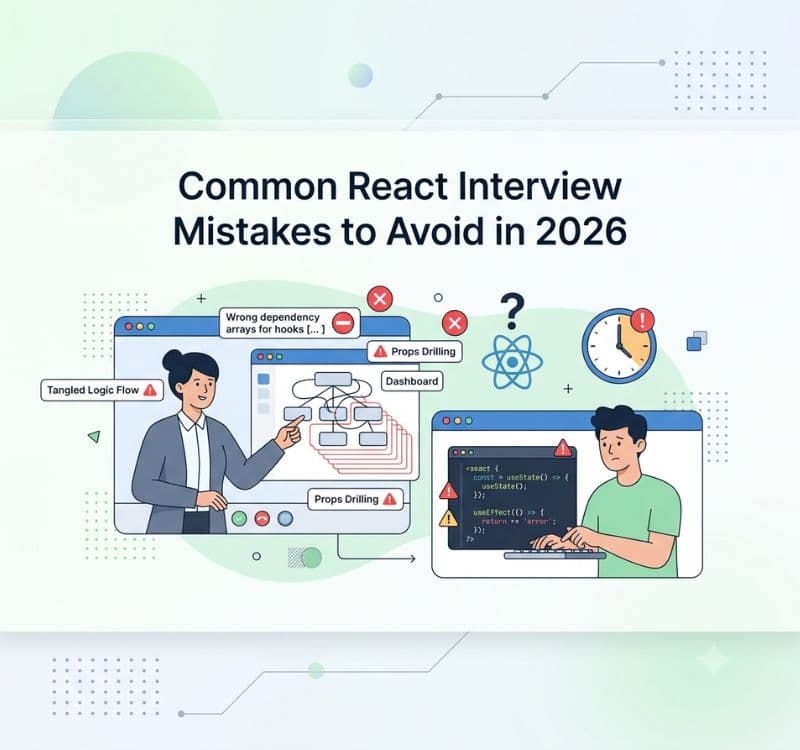


Sep 30, 2026
React Developer Interview Preparation Guide: A Complete Roadmap for 2026
31 min read