Loading...
Contents
Frontend Developer Interview Preparation Guide
A Complete Roadmap for 2026
Aug 20, 202616 min readUpdated Oct 3, 2026
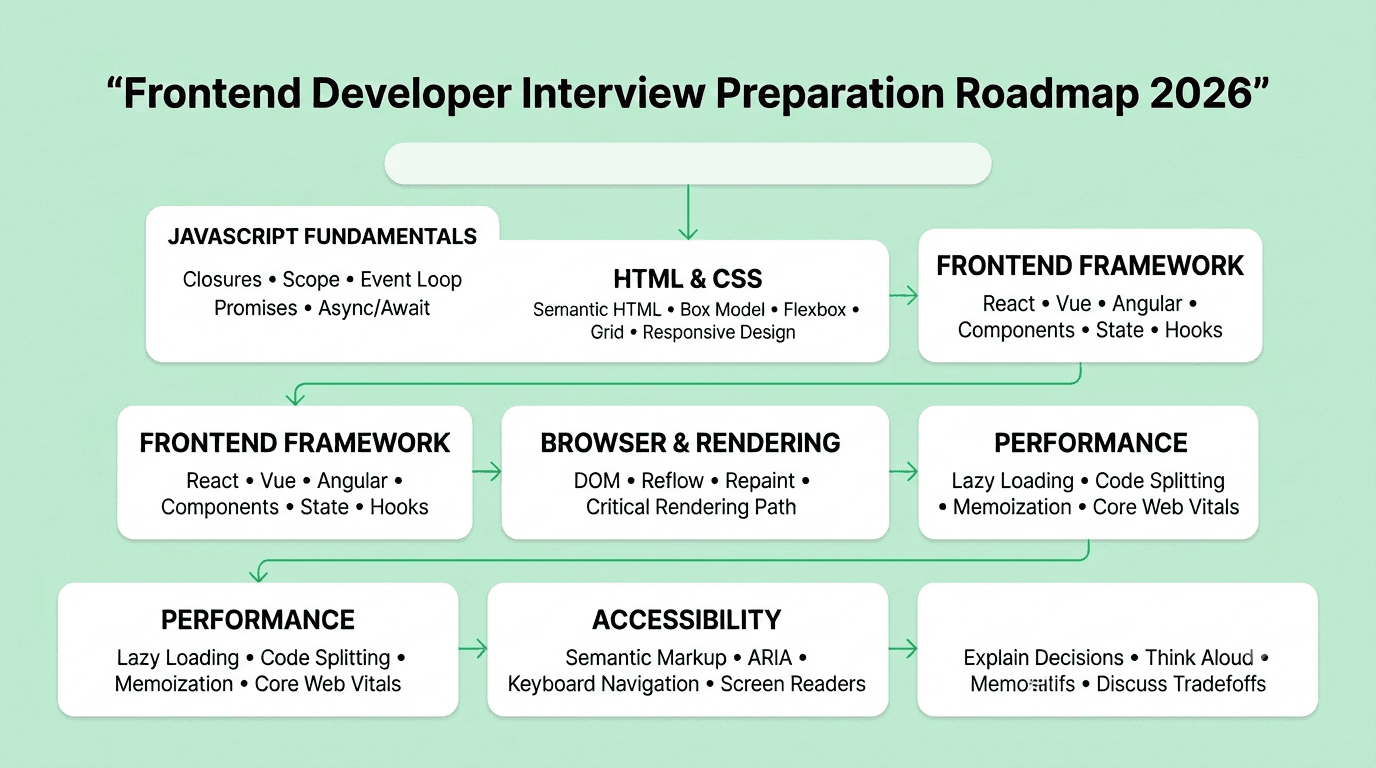
To prepare for a frontend developer interview, focus on five pillars: JavaScript fundamentals and how the browser actually works, deep proficiency in a framework like React, Vue, or Angular, strong CSS and layout skills, an eye for performance and accessibility, and clear verbal communication for walking through your decisions. Most interview loops include a resume screen, an online assessment or live coding round, one or two technical interviews covering JavaScript and framework depth, a UI or system design round for experienced candidates, and a final hiring manager round. Candidates who can explain why a component re-renders or why a layout breaks, not just fix it, consistently stand out.
If you are preparing for a frontend developer interview, you already know it is no longer just about making a page look right. Companies now expect frontend engineers to understand rendering behavior, state management, accessibility, and performance well enough to make sound architectural decisions, not just implement a design file. This guide covers everything you need, whether you are a fresher applying for your first frontend role or an experienced engineer targeting a senior or lead position.
FREE TO USE
25K+ INTERVIEWS4.8★ RATING68% IMPROVEMENT
Crack Your Dream Job
Real Interviews. Real Pressure. Practice until it feels easy.
- Seamless Interview Experience
- Resume & JD Questions
- Instant Personalized Feedback
Section 1: Introduction to the Frontend Developer Interview Process
Frontend interviews test three things together: JavaScript and browser fundamentals, framework depth, and the ability to reason about user experience, performance, and edge cases. A candidate who can build a beautiful component but cannot explain why it re-renders unnecessarily will struggle just as much as someone who understands theory but cannot ship a working feature under time pressure.
Most processes run three to five rounds over two to five weeks. Larger companies typically separate a JavaScript fundamentals round from a framework-specific or UI implementation round. Startups often compress these into fewer, broader conversations, sometimes including a take-home project that mirrors a real feature from the product.
What changes with experience is depth and scope, not the topic list itself.
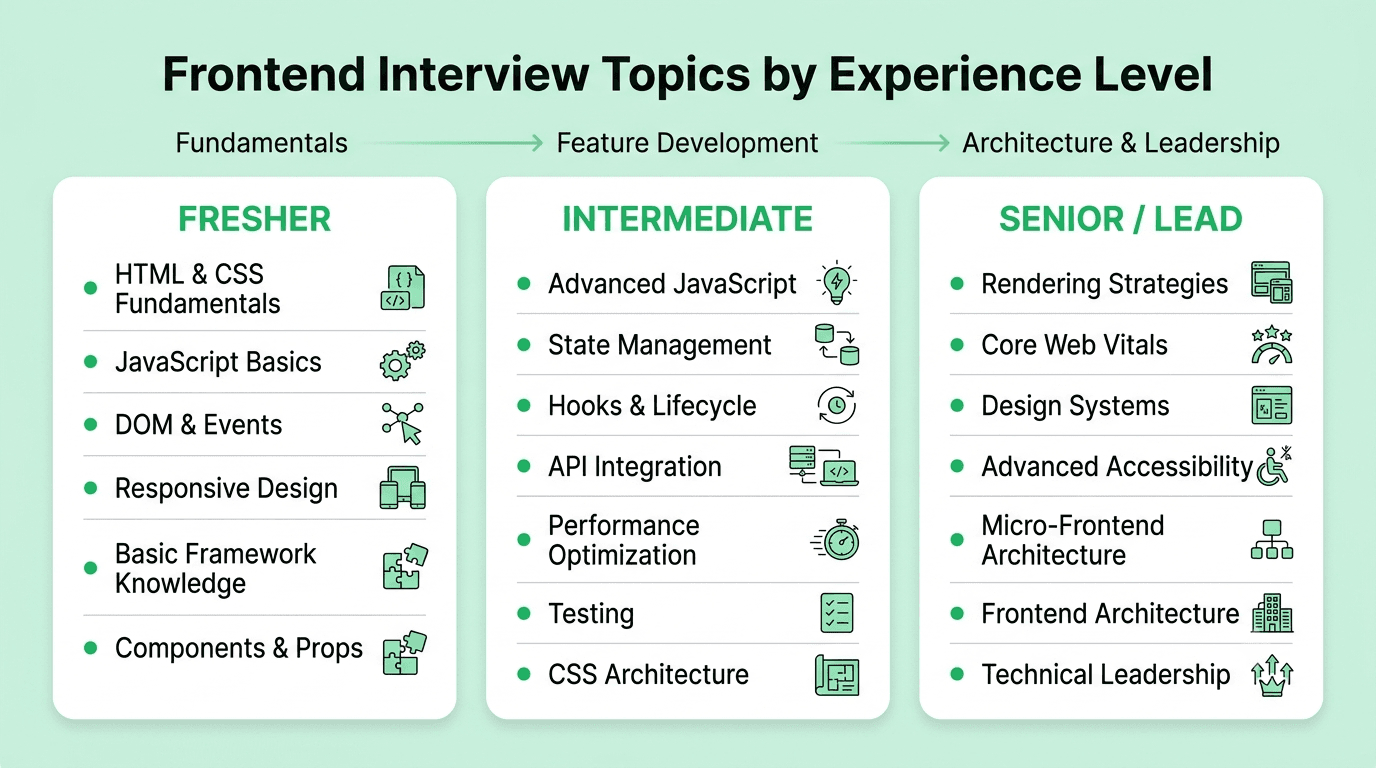
- Freshers are tested on HTML, CSS, and JavaScript fundamentals, plus basic proficiency in one framework.
- Intermediate candidates (two to five years) are expected to build a feature end to end, discuss state management trade offs, and debug realistic rendering or performance issues.
- Experienced professionals are evaluated on architecture decisions, performance strategy at scale, mentoring, and how they have influenced frontend direction and tooling on past teams.
Section 2: What Recruiters and Hiring Managers Look For
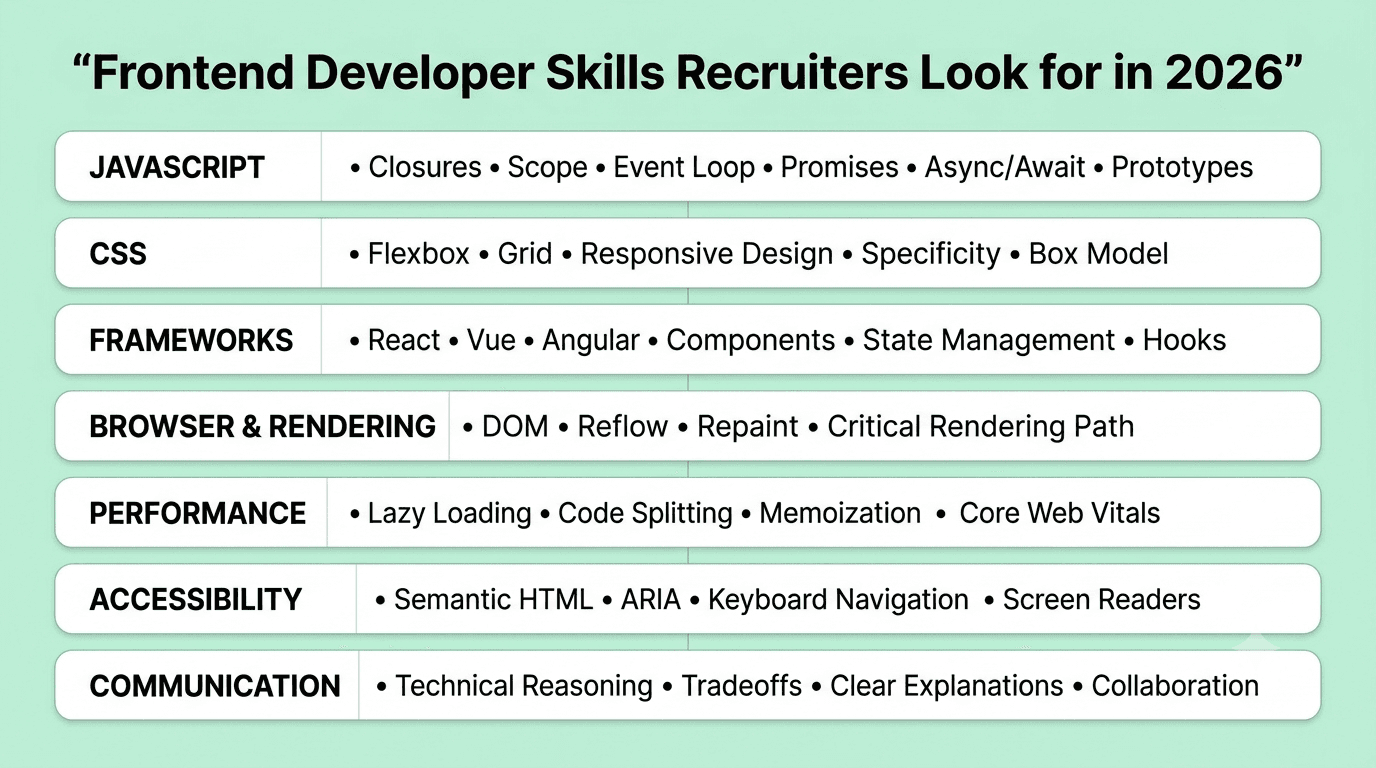
Recruiters and interviewers are trying to answer one core question: will this person build interfaces that are fast, accessible, and maintainable, and can they reason clearly about the trade offs involved.
Core skills recruiters expect:
- JavaScript fundamentals. Closures, scope, the event loop, promises and async/await, and prototypal inheritance.
- Deep CSS knowledge. Flexbox, grid, responsive design, specificity, and the box model, well enough to debug a layout issue quickly.
- Framework proficiency. Real, hands-on experience with React, Vue, or Angular, including component lifecycle, state management, and hooks or their framework equivalent.
- Browser and rendering knowledge. Understanding of the DOM, reflow and repaint, the critical rendering path, and how the browser actually displays a page.
- Performance awareness. Knowledge of lazy loading, code splitting, memoization, and how to diagnose a slow-loading or janky interface.
- Accessibility fundamentals. Semantic HTML, ARIA attributes, keyboard navigation, and awareness of how assistive technology interacts with the page.
- Communication. The ability to explain a design or debugging decision clearly, especially in live coding rounds where interviewers are grading your reasoning as much as your syntax.
Hiring managers also watch for quieter signals: Do you consider edge cases like empty states and loading states without being asked? Do you write clean, componentized code? Do you accept feedback on your implementation gracefully?
Read More: Top Frontend Developer Skills Recruiter Look For in 2026
Section 3: Resume and Portfolio Preparation
Your resume and portfolio are the first filter, and for frontend roles, your portfolio often matters more than for almost any other engineering discipline since your work is visible.
- Lead with outcomes, not just tools. Instead of listing "React, Tailwind, TypeScript," describe what you built: "Rebuilt the checkout flow in React, reducing page load time by 35 percent and cart abandonment by 12 percent."
- Keep two or three strong portfolio projects, each deployed and live rather than sitting only in a repository, showing real interactivity, not just static pages.
- Include a live demo link and a clean GitHub repository with a clear README explaining your component structure and any specific technical decisions, such as why you chose a particular state management approach.
- Avoid generic template clones without a twist. A basic clone of a popular app copied from a tutorial stands out far less than a smaller project solving a specific, real interface problem.
- Quantify wherever possible: load time improvements, accessibility score improvements, or user engagement metrics tied to a UI change you made.
Section 4: Core Topics to Study, Ranked by Interview Importance
Fundamental Concepts (asked in almost every interview)
- JavaScript fundamentals: closures, hoisting,
thisbinding, and the event loop - HTML semantics and accessibility basics
- CSS layout: box model, flexbox, and grid
- DOM manipulation and event handling
- Basic responsive design: media queries and mobile-first thinking
- Framework fundamentals: components, props, and basic state in React, Vue, or Angular
Intermediate Concepts (common at two to five years experience)
- State management: Context API, Redux, Zustand, or the equivalent in your framework of choice
- Component lifecycle and hooks, including
useEffectdependency arrays and common pitfalls - API integration: fetching data, handling loading and error states, and caching strategies
- Performance optimization: memoization, virtualization for long lists, and code splitting
- Testing: unit testing components with Jest or Vitest, and basic end to end testing with tools like Cypress or Playwright
- CSS architecture: utility-first approaches like Tailwind versus component-scoped styling
Advanced Concepts (senior and lead roles)
- Rendering strategies: client-side rendering, server-side rendering, and static generation, and when each fits
- Web performance at scale: Core Web Vitals, bundle size analysis, and lazy loading strategies for large applications
- Design systems: building and maintaining a shared component library across teams
- Advanced accessibility: managing focus, screen reader testing, and complex ARIA patterns
- Micro-frontend architecture and its trade offs for large organizations
- Technical leadership: setting frontend architecture standards, mentoring, and driving tooling decisions like build system or framework migrations
Scenario Based Preparation Tips
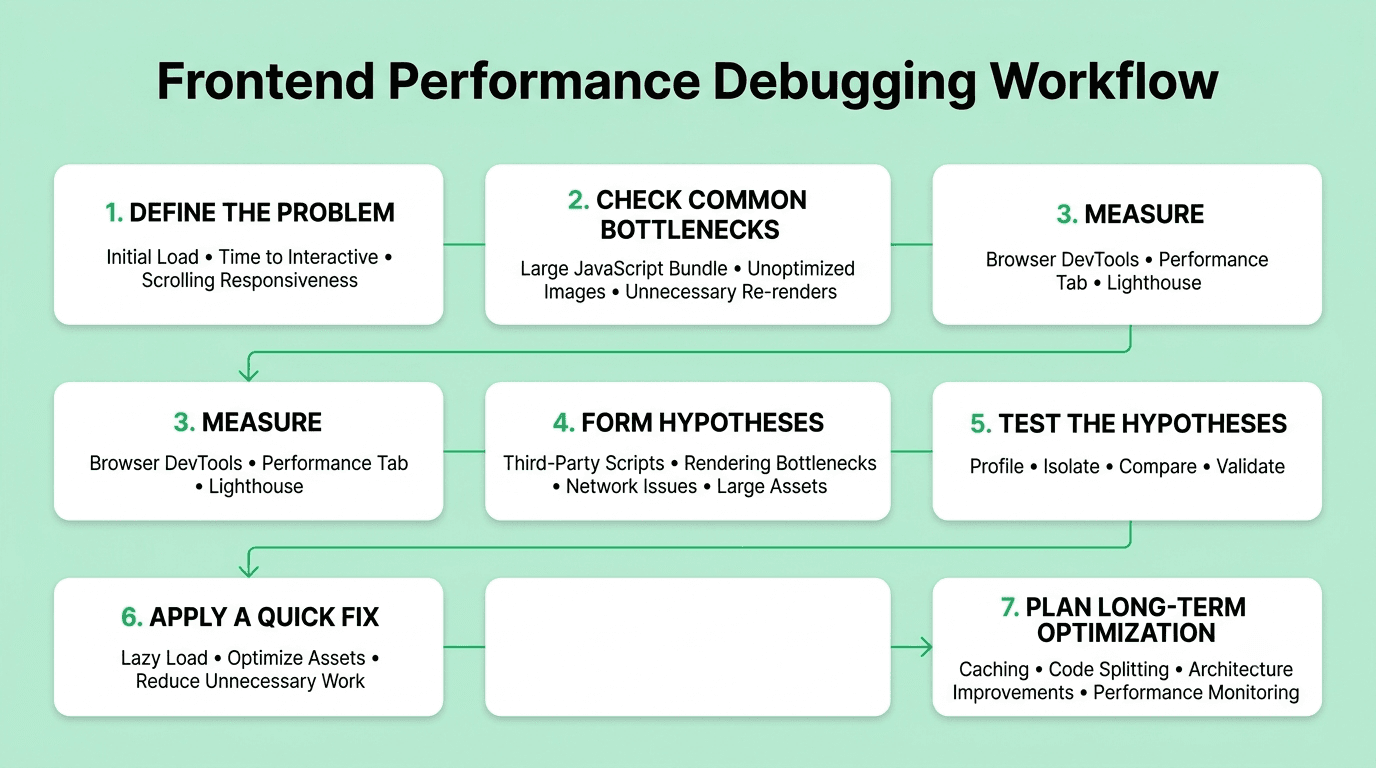
Interviewers often ask questions like "this page is loading slowly for users on mobile, how would you investigate this." Practice a repeatable framework:
- Clarify what "slow" means: initial load time, time to interactive, or perceived responsiveness while scrolling.
- Check the obvious first: unoptimized images, large JavaScript bundles, or unnecessary re-renders.
- Narrow it down using browser dev tools, such as the Performance tab or Lighthouse, to isolate the bottleneck.
- Form two or three hypotheses, such as a large third-party script blocking rendering, and explain how you would test each.
- Propose a short-term fix, like lazy loading below-the-fold content, and a longer-term improvement, like adopting a lighter framework or better caching.
This structure demonstrates debugging maturity, which interviewers value more than guessing the exact answer instantly.
Practical Preparation Exercises
- Build a small interactive feature, such as an infinite scroll list or a form with validation, within a fixed two hour window to build speed and confidence.
- Take an old project and run it through Lighthouse, then fix the top three performance or accessibility issues it flags.
- Practice explaining a rendering behavior out loud, such as why a component re-renders unnecessarily, using a simple code example.
- Time yourself solving three medium-level JavaScript coding problems in forty five minutes to simulate real technical screen pressure.
- Rebuild a small piece of a well-known interface, like a dropdown menu or a modal, using only semantic HTML and keyboard-accessible interactions.
FREE TO USE
8k+ SESSIONS92% FLUENCY4.9★ RATING
Speak With Confidence
Real Conversations. Real Scenarios. Speak until it feels natural.
- Real-Time Speaking Practice
- Guided Conversation Flows
- Instant AI Feedback
Section 5: Common Interview Rounds
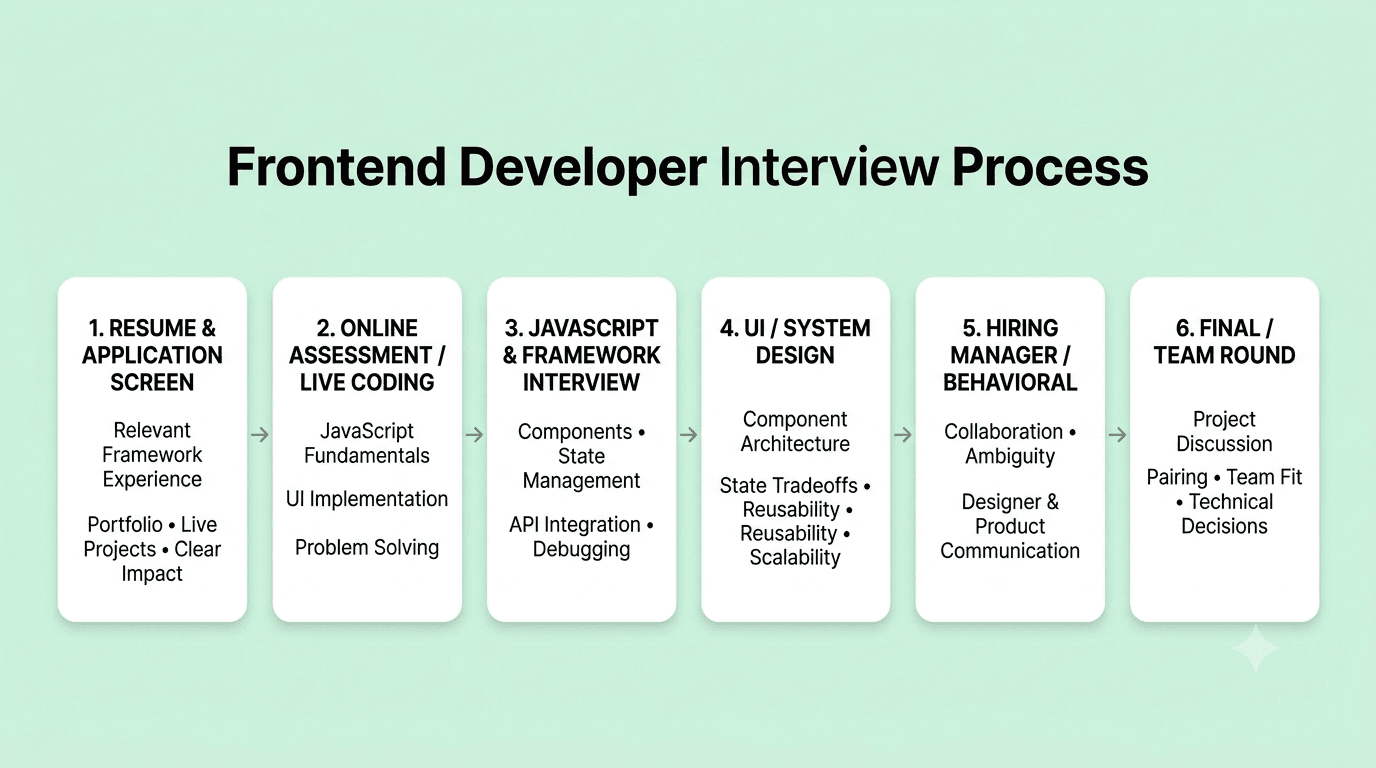
Resume and application screen Recruiters look for relevant framework experience, clear project descriptions, and a portfolio that demonstrates real, working interfaces. A resume with vague bullet points and no live links rarely survives this stage at competitive companies.
Online assessment or live coding round A timed coding test, often on a platform like CoderPad or a shared editor, covering JavaScript fundamentals and sometimes a small UI-building task such as implementing a component from a spec.
Technical interview: JavaScript and framework A live coding or pairing session focused on building or debugging a small feature, often involving state management or an API integration, while explaining your reasoning out loud.
UI or system design round For intermediate and senior roles, you may be asked to design a component architecture for a complex feature, such as a data table with sorting and filtering, discussing trade offs in state management and reusability.
Hiring manager or behavioral round Focused on past experience, collaboration style with designers and backend engineers, and how you have handled ambiguity or conflicting feedback on previous teams.
Final round or team round Often includes a presentation of a past project or an additional pairing session with future teammates to assess both technical fit and working style.
Behavioral and Situational Interview Preparation
Behavioral rounds often decide close calls between candidates with similar technical scores, and frontend roles especially value collaboration with designers and product managers.
- Use the STAR method: Situation, Task, Action, Result. Keep each story under two minutes and end with a clear outcome.
- Prepare five to six core stories covering a disagreement with a designer over feasibility, a performance issue you fixed, a mistake you made, a time you pushed back on a deadline, and a time you influenced a technical decision without formal authority.
- Be honest about failures. Interviewers are more interested in what you learned and changed afterward than in a flawless track record.
- Practice explaining trade offs, not just outcomes. "I chose to build a custom hook here instead of pulling in a library because the use case was narrow and the bundle
How to Answer Confidently
Mistakes to Avoid in 2026
- Jumping straight into coding without clarifying requirements. This is one of the most common mistakes in both live coding and UI design rounds.
- Memorizing solutions instead of understanding patterns. Interviewers frequently tweak a familiar problem slightly, such as adding a new edge case to a component spec, and memorized answers fall apart under a small twist.
- Only listing frameworks, not decisions. Saying "I used Redux" is weaker than explaining why Redux fit that specific project's state complexity over simpler alternatives.
- Ignoring accessibility and edge cases. Candidates who only build for the happy path often lose points when interviewers ask about keyboard navigation, empty states, or error handling.
- Rambling in behavioral answers. Long, unstructured stories lose the interviewer's attention. Stick to STAR and stay under two minutes.
- Skipping communication practice. Especially for candidates preparing in a second language, under-practicing spoken delivery is a bigger risk than under-practicing syntax.
- Not testing your own UI during live rounds. Clicking through your own component, checking responsiveness, and testing keyboard interaction before declaring it done signals discipline interviewers notice.
- Read More: Common Frontend Developer Interview Mistakes to avoid in 2026
Best Practices to follow
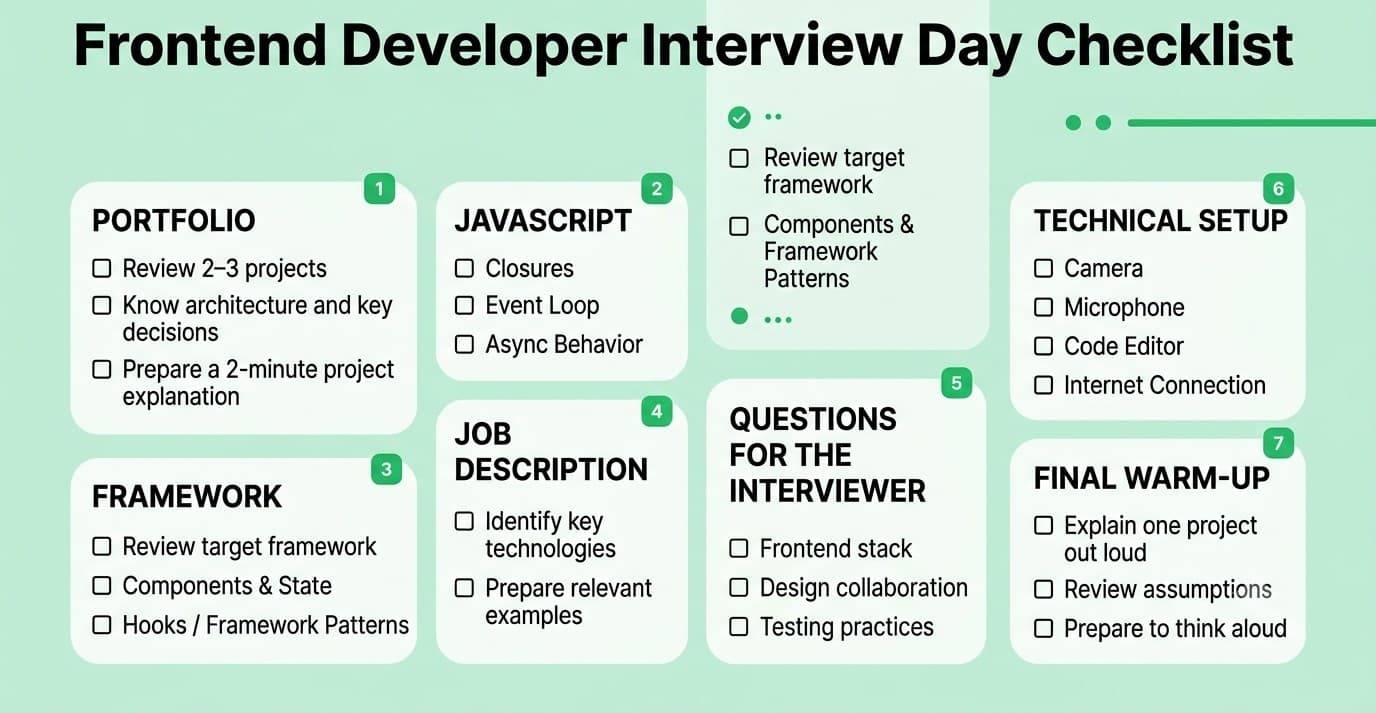
Final Interview Day Checklist
1. Review your two or three portfolio projects and be ready to explain the architecture and key decisions of each in under two minutes.
- 2. Refresh core JavaScript concepts: closures, the event loop, and async behavior.
- 3. Re-read the job description and note two or three specific frameworks or tools to emphasize.
- 4. Prepare three to five thoughtful questions about the team's frontend stack, design collaboration process, and testing practices.
- 5. Test your camera, microphone, code editor, and internet connection if the interview is remote.
- 6. Have a notepad or blank document ready for UI or component design rounds to sketch structure.
- 7. Do a five minute warm-up: explain one project's architecture out loud before the call starts.
Industry Trends Shaping Frontend Developer Interviews in 2026
Preparing for your next frontend developer interview? Practicing out loud with realistic follow-up questions is one of the fastest ways to close the gap between knowing the material and performing well under pressure. Mocklingo offers AI-powered mock interviews and English communication coaching designed for exactly this kind of preparation.
FAQs
More Blogs

Sep 30, 2026
React Developer Interview Preparation Guide: A Complete Roadmap for 2026
31 min read