Loading...
Contents
Top Frontend Developer Skills Recruiters Look for in 2026
Aug 21, 202642 min readUpdated Oct 5, 2026
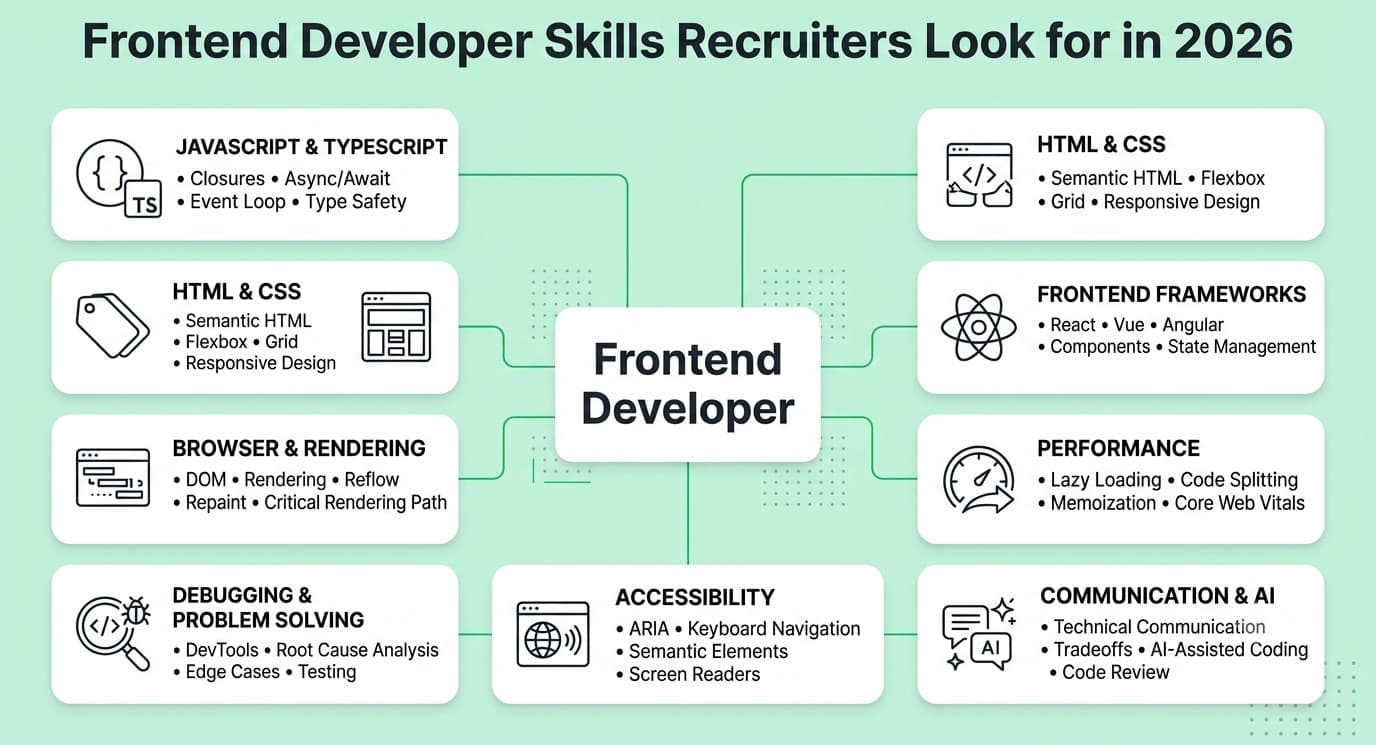
In 2026, recruiters hiring frontend developers prioritize deep JavaScript and TypeScript fundamentals, React component architecture and rendering knowledge, Core Web Vitals performance engineering, accessibility implementation that meets modern legal requirements, testing with component and end-to-end tools, server-side rendering fluency in meta-frameworks like Next.js, and the discipline to review and verify AI-generated component code before shipping. Certifications carry almost no weight against a deployed project with measurable performance scores and real accessibility compliance. Fresher expectations center on clean semantic HTML, CSS architecture, and working component-level code. Senior expectations center on owning the frontend architecture, performance budget, and design system decisions that govern how an entire product feels to use.
Frontend development has undergone a more significant skills shift over the past two years than almost any other engineering discipline. CSS became genuinely powerful. Performance metrics changed in ways that required relearning what "fast" means. Accessibility transformed from a nice-to-have into a legal obligation in dozens of jurisdictions. React Server Components quietly rewired how experienced developers think about rendering. And AI tools began generating component scaffolding so quickly that the skill being tested in interviews is no longer whether you can build a component, but whether you understand the component deeply enough to catch what the AI got wrong.
This guide is built around what recruiters are actually testing in 2026, not the skill list from 2021 that most bootcamp curricula are still teaching. Every skill below is covered from a hiring manager's perspective: why it matters, how it is tested, what separates average candidates from exceptional ones, and exactly how to build it before your next interview.
FREE TO USE
25K+ INTERVIEWS4.8★ RATING68% IMPROVEMENT
Crack Your Dream Job
Real Interviews. Real Pressure. Practice until it feels easy.
- Seamless Interview Experience
- Resume & JD Questions
- Instant Personalized Feedback
How Hiring for Frontend Developers Has Changed Going Into 2026
The biggest hiring shift is that performance, accessibility, and rendering architecture have moved from specialist knowledge to baseline expectations. Candidates who treat these as optional polish on top of a working UI are being screened out at the technical interview stage, while candidates who bake these concerns into how they build from the start are consistently moving forward.
Several forces have restructured what frontend hiring looks like this year:
Performance is now measured in the interview, not assumed. Recruiters increasingly include Lighthouse audits or Core Web Vitals references in take-home evaluations. A component that works but scores poorly on Interaction to Next Paint or Cumulative Layout Shift is no longer a passing submission.
Accessibility became a legal requirement across much of the world. The European Accessibility Act took effect in 2025, and legislation in the United States has expanded enforcement. Recruiters at companies serving these markets now treat WCAG compliance as a baseline hiring criterion, not a bonus.
The rendering landscape fragmented, then matured. Candidates are expected to understand the difference between client-side rendering, server-side rendering, static generation, and incremental static regeneration, and to make deliberate choices between them rather than defaulting to whatever the framework generates.
TypeScript is now the default, not the addition. A frontend developer who cannot work in a TypeScript codebase is no longer competitive for most mid-level and above roles, because TypeScript is now the assumed baseline in the majority of professional React, Vue, and Angular projects.
AI tools generate component scaffolding instantly, shifting what gets tested. The interview question has moved from "can you build this component" to "can you review this component, catch its accessibility failures, fix its performance issues, and explain every prop and hook in it."
Read More : How to prepare for Frontend Developer Interview in 2026
Core Fundamentals
JavaScript and TypeScript Fundamentals
Why Recruiters Prioritize This Skill
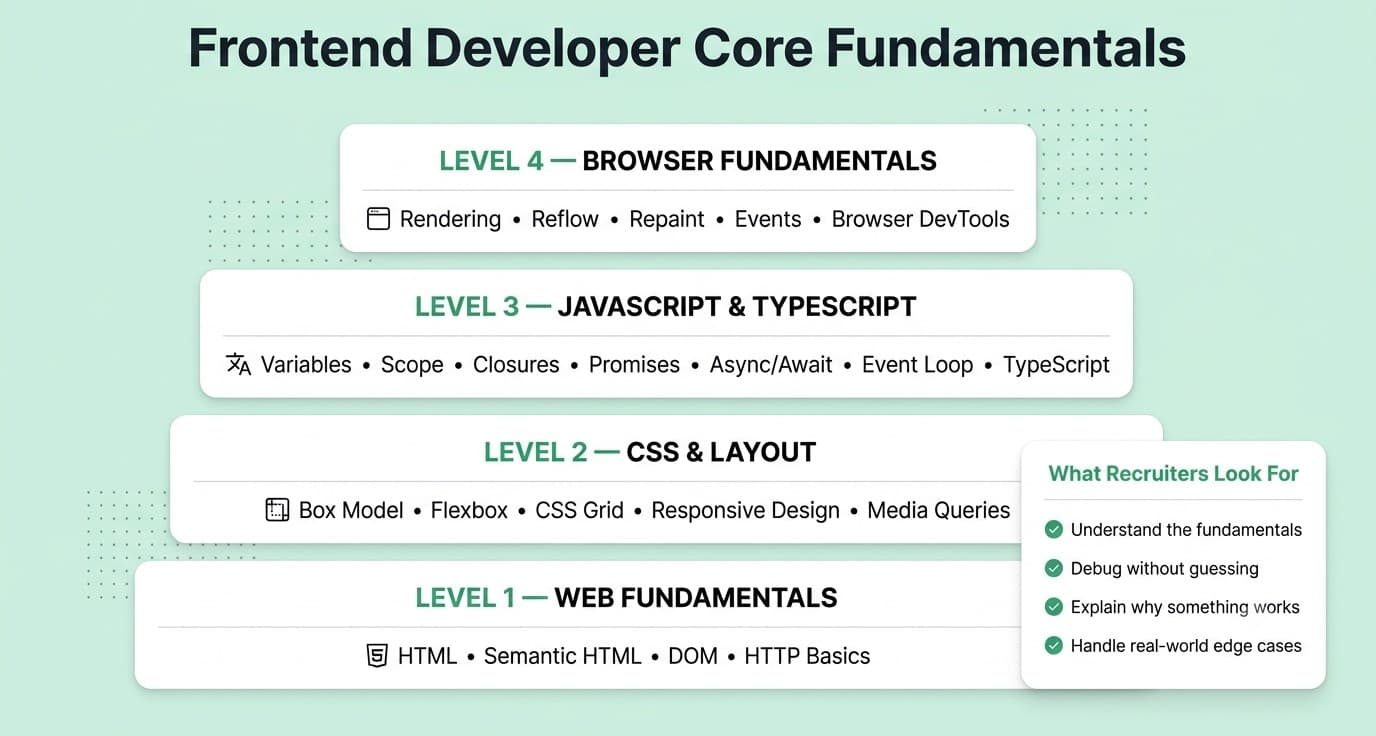
Every frontend framework is built on JavaScript. Candidates who only know a framework's patterns without the language beneath them are entirely dependent on the framework behaving as expected, which it does not during debugging, edge cases, or version updates. Recruiters test language fundamentals because they predict whether a candidate will be able to reason about unexpected behavior rather than only copy patterns from documentation.
What Recruiters Actually Expect in 2026
TypeScript fluency is now a baseline expectation at most companies beyond the very early stage. Recruiters expect comfort with generics, union and intersection types, conditional types for reusable utilities, and the ability to write and extend interface definitions for component props and API responses. Beyond TypeScript, deep JavaScript knowledge including closures, the event loop and microtask queue, promise chaining versus async/await, and prototype-based inheritance is tested because these are the mechanisms behind every framework abstraction that breaks unexpectedly in production.
Interview Evaluation
Resume screening looks for TypeScript listed explicitly alongside framework names, not just JavaScript. Technical interviews include "what will this code do and why" questions built around closures inside loops, event loop ordering with mixed promises and setTimeout calls, or type narrowing in TypeScript that reveals whether the candidate understands structural typing rather than only nominal typing. Practical rounds may ask candidates to add types to an untyped component or to debug a TypeScript type error in an existing codebase.
Real Workplace Example
A component fetches data from three endpoints and merges the results before rendering. A developer without solid JavaScript fundamentals writes three sequential awaits, tripling the total wait time unnecessarily. A developer who understands Promise.all combines all three fetches concurrently, and a developer who understands TypeScript generics types the merge function so that the return type is correctly inferred regardless of which endpoints are combined.
Fresher Expectations
Understands closures, async/await, array methods including map, filter, and reduce, and can add basic TypeScript annotations to function parameters and return types without prompting.
Mid-Level Expectations
Writes TypeScript generics for reusable utilities, understands how the event loop processes promises and callbacks, and can debug a type error in an existing codebase without spending an hour on it.
Senior-Level Expectations
Designs shared TypeScript types and utilities that the entire frontend team uses, makes decisions about TypeScript configuration strictness, and reviews other developers' types for correctness and maintainability rather than just presence.
Common Mistakes
Annotating everything as any in TypeScript, which satisfies a type-checking requirement while providing none of its value. Also common: using async/await without understanding what happens when a promise inside a loop is not properly awaited, which creates a race condition that only surfaces under specific timing conditions.
How to Build This Skill
Take an existing JavaScript project and migrate it to TypeScript strict mode, resolving every error. This exercise forces engagement with every type assumption you made implicitly when you wrote the original JavaScript, building TypeScript depth faster than any tutorial.
Example Interview Questions
"What will this code log, and in what order?" followed by a snippet mixing setTimeout, Promises, and async/await. "How would you type a React component that accepts either a string or a callback as a prop, with different behavior for each?" "What is the difference between unknown and any in TypeScript, and when would you use each?"
Strong Sample Answer Direction
A strong TypeScript answer discusses structural typing explicitly, explaining that TypeScript checks whether a value has the right shape rather than whether it was declared with a specific type, and uses that principle to reason about why a type error occurs rather than just describing the error message.
CSS Architecture, Modern CSS, and Layout Systems
Why Recruiters Prioritize This Skill
CSS is the most underestimated technical skill in frontend hiring. Most candidates treat it as a collection of properties to look up rather than a system with its own mental model, cascade logic, and layout algorithms. This mismatch shows up immediately when a recruiter shows a candidate a layout or styling bug: someone who knows CSS at a surface level guesses at fixes, while someone who understands it knows exactly why the bug occurred and which property controls the specific behavior.
What Recruiters Actually Expect in 2026
CSS has changed significantly. Container queries, cascade layers, the :has() pseudo-class, logical properties, and the subgrid layout model are now in production use at many companies, and candidates who are still writing CSS from 2019 mental models will struggle with modern codebases. Beyond modern features, recruiters expect a clear understanding of the cascade, specificity, inheritance, and the box model, because these are what cause most CSS bugs and what every debugging session requires.
Interview Evaluation
Practical rounds often include a debugging exercise where a layout is broken and the candidate must identify the specific CSS property or cascade issue causing it. Portfolio reviews look for clean, maintainable CSS architecture rather than inline styles, framework utility classes alone, or deeply nested selectors. Some companies ask candidates to explain how they would scale their CSS approach for a component library used by multiple teams.
Real Workplace Example
A card component needs to adjust its internal layout when placed in a narrow sidebar versus a wide main content area. A developer using only media queries writes breakpoints that respond to viewport width, which breaks as soon as the sidebar width changes. A developer who understands container queries writes a single responsive style that reacts to the component's own container width instead, making the component genuinely reusable regardless of where it is placed.
Fresher Expectations
Understands the box model, specificity, flexbox, and grid layout. Can write responsive designs without relying entirely on a utility framework, meaning they can explain the CSS properties being applied rather than only knowing the class names.
Mid-Level Expectations
Writes scalable CSS architecture using either BEM, utility classes with a clear mental model, or CSS modules, with a clear explanation of why the chosen approach fits the project's scale and team size. Uses custom properties effectively for theming and design token systems.
Senior-Level Expectations
Makes CSS architecture decisions for a team or a component library, establishes naming conventions and cascade boundaries, and evaluates when a CSS-in-JS approach is worth its performance trade-offs versus a build-time CSS approach.
Common Mistakes
Treating specificity problems by adding !important instead of understanding why the specificity conflict occurred and restructuring the selectors. Also common: writing CSS that works at one viewport size and breaks at others because the developer used fixed pixel values instead of fluid or responsive units throughout.
How to Build This Skill
Build a component library containing ten components using only native CSS and no utility framework, specifically using custom properties for all design tokens, container queries for responsive behavior, and cascade layers to control specificity. The constraint forces engagement with the CSS system rather than delegation to a framework.
Example Interview Questions
"Why is this CSS rule not applying even though the selector looks correct?" followed by a specificity conflict scenario. "How would you design a theming system for a component library that supports both light and dark modes?" "What is a container query, and how does it differ from a media query?"
Strong Sample Answer Direction
A strong CSS answer demonstrates an understanding of the cascade as a feature rather than a bug: explaining that CSS resolves conflicts through specificity, source order, and origin, and that well-designed CSS uses this cascade deliberately rather than fighting it with override specificity.
Technical Skills
React Component Architecture and Rendering Depth
Why Recruiters Prioritize This Skill
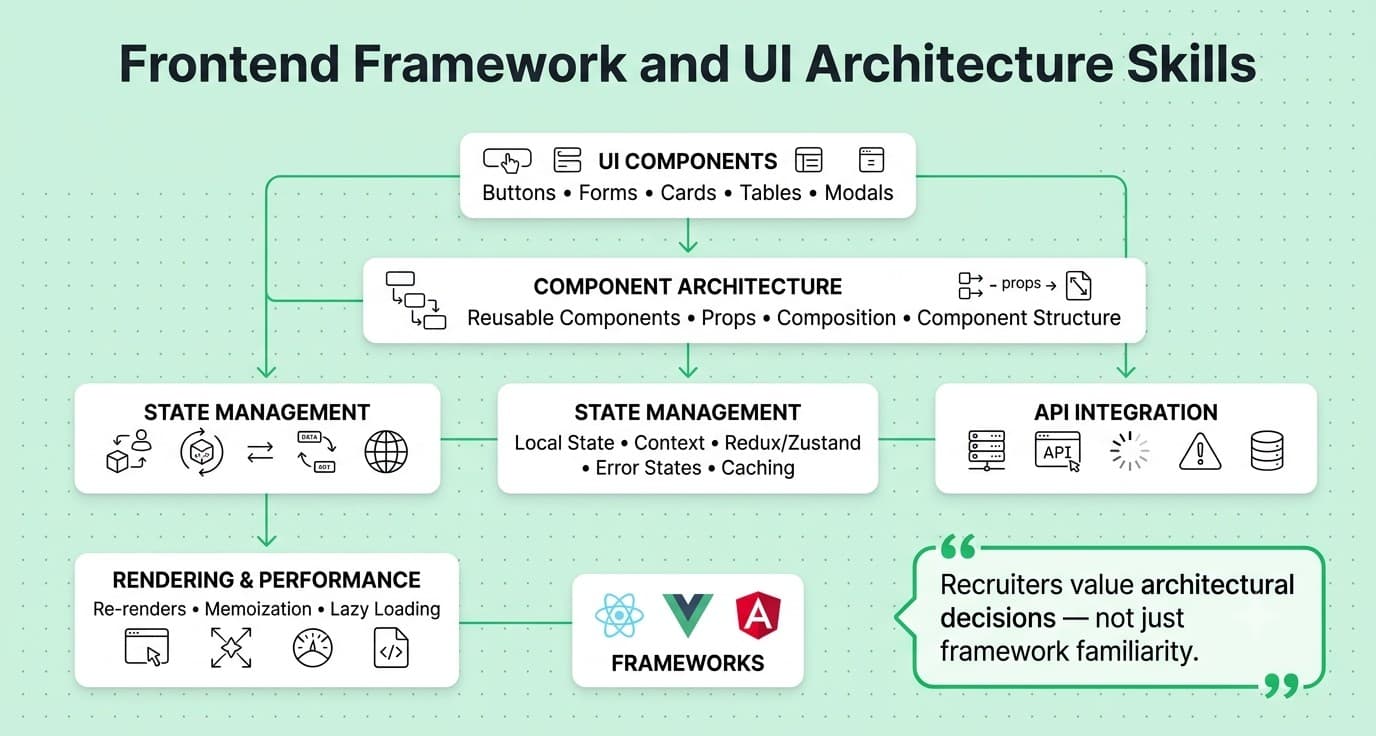
React remains the dominant frontend framework in professional hiring. Recruiters test React specifically because the gap between surface knowledge and real depth is wider in React than almost any other frontend tool: a developer can build working features using hooks and components without understanding when and why components re-render, how the reconciliation algorithm works, or why a specific pattern causes a performance issue that only appears under real data volume.
What Recruiters Actually Expect in 2026
React Server Components and the mental model shift they require have become interview topics at mid-level and above, because Next.js and similar meta-frameworks now default to server components and candidates need to understand which components need to be client components and why. Beyond this, recruiters expect fluency with the full hook model including custom hooks, useMemo and useCallback with correct dependency arrays, and the ability to identify unnecessary re-renders and fix their root cause rather than applying memoization as a generic performance patch.
Interview Evaluation
Live coding rounds include building a component with non-trivial state management, often followed by a deliberate follow-up asking the candidate to identify and fix a performance issue the interviewer introduces. System design style questions ask candidates to design a component architecture for a complex UI feature, evaluating how they decompose state, where they place data fetching, and whether they understand when to reach for a global state solution versus local component state.
Real Workplace Example
A data table component renders correctly but causes the entire page to re-render every time any row is selected, because the row selection handler is recreated on every parent render and passed as a prop to every row component. A developer with real React depth identifies the root cause as a missing useCallback on the handler and missing React.memo on the row component, explains why both are needed, and verifies the fix by confirming the render count in the React DevTools profiler rather than assuming the memoization worked.
Fresher Expectations
Builds functional components with hooks correctly, understands props versus state, and can explain in plain language why a component re-renders when either its state or its props change.
Mid-Level Expectations
Writes custom hooks that encapsulate reusable stateful logic, understands when to use useReducer instead of multiple useState calls, uses the React DevTools profiler to identify unnecessary renders, and makes deliberate decisions about component boundaries.
Senior-Level Expectations
Designs the component architecture and state management strategy for a feature area, sets standards for when to use server components versus client components in a Next.js codebase, and mentors other developers on performance debugging using profiling tools rather than guesses.
Common Mistakes
Using useMemo and useCallback everywhere defensively without profiling first, which adds cognitive overhead and dependency array maintenance burden without necessarily improving performance. Also common: not understanding the dependency array for useEffect, leading to either stale closures that cause incorrect behavior or missing dependencies that trigger infinite re-render loops.
How to Build This Skill
Build a moderately complex feature such as a filterable, sortable data table with pagination, and use the React DevTools profiler to measure render counts before and after every optimization you apply. Do not apply any optimization without measuring first, and do not claim the optimization worked without measuring after.
Example Interview Questions
"Why is this component re-rendering on every keystroke even though the input value has not changed?" "When would you choose useReducer over multiple useState hooks?" "In a Next.js App Router application, how do you decide whether a component should be a server component or a client component?"
Strong Sample Answer Direction
A strong answer on React Server Components explains the mental model shift: server components run only on the server, cannot use hooks or browser APIs, and do not contribute to the JavaScript bundle sent to the client, which is why they are the default and client components must be explicitly opted into. This explanation demonstrates understanding of the rendering and bundle implications rather than just the syntactic difference.
Core Web Vitals and Performance Engineering
Why Recruiters Prioritize This Skill
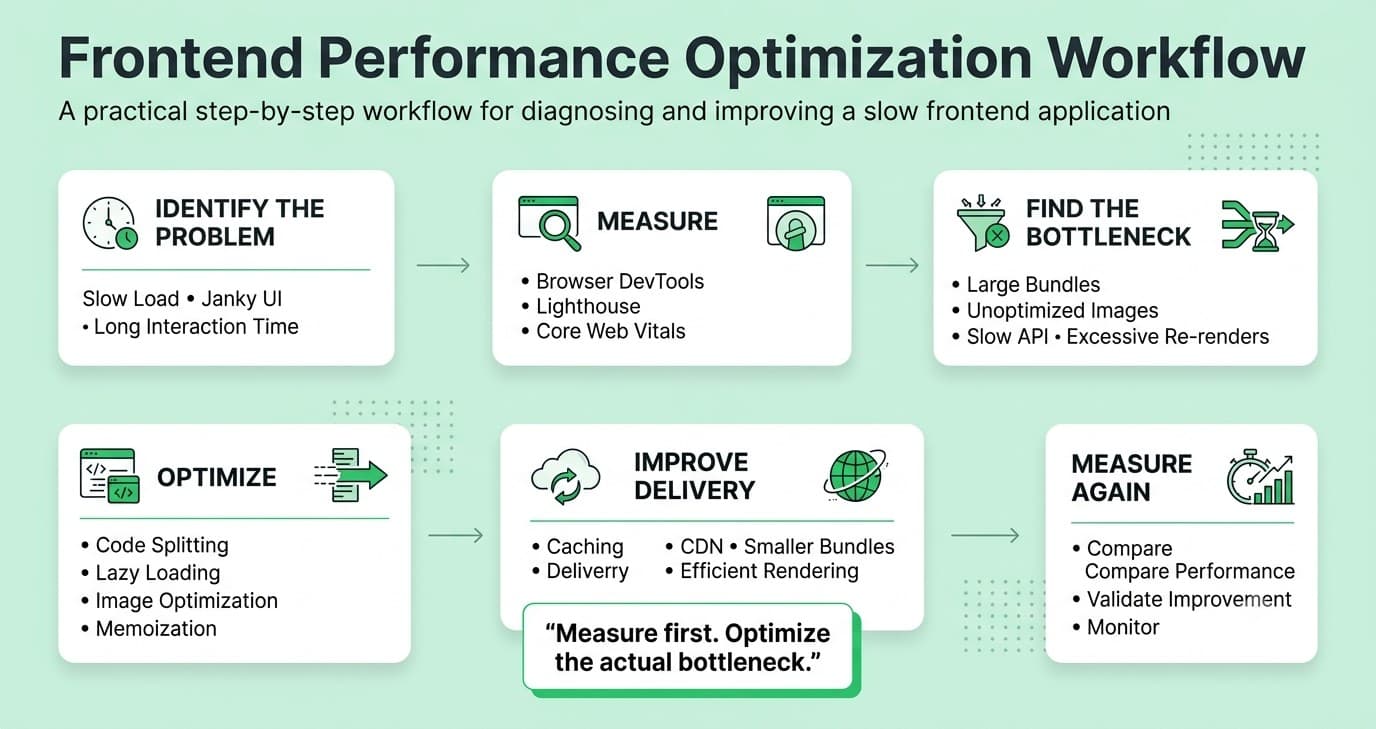
Performance is user experience, and it is now measurable and publicly accountable through Google's Core Web Vitals, which directly affect search ranking. Recruiters at product companies specifically test this skill because a frontend developer who ships slow pages costs the business in both user retention and SEO, and fixing performance problems after the fact is significantly more expensive than building for performance from the start.
What Recruiters Actually Expect in 2026
The three Core Web Vitals as of 2026 are Largest Contentful Paint, Cumulative Layout Shift, and Interaction to Next Paint, which replaced First Input Delay in March 2024. Recruiters expect candidates to know what each metric measures and what causes a poor score, not just that these metrics exist. Beyond the metrics themselves, candidates are expected to understand the specific techniques that improve each one: image optimization and lazy loading for LCP, dimension reservation and font swap strategies for CLS, and interaction handler optimization for INP.
Interview Evaluation
Take-home assignments are increasingly evaluated with a Lighthouse run as part of the rubric. Some companies share a Lighthouse report for a real page and ask the candidate to identify the top three issues and propose specific fixes. Portfolio reviews look for candidates who can cite performance numbers from their own deployed projects, not just claim that they care about performance.
Real Workplace Example
A marketing landing page has an LCP score of 5.2 seconds, failing the good threshold. A performance-aware developer identifies that the hero image is not preloaded, is served at a resolution larger than its display size, and is in JPEG format when WebP would be significantly smaller. Adding a preload link, serving the image at the correct size through a responsive image with srcset, and converting to WebP drops the LCP to 1.8 seconds, crossing into the good range without any backend changes.
Fresher Expectations
Knows what the three Core Web Vitals measure, can run a Lighthouse audit and read its output, and applies basic image optimization and lazy loading to new work without being prompted.
Mid-Level Expectations
Diagnoses specific performance issues using Chrome DevTools Performance panel and Lighthouse, applies targeted fixes to LCP, CLS, and INP issues, and can explain the mechanism behind each fix rather than only knowing which setting to toggle.
Senior-Level Expectations
Establishes performance budgets for a product, builds performance monitoring into the CI/CD pipeline to catch regressions before they reach production, and makes architectural decisions about rendering strategy based on performance implications for the specific product's usage patterns.
Common Mistakes
Running Lighthouse once during development and treating the score as a fixed property of the page rather than monitoring it continuously, since performance regressions commonly ship silently when no automated check is in place.
How to Build This Skill
Pick any publicly accessible website with a poor Lighthouse score and spend two hours improving it on a local copy using only frontend techniques: image optimization, lazy loading, font loading strategy, preloading critical resources, and removing render-blocking scripts. Document the before and after scores and the specific changes that produced each improvement.
Example Interview Questions
"What does Cumulative Layout Shift measure, and what are three common causes of a poor CLS score?" "How would you diagnose and fix a slow Interaction to Next Paint on a page with a complex filter UI?" "What is the difference between using loading=lazy on an image and preloading it with a link tag, and when would you use each?"
Strong Sample Answer Direction
A strong performance answer quantifies where possible: naming that a good LCP score is under 2.5 seconds, explaining what specific loading behavior causes layout shift, and connecting the fix to the specific measurement it improves rather than speaking about performance in general terms.
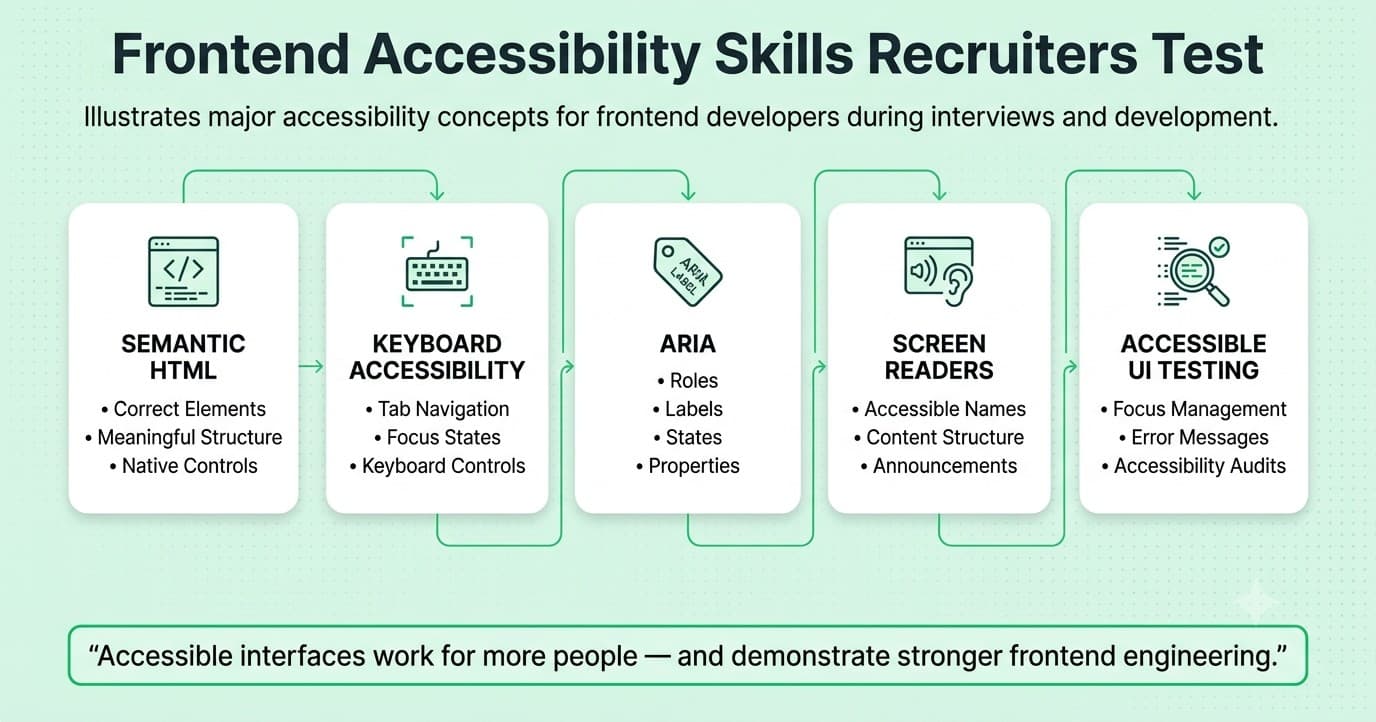
Accessibility Implementation and WCAG Compliance
Why Recruiters Prioritize This Skill
Accessibility is no longer an optional enhancement. The European Accessibility Act, which took effect in June 2025, requires digital products sold in the EU to meet accessibility standards. ADA enforcement for web accessibility has expanded in the United States. Recruiters at companies with any international user base or regulated industry exposure now treat accessibility as a hiring criterion because shipping inaccessible code creates genuine legal and reputational risk.
What Recruiters Actually Expect in 2026
Not memorization of WCAG criteria numbers. Recruiters expect the ability to implement accessible components correctly, which means understanding semantic HTML as the foundation, ARIA attributes as the supplement for patterns HTML cannot express natively, keyboard navigation that actually works for every interactive element, color contrast ratios that meet WCAG AA or AAA requirements, and screen reader testing using at least one real screen reader rather than only automated tools.
Interview Evaluation
Practical rounds increasingly include an accessibility audit component: showing a candidate a component and asking them to identify accessibility failures, then fix them. Portfolio reviews now look for explicit accessibility statements or test results. Some companies specifically ask "how would you ensure this component is accessible" as part of any UI component design question.
Real Workplace Example
A dropdown menu component built with div and span elements and custom click handlers works perfectly for mouse users. A keyboard user cannot open it with Enter or Space, cannot navigate the options with arrow keys, and gets no announcement from a screen reader when the menu opens or when a selection is made. Replacing the trigger with a button element, adding role="listbox" and role="option" ARIA attributes, implementing keyboard navigation with keydown handlers, and adding aria-expanded to communicate state converts the component from inaccessible to WCAG AA compliant without any visual design change.
Fresher Expectations
Writes semantic HTML as a first choice, uses alt text on images with meaningful descriptions, and understands that div and span have no semantic meaning and should not be used where a button, a link, a list, or a form element would be more appropriate.
Mid-Level Expectations
Implements keyboard navigation correctly for interactive components, uses ARIA attributes correctly and sparingly, and can run both automated accessibility checks using axe or similar tools and manual keyboard-only testing on any component they build.
Senior-Level Expectations
Sets accessibility standards for a team or a component library, establishes an accessibility testing process including automated checks in CI/CD and regular screen reader testing, and makes architecture decisions about which ARIA patterns to use for which UI components across the product.
Common Mistakes
Adding ARIA attributes to compensate for non-semantic HTML when the correct fix is to use the right HTML element in the first place. For example, adding role="button" to a div rather than using an actual button element, which requires manually reimplementing all the keyboard behavior the button element provides for free.
How to Build This Skill
Navigate a project you have already built using only the keyboard, with the mouse disconnected, and a screen reader running. Discover every element that is inaccessible and fix it. Then run an axe accessibility audit and address every issue it raises. This combination of manual and automated testing covers different categories of accessibility failures and builds instincts that no tutorial replicates.
Example Interview Questions
"How would you make a custom dropdown component accessible to keyboard users and screen reader users?" "What is the difference between using aria-label, aria-labelledby, and a visible label element, and when would you use each?" "What does the rule 'no ARIA is better than bad ARIA' mean in practice?"
Strong Sample Answer Direction
A strong accessibility answer starts with semantic HTML as the foundation and treats ARIA as the last resort rather than the first tool, explaining that native HTML elements carry their own role, state, and focus management for free while ARIA attributes require the developer to implement all of these manually and correctly.
Frontend Testing: Component, Integration, and End-to-End
Why Recruiters Prioritize This Skill
Frontend code that is not tested is fragile in a specific way: it tends to break silently in a specific browser, on a specific screen size, or with a specific user interaction that was never manually tested. Recruiters who have managed untested frontend codebases have experienced these regressions firsthand, and they now specifically evaluate whether a candidate writes tests as a matter of course rather than as an afterthought when asked.
What Recruiters Actually Expect in 2026
The testing ecosystem has consolidated around Vitest for unit and component tests, React Testing Library for component behavior tests that mirror user interaction rather than implementation details, and Playwright for end-to-end tests. Candidates are expected to understand the distinction between these levels, know which level of test is appropriate for which type of verification, and write tests that test behavior from the user's perspective rather than internal implementation details that break on every refactor.
Interview Evaluation
Take-home assignments are evaluated on test coverage and test quality. Reviewers specifically look for tests that use queries from Testing Library that reflect how a user would find an element, such as getByRole and getByLabelText, rather than getByTestId or class name selectors that could break on a pure refactor.
Real Workplace Example
A form component has a required validation rule. An implementation-detail test asserts that a specific internal state variable changes when the form is submitted without required fields. A user-behavior test clicks the submit button and asserts that an error message appears in the document with the correct text and the correct ARIA role for screen reader accessibility. When the component is refactored to use a different internal state structure, the implementation-detail test breaks and requires rewriting. The user-behavior test continues to pass because the behavior it verified did not change.
Fresher Expectations
Can write basic component tests using React Testing Library with getByRole queries, understands that tests should verify what the user sees and can do rather than internal state, and has at minimum tested the happy path of the components in their portfolio projects.
Mid-Level Expectations
Writes tests at the appropriate level for each verification, using component tests for UI behavior and Playwright for user flows that span multiple pages or require real browser APIs. Designs tests that remain stable through refactors by testing behavior rather than implementation.
Senior-Level Expectations
Sets up and maintains the testing infrastructure for a frontend project, makes decisions about test coverage requirements and what should be tested at which level, and identifies when a test suite is providing false confidence because it is testing implementation details rather than user behavior.
Common Mistakes
Using getByTestId for most queries because it is the most specific selector, which creates tests that are tightly coupled to implementation details and break on any refactor even when the user-visible behavior is unchanged.
How to Build This Skill
Rewrite the tests in an existing project to use only getByRole, getByLabelText, getByText, and getByPlaceholderText queries, avoiding getByTestId entirely. The constraint forces you to think about your UI from the user's perspective rather than the developer's perspective, which is exactly the mental model React Testing Library is designed to build.
Example Interview Questions
"How would you test that a modal opens when a button is clicked and closes when the Escape key is pressed?" "What is the difference between unit tests, component tests, and end-to-end tests for a frontend application, and when would you choose each?" "Why does React Testing Library recommend against using getByTestId for most queries?"
Strong Sample Answer Direction
A strong testing answer explains the guiding principle before the specific implementation: tests should give you confidence that users can accomplish their goals, which means testing the behavior users experience, not the internal state your code uses to produce that behavior.
Server-Side Rendering and Meta-Framework Architecture
Why Recruiters Prioritize This Skill
The default assumption in modern frontend hiring is that most product work happens inside a meta-framework such as Next.js, Nuxt, or SvelteKit. Candidates who only understand client-side rendering cannot reason about the rendering strategy choices these frameworks offer, cannot debug hydration issues, and cannot make the architecture decisions that determine how a Next.js application performs and scales.
What Recruiters Actually Expect in 2026
Understanding of four distinct rendering strategies and when each is appropriate: client-side rendering for highly interactive, personalized pages where SEO is not critical; server-side rendering for personalized content that needs SEO; static site generation for content that does not change per user or request; and incremental static regeneration for content that changes infrequently but benefits from static performance. Beyond these strategies, React Server Components have become central to the Next.js App Router model, and candidates are expected to understand which components render on the server, which on the client, and why the distinction matters for bundle size and data fetching patterns.
Interview Evaluation
System design questions ask candidates to choose a rendering strategy for a given use case and justify it. Debugging questions present a hydration mismatch error and ask the candidate to explain what caused it and how to fix it. Architecture questions ask candidates to design a Next.js application for a product with both public marketing pages and authenticated user dashboards.
Real Workplace Example
A product has a public product listing page that needs good SEO, a personalized recommendation section that changes per user, and an interactive configurator tool. A developer with meta-framework depth designs the listing page using static generation with on-demand revalidation, wraps the recommendation section in a client component that fetches personalized data client-side after hydration, and builds the configurator as a fully client-rendered interactive experience, rather than applying one rendering strategy uniformly and paying performance or complexity costs on every page.
Fresher Expectations
Understands the difference between client-side rendering and server-side rendering at a conceptual level, can create pages using Next.js App Router conventions, and knows what a hydration error looks like and that it is caused by a server and client rendering mismatch.
Mid-Level Expectations
Chooses rendering strategies deliberately based on SEO, personalization, and performance requirements, understands React Server Components and knows which components must be client components, and can debug a hydration mismatch by reading the error and identifying where the server and client output diverged.
Senior-Level Expectations
Makes rendering architecture decisions for an entire application, sets caching and revalidation strategy for dynamic content, and evaluates when the complexity of a meta-framework is worth its overhead versus when a simpler client-side application is more appropriate.
Common Mistakes
Marking every component as a client component in a Next.js application to avoid thinking about the server versus client distinction, which defeats the bundle size and performance benefits of server components entirely.
How to Build This Skill
Build one application using Next.js App Router that contains at least one page using each of the four rendering strategies, verify the rendering behavior using the network panel to confirm which content arrives in the initial HTML versus which loads client-side, and document why you chose each strategy for each page.
Example Interview Questions
"When would you use static generation with revalidation versus server-side rendering for a page that displays product information?" "What causes a React hydration mismatch error, and how do you debug it?" "In Next.js App Router, what is the difference between a server component and a client component, and which is the default?"
Strong Sample Answer Direction
A strong rendering strategy answer specifies which requirement drives the choice: if personalization is the primary need, SSR. If SEO with stable content is the need, static generation. If the content is highly interactive with no SEO requirement, client-side rendering. Connecting the strategy to the specific requirement rather than stating a general preference demonstrates genuine architectural judgment.
AI and Automation Skills
AI Coding Tool Fluency With Frontend-Specific Review Discipline
Why Recruiters Prioritize This Skill
Frontend teams now assume AI tool use. Most component scaffolding, boilerplate, and routine styling can be generated faster with AI assistance than without it. What recruiters test in 2026 is whether a candidate treats AI-generated frontend code with the same critical eye they would apply to a junior developer's pull request: checking for accessibility failures the tool did not consider, performance implications the tool cannot measure, and TypeScript types that are technically valid but semantically incorrect.
What Recruiters Actually Expect in 2026
The ability to direct an AI tool effectively enough to get a usable starting point, and the frontend-specific review discipline to evaluate every aspect of the output before shipping it: semantic HTML usage, keyboard accessibility, screen reader behavior, re-render triggers, bundle size implications, and TypeScript correctness. Some interview rounds now include a component built by an AI tool and ask the candidate to review it as if it were a pull request.
Interview Evaluation
Live rounds that permit AI tool use are specifically watching whether the candidate reads and tests the generated component, narrates their review process, and modifies the output rather than submitting it verbatim. Code review rounds show candidates a plausible AI-generated component and ask for their feedback.
Real Workplace Example
An AI tool generates a modal component with working open and close functionality. The component looks correct visually and passes every functional test case. But the modal does not trap focus inside itself when open, meaning keyboard users can tab behind the modal to the page underneath. It does not set aria-modal or aria-labelledby to communicate its structure to screen readers. It does not close when the Escape key is pressed. A developer with frontend review discipline catches all three gaps before the component ships.
Fresher Expectations
Tests AI-generated components using keyboard navigation and at least one automated accessibility check before submitting or merging any AI-generated code.
Mid-Level Expectations
Applies a structured review to AI-generated frontend code covering semantics, accessibility, performance implications, TypeScript correctness, and re-render triggers, and modifies any generated code that fails any of these checks.
Senior-Level Expectations
Sets team standards for reviewing AI-generated frontend code, builds the specific frontend review checklist into code review guidelines so that the entire team applies consistent quality standards to AI-assisted work.
Common Mistakes
Treating a visually correct component as a complete component without checking keyboard behavior or screen reader output, because those tests require manual effort that AI tools do not automate.
How to Build This Skill
Ask an AI tool to generate five different interactive UI components. For each one, navigate it using only the keyboard, run an axe accessibility check, inspect the TypeScript types for correctness, and count how many re-renders it triggers using React DevTools. Document every issue found in each component. This exercise calibrates exactly which categories of frontend issue AI tools most consistently miss.
Example Interview Questions
"Here is a component generated by an AI tool. What accessibility or performance issues do you see?" "How do you decide which parts of frontend work to delegate to AI tools versus write by hand?" "Tell me about a time an AI tool generated frontend code that looked correct but had a significant problem."
Strong Sample Answer Direction
A strong answer names specific frontend categories to review rather than speaking generally about being careful, because specificity proves the review habit is real and not performed for the interview. The candidate who says "I always check keyboard navigation and run axe before merging any AI-generated interactive component" is demonstrating a real habit.
FREE TO USE
8k+ SESSIONS92% FLUENCY4.9★ RATING
Speak With Confidence
Real Conversations. Real Scenarios. Speak until it feels natural.
- Real-Time Speaking Practice
- Guided Conversation Flows
- Instant AI Feedback
Skills Recruiters Value More Than Certifications
Certifications demonstrate that you completed a structured curriculum. A deployed project with a measurable Lighthouse score, real accessibility compliance, and typed components demonstrates that you can make production quality decisions. Most frontend hiring managers explicitly deprioritize certifications in favor of a portfolio that answers the question: can this person ship frontend code that is fast, accessible, and maintainable?
The specific reason certifications fall short for frontend roles is that the skills that matter most, performance engineering, accessibility implementation, and component architecture, require working in real browser environments with real user feedback, which a course assessment cannot replicate. A candidate who can share a deployed project, run a Lighthouse audit on it during the interview, and explain every score they see will consistently outperform a certified candidate who cannot.
Skills That Are Becoming Less Important
jQuery and vanilla DOM manipulation as primary skills are no longer interview signal. Knowledge of how the DOM works is still useful for debugging, but writing jQuery-style code for new projects is a negative signal at most companies.
CSS preprocessors like Sass as a primary differentiator are fading. Modern CSS custom properties and cascade layers handle most of what Sass variables and nesting were used for, and PostCSS handles the rest. Knowing Sass is fine but is no longer impressive.
Class-based React components signal an outdated React mental model. Functional components and hooks have been the standard for several years. Claiming React expertise while primarily discussing class components and lifecycle methods raises doubts about whether a candidate's experience is current.
Pixel-perfect implementation as a core selling point has been replaced by token-based design implementation and responsive behavior testing. Modern responsive design, fluid typography, and component libraries have made pixel-perfect a concept less relevant to how real products are built.
AI Is Changing Frontend Development
Which skills AI is replacing: Component scaffolding, boilerplate CSS, initial TypeScript interface generation, and routine test skeleton creation are generated by AI tools faster than any developer can type them. Candidates who define their value by the speed of their initial component creation face real pressure.
Which skills AI is enhancing: Frontend developers with strong design system knowledge can now extend and scale a component library far faster because AI handles the routine patterns. Developers with strong performance instincts can use AI to generate a first draft and then focus their time entirely on the optimization and testing work the tool cannot do.
Which human skills are becoming more valuable: Accessibility judgment, performance measurement and diagnosis, rendering architecture decisions, component API design for reusability, and the review discipline to evaluate AI output for semantic correctness and user experience quality are all becoming sharper differentiators.
How professionals should adapt: Treat AI as a fast but accessibility-blind, performance-unaware junior developer. Use it to reduce the time from design to working component, then invest that saved time into the verification work it cannot do: keyboard testing, screen reader testing, performance profiling, and meaningful type design.
Skills That Instantly Differentiate Candidates
A portfolio project with a Lighthouse score above 90 on all four categories, combined with the ability to explain specifically what technical decisions produced each score, immediately separates a candidate from the majority who claim to care about performance without being able to measure it.
A component built from scratch with full keyboard accessibility, focus trapping where appropriate, and verified screen reader behavior demonstrates the accessibility depth that is now legally required and hiring-critical, and is still rare enough to be a genuine differentiator.
Fluent explanation of when and why each rendering strategy is appropriate in a meta-framework, with a real project that uses more than one strategy deliberately, shows architectural judgment that most candidates lack.
A TypeScript type utility written from scratch, such as a generic type for an API response wrapper, demonstrates comfort with the type system beyond basic annotations in a way that cannot be faked under a follow-up question.
Common Skill Gaps Recruiters Notice
Candidates who can style a UI but cannot explain why a specific CSS rule is being overridden by another, revealing surface knowledge of CSS without understanding of the cascade.
Candidates who write React hooks correctly but cannot explain what the dependency array is for, leading to stale closures in production that are extremely difficult to debug.
Candidates who have never tested their UI with a keyboard and cannot navigate their own portfolio projects without a mouse.
Candidates who list performance as a skill but have never run a Lighthouse audit on their own projects or cannot explain what LCP or CLS measures in plain language.
Candidates who claim TypeScript experience but annotate every non-obvious type as any, revealing surface annotation without genuine type system understanding.
Read More : Top 100 Frontend Developer Interview Question in 2026
Learning Roadmap
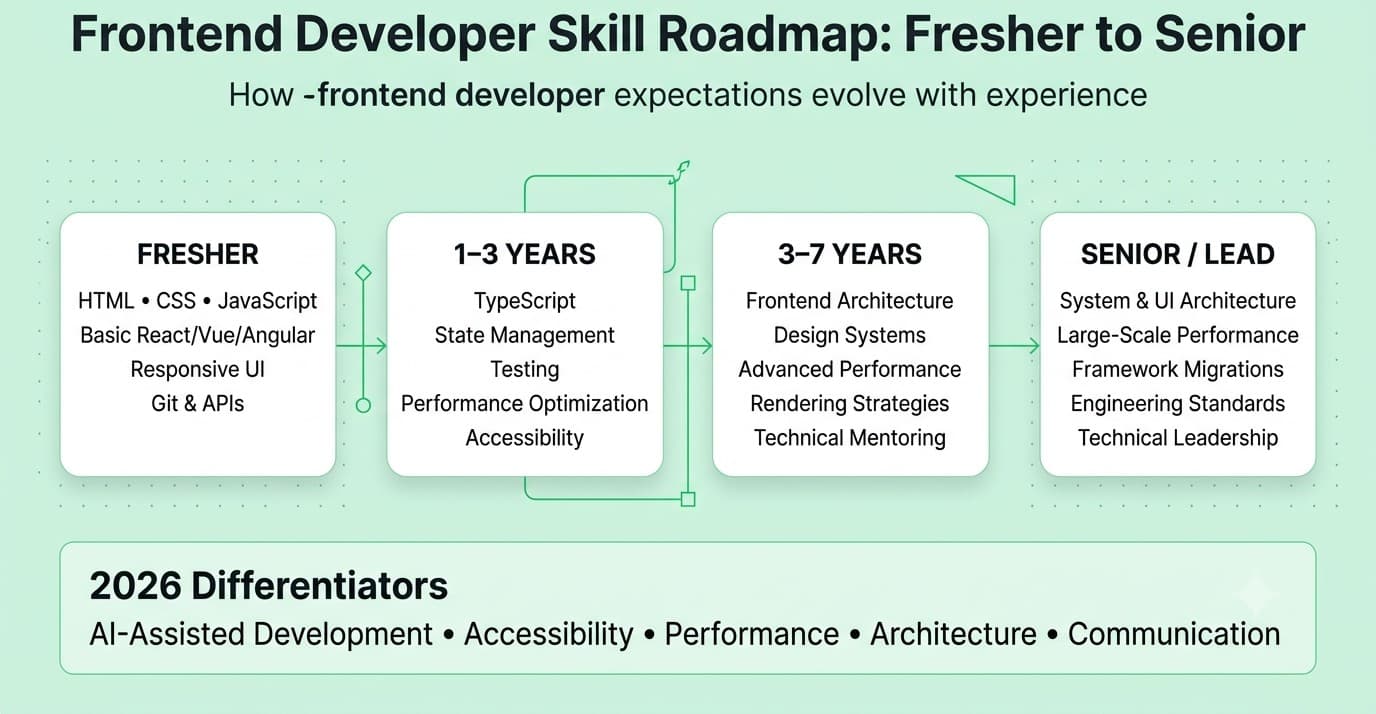
For Freshers
- 1. Semantic HTML as a first instinct before any CSS is written, including forms, buttons, links, headings, and landmark elements used correctly.
- 2. CSS fundamentals through the cascade, specificity, flexbox, and grid, built without a utility framework first so the underlying model is understood.
- 3. JavaScript fundamentals including closures, async/await, and array methods before picking any framework.
- 4. TypeScript basics: annotating function parameters, return types, and props interfaces correctly.
- 5. React fundamentals through functional components, hooks, and state management in a single deployed project.
For Professionals With 1 to 3 Years of Experience
-
- 1. Core Web Vitals measurement and targeted improvement: run Lighthouse on a real project and fix the top three issues with specific techniques.
- 2. Accessibility implementation: audit a project with axe and fix every issue, then test keyboard navigation and fix every broken interaction.
- 3. Testing with React Testing Library and Vitest, using behavior-based queries throughout.
- 4. Next.js App Router and the four rendering strategies, with a project that uses at least two deliberately.
- 5. Verified AI coding tool use with a frontend-specific review checklist applied to every generated component.
- 1. Core Web Vitals measurement and targeted improvement: run Lighthouse on a real project and fix the top three issues with specific techniques.
- 2. Accessibility implementation: audit a project with axe and fix every issue, then test keyboard navigation and fix every broken interaction.
- 3. Testing with React Testing Library and Vitest, using behavior-based queries throughout.
- 4. Next.js App Router and the four rendering strategies, with a project that uses at least two deliberately.
- 5. Verified AI coding tool use with a frontend-specific review checklist applied to every generated component.
For Professionals With 3 to 7 Years of Experience
-
- 1. Design system architecture: build or extend a component library with token-based theming, container-query-based responsiveness, and full accessibility documentation.
- 2. Performance monitoring in CI/CD: add a Lighthouse CI check that fails the build when a performance regression exceeds a threshold.
- 3. End-to-end testing with Playwright for critical user flows.
- 4. TypeScript advanced patterns: generics, conditional types, and discriminated unions for reusable, type-safe components.
- 5. Mentoring other developers on accessibility, performance, and testing through code review.
-
- 1. Design system architecture: build or extend a component library with token-based theming, container-query-based responsiveness, and full accessibility documentation.
- 2. Performance monitoring in CI/CD: add a Lighthouse CI check that fails the build when a performance regression exceeds a threshold.
- 3. End-to-end testing with Playwright for critical user flows.
- 4. TypeScript advanced patterns: generics, conditional types, and discriminated unions for reusable, type-safe components.
- 5. Mentoring other developers on accessibility, performance, and testing through code review.
For Senior Professionals
-
- 1. Frontend architecture decisions: rendering strategy selection, state management architecture, and technology selection for new projects.
- 2. Accessibility program ownership: establishing compliance standards, testing processes, and remediation prioritization.
- 3. Performance budget ownership: setting measurable targets, monitoring production real user metrics, and making trade-offs explicit.
- 4. Hiring and evaluating other frontend developers using the judgment-based standards outlined in this guide.
-
- 1. Frontend architecture decisions: rendering strategy selection, state management architecture, and technology selection for new projects.
- 2. Accessibility program ownership: establishing compliance standards, testing processes, and remediation prioritization.
- 3. Performance budget ownership: setting measurable targets, monitoring production real user metrics, and making trade-offs explicit.
- 4. Hiring and evaluating other frontend developers using the judgment-based standards outlined in this guide.
Self-Assessment Checklist
- I can explain the CSS cascade, specificity, and inheritance well enough to debug any CSS conflict without resorting to !important.
- I can write a TypeScript generic type for a reusable component without using any as an escape hatch.
- I can explain why a React component is re-rendering unnecessarily and fix the root cause using the React DevTools profiler.
- I can run a Lighthouse audit on a project I have built and explain specifically what technical change would improve each of the three Core Web Vitals scores.
- I can build an interactive component such as a modal, a dropdown, or a menu, that is fully keyboard accessible and screen reader announced without starting from a library component.
- I can explain the difference between four rendering strategies in Next.js and give a real scenario where each is the correct choice.
- I write tests using React Testing Library with getByRole and getByLabelText queries as a default, not getByTestId.
- I have a deployed project where I can cite the Lighthouse score and explain the three decisions that most affected it.
- I apply a frontend-specific checklist to any AI-generated component covering accessibility, keyboard behavior, TypeScript correctness, and re-render triggers.
If fewer than six of these are checked, the learning roadmap above is your concrete preparation plan before your next interview.
Portfolio or Resume Proof
| Skill | Resume | Portfolio or GitHub | Interview Talking Point | |
|---|---|---|---|---|
| JavaScript and TypeScript | List specific TS features used: generics, discriminated unions, not just "TypeScript" | Share a post on a specific TypeScript challenge and how you solved it | Publish a typed component library with no any usages | Explain the type design reasoning, not just the syntax |
| CSS Architecture | Describe the CSS methodology chosen and why it fits the project scale | Share a before/after refactor of a CSS architecture decision | Publish a component built with container queries and cascade layers with explanatory comments | Explain why you chose this approach over alternatives for this project |
| React depth | Describe state management decisions and performance optimizations, not just "built with React" | Share a post on a specific rendering or state problem you solved | Publish a project with React DevTools profiler screenshots showing your optimization work | Explain the specific re-render problem and its root cause |
| Performance | Quantify Lighthouse scores and specific improvements achieved | Share a before/after performance improvement with specific metrics | Include Lighthouse score badges or screenshots in project READMEs | Cite the score, name the metric, explain the fix |
| Accessibility | Describe WCAG compliance level achieved and testing methods used | Share an accessibility audit you performed and what you found | Include an accessibility statement in deployed projects | Demonstrate keyboard navigation of your own project during the interview |
| Testing | Mention testing library and approach, with coverage level | Share a post on testing philosophy or a specific testing pattern | Publish test files alongside components with comments explaining query choices | Explain what the test would catch if the behavior broke |
| Meta-frameworks | Describe rendering strategy choices made and why | Share a post on a Next.js rendering decision and its outcome | Publish a project using multiple rendering strategies with a documented explanation of each | Connect the strategy choice to the specific requirement it met |
Final Thoughts
Frontend development in 2026 rewards a combination that was not quite the same two years ago: language fundamentals deep enough to catch what frameworks hide, performance and accessibility instincts built into how you write components from the start rather than retrofitted as a final audit, and the review discipline to catch what AI tools generate but cannot verify. None of these require rare talent. They require deliberate practice at the layer beneath what tutorials cover, and honest assessment of which skills you have at a surface level versus which ones you can explain and apply under the pressure of a real interview follow-up question.
That explanation-under-pressure gap is the hardest one to close with solo study, because the habit only shows up clearly when someone is asking a question you did not prepare for. Building that fluency before it matters in an interview that decides your offer is exactly what structured mock interview practice is designed for, and it is where platforms like Mocklingo's AI mock interview practice make the most practical difference.
Practice for Your Next Frontend Developer Interview with Mocklingo
FAQs
More Blogs
Sep 30, 2026
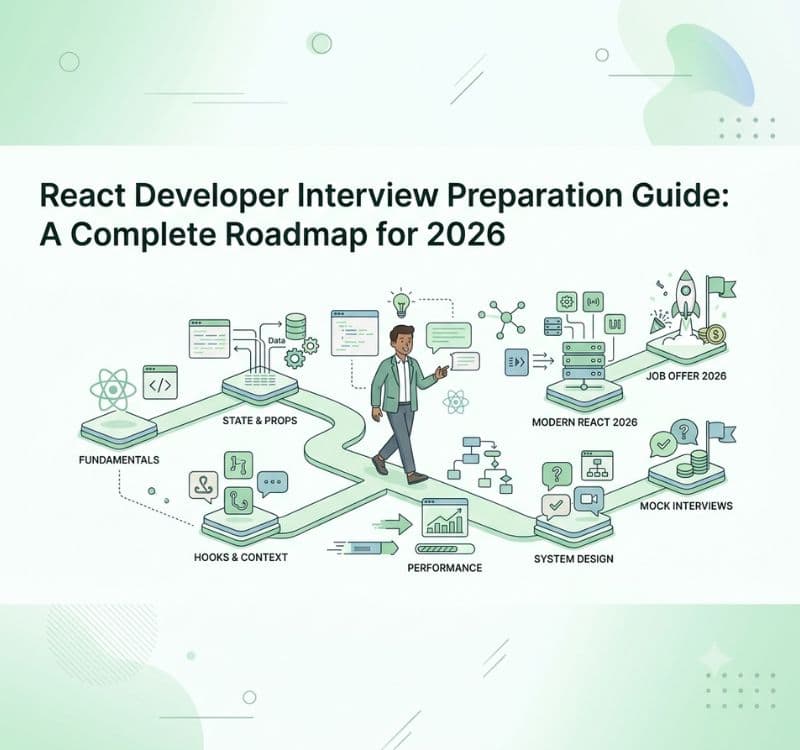
React Developer Interview Preparation Guide: A Complete Roadmap for 2026
31 min read